
MEATER OSC-MT-MP201
MEATER Pro/2 Plus Smart Wireless Meat Thermometer User Manual
Model: OSC-MT-MP201 | Brand: MEATER
Introduction
The MEATER Pro/2 Plus is a state-of-the-art smart wireless meat thermometer designed to help you achieve perfect cooking results across various methods. With its advanced technology, you can monitor your food's internal temperature and ambient cooking environment with precision, ensuring your meals are cooked to perfection every time. This manual provides comprehensive instructions for setting up, operating, and maintaining your MEATER Pro/2 Plus thermometer.

Figure 1: The MEATER Pro/2 Plus thermometer and its charging block, alongside a smartphone showing the intuitive MEATER app interface.
What's in the Box?
Upon opening your MEATER Pro/2 Plus package, you should find the following components:
- 1x MEATER Pro/2 Plus Probe
- 1x MEATER Charging Block (bamboo)
- 1x AAA Battery (pre-installed or included separately)
- Safety Manual
- Compliance Verified Documentation
- Calibration Certificate

Figure 2: All components included in the MEATER Pro/2 Plus retail packaging.
Setup Guide
- Insert Battery: Ensure the included AAA battery is correctly inserted into the MEATER Charging Block. The charging block is designed to power the probe.

Figure 3: The battery compartment within the MEATER charging block.
- Charge Probe: Place the MEATER probe into the charging block. A small LED indicator on the block will illuminate to confirm charging. A 15-minute charge provides up to 12 hours of operation.
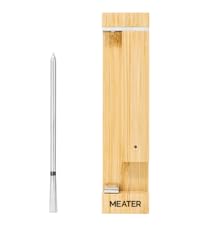
Figure 4: The MEATER probe charging in its bamboo block.
- Download MEATER App: Download the free MEATER app from the Apple App Store (for iOS devices) or Google Play Store (for Android devices).
- Connect via Bluetooth: Open the MEATER app and follow the on-screen instructions to pair your MEATER probe via Bluetooth. The MEATER Pro/2 Plus utilizes Bluetooth Coded PHY for extended range.
Operating Instructions
- Insert Probe into Meat: Carefully insert the MEATER probe into the thickest part of your meat, ensuring the probe is fully inserted up to the safety notch. The tip of the probe measures the internal temperature, while the ceramic handle measures the ambient temperature.

Figure 5: Proper insertion of the MEATER probe into meat, highlighting the dual temperature sensors.
- Start Cook in App: In the MEATER app, select the type of meat and desired doneness. The app's Advanced Estimator Algorithm will calculate the estimated cooking time and guide you through the process.

Figure 6: The MEATER app provides smart cooking guidance and real-time monitoring.
- Monitor Progress: The app provides real-time internal and ambient temperature readings, along with estimated time remaining. You will receive custom alerts when your food is ready to remove from heat and when it's ready to serve after resting.

Figure 7: Real-time temperature monitoring and estimated cook time displayed on the MEATER app.
- Resting Period: The app will guide you on the optimal resting period for your meat, which is crucial for achieving juicy and tender results.
Key Features

1000°F Heat Resistance (Flame Guard™)
The MEATER Pro/2 Plus probe is engineered to withstand ambient temperatures up to 1000°F, making it suitable for high-heat searing, grilling, and deep frying without damage. This robust design ensures durability and reliability in extreme cooking conditions.

Versatile Cooking Applications
This thermometer is designed for use with a wide range of cooking methods, including BBQ, oven, grill, smoker, air fryer, and deep fryer. Its adaptability makes it an essential tool for any kitchen or outdoor cooking setup.

100% Wireless & Waterproof
Enjoy complete freedom from wires with Bluetooth Coded PHY long-range connectivity. The probe is also fully waterproof and dishwasher safe, simplifying cleanup after use.
Smart Temp Multisensor Technology
Equipped with multiple internal sensors, the MEATER Pro/2 Plus accurately detects the real core temperature of your food, providing precise readings for optimal doneness.
Maintenance
- Cleaning the Probe: The MEATER Pro/2 Plus probe is 100% waterproof and dishwasher safe. After each use, simply place it in the dishwasher for easy cleaning. For stubborn residue, a soft brush and mild soap can be used. Ensure the probe is completely dry before returning it to the charging block.
- Cleaning the Charging Block: Wipe the bamboo charging block with a damp cloth. Do not submerge the charging block in water.
- Battery Replacement: The charging block uses one AAA battery. Replace the battery when the charging indicator light no longer illuminates or if the probe does not charge properly.
Troubleshooting
| Issue | Possible Cause | Solution |
|---|---|---|
| Probe not connecting to app | Out of Bluetooth range, low probe battery, app issue. | Ensure the charging block is within range of your phone (up to 250 ft indoors, 2500 ft outdoors). Fully charge the probe. Restart the MEATER app or your phone. |
| Inaccurate temperature readings | Improper probe insertion, probe damage, external interference. | Ensure the probe is inserted into the thickest part of the meat, past the safety notch. Check for visible damage to the probe. Avoid placing the charging block directly on metal surfaces that might interfere with the signal. |
| Charging block indicator not lighting up | Low or dead AAA battery in the charging block, improper probe placement. | Replace the AAA battery in the charging block. Ensure the probe is correctly seated in the charging slot. |
Specifications
- Product Dimensions: 4.41 x 0.2 x 0.2 inches
- Item Weight: 7.83 ounces
- Model Number: OSC-MT-MP201
- Batteries: 1 AAA battery required (included)
- Outer Material: Stainless Steel
- Special Features: Waterproof, App Companion, Rechargeable, High Accuracy
- Connectivity Technology: Bluetooth Coded PHY (Long Range)
- Max Ambient Temperature: 1000°F
- Product Care Instructions: Oven Safe, Wipe Clean, Dishwasher Safe
Warranty and Support
MEATER products are designed for durability and performance. For specific warranty details and to access customer support, please refer to the official MEATER website or the documentation included with your product. You can also find helpful resources, FAQs, and contact information on their support pages.
For additional tips and recipes, explore the MEATER app's "Master Class" section.
Related documentsOSC-MT-MP201


Ask a question about this manual
Ask about setup, troubleshooting, compatibility, parts, safety, or missing instructions. Manuals+ will review the question and use this page’s manual context to help answer it.