
1. Introduction
Thank you for choosing the Energizer E29-2G Mobile Phone. This device is designed for simplicity and efficiency, offering essential communication features in a robust and user-friendly package. It features a physical keypad, dual SIM support, and expandable memory, making it ideal for reliable daily use. This manual provides comprehensive instructions to help you set up, operate, and maintain your new phone.
2. Package Contents
Please check the package for the following items:
- Energizer E29-2G Mobile Phone
- Battery (Lithium-polymer, 1700 mAh)
- User Manual
- Note: A charging adapter and cable are not included in the package. Please use a compatible Micro USB charger.
3. Product Overview
The Energizer E29-2G features a classic bar phone design with a 2.8-inch display and an alphanumeric keypad for easy navigation and typing. Its robust body is designed for durability.

Figure 3.1: Front view of the Energizer E29-2G, showing the display and physical keypad.

Figure 3.2: Back view of the Energizer E29-2G, highlighting the camera and textured casing.
3.1 Keypad Layout
The phone features a standard alphanumeric keypad.
- Call Key: Initiates or answers calls.
- End Key: Ends calls or returns to the home screen.
- Navigation Keys: Used to scroll through menus and options.
- Center Select Key: Confirms selections.
- Alphanumeric Keys (0-9, *, #): For dialing numbers and entering text.
4. Setup
4.1 Inserting SIM Cards and Micro-SD Card
The Energizer E29-2G supports two Mini SIM cards and one Micro-SD card for expandable memory up to 32GB.
- Carefully remove the back cover of the phone.
- If the battery is installed, remove it.
- Locate the SIM card slots (SIM1 and SIM2) and the Micro-SD card slot.
- Insert your Mini SIM cards into the designated slots with the gold contacts facing down, ensuring they are correctly oriented.
- Insert the Micro-SD card into its slot with the gold contacts facing down.
- Replace the battery and then the back cover, ensuring it clicks securely into place.

Figure 4.1: Illustration of the dual SIM and Micro-SD card slots.
4.2 Battery Installation and Charging
The phone comes with a 1700 mAh Lithium-polymer battery.
- After inserting SIM/SD cards, place the battery into the battery compartment, aligning the contacts.
- Replace the back cover.
- Connect a compatible Micro USB charger to the phone's charging port.
- Plug the charger into a power outlet.
- Allow the phone to charge completely before first use. The battery indicator on the screen will show charging status.
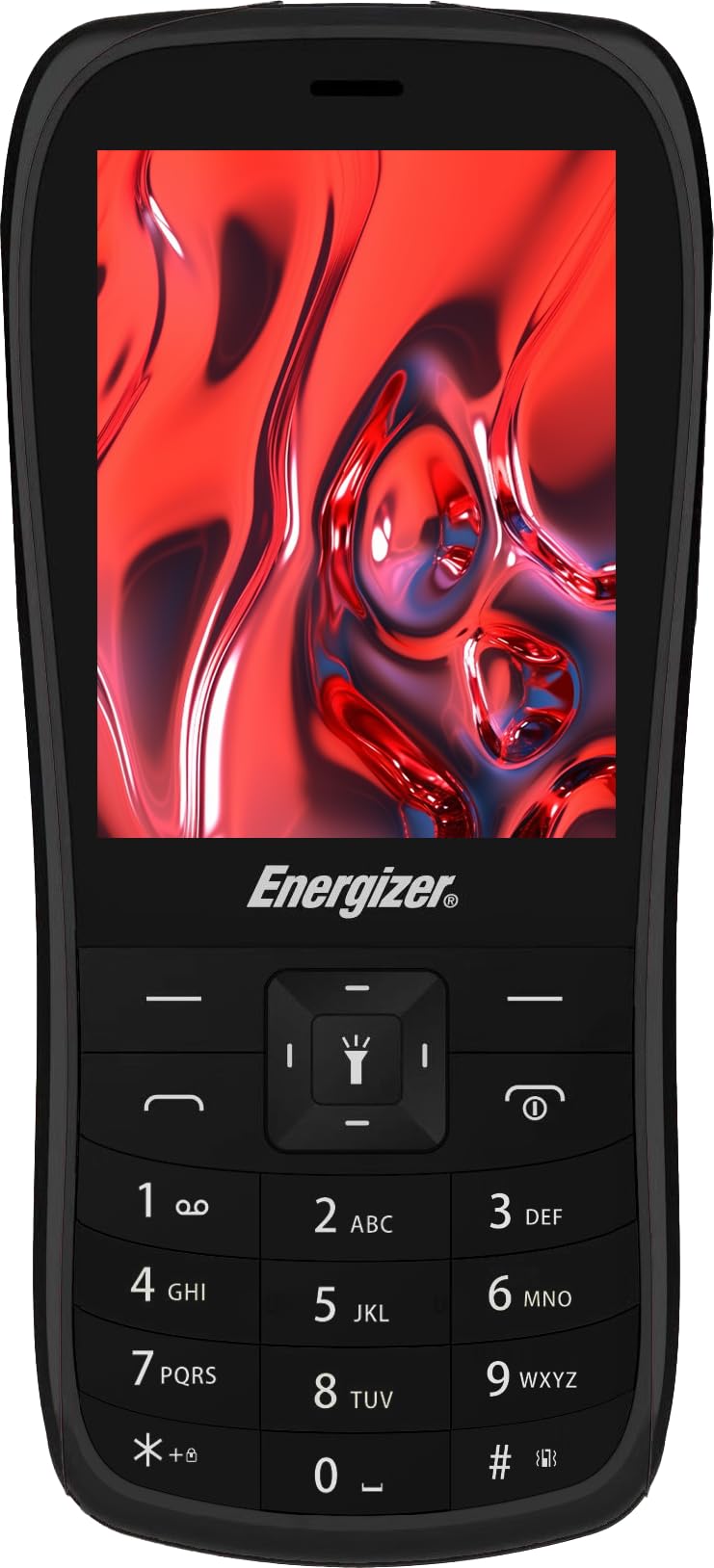
Figure 4.2: The 1700 mAh battery, providing over 300 hours of standby time.
5. Operating Your Phone
5.1 Power On/Off
- To Power On: Press and hold the End Key (red button) until the screen lights up.
- To Power Off: Press and hold the End Key until the power-off options appear, then select "Power off".
5.2 Making and Receiving Calls
- To Make a Call: Enter the phone number using the keypad and press the Call Key (green button).
- To Answer a Call: When the phone rings, press the Call Key.
- To End a Call: Press the End Key.
5.3 Sending and Receiving SMS
- Navigate to the "Messages" menu.
- Select "Write message" or "New SMS".
- Enter your message using the alphanumeric keypad.
- Enter the recipient's number or select from contacts.
- Select "Send".
5.4 Dual SIM Functionality
The E29-2G allows you to use two different SIM cards simultaneously. This is useful for separating personal and work calls, or for utilizing different network coverages.
- When making a call or sending an SMS, the phone will typically prompt you to choose which SIM card to use (SIM1 or SIM2).
- You can manage SIM settings in the phone's menu to set a default SIM for calls or messages if desired.
5.5 Expandable Memory
The Micro-SD card slot allows you to expand the phone's storage capacity for photos, music, or other files.
- Files can be transferred to the Micro-SD card via a computer connection or directly through the phone's file manager.
- Ensure the Micro-SD card is properly inserted for the phone to recognize it.
6. Maintenance
- Cleaning: Use a soft, dry cloth to clean the phone's screen and body. Avoid liquid cleaners.
- Storage: Store the phone in a cool, dry place away from direct sunlight and extreme temperatures.
- Battery Care: To prolong battery life, avoid fully discharging the battery frequently. Charge the phone regularly.
- Software Updates: Check the phone's settings periodically for any available software updates.

Figure 6.1: The Energizer E29-2G features an eco-friendly design with a recycled plastic shell.
7. Troubleshooting
If you encounter issues with your Energizer E29-2G, refer to the following common problems and solutions:
| Problem | Solution |
|---|---|
| Phone does not power on. | Ensure the battery is correctly installed and charged. Connect the charger and try again. |
| No network signal. | Check if SIM cards are properly inserted. Verify that your SIM card supports 2G networks. Move to an area with better network coverage. |
| Cannot make or receive calls/SMS. | Check network signal. Ensure SIM card is active and has sufficient balance/plan. Verify call barring settings. |
| Poor audio quality during calls. | Adjust call volume. Ensure nothing is obstructing the speaker or microphone. Move to a quieter environment. |
| Battery drains quickly. | Reduce screen brightness. Close unused applications. Ensure the phone is not in an area with very weak signal, which can cause increased battery usage. |
8. Specifications
Key technical specifications for the Energizer E29-2G:
| Feature | Detail |
|---|---|
| Model Name | E29 |
| Operating System | Unisoc 6531E |
| Display Size | 2.8 Inches |
| Display Resolution | 640 x 480 |
| RAM | 32 MB |
| Internal Storage | 1 GB |
| Expandable Memory | Micro-SD up to 32 GB |
| SIM Card Type | Dual Mini SIM |
| Cellular Technology | 2G |
| Connectivity | Bluetooth, Cellular |
| Charging Port | Micro USB |
| Battery Capacity | 1700 mAh Lithium-polymer |
| Special Features | Robust body, Dual SIM, Expandable memory |
9. Warranty and Support
The Energizer E29-2G Mobile Phone comes with a 9-year manufacturer's warranty.
For technical support, warranty claims, or further assistance, please refer to the contact information provided with your purchase documentation or visit the official Energizer mobile website.


