
T TICCI Camera Bird Feeder
T TICCI Smart Bird Feeder with Camera
Model: Camera Bird Feeder | Brand: T TICCI
1. Introduction
Thank you for choosing the T TICCI Smart Bird Feeder. This innovative device combines a high-definition camera with advanced AI technology to bring the wonders of nature directly to your smartphone. Designed for ease of use and durability, it allows you to identify over 1000 bird species, receive instant notifications of bird visits, and capture stunning photos and videos, day or night. Its solar-powered design ensures continuous operation, making bird watching effortless and enjoyable.

Figure 1: Overview of the T TICCI Smart Bird Feeder.
2. Product Features
- AI Bird Species Recognition & Notification: Advanced AI identifies over 1000 bird species worldwide. Receive automatic notifications on your smartphone when a bird visits, ensuring you never miss a moment.
- 1080P HD Camera & Automatic Bird Video Capture: Experience crystal-clear 1080P resolution with a 170-degree wide-angle lens. Capture birds in exquisite detail, from close-up feathers to panoramic views, with 8X magnification. Footage is automatically stored on a TF card for easy playback.
- Solar Panel for Sustainable Power: Integrated solar panel ensures continuous power. A built-in 5200mAh battery provides approximately 2 months of standby power, with solar panels charging up to 1000mAh per day.
- DIY Attachments & Independent Water System: The wider structure allows for various add-ons, such as mini hummingbird feeders or fruit holders. It features a 2.5L capacity, IP65 waterproofing, a stainless steel and plastic bracket with a drinking glass, and a robust yet lightweight metal case.
- Secure 2.4Ghz WiFi Connection: The camera supports 2.4GHz WiFi for stable connectivity. Ensure your phone is connected to a 2.4GHz WiFi network and grant all necessary permissions when prompted.
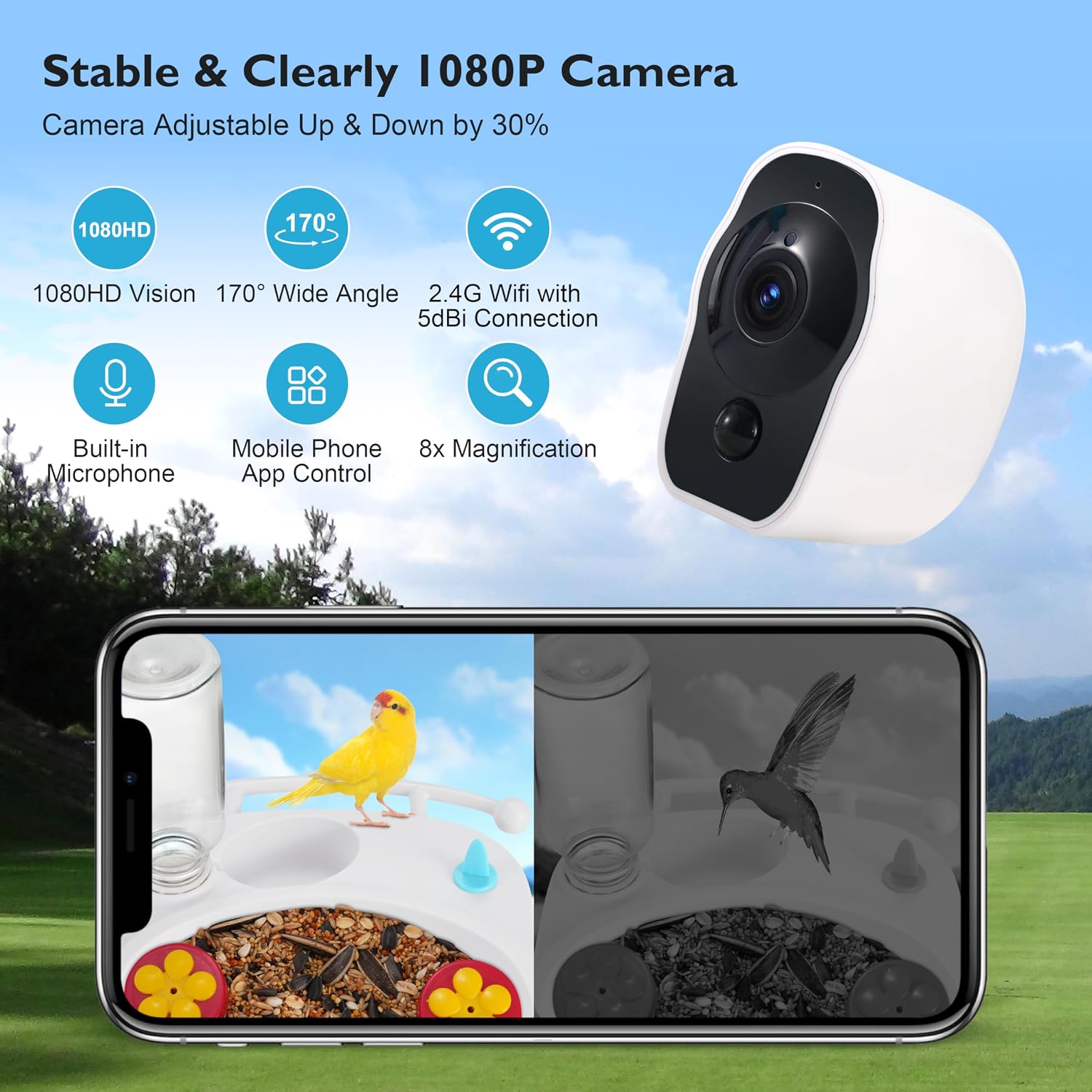
Figure 2: Detailed view of the camera's capabilities.

Figure 3: Solar panel for eco-friendly power.

Figure 4: Versatile design for customization and durability.
3. Setup Guide
Follow these steps to set up your T TICCI Smart Bird Feeder:
- Unpack Components: Carefully remove all components from the packaging. Verify you have the main feeder unit, camera, solar panel roof, feeding trays, water bottle, mounting bracket, and hardware.
- Assemble Feeder Unit: Slide the food storage compartment into the main feeder body. Attach the solar panel roof by screwing it securely into place.
- Install Camera: Remove any protective film from the camera lens. Slide the camera into the designated U-shaped mount inside the feeder. Connect the power cord from the solar panel to the camera.
- Attach Feeding Trays: Choose between the traditional food tray or the hummingbird feeder attachments. Insert them into the designated slots on the feeder base. The water bottle can be placed in its holder.
- Mounting: Select a suitable outdoor location (tree, wall, fence) that receives ample sunlight for the solar panel. Screw the mounting bracket securely onto your chosen surface using the provided hardware. Use the two wrenches to tighten the bolts for a stable installation.
- Attach Feeder to Mount: Turn the camera on. Slide the back bracket of the feeder onto the mounted holder until it clicks securely into place.
- Fill Feeder: Pour bird food into the chimney opening on the roof. Securely place the lid back on. Fill the water bottle and place it in its holder if using.
- App Setup: Download the iWFCam app from your device's app store (App Store for iOS, Google Play for Android). Follow the in-app instructions to connect your feeder. Ensure your phone is connected to a 2.4GHz WiFi network and grant all necessary permissions when prompted. Scan the QR code on the device or manual to pair.
For a visual guide on assembly and setup, please watch the official seller video below:
Video 1: Official setup and feature overview of the T TICCI Smart Bird Feeder.
4. Operating Instructions
- Live View: Open the iWFCam app to access the live feed from your bird feeder camera.
- Notifications: Ensure notifications are enabled in the app settings to receive alerts when birds are detected.
- AI Identification: The app will display the identified bird species along with a similarity percentage. You can often tap for more details about the species.
- Recording & Snapshots: Use the app to manually record video or take snapshots of visiting birds. Automatic capture is also enabled by motion detection.
- Night Vision: The camera automatically switches to night vision mode in low-light conditions, allowing for 24/7 bird observation.
- Device Sharing: Utilize the device sharing function within the app to allow family and friends to view the live feed and captured moments.

Figure 5: Day and Night Vision capabilities.
5. Maintenance
- Cleaning: Regularly clean the feeder to prevent mold and bacteria buildup. Disassemble the feeding trays and water system for thorough cleaning. Wipe down the camera lens and transparent panels.
- Refilling: Monitor the food and water levels regularly. Refill as needed through the chimney opening for food and by removing and refilling the water bottle.
- Solar Panel: Keep the solar panel clean and free of debris (leaves, snow) to ensure optimal charging efficiency.
- Battery Check: The app will provide battery status. Ensure the feeder is placed in an area with sufficient sunlight for consistent charging.
6. Troubleshooting
- Camera Not Connecting to WiFi:
- Ensure your WiFi is 2.4GHz. The camera does not support 5GHz networks.
- Verify the WiFi password is correct.
- Make sure the feeder is within range of your WiFi router.
- Reset the camera by pressing the reset button for six seconds. Reattempt connection through the app.
- Ensure you allow the app to connect to the network when prompted during setup.
- Short Battery Life:
- Ensure the solar panel is receiving direct sunlight for several hours daily.
- Clean the solar panel regularly to remove any obstructions.
- Reduce the frequency of live viewing or motion detection sensitivity if battery drain is excessive.
- Poor Image/Video Quality:
- Clean the camera lens.
- Ensure adequate lighting during the day. Night vision performance depends on ambient light.
- Check your internet connection speed.
- Squirrels/Other Animals Accessing Feeder:
- Consider relocating the feeder to an area less accessible to larger animals.
- Ensure the seed tank lid is securely closed.
7. Specifications
| Brand | T TICCI |
| Model Number | Camera Bird Feeder |
| Product Dimensions | 10"L x 7"W x 10"H |
| Item Weight | 4.5 Pounds |
| Material | Stainless Steel, Acrylonitrile Butadiene Styrene |
| Capacity | 2.5 Liters |
| Power Source | Solar Powered (5200mAh battery included) |
| Waterproofing | IP65 Weatherproof |
| Camera Resolution | 1080P HD |
| Camera Angle | 170-degree Wide-Angle |
| Connectivity | 2.4Ghz WiFi |
8. Warranty Information
Please refer to the product packaging or the manufacturer's official website for detailed warranty information. Typically, T TICCI products come with a limited warranty covering manufacturing defects.
9. Support
For further assistance, technical support, or inquiries, please visit the official T TICCI store on Amazon or contact their customer service directly. You can find contact details on the product page or within the iWFCam app's support section.
Ask a question about this manual
Ask about setup, troubleshooting, compatibility, parts, safety, or missing instructions. Manuals+ will review the question and use this page’s manual context to help answer it.