
1. Introduction
Thank you for choosing the TALOYA Φ132cm Dimmable Ceiling Fan Light. This product combines efficient lighting with effective air circulation, designed to enhance comfort in your living space. It features dimmable and color-adjustable LED lighting, a silent DC motor, and convenient remote control operation. This manual provides essential information for safe installation, operation, maintenance, and troubleshooting.
2. Safety Information
- Installation must be performed by a qualified electrician or in accordance with local electrical codes.
- Always turn off the main power supply before installation, maintenance, or cleaning.
- This product is heavy. Ensure the ceiling structure can safely support the product's weight (approximately 6.1 kg / 13.4 lbs) and that it is securely fastened with screws (drilling may be required).
- This product is designed for flat ceilings only. Do not install on sloped, arched, or uneven ceilings.
- If a dimmer switch is currently installed, it must be removed and replaced with a standard ON/OFF switch. Consult an electrician for wiring modifications.
- Maintain a minimum distance of 0.4 meters (15 inches) from walls and 1.8 meters (71 inches) from the floor to the fan blades for safe operation.
- Do not insert objects into the fan blades while the fan is operating.
3. Package Contents
Verify that all components are present before beginning installation:
- Main Unit (Fan Motor and Light Fixture)
- Mounting Bracket
- Flange
- Fixed Arm
- Remote Control
- Fan Blades (5 pieces)
- Screws and other installation accessories
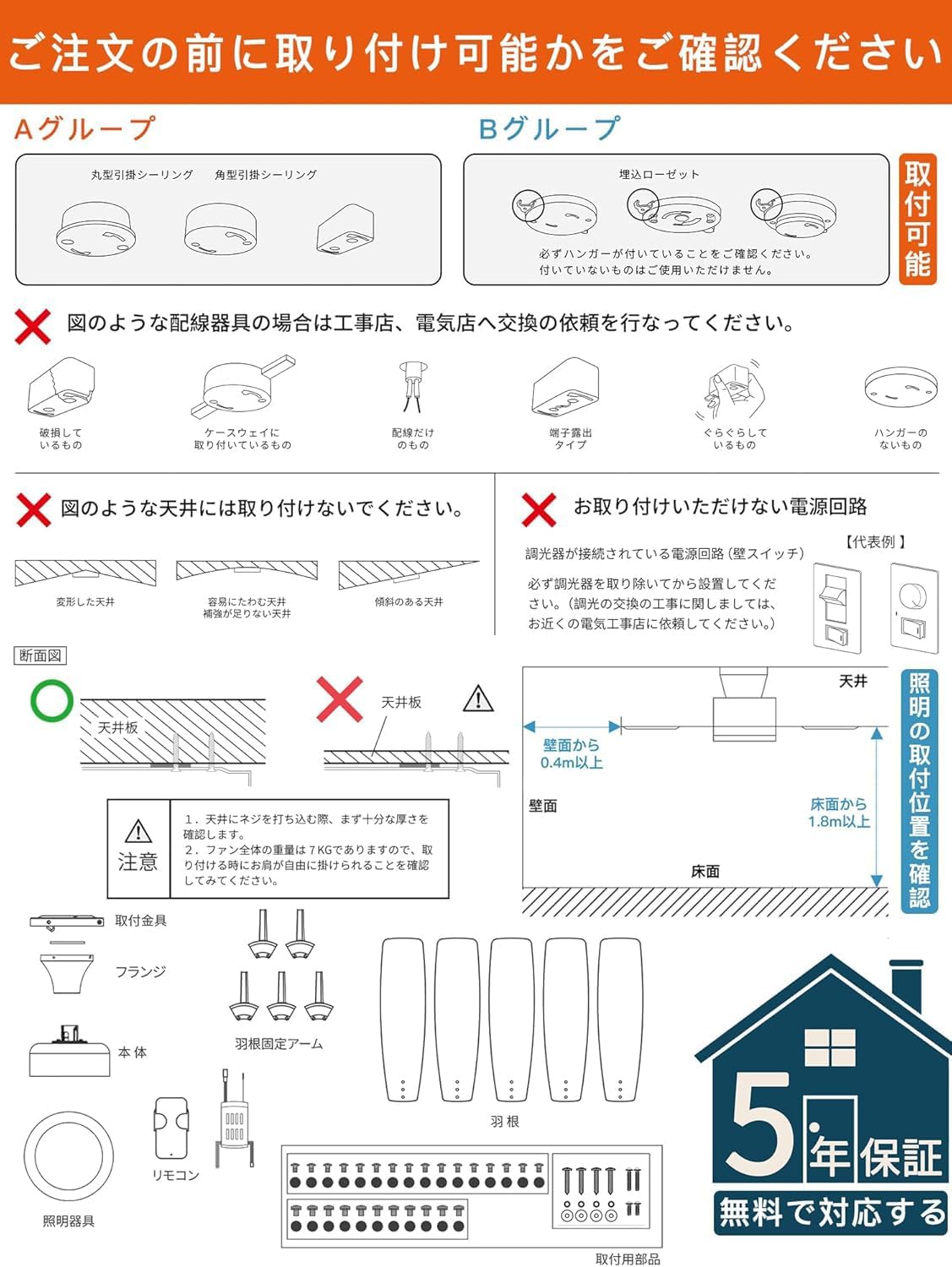
Figure 3.1: Package Contents and Installation Overview
4. Setup and Installation
Careful installation is crucial for the safe and proper functioning of your ceiling fan light. Please follow these steps:
4.1 Pre-Installation Checks
- Ceiling Type: Confirm your ceiling is flat and compatible with either a round or square hanging ceiling fixture. This product is not suitable for sloped or arched ceilings.
- Ceiling Support: Ensure the ceiling can support the product's weight (approximately 6.1 kg). Secure fastening with screws into a sturdy ceiling joist or blocking is required.
- Wiring: If a dimmer switch is present, it must be replaced with a standard ON/OFF switch. Consult a professional electrician for any complex wiring work.
- Clearance: Ensure there is at least 0.4 meters (15 inches) clearance from any wall and 1.8 meters (71 inches) from the floor to the lowest point of the fan blades.
Figure 4.1: Ceiling Compatibility and Clearance Requirements
4.2 Assembly Steps
- Attach the mounting bracket to the ceiling junction box using appropriate screws, ensuring it is firmly secured.
- Connect the electrical wires from the ceiling to the fan unit according to the wiring diagram provided in the detailed instructions (not shown here, refer to included paper manual).
- Carefully lift the fan unit and attach it to the mounting bracket. Secure it with the provided screws.
- Install the fan blades onto the motor housing. Ensure each blade is securely fastened.
- Attach the light fixture cover to the main unit.
- Test the fan and light functions using the remote control.

Figure 4.2: Product Dimensions
5. Operating Instructions
Your TALOYA Ceiling Fan Light is operated via the included 2.4Ghz remote control, offering a range of up to 10 meters even with obstacles.
5.1 Fan Functions
- Fan Speed: Adjust between 6 levels of fan speed to suit your comfort.
- Reversible Rotation: The fan features a reversible motor for year-round use.
- Summer Mode (Downward Airflow): Blades rotate counter-clockwise to create a cooling breeze.
- Winter Mode (Upward Airflow): Blades rotate clockwise to circulate warm air trapped near the ceiling, improving heating efficiency.
- Timer Function: Set a 1-hour sleep timer for automatic shutdown.

Figure 5.1: Summer and Winter Modes
5.2 Lighting Functions
- Stepless Dimming: Adjust the brightness from 20% to 100% seamlessly. The maximum brightness is approximately 3240 lumens.
- Color Adjustment: Change the color temperature from warm white (3000K) to natural white (4000K) and cool white (6500K).
- Soft Off: The light gradually dims before turning off completely.

Figure 5.2: Dimmable and Color Adjustable Lighting
5.3 Remote Control Pairing
If your remote control is not responding, it may need to be re-paired with the fan unit. Refer to the specific pairing instructions in your included paper manual. Typically, this involves turning off the power to the fan, then turning it back on and pressing a specific button combination on the remote within a few seconds.
6. Maintenance
Regular maintenance ensures optimal performance and longevity of your TALOYA Ceiling Fan Light.
- Cleaning: Dust the fan blades and light fixture regularly with a soft, dry cloth. For stubborn dirt, a slightly damp cloth can be used, followed by a dry cloth.
- Avoid Chemicals: Do not use abrasive cleaners, solvents, or harsh chemicals, as these can damage the finish and electrical components.
- Blade Inspection: Periodically check that all fan blade screws are tight and that the blades are free from damage.
- Power Off: Always turn off the power to the unit at the circuit breaker before performing any cleaning or maintenance.
7. Troubleshooting
If you encounter any issues with your ceiling fan light, refer to the following common problems and solutions:
| Problem | Possible Cause | Solution |
|---|---|---|
| Fan does not turn on | No power supply; Remote control batteries are dead; Remote not paired. | Check circuit breaker and wall switch; Replace remote batteries; Re-pair remote control (see Section 5.3). |
| Light does not turn on | No power supply; Remote control batteries are dead; LED driver issue. | Check circuit breaker and wall switch; Replace remote batteries; Contact support if LED driver is suspected. |
| Fan makes unusual noise | Loose screws; Unbalanced blades; Motor issue. | Ensure all mounting and blade screws are tightened; Check for balanced blades; Contact support if noise persists. |
| Remote control unresponsive | Dead batteries; Not paired; Interference. | Replace batteries; Re-pair remote control (see Section 5.3); Reduce interference sources. |
If the problem persists after trying these solutions, please contact customer support.
8. Specifications
| Feature | Specification |
|---|---|
| Brand | Taloya |
| Model Number | TLYCFL001 (Manufacturer Model: TLY52-WE-5X-T5-J) |
| Color | White Frame |
| Material | Metal |
| Style | Minimalist |
| Room Type | Living Room (Suitable for 10-12 Tatami rooms) |
| Indoor/Outdoor Usage | Indoor |
| Power Source | Silent DC Motor |
| Special Features | Dimmable, Color Adjustable, Reversible Fan, Timer |
| Light Source Type | LED |
| Voltage | 100 Volts |
| Wattage | 59 W (Fan: 35W, Light: 24W) |
| Controller Type | Remote Control (2.4Ghz) |
| Brightness | Max 3240 Lumens |
| Mounting Type | Semi-flush mount |
| Assembly Required | Yes |
| Product Dimensions (L x W x H) | 132 cm x 132 cm x 25.4 cm (Φ132cm) |
| Product Weight | 6.1 kg |
| Country of Origin | China |
9. Warranty and Support
TALOYA provides a reliable 5-year warranty for this product. If you encounter any issues or defects within this period, please contact us directly.
9.1 Warranty Claim Process
To make a warranty claim, please provide the following information:
- Your order number.
- A detailed description of the issue.
- Photos or videos clearly showing the defect or problem.
Upon receipt of your information, we will assess the issue and provide a free resolution within the 5-year warranty period.
9.2 Customer Support
For any questions, technical assistance, or warranty inquiries, please contact our customer support team:
Email: servicejp@taloya.com
Our quality mail service team is available to assist you promptly (excluding Saturdays, Sundays, and public holidays).

Figure 9.1: Customer Support Contact Information


