
Introduction
This manual provides essential information for the proper setup, operation, maintenance, and troubleshooting of your Littmann Core Digital Stethoscope Model 8890. Please read these instructions carefully before using the device to ensure optimal performance and longevity.
The Littmann Core Digital Stethoscope combines the superior acoustics of a Littmann cardiology stethoscope with digital technology, offering up to 40x amplification and active noise cancellation for enhanced auscultation. It features a dual-sided chestpiece for both adult and pediatric patients and can connect to Eko software for visualization, recording, and saving of acoustic waveforms.

Image: The Littmann Core Digital Stethoscope Model 8890, showcasing its design with the chestpiece, tubing, and ear tips.
Setup
1. Unboxing and Initial Inspection
Carefully remove the stethoscope from its packaging. Inspect all components for any visible damage. The package typically includes the stethoscope unit. No additional accessories are included.
2. Charging the Device
Before first use, ensure the stethoscope is fully charged. Connect the charging cable (not specified in product details, assume standard USB-C or similar) to the charging port on the digital module and to a suitable power source. The indicator light will show charging status.
3. Ear Tip Installation and Adjustment
The stethoscope comes with soft-sealing eartips designed for comfort and an excellent acoustic seal. Ensure they are securely attached to the binaural tubes. Adjust the binaural angle to fit comfortably in your ear canals, pointing forward for optimal sound transmission.

Image: Close-up of the soft-sealing eartips, which provide a comfortable fit and excellent acoustic seal.
4. Initial Power-On
Press and hold the power button on the digital module until the indicator light illuminates, indicating the device is powered on.
Operating Instructions
1. Powering On/Off and Volume Adjustment
- To power on, press and hold the power button.
- To power off, press and hold the power button again.
- Use the volume control buttons (usually '+' and '-') on the digital module to adjust the amplification level. The Littmann Core offers up to 40x acoustic amplification.

Image: A medical professional using the stethoscope, illustrating the up to 40x acoustic amplification feature, which enhances subtle sounds for diagnosis.
2. Switching Between Analog and Digital Modes
The stethoscope allows quick switching between traditional analog and amplified digital auscultation modes. Refer to the device's specific button for mode selection (typically a dedicated button on the digital module).
3. Using the Dual-Sided Chestpiece
The chestpiece is designed for both adult and pediatric patients, featuring an integrated tunable diaphragm on both sides. Simply rotate the chestpiece to select the appropriate side for adult (approx. 45mm diameter) or pediatric (approx. 35mm diameter) auscultation. This allows differentiation of high-frequency and low-frequency sounds without changing the chestpiece position.

Image: A doctor examining a child, demonstrating the versatility of the stethoscope with its dual-sided chestpiece for various auscultation modes.
4. Active Noise Cancellation
The Littmann Core Digital Stethoscope incorporates active noise cancellation technology. This feature helps reduce unwanted external noise in busy environments, allowing you to concentrate on important body sounds. This function is automatically engaged in digital mode.

Image: A medical professional using the stethoscope, highlighting the active noise cancelling feature that helps focus on critical sounds by reducing ambient noise.
5. Connecting to Eko Software/App
The stethoscope can be paired with various mobile devices via Bluetooth® communication. This allows for visualization, recording, and saving of acoustic waveforms using the Eko Health software/app. Registration with Eko Health (ekohealth.com) is required to use their English version software/app.
- Ensure Bluetooth is enabled on your mobile device.
- Open the Eko app and follow the on-screen instructions to pair your Littmann Core Stethoscope.
- Once paired, you can visualize, record, and save auscultation data directly from the app.

Image: Individuals viewing a laptop screen, demonstrating the connection to Eko Health software/app for visualizing, recording, and saving acoustic data via Bluetooth.
Maintenance
1. Cleaning Instructions
- Chestpiece and Tubing: Wipe the chestpiece and tubing with a 70% isopropyl alcohol solution or a disposable wipe with a 2% bleach solution. Ensure the device is powered off before cleaning.
- Ear Tips: Remove the ear tips from the binaural tubes and clean them thoroughly with soap and water or an alcohol solution. Allow them to dry completely before reattaching.
- Do not immerse the stethoscope in any liquid.
2. Storage Recommendations
Store the stethoscope in a clean, dry place, away from extreme temperatures, direct sunlight, and harsh chemicals. Avoid tightly coiling the tubing to prevent kinks or damage.
3. Battery Care
To maintain battery life, avoid fully discharging the device frequently. Charge the stethoscope regularly, even if not in constant use. If storing for an extended period, ensure it has a partial charge (e.g., 50%) and recharge every few months.
Troubleshooting
- No Sound or Poor Sound Quality:
- Ensure the device is powered on and fully charged.
- Check volume settings.
- Verify ear tips are securely attached and properly oriented in your ear canals.
- Ensure the chestpiece is correctly positioned on the patient and the correct side (adult/pediatric) is selected.
- Clean the diaphragm and ear tips.
- Bluetooth Connection Issues:
- Ensure the stethoscope is powered on and within range of your mobile device.
- Turn Bluetooth off and on again on your mobile device.
- Restart both the stethoscope and your mobile device.
- Unpair and re-pair the stethoscope in your device's Bluetooth settings.
- Device Not Powering On:
- Connect the stethoscope to a charger and allow it to charge for at least 30 minutes.
- Try a different charging cable or power adapter.
If problems persist, please contact Littmann customer support or refer to the official Littmann website for further assistance.
Specifications
| Feature | Detail |
|---|---|
| Model Number | 8890 |
| Brand | Littmann (3M) |
| Chestpiece | Dual-sided, adult and pediatric (Stainless Steel) |
| Diaphragm Diameter (Adult) | Approx. 45mm |
| Diaphragm Diameter (Pediatric) | Approx. 35mm |
| Tubing | High-sensitivity two-in-one binaural tubing |
| Overall Length | Approx. 69cm |
| Product Weight | Approx. 232g |
| Color | Black (Mirror finish on chestpiece) |
| Connectivity | Bluetooth® for Eko App |
| Amplification | Up to 40x acoustic amplification |
| Noise Reduction | Active Noise Cancellation |
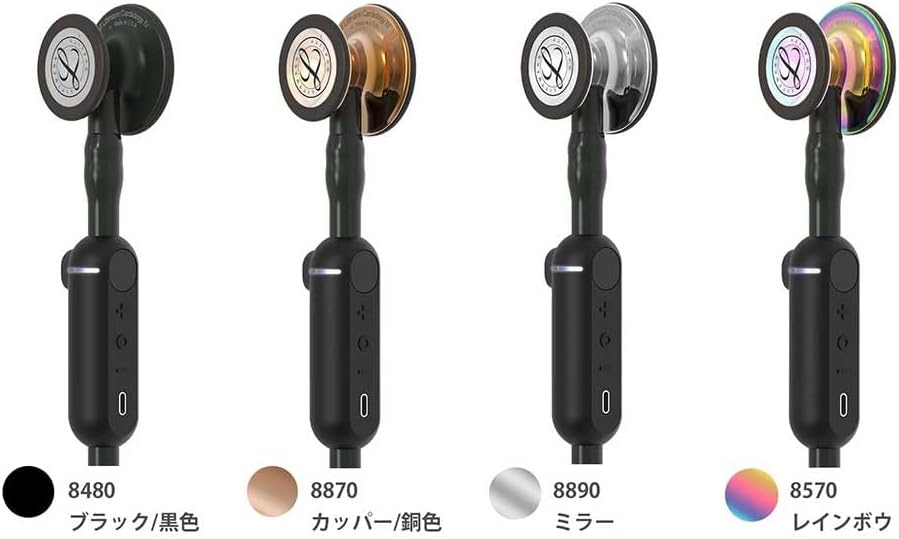
Image: A visual comparison of different Littmann Core Digital Stethoscope models, highlighting the 8890 with its mirror finish chestpiece.
Warranty and Support
For detailed warranty information, please refer to the official Littmann website or the documentation provided with your purchase. Littmann stethoscopes are manufactured by 3M. For technical support, service, or to inquire about replacement parts, please contact Littmann customer service directly through their official channels.
Always ensure you are using genuine Littmann parts and accessories for optimal performance and to maintain warranty validity.


