
Introduction
The TOA Electronics D-901 US Modular Digital Mixer is a versatile audio processing unit designed for a wide range of installed sound applications, including audio/visual systems and houses of worship. Its modular architecture supports up to twelve microphone/line inputs and eight line outputs, offering extensive flexibility for signal routing and processing. The D-901 integrates advanced audio tools such as automixing, feedback suppression, multi-band parametric filters, compressors, limiters, noise gates, crossovers, and delays to optimize sound quality and system performance.
This manual provides essential information for the proper installation, operation, and maintenance of your D-901 Digital Mixer.
Key Features
- Modular Design: Supports flexible configurations with up to 12 inputs and 8 outputs.
- Intuitive Operation: Control via front panel display and dedicated controls.
- Auto-Mixing: Facilitates automatic level adjustments for multiple microphones.
- Feedback Suppression: Automatically identifies and attenuates up to 12 problematic frequencies.
- Comprehensive Audio Processing: Includes compressors, gates, crossovers, multi-band filtering, parametric, high/low-pass, all-pass, and notch filters, horn EQ, high/low shelving, and output delay.
- Input and Output Channel Metering: Visual indication of signal levels.
- Memory Presets: 16 internal memories for storing and recalling various signal routing and parameter configurations.
- Echo Effect: Provides vocal enhancement capabilities.
Setup
1. Unpacking and Inspection
Carefully remove the D-901 mixer from its packaging. Inspect the unit for any signs of damage that may have occurred during transit. Retain all packaging materials for future transport or storage.
2. Physical Installation
The D-901 is designed for standard 19-inch rack mounting. Secure the unit using appropriate rack screws. Ensure adequate ventilation around the unit to prevent overheating.
3. Power Connection
Connect the supplied power cord to the AC inlet on the rear panel of the D-901 and then to a grounded 230VAC, 50/60Hz power outlet. Ensure the power switch on the front panel is in the OFF position before connecting to power.
4. Input/Output Module Installation
The D-901 features a modular design. Install the required input and output modules into the designated slots on the rear panel. Refer to the module-specific instructions for proper installation and configuration.
5. Audio Connections
Connect your audio sources (microphones, line-level devices) to the input connectors on the installed input modules. Connect your audio destinations (amplifiers, recording devices) to the output connectors on the installed output modules. Use high-quality shielded cables to minimize noise and interference.
6. Control Connections
For remote control, connect an RS-232 cable to the serial port on the rear panel for PC control software integration, or utilize the contact-closure terminals for external control devices as needed.
Operating the Mixer
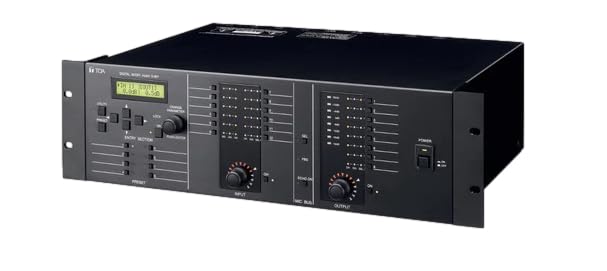
This image displays the front panel of the TOA Electronics D-901 US Modular Digital Mixer, featuring its display screen, control buttons, input/output level meters, and rotary knobs for input and output adjustments. The unit is designed for rack mounting.
1. Powering On
After all connections are made, switch the power button on the front panel to the ON position. The display will illuminate, indicating the unit is operational.
2. Front Panel Controls
- Display Screen: Shows current settings, menus, and metering information.
- Navigation Buttons: Used to navigate through menus and adjust parameters.
- Rotary Knobs: Provide fine control over input and output levels, and other adjustable parameters.
- Input/Output Level Meters: Indicate the signal strength for each channel.
3. PC Control Software
For advanced configuration and control, connect the D-901 to a computer via the RS-232 port and use the dedicated PC control software. This software allows for detailed parameter adjustments, system design, and off-site programming.
4. Basic Signal Routing
Utilize the front panel controls or PC software to establish input-to-output routing. The D-901 supports full input-to-output matrixing, enabling flexible signal distribution for multi-zone or room-combining applications.
5. Audio Processing
Access the various audio processing tools through the menu system. Configure parameters for automixing, feedback suppression, equalization (parametric, high/low-pass, etc.), compression, limiting, noise gating, and delay as required for your specific audio environment.
6. Saving and Recalling Memories
The D-901 can store up to 16 internal memory presets. Once a desired configuration is achieved, save it to a memory slot for quick recall. This is particularly useful for different event setups or room configurations.
Maintenance
1. Cleaning
Regularly clean the exterior of the D-901 with a soft, dry cloth. For stubborn dirt, a slightly damp cloth with a mild, non-abrasive cleaner can be used. Ensure no liquid enters the unit. Avoid using harsh chemicals or solvents.
2. Ventilation
Ensure that the ventilation openings on the unit are not obstructed. Proper airflow is crucial for maintaining optimal operating temperature and preventing component damage.
3. Firmware Updates
Check the TOA Electronics website periodically for any available firmware updates. Updates can provide new features, performance enhancements, or bug fixes. Follow the instructions provided with the firmware update carefully.
Troubleshooting
- No Power:
- Verify the power cord is securely connected to both the unit and the power outlet.
- Check the power outlet for functionality.
- Ensure the front panel power switch is in the ON position.
- No Audio Output:
- Confirm all audio cables are correctly connected to inputs and outputs.
- Check input and output levels on the D-901 and connected devices.
- Verify signal routing within the D-901 to ensure inputs are correctly assigned to outputs.
- Ensure no mute functions are active on any channels or outputs.
- Distorted Audio:
- Check input levels to prevent clipping (indicated by red peak lights). Reduce gain if necessary.
- Inspect audio cables for damage or poor connections.
- Review processing settings (e.g., compressor thresholds, EQ settings) that might be causing distortion.
- Feedback Issues:
- Ensure the Feedback Suppression function is enabled and configured correctly.
- Adjust microphone placement relative to loudspeakers.
- Reduce microphone gain.
If problems persist, consult the TOA Electronics website for further support or contact an authorized service center.
Specifications
| Feature | Specification |
|---|---|
| Power Source | 230VAC, 50 / 60Hz |
| Power Consumption | 27W |
| Frequency Response | 20Hz - 20kHz, ±1dB (+4 dB* input) |
| Input Channels | Max. 12 channels, modular construction (modules optional) |
| Output Channels | Max. 8 channels, modular construction (modules optional) |
| Feedback Suppression Function | 12 filters (auto/dynamic) |
| Auto-Mixing Group | 4 groups |
| Operating Temperature | +5°C to +40°C |
| Finish | Panel: Aluminum, hair-line finish, black. Others: Pre-coated steel plate, black, 30% gloss |
| Dimensions (W × H × D) | 482.6 × 132.6 × 320 mm (excluding projection) |
| Weight | 15.21 pounds (6.9 kg) |
Warranty and Support
The TOA Electronics D-901 US Modular Digital Mixer is covered by a five-year product warranty from the date of purchase. This warranty covers defects in materials and workmanship under normal use.
For technical support, service, or warranty claims, please contact your authorized TOA Electronics dealer or visit the official TOA Electronics website for contact information and resources.


