
TEMKIN 124511425
TEMKIN 4L Digital Air Fryer User Manual
Model: 124511425
Introduction
Thank you for purchasing the TEMKIN 4L Digital Air Fryer. This appliance is designed to provide a healthier way to cook your favorite meals with less oil. Its compact size makes it ideal for smaller kitchens, dorms, or RV travel. Please read this manual thoroughly before first use to ensure safe and optimal operation.
Important Safety Instructions
WARNING: To reduce the risk of fire, electric shock, or injury, always follow these basic safety precautions.
- Read all instructions before using the appliance.
- Do not touch hot surfaces. Use handles or knobs.
- To protect against electric shock, do not immerse cord, plugs, or the appliance in water or other liquid.
- Close supervision is necessary when any appliance is used by or near children.
- Unplug from outlet when not in use and before cleaning. Allow to cool before putting on or taking off parts.
- Do not operate any appliance with a damaged cord or plug or after the appliance malfunctions or has been damaged in any manner.
- The use of accessory attachments not recommended by the appliance manufacturer may cause injuries.
- Do not use outdoors.
- Do not let cord hang over edge of table or counter, or touch hot surfaces.
- Do not place on or near a hot gas or electric burner, or in a heated oven.
- Extreme caution must be used when moving an appliance containing hot oil or other hot liquids.
- Always attach plug to appliance first, then plug cord into the wall outlet. To disconnect, turn any control to "off", then remove plug from wall outlet.
- Do not use appliance for other than intended use.
- Ensure the frying basket is properly inserted before operation. The appliance will automatically power off if the basket is pulled out during operation.
Product Overview
Familiarize yourself with the components of your TEMKIN 4L Digital Air Fryer.
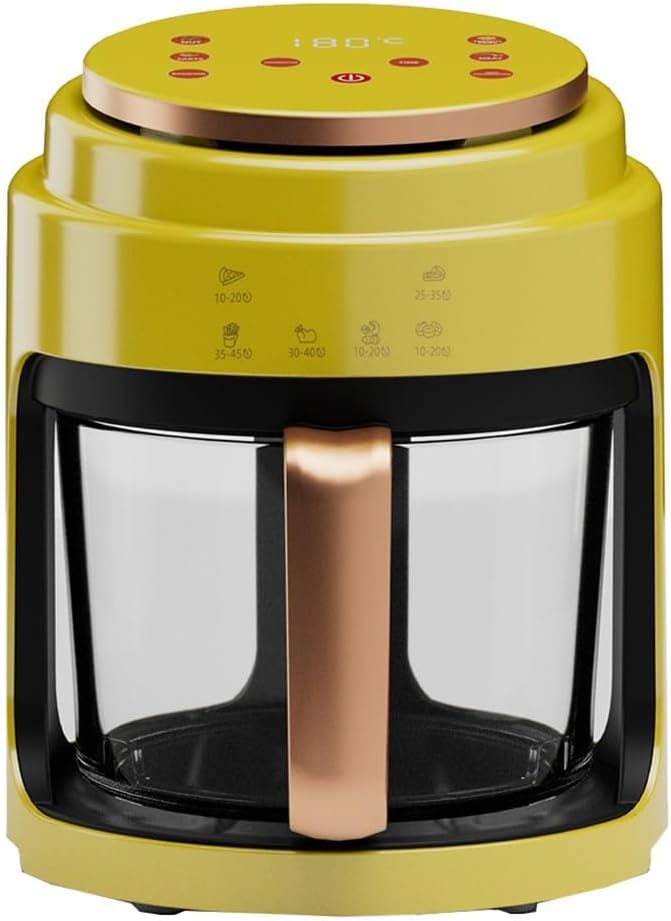
Image: Front view of the TEMKIN 4L Digital Air Fryer in yellow, showing the main unit, control panel on top, and the transparent frying basket.
- Control Panel: Digital touch screen interface for setting time, temperature, and selecting presets.
- Frying Basket: Detachable, transparent basket for holding food during cooking. Features a handle for easy removal.
- Main Unit: Houses the heating element and fan for 360° rapid air circulation.
- Air Outlet: Located at the rear of the appliance for hot air exhaust.
Setup and First Use
- Unpacking: Carefully remove all packaging materials from the air fryer.
- Cleaning: Before first use, clean the frying basket and any removable parts with warm soapy water. Wipe the main unit with a damp cloth. Ensure all parts are completely dry before assembly.
- Placement: Place the air fryer on a stable, heat-resistant surface, away from walls or other appliances to allow for proper air circulation. Ensure there is at least 10 cm (4 inches) of clear space around the appliance.
- Power Connection: Plug the power cord into a grounded electrical outlet.
- Initial Run (Optional): For the first use, it is recommended to run the air fryer empty for about 10-15 minutes at 200°C (390°F) to burn off any manufacturing odors. A slight odor may be present, which is normal and will dissipate.
Operating Instructions
Basic Operation
- Prepare Food: Place your ingredients into the frying basket. Do not overfill the basket to ensure even cooking.
- Insert Basket: Slide the frying basket back into the main unit until it clicks into place.
- Power On: The control panel will illuminate.
- Set Temperature and Time: Use the touch controls to adjust the desired cooking temperature and time. The air fryer supports a wide range of temperatures.
- Start Cooking: Press the Start/Pause button to begin the cooking process.
- Check Progress: You can monitor the cooking progress through the 360° visible cooking window. If you need to check or shake the food, pull out the basket; the air fryer will automatically pause. Reinsert the basket to resume cooking.
- Completion: The air fryer will beep when the cooking time is complete. Carefully remove the basket and transfer the cooked food.
Using Preset Functions
The TEMKIN 4L Digital Air Fryer features 6-in-1 cooking functions with user-friendly touch screen interface. These presets are designed for common dishes.
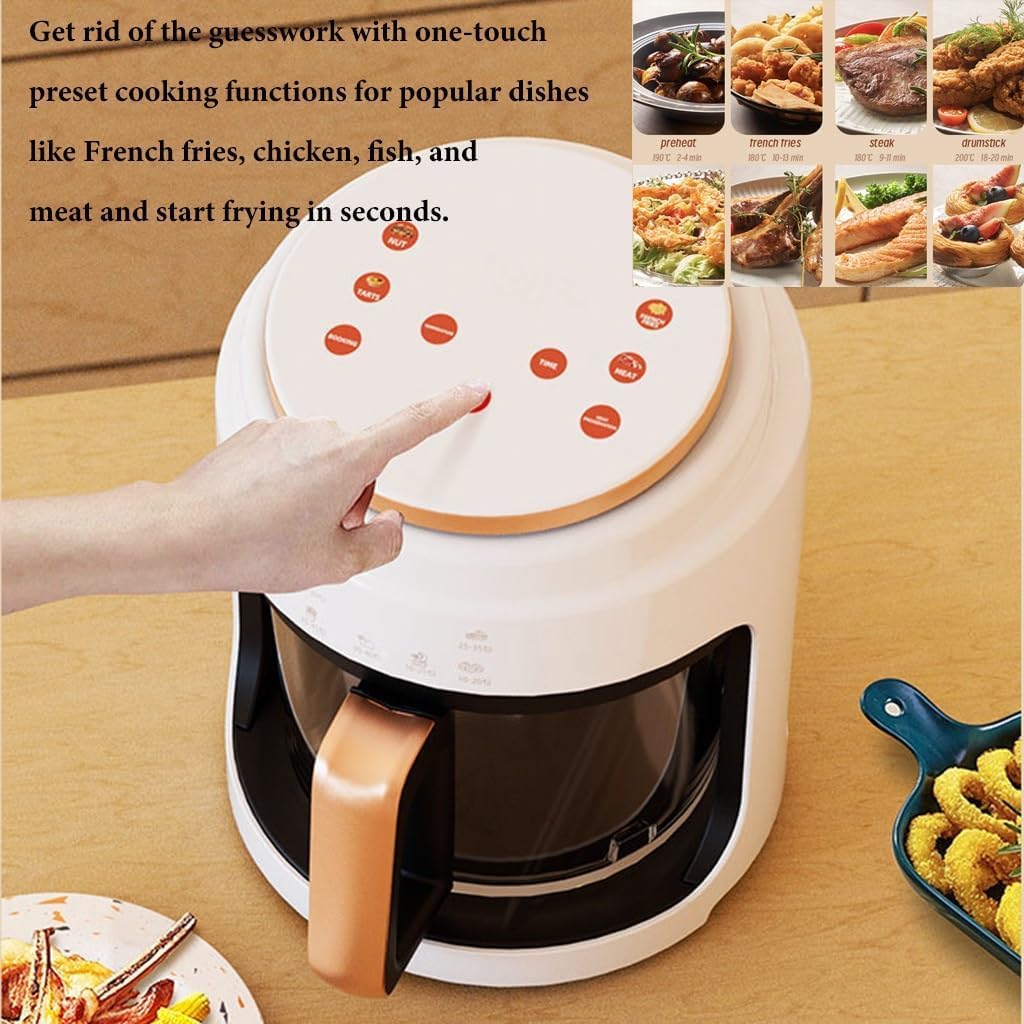
Image: Top-down view of the air fryer's control panel, highlighting the touch buttons for various preset cooking functions like preheat, french fries, steak, chicken, fish, and drumstick.
To use a preset:
- Place food in the basket.
- Select the desired preset icon on the control panel (e.g., French fries, chicken wings, vegetables, sausage, dehydrate).
- The air fryer will automatically set the optimal temperature and time for that dish. You can manually adjust these settings if needed.
- Press the Start/Pause button to begin.
Maintenance and Cleaning
Regular cleaning will extend the life of your air fryer and ensure optimal performance.

Image: A person cleaning the transparent air fryer basket under a kitchen faucet, demonstrating its ease of cleaning.
- Unplug: Always unplug the air fryer from the power outlet and allow it to cool completely before cleaning.
- Frying Basket: The frying basket is made of uncoating glass, making it easy to clean. Wash it with warm soapy water and a non-abrasive sponge. Rinse thoroughly and dry completely. Do not use metal scouring pads or abrasive cleaning materials. The basket is NOT dishwasher safe.
- Main Unit: Wipe the exterior of the air fryer with a damp cloth. Do not immerse the main unit in water or any other liquid.
- Interior: For the interior, wipe with a damp cloth. For stubborn residue, use a mild detergent.
- Storage: Store the air fryer in a cool, dry place once it is clean and dry.
Troubleshooting
If you encounter any issues with your air fryer, please refer to the following common problems and solutions:
| Problem | Possible Cause | Solution |
|---|---|---|
| Air fryer does not turn on. | Not plugged in; power outlet malfunction; basket not properly inserted. | Ensure the power cord is securely plugged into a working outlet. Check if the frying basket is fully pushed into the unit. |
| Food is not cooked evenly. | Basket is overfilled; temperature or time settings are incorrect; food not shaken/flipped. | Do not overfill the basket. Adjust temperature and time as needed. Shake or flip food halfway through cooking for best results. |
| White smoke coming from the appliance. | Grease residue from previous use; cooking fatty foods. | Clean the basket and interior thoroughly after each use. For fatty foods, drain excess oil during cooking. |
| Appliance emits a burning smell. | Food residue stuck to heating element; new appliance odor. | Unplug and allow to cool. Clean the interior and heating element carefully. New appliance odor is normal for first few uses. |
Specifications
| Feature | Detail |
|---|---|
| Model Name | 5461544 |
| Item Model Number | 124511425 |
| Brand | TEMKIN |
| Capacity | 4 Liters |
| Power | 1000W |
| Voltage | 110V-280V |
| Product Dimensions (L x W x H) | 28.8 cm x 25.2 cm x 23.2 cm (11 in x 9.9 in x 9 in) |
| Material | PP + Metal |
| Control Method | Touch control |
| Special Feature | Temperature Control, Detachable Basket, Visible Cooking Window |
| Dishwasher Safe | No (for basket), Main unit not immersible. |

Image: Diagram showing the dimensions of the air fryer: 28.8cm (11 inches) wide, 25.2cm (9.9 inches) deep, and 23.2cm (9 inches) high.
Warranty and Support
TEMKIN products are manufactured to high-quality standards. For any questions regarding your product, please contact customer support. While specific warranty details are not provided in this manual, please retain your proof of purchase for any warranty claims.
For assistance, please refer to the contact information provided at the point of purchase or visit the official TEMKIN website.
Ask a question about this manual
Ask about setup, troubleshooting, compatibility, parts, safety, or missing instructions. Manuals+ will review the question and use this page’s manual context to help answer it.