
Introduction
This instruction manual provides detailed guidance for the installation, operation, and maintenance of your YOURRYONG USB Arcade Joystick Circuit Board. This board is designed for DIY arcade projects, enabling PC joystick control for fighting machines and game consoles. Please read this manual thoroughly before use to ensure proper functionality and longevity of the product.
Safety Information
- Ensure all connections are secure before powering on. Loose connections can cause malfunctions.
- Do not expose the circuit board to moisture or extreme temperatures.
- Avoid touching the circuit board components while it is powered to prevent electric shock or damage.
- Keep out of reach of children.
- If any damage is observed, discontinue use immediately and contact support.
Package Contents
Verify that all items are present in your package:
- 1 x YOURRYONG USB Arcade Joystick Circuit Board
- (Additional cables or accessories may be included depending on the specific kit purchased.)
Setup
Follow these steps to set up your USB Arcade Joystick Circuit Board:
- Identify Components: Familiarize yourself with the various connection points on the circuit board.
- Connect Joystick: Connect your arcade joystick to the designated 5-pin connector on the board. Ensure correct orientation.
- Connect Buttons: Connect your arcade buttons to the individual 2-pin connectors. Each button typically requires two wires: one for signal and one for ground (GND). The board provides multiple input terminals for up to 16 buttons, including dedicated inputs for directional controls (Up, Down, Left, Right) and action buttons.
- USB Connection: Connect the USB cable (not included, typically a standard USB Type-B to Type-A cable) to the USB port on the circuit board.
- Connect to PC/Console: Plug the other end of the USB cable into an available USB port on your PC or compatible game console. The system should automatically detect the device as a standard USB HID (Human Interface Device) gamepad. No special drivers are typically required for most operating systems.
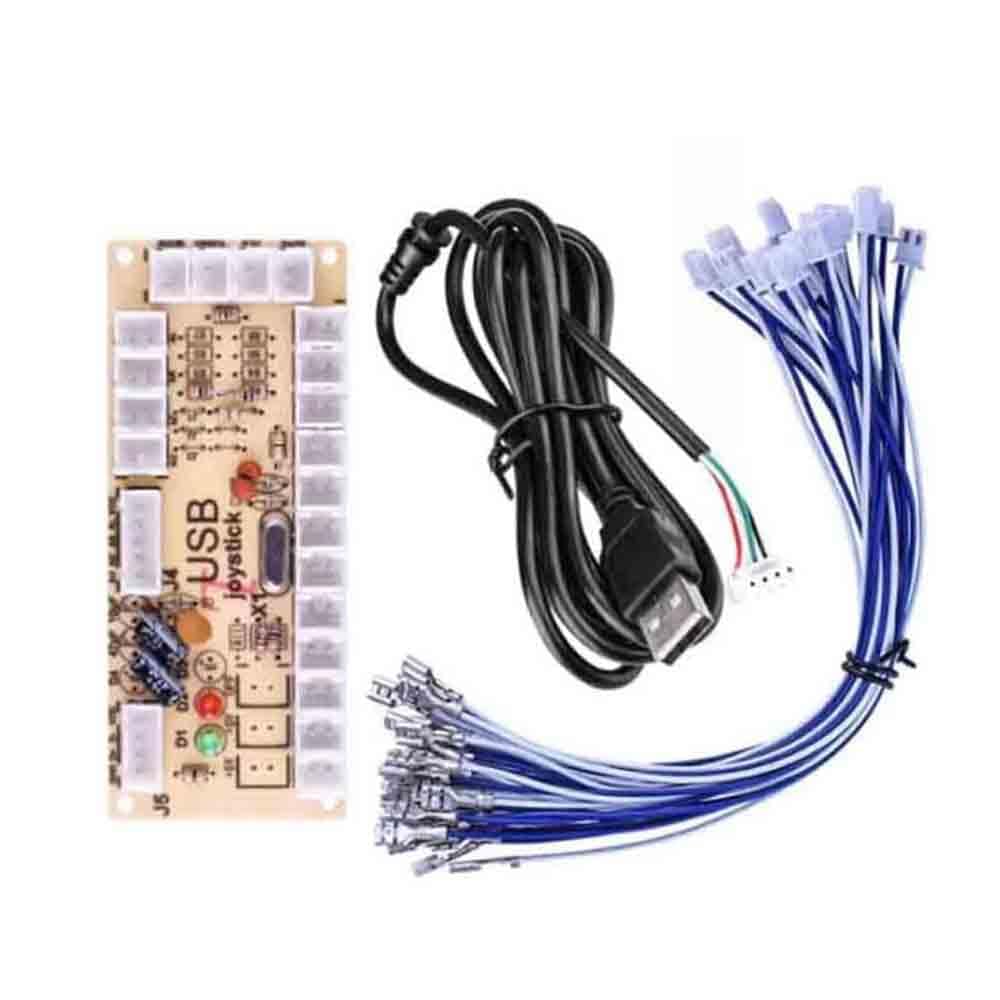
Image 1: Overview of the YOURRYONG USB Arcade Joystick Circuit Board. This image displays the main circuit board with numerous white 2-pin and 5-pin connectors for joystick and button inputs. Key labels visible include "USB joystick", "GND D+ D- VDD" for the USB connection, and "AUTO", "CLR", "TURBO MODE" near a set of input pins. Resistors, capacitors, and indicator LEDs (red and green) are also visible on the board.
Operating Instructions
Once the circuit board is connected to your PC or console, it should be recognized as a standard game controller. You can then configure it within your game or emulator settings.
- Button Mapping: Access the controller settings in your game or operating system to map the physical buttons and joystick directions to the desired in-game actions.
- Turbo Function: The board features "TURBO MODE" functionality. To activate turbo for a specific button, press and hold the button you wish to set to turbo, then press the "TURBO MODE" button on the board (if available as a separate input or combination). To clear turbo, press the button again and then the "CLR" (Clear) button. The "AUTO" function typically enables automatic turbo without holding the button. Refer to your specific board's wiring diagram or test functionality for exact implementation.
- LED Indicators: The red and green LEDs on the board typically indicate power status and data transmission. A lit LED usually signifies power, and blinking may indicate data activity.
Maintenance
Proper maintenance ensures the longevity and reliable performance of your circuit board.
- Cleaning: Use a soft, dry cloth to gently wipe the surface of the board. Do not use liquid cleaners or solvents, as these can damage components.
- Storage: When not in use, store the circuit board in a dry, dust-free environment. Avoid placing heavy objects on top of it.
- Connection Integrity: Periodically check all wire connections to ensure they are secure and free from corrosion or damage.
Troubleshooting
If you encounter issues with your USB Arcade Joystick Circuit Board, refer to the following common solutions:
| Problem | Possible Cause | Solution |
|---|---|---|
| Board not recognized by PC/Console. | Loose USB connection, faulty USB cable, or incompatible USB port. |
|
| Buttons or joystick not responding. | Incorrect wiring, loose button/joystick connections, or faulty button/joystick. |
|
| Turbo function not working. | Incorrect activation sequence or button mapping. |
|
Specifications
| Feature | Detail |
|---|---|
| Brand | YOURRYONG |
| Model Number | 749771582871 |
| ASIN | B0CP67PF5K |
| UPC / GTIN | 749771582901 |
| Interface | USB (Plug and Play) |
| Button Quantity Support | Up to 16 buttons (including directional inputs) |
| Compatibility | PC, compatible game consoles (as a standard HID gamepad) |
| Connector Type | 4.8mm (for buttons and joystick, as per product title) |
Warranty and Support
YOURRYONG products are manufactured with quality and reliability in mind. For specific warranty details, please refer to the warranty card included with your purchase or visit the official YOURRYONG website.
If you require technical assistance or have questions not covered in this manual, please contact YOURRYONG customer support through the retailer where the product was purchased or via the contact information provided on the official website.
Please have your model number (749771582871) and ASIN (B0CP67PF5K) ready when contacting support.