
1. Introduction
Thank you for choosing the Yomile ST100 Sprinkler Timer. This programmable water timer is designed to automate your garden irrigation, ensuring your plants receive optimal watering with minimal effort. Featuring rain delay, manual watering, and child lock functions, this timer provides convenience and control for various outdoor watering needs. Please read this manual carefully to ensure proper installation, operation, and maintenance of your device.
2. Product Overview
2.1 Key Features
- Dual Independent Outputs: Control two watering zones separately.
- Large LCD Screen: Easy to program and read settings.
- Auto/Manual/Rain Delay Watering: Flexible watering options.
- Child Lock Function: Prevents accidental program changes.
- Durable Construction: Waterproof, UV-proof, and corrosion-proof design with stainless steel filter and reinforced nylon fiber material.
- Easy Setup: No tools required for installation.
2.2 Product Components

Image: Yomile Sprinkler Timer with labels indicating Current Time, Irrigation Start Time, Irrigation Duration, Irrigation Frequency, Duration to Next Irrigation, Hose Faucet Connection, Zone 1, Zone 2, and Outlet Fittings (NH3/4").
- Hose Faucet Connection: Connects to your outdoor faucet.
- LCD Display: Shows time, program settings, and status.
- Control Dial: Used to navigate through different settings (SET CLOCK, START TIME, HOW LONG, HOW OFTEN, AUTO, OFF).
- Buttons: OK, Manual, Delay, Zone, +/-, ESC/OFF.
- Outlet Fittings (A & B): Connect to your hoses for Zone 1 and Zone 2.
- Battery Compartment: Located at the back, requires 2x 1.5V AA alkaline batteries.
2.3 Independent Zone Control

Image: The Yomile Sprinkler Timer connected to a faucet, displaying settings for Zone 1 and Zone 2 operating independently. Zone 1 is shown watering a garden, and Zone 2 is shown filling a pool.
The Yomile ST100 features two independent outputs (Zone 1 and Zone 2) that can be programmed to run simultaneously without interfering with each other. This allows for customized watering schedules for different areas of your garden or lawn.
2.4 Durability and Applications
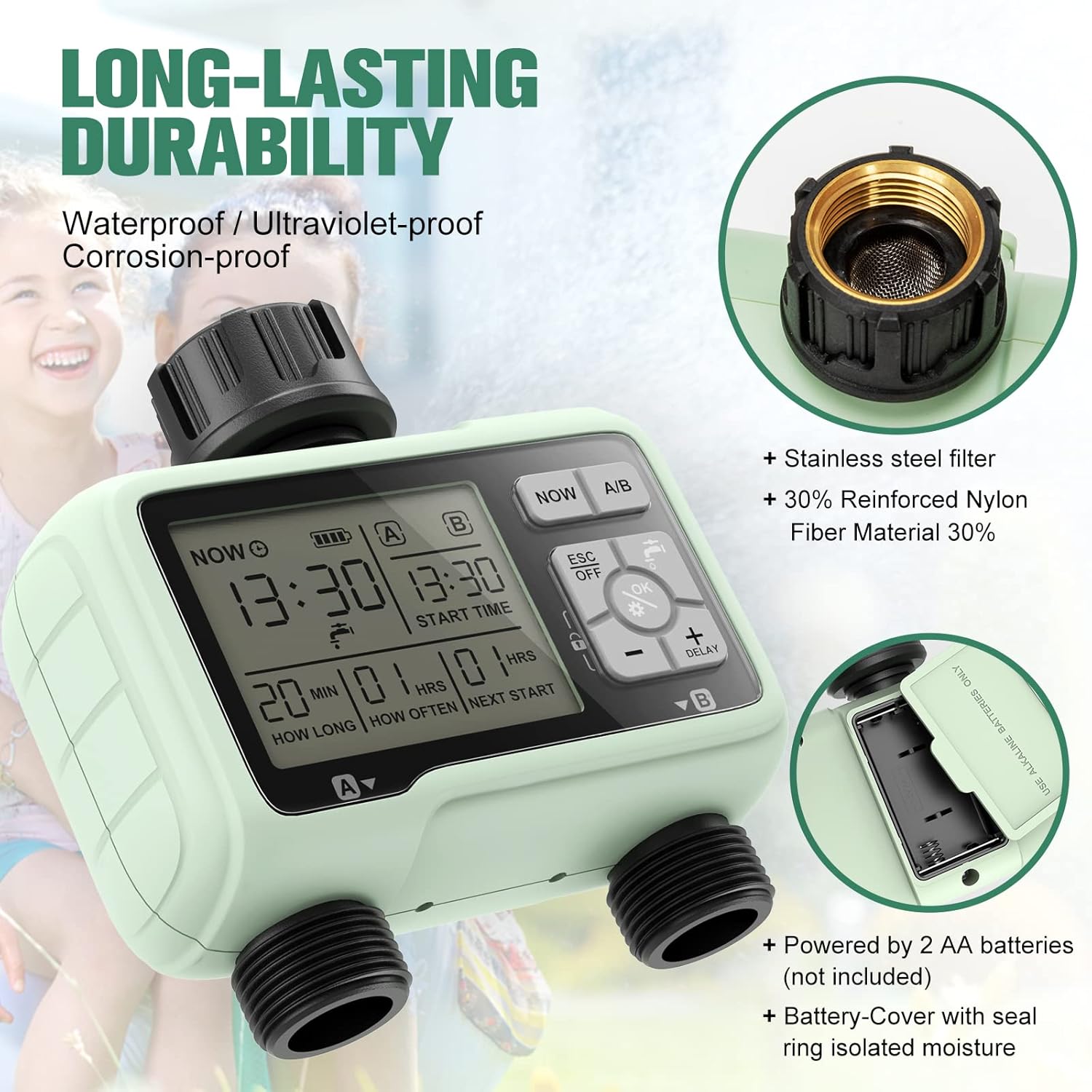
Image: A close-up of the Yomile Sprinkler Timer highlighting its long-lasting durability, including a stainless steel filter, 30% reinforced nylon fiber material, and a battery cover with a seal ring to isolate moisture.

Image: A collage showing various applications of the Yomile Sprinkler Timer, including mist systems, pool filling, drip irrigation, and sprinkler control.
Constructed with waterproof, UV-proof, and corrosion-proof materials, the Yomile ST100 is built for long-lasting outdoor use. It is suitable for a variety of applications such as mist systems, drip irrigation, sprinkler control, and even pool filling.
3. Setup
3.1 Battery Installation
Image: A close-up of the Yomile Sprinkler Timer showing the battery compartment, indicating it is powered by 2 AA batteries (not included) and features a battery cover with a seal ring to isolate moisture.
- Remove the battery compartment cover from the back of the timer.
- Insert two (2) new 1.5V AA alkaline batteries (not included), ensuring correct polarity (+/-).
- Securely replace the battery compartment cover. Ensure the seal ring is properly seated to maintain water resistance.
3.2 Connecting the Timer
- Ensure the faucet is turned off.
- Screw the Yomile ST100 Sprinkler Timer onto your outdoor garden faucet. Hand-tighten only; do not overtighten. The connection features a metal liner for durability.
- Connect your garden hoses to the outlet fittings (Zone A and Zone B) at the bottom of the timer.
- Slowly turn on the faucet. The timer is designed to withstand standard household water pressure.
4. Operating Instructions
The Yomile ST100 Sprinkler Timer features a user-friendly dial and buttons for programming. The following steps outline how to set up your watering schedule. For visual guidance, please refer to the demonstration video below, which illustrates similar programming steps on a comparable sprinkler timer.
Video: A demonstration of setting up a weekly program on a 2-zone water timer. This video provides a general guide for programming similar features found on the Yomile ST100 Sprinkler Timer, including setting the clock, start time, watering duration, frequency, manual watering, rain delay, and child lock.
4.1 Setting the Current Time (SET CLOCK)
- Turn the control dial to SET CLOCK.
- Use the +/- buttons to adjust the hour. Press OK to switch to minutes.
- Use the +/- buttons to adjust the minutes.
- Press OK to confirm and save the time.
4.2 Programming Start Time (START TIME)
- Turn the control dial to START TIME.
- Press the ZONE button to select either Zone 1 or Zone 2 for programming.
- Use the +/- buttons to set the desired start hour. Press OK to switch to minutes.
- Use the +/- buttons to set the desired start minutes.
- Press OK to confirm.
- To turn off a program for a specific zone, repeatedly press +/- until "OFF" is displayed for the start time.
4.3 Setting Watering Duration (HOW LONG)
- Turn the control dial to HOW LONG.
- Press the ZONE button to select either Zone 1 or Zone 2.
- Use the +/- buttons to set the watering duration from 1 minute to 240 minutes.
- Press OK to confirm.
4.4 Setting Watering Frequency (HOW OFTEN)
- Turn the control dial to HOW OFTEN.
- Press the ZONE button to select either Zone 1 or Zone 2.
- Use the +/- buttons to set the watering frequency (e.g., every 1 hour to 12 hours, or every 1 day to 7 days).
- Press OK to confirm.
4.5 Automatic Watering (AUTO)
- After setting all desired programs, turn the control dial to AUTO to activate the automatic watering schedule.
- When watering is active, the LCD screen will display the remaining time for the current watering program.
- When watering is off, the LCD screen will flash between the next scheduled watering start time and the current time.
4.6 Manual Watering
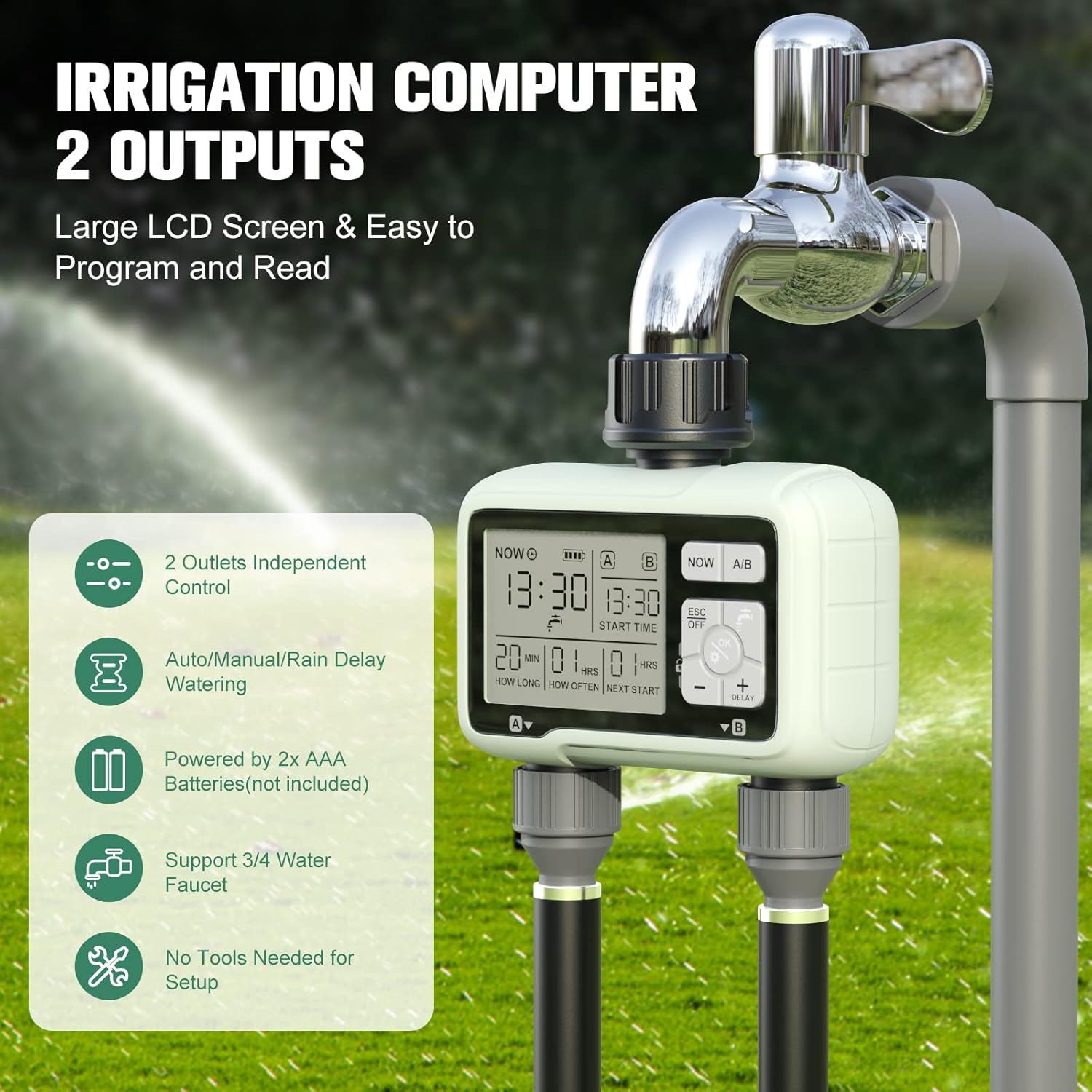
Image: A collage illustrating manual watering, showing a person watering plants with a hose and another image of a family enjoying water from a hose, emphasizing that manual watering can be done without interrupting programmed schedules.
Manual watering allows you to water immediately without affecting your programmed schedule.
- With the dial at AUTO and not in Rain Delay mode, long press the MANUAL button (for approximately 3 seconds).
- Use the ZONE button to select Zone 1, Zone 2, or both.
- Use the +/- buttons to set the desired manual watering duration (e.g., 10 minutes).
- Press OK to confirm and start manual watering.
- To cancel manual watering, turn the dial to OFF and then back to AUTO.
4.7 Rain Delay Function
The rain delay function allows you to pause your watering schedule for a set period, conserving water during rainy weather.
- With the dial at AUTO, long press the DELAY button (for approximately 3 seconds).
- Use the +/- buttons to select a delay period of 24, 48, or 72 hours.
- Press OK to confirm. The rain delay will start, and the LCD screen will display the remaining delay time before the preset program resumes.
- To cancel rain delay, long press the DELAY button (for approximately 3 seconds) with the dial at AUTO.
4.8 Child Lock
The child lock feature prevents accidental changes to your programmed settings.
- With the dial at AUTO, press and hold the LOCK button (often integrated with the '-' button, long press for 5 seconds as indicated in product images) for 3-5 seconds to activate the child lock function. A lock icon will appear on the screen.
- During this mode, the key functions of the dial and buttons will be disabled.
- To deactivate child lock, long press the LOCK button again for 3-5 seconds. The lock icon will disappear.
5. Maintenance
- Battery Replacement: Replace batteries annually or when the low battery indicator appears on the screen. Always use new alkaline batteries.
- Cleaning: Periodically check the inlet filter for debris and clean it if necessary to ensure proper water flow.
- Winter Storage: Before the first frost, remove the timer from the faucet, remove the batteries, and store it indoors in a dry, frost-free location.
6. Troubleshooting
| Problem | Possible Cause | Solution |
|---|---|---|
| Timer not watering. | Faucet is off; low batteries; program not set correctly; rain delay active. | Turn on faucet; replace batteries; check program settings; cancel rain delay. |
| Water leaking from connections. | Loose connection; worn washer; damaged threads. | Tighten connections; replace washer; check for damage. |
| Timer not responding to buttons. | Child lock is active; low batteries. | Deactivate child lock; replace batteries. |
| Water flows continuously. | Valve stuck open; timer malfunction. | Turn dial to OFF, then AUTO to reset. If issue persists, contact support. |
7. Specifications
- Model Number: ST100
- Power Supply: 2 x 1.5V AA Alkaline Batteries (not included)
- Working Temperature: 34 to 113°F (1 to 45°C)
- Working Pressure: 0.05Mpa - 0.8Mpa
- Waterproof Rate: IPX5
- Inlet/Outlet Thread: NH3/4"
- Number of Settings: 3 (likely referring to programs or modes)
8. Warranty and Support
For warranty information or technical support, please refer to the product packaging or contact Yomile customer service directly. Keep your purchase receipt for warranty claims.