
Introduction
The PerGar Digital Angle Finder is a versatile and precise tool designed for accurate angle measurement in various applications. Featuring a magnetic base, easy mode switching, and a compact design, this inclinometer is ideal for woodworking, construction, machinery, and automotive tasks. This manual provides detailed instructions for its setup, operation, and maintenance to ensure optimal performance and longevity.
Package Contents
Please verify that all items are present in the package:
- 1 x Digital Level Box
- 1 x Screwdriver
- 1 x User Manual
- 1 x Storage Bag
Product Features
- Magnetic Base: Allows the device to attach securely to metal surfaces for hands-free measurement.
- Dual Measurement Modes: Supports both absolute and relative angle measurements.
- Unit Conversion: Easily switch between angle and slope units.
- Wide Application: Suitable for woodworking, construction, machinery, communication, and automotive industries.
- Compact and Portable: Small size for easy carrying and use with other tools.
- Auto-Rotating Display: The screen automatically rotates for convenient reading at any orientation.
- Large LCD Display with Backlight: Ensures clear visibility of measurements in various lighting conditions.
Setup
Battery Installation
The Digital Angle Finder requires 2 AAA batteries (not included). To install:
- Locate the battery compartment cover on the back of the device.
- Use the provided screwdriver to open the battery compartment.
- Insert 2 AAA batteries, ensuring correct polarity (+/-).
- Replace the battery compartment cover and secure it with the screwdriver.
Operating Instructions

Image: Detailed diagram of the digital angle finder's front panel, labeling each button and display indicator. Labels include ON/OFF/REF Button, UNIT Button, HOLD Button, Low Battery indicator, and Measuring Surface.
Power On/Off
- Press the ON/OFF/REF button once to turn the device on.
- Press and hold the ON/OFF/REF button for approximately 3 seconds to turn the device off.
Measurement Modes (Absolute and Relative)
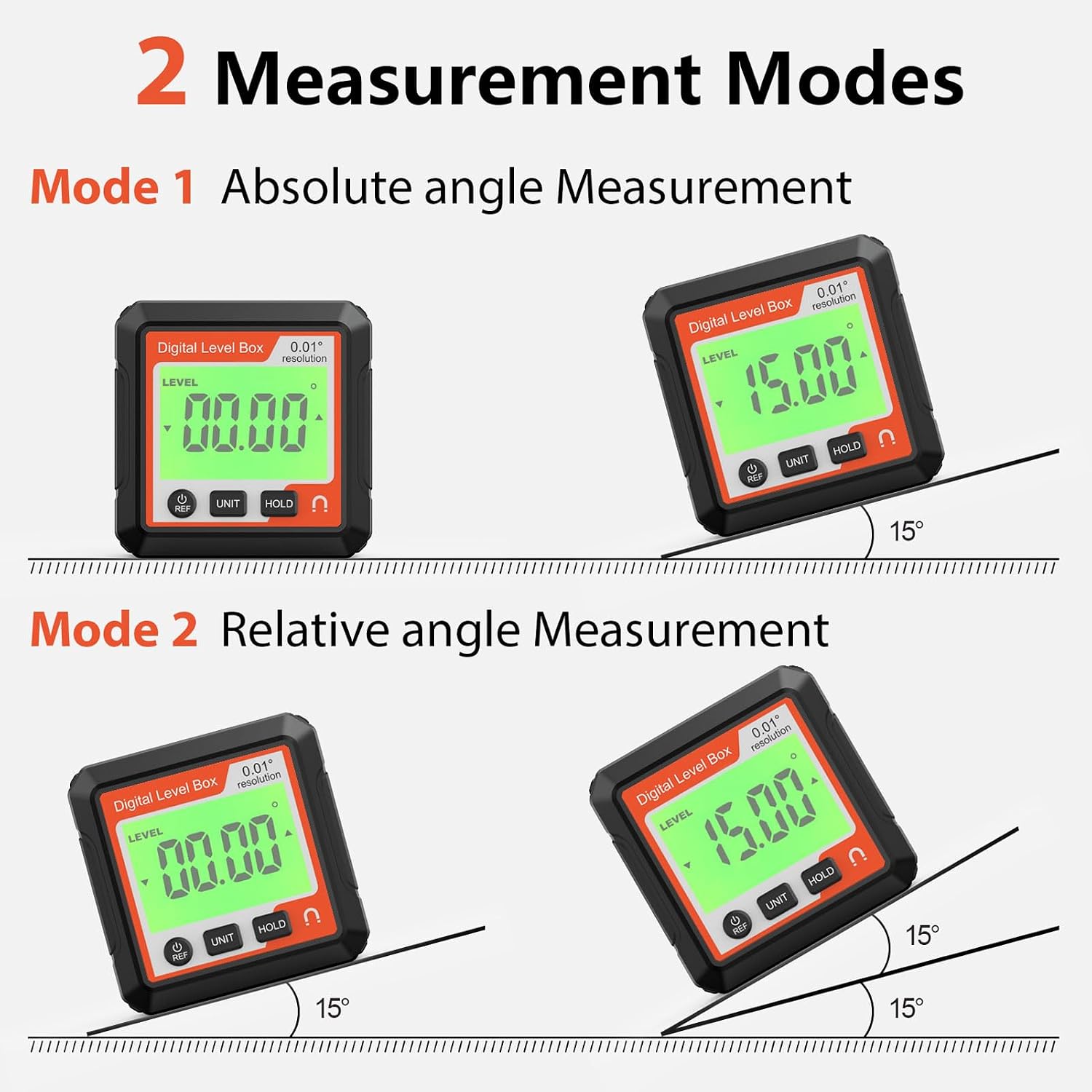
Image: Diagram explaining the two measurement modes: Absolute Angle Measurement and Relative Angle Measurement. It shows how the device displays angles in both modes, with examples of 0.00° and 15.00° readings.
- Absolute Measurement Mode: This mode measures the angle relative to a true horizontal surface (0°). When the device is powered on, it defaults to this mode.
- Relative Measurement Mode: To enter relative measurement mode, place the device on a surface that you wish to set as your new 0° reference. Press the ON/OFF/REF button briefly. The display will show 0.00°, indicating that this new position is now the reference point for subsequent measurements. Press the ON/OFF/REF button again to return to absolute measurement mode.
Unit Conversion
Press the UNIT button to cycle through different measurement units, such as degrees (°), percentage (%), in/ft, and mm/m.
Hold Function
Press the HOLD button to freeze the current measurement on the display. Press it again to release the hold and resume live measurement.
Magnetic Base Usage

Image: Image highlighting the magnetic base of the digital angle finder, showing it securely attached to a metal surface. Red lightning bolt icons indicate the magnetic force.
The strong magnetic base allows the angle finder to be securely attached to any ferrous metal surface, such as saw blades, metal pipes, or machinery. This provides stability and hands-free operation, enhancing measurement accuracy and convenience.
Auto-Rotating Display

Image: Image demonstrating the auto-rotating screen feature of the digital angle finder. A person is using the device to measure an angle on a window frame, and the display automatically adjusts its orientation for easy reading.
The display automatically inverts its orientation when the device is turned upside down, ensuring that the readings are always upright and easy to read, regardless of the device's position.
4x90° Measurement Range

Image: Diagram illustrating the 4x90° measurement capability, showing the device measuring angles in all four quadrants, with the display automatically updating based on gravity.
The device can measure angles across a full 360-degree range, divided into four 90-degree quadrants. The display automatically updates to show the correct angle based on the device's orientation, making it suitable for complex angular measurements.
Applications

Image: Collage of images illustrating various applications of the digital angle finder, including woodworking, construction, and hanging items, highlighting its versatility.
- Woodworking: Ideal for accurate cutting of wood corners and setting saw blade angles.
- Construction: Useful for measuring and setting angles in framing, roofing, and other structural work.
- Auto Repair Industry: Assists in accurate control of tire assembly angles and other automotive adjustments.
- Machinery: For precise positioning of machine tool working angles and rotation angles of booms.
- General Use: Can be used for leveling pictures, shelves, and other household tasks requiring precise angle or level measurements.
Maintenance
- Keep the device clean and dry. Wipe with a soft, damp cloth. Do not use abrasive cleaners or solvents.
- Avoid dropping the device or subjecting it to strong impacts, as this may affect its accuracy.
- When not in use for extended periods, remove the batteries to prevent leakage and damage.
- Store the device in its provided storage bag to protect it from dust and scratches.
Troubleshooting
Device Does Not Power On
- Check if the batteries are installed correctly with the correct polarity.
- Replace the batteries with new ones if they are depleted.
Inaccurate Readings
- Ensure the measuring surface is clean and free of debris.
- Calibrate the device if necessary (refer to specific calibration instructions if provided with the device, or contact support).
- Avoid strong magnetic fields or extreme temperatures that could interfere with sensor accuracy.
Display Not Rotating Automatically
- Ensure the device is not in a fixed orientation that prevents the sensor from detecting rotation.
- Check for low battery, which might affect sensor functionality.
Specifications

Image: Image showing the dimensions of the Digital Angle Finder. The device measures approximately 5.7cm (2.24in) in height and width, and 2.5cm (0.98in) in depth.
| Feature | Specification |
|---|---|
| Item Type | Digital Level Box |
| Material | ABS |
| Battery Type | AAA battery x 2 (not included) |
| Measurement Range | 4 x 90 ° (360°) |
| Accuracy | 0.01 ° |
| Item Weight | 2.82 ounces |
| Package Dimensions | 3.54 x 3.15 x 1.57 inches |
| Model Number | PerGarx4mo2tc1qv-12 |
Warranty and Support
For warranty information or technical support, please refer to the contact details provided with your purchase or visit the official PerGar website. Keep your purchase receipt as proof of purchase for any warranty claims.