
1. Introduction
This manual provides essential information for the safe and efficient operation of your new Exquisit WA7014-020A washing machine. Please read these instructions carefully before installation and use, and keep them for future reference. Proper use and maintenance will ensure optimal performance and extend the lifespan of your appliance.

Front view of the Exquisit WA7014-020A washing machine with the loading door open, showing the drum interior.
2. Safety Instructions
Always adhere to the following safety guidelines to prevent accidents and ensure safe operation:
- Ensure the appliance is properly grounded.
- Do not allow children to play with or operate the washing machine.
- Never force the door open during operation.
- Unplug the appliance before cleaning or maintenance.
- Do not install the machine in areas exposed to freezing temperatures.
- The Aquastop system provides enhanced safety against water leaks.
3. Setup and Installation
3.1 Unpacking
Carefully remove all packaging materials. Inspect the machine for any damage incurred during transit. Keep packaging materials out of reach of children.
3.2 Removing Transport Bolts
Before using the washing machine, you must remove all transport bolts located at the rear of the appliance. Failure to do so will cause severe vibration and damage during operation. Store the bolts for future transport.
3.3 Location and Leveling
Place the washing machine on a firm, level surface. Adjust the adjustable leveling feet to ensure the machine is perfectly stable and balanced. This prevents excessive vibration and noise during the spin cycle.

The Exquisit WA7014-020A washing machine showing its dimensions: 85.0 cm height and 59.5 cm width.
3.4 Water Connection
Connect the water inlet hose to a cold water tap with a 3/4-inch thread. Ensure all connections are tight to prevent leaks. Position the drain hose into a standpipe or over the edge of a sink, ensuring it is securely fixed to prevent displacement during drainage.
3.5 Electrical Connection
Plug the power cord into a grounded electrical outlet. Ensure the voltage and frequency match the specifications on the rating plate of the appliance. Do not use extension cords or adapters.
4. Operating Instructions
4.1 Control Panel Overview

Close-up of the control panel featuring the program dial, digital display, and function buttons.
The control panel consists of a program selector dial, a digital display showing remaining time, and various function buttons for options like temperature, spin speed, delay start, and child lock.
4.2 Loading Laundry
Open the washing machine door and load laundry into the drum. Do not overload the machine; ensure there is enough space for the clothes to move freely. Close the door firmly.
4.3 Adding Detergent
Pull out the detergent drawer located on the top left of the control panel. Add the appropriate amount of detergent and fabric softener to the designated compartments. Refer to your detergent packaging for dosage recommendations.
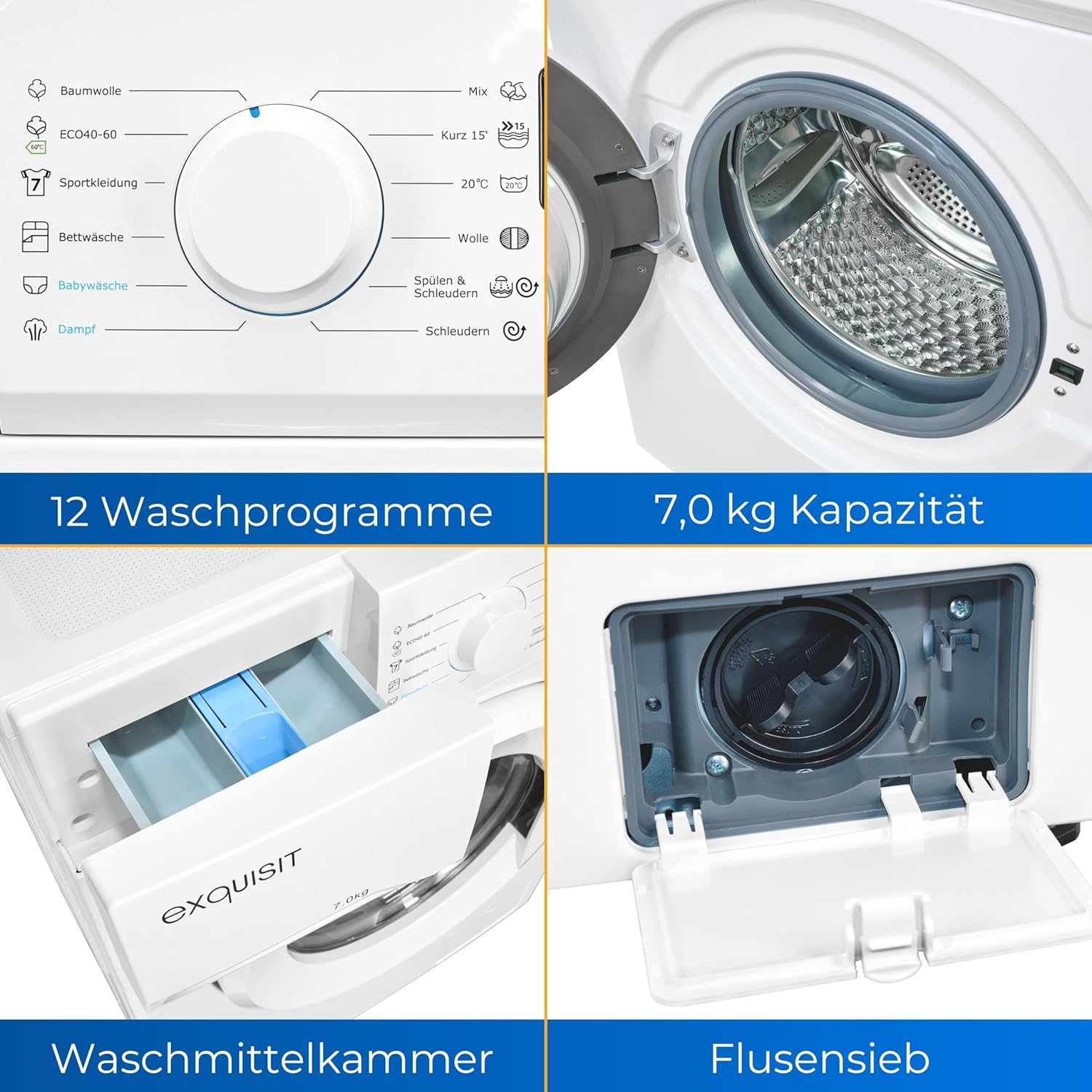
Detailed view of the detergent compartment and the lint filter access panel.
4.4 Selecting a Program
Turn the program selector dial to choose the desired wash program. The digital display will show the default settings for the selected program.
4.5 Adjusting Options
Use the function buttons to adjust temperature, spin speed, or other available options for the selected program. The display will update to reflect your choices.
4.6 Delay Start
To set a delayed start, press the 'Delay Start' button repeatedly to select the desired delay time. The machine will start the cycle after the set delay.
4.7 Child Lock
To activate the child lock, press and hold the designated button (often marked with a lock icon) for 3 seconds. This prevents accidental changes to settings during operation. Repeat the action to deactivate.
4.8 Starting the Wash Cycle
Press the 'Start/Pause' button to begin the wash cycle. The machine will automatically proceed through the selected program.
4.9 End of Cycle
Once the program is complete, the machine will signal with an audible alert and the display will indicate the end of the cycle. Open the door and remove your laundry promptly.
5. Programs Overview
The Exquisit WA7014-020A offers 12 distinct wash programs to cater to various fabric types and soil levels:
- Cotton: For durable cotton items.
- ECO 40-60: Energy-efficient program for normally soiled cotton garments washable at 40°C or 60°C.
- Sportswear: Designed for synthetic sports clothing.
- Bedding: For larger items like sheets and duvet covers.
- Baby Clothes: Gentle wash for baby garments.
- Steam: Program utilizing steam for enhanced cleaning or wrinkle reduction.
- Mixed Load: For a combination of different fabric types.
- Quick 15': A rapid wash cycle for lightly soiled items.
- 20°C: Low-temperature wash for delicate items or energy saving.
- Wool: Gentle program for woolens and hand-washable items.
- Rinse & Spin: An additional rinse and spin cycle.
- Spin: Drains water and spins laundry.
6. Maintenance
Regular maintenance ensures the longevity and efficiency of your washing machine.
6.1 Cleaning the Exterior
Wipe the exterior surfaces with a soft, damp cloth. Do not use abrasive cleaners or solvents.
6.2 Cleaning the Detergent Drawer
Periodically remove and clean the detergent drawer under running water to prevent residue buildup.
6.3 Cleaning the Drum
Run a maintenance wash cycle (e.g., a hot wash with no laundry and a descaling agent) every few months to clean the drum and remove any odors.
6.4 Cleaning the Lint Filter
The lint filter (also known as the drain pump filter) should be cleaned regularly to prevent blockages. Open the access panel at the bottom front of the machine, carefully unscrew the filter, and remove any lint or debris. Ensure to place a shallow container underneath to catch any residual water.
7. Troubleshooting
Before contacting customer service, please refer to the following common issues and their solutions:
- Machine does not start: Check if the power cord is plugged in, the door is closed properly, and the 'Start/Pause' button has been pressed.
- No water intake: Ensure the water tap is open and the water inlet hose is not kinked or blocked.
- Excessive vibration/noise: Verify that the transport bolts have been removed and the machine is level.
- Water leakage: Check all hose connections for tightness and inspect the lint filter for proper sealing.
- Error codes on display: Consult the full user manual (if available) or contact customer support with the specific code.
8. Specifications
| Feature | Specification |
|---|---|
| Brand | Exquisit |
| Model Number | WA7014-020A (813072700) |
| Dimensions (L x W x H) | 48 x 59.5 x 85 cm |
| Weight | 60 Kilograms |
| Capacity | 7 Kilograms |
| Spin Speed | 1400 rpm |
| Noise Level | 76 dB |
| Installation Type | Freestanding |
| Special Features | Delay Start, Adjustable Leveling Feet, Child Lock, Aquastop |
| Color | White |
| Number of Standard Programs | 12 |
| Loading Type | Front Loader |
| Voltage | 240 Volts |
| Included Components | Power cable, Drain hose |

The Exquisit WA7014-020A washing machine displaying its energy label, indicating an A-class energy efficiency rating.
For detailed energy information, please visit: EPREL Product Information
9. Warranty and Support
Your Exquisit WA7014-020A washing machine comes with a standard manufacturer's warranty. Please refer to the warranty card included with your purchase for specific terms and conditions. For technical support, spare parts, or service inquiries, please contact your retailer or the Exquisit customer service department. Keep your proof of purchase for warranty claims.


