
BENCHFOODS CMDH-1-28CUD-220V3-0
BENCHFOODS Commercial Food Dehydrator User Manual
Model: CMDH-1-28CUD-220V3-0
Introduction
Thank you for choosing the BENCHFOODS Commercial Food Dehydrator. This manual provides essential information for the safe and efficient operation, maintenance, and troubleshooting of your new appliance. Please read this manual thoroughly before first use and keep it for future reference.

Figure 1: BENCHFOODS Commercial Food Dehydrator
This image shows the full front view of the BENCHFOODS Commercial Food Dehydrator, highlighting its stainless steel construction, four transparent glass doors, and the digital control panel located at the top center. Inside, multiple trays filled with various foods are visible, demonstrating its large capacity.
Safety Instructions
Always follow basic safety precautions when using electrical appliances to reduce the risk of fire, electric shock, and injury.
- Read all instructions before operating the dehydrator.
- Do not immerse the appliance, cord, or plug in water or other liquids.
- Close supervision is necessary when any appliance is used by or near children.
- Unplug from outlet when not in use and before cleaning. Allow to cool before putting on or taking off parts.
- Do not operate any appliance with a damaged cord or plug, or after the appliance malfunctions or has been damaged in any manner.
- The use of accessory attachments not recommended by the appliance manufacturer may cause injuries.
- Do not use outdoors.
- Do not let cord hang over edge of table or counter, or touch hot surfaces.
- Do not place on or near a hot gas or electric burner, or in a heated oven.
- Extreme caution must be used when moving an appliance containing hot oil or other hot liquids.
- Always attach plug to appliance first, then plug cord into the wall outlet. To disconnect, turn any control to "off", then remove plug from wall outlet.
- Do not use appliance for other than intended use.
- Ensure the dehydrator is placed on a stable, level, heat-resistant surface.
- Maintain adequate clearance around the unit for proper ventilation.
Product Overview and Components
The BENCHFOODS Commercial Food Dehydrator is designed for high-capacity, efficient food drying. It features durable stainless steel construction and advanced drying technology.

Figure 2: Premium Commercial Grade Quality Materials
This diagram illustrates the high-quality materials used in the dehydrator's construction, including double-walled stainless steel for insulation, commercial-grade electronics for reliable performance, tempered glass display windows for visibility, and food-grade 304 stainless steel for all food contact surfaces and trays.
Key Components:
- Stainless Steel Housing: Durable and easy to clean.
- Tempered Glass Doors: Allow monitoring of the drying process without opening.
- Control Panel: Digital display for temperature and timer settings.
- Drying Trays: 28 food-grade 304 stainless steel trays for large capacity.
- Heating Elements: Provide consistent heat for efficient drying.
- Fans: High-efficiency forced air convection system for horizontal airflow.
- Casters: For easy mobility of the unit.
Setup
- Unpacking: Carefully remove the dehydrator from its packaging. Inspect for any shipping damage. Retain packaging for future transport or storage.
- Placement: Place the dehydrator on a stable, level, and heat-resistant surface. Ensure there is adequate clearance (at least 6 inches) around all sides for proper ventilation. Avoid placing near heat sources or in direct sunlight.
- Cleaning Before First Use: Before initial operation, wipe down the interior and exterior surfaces with a damp cloth. Wash all stainless steel trays with warm, soapy water, rinse thoroughly, and dry completely.
- Tray Installation: Insert the clean, dry trays into the dehydrator racks. Ensure they are properly seated.
- Power Connection: Plug the power cord into a grounded electrical outlet with the correct voltage (120V AC).
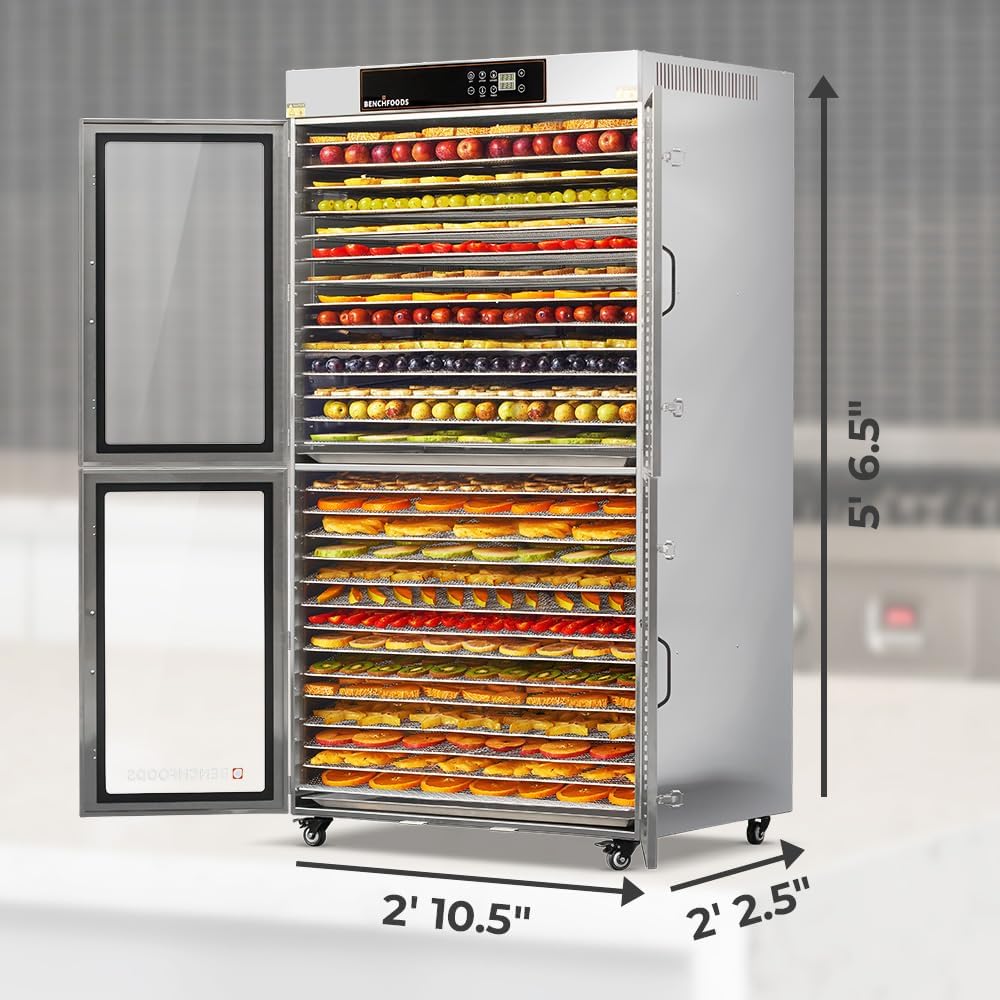
Figure 3: Dehydrator Dimensions
This image provides a side view of the dehydrator, clearly showing its overall dimensions: approximately 5 feet 6.5 inches in height, 2 feet 10.5 inches in depth, and 2 feet 2.5 inches in width. This is useful for planning placement.
Operating Instructions
This section details how to operate your BENCHFOODS Commercial Food Dehydrator for optimal results.

Figure 4: Preparing Food for Dehydration
This image shows a user slicing strawberries on a cutting board, with other fruits and herbs prepared for dehydration, demonstrating the preparation process before loading the dehydrator. The BENCHFOODS dehydrator is visible in the background.
General Operation:
- Prepare Food: Wash, peel, and slice food items evenly. Arrange them in a single layer on the dehydrator trays, ensuring adequate space for airflow.
- Load Trays: Slide the loaded trays into the dehydrator. Close the doors securely.
- Set Temperature: Use the control panel to set the desired drying temperature. The adjustable temperature range is between 85°F and 195°F (30°C - 90°C).
- Set Timer: Use the control panel to set the drying time. The timer can be set for up to 99 hours.
- Start Dehydration: Press the start button to begin the drying process. The unit will automatically maintain the set temperature and time.
- Horizontal Airflow: The unit utilizes horizontal airflow technology, eliminating the need to rotate or flip trays during the drying cycle.
- Ambient Air Mode: To dry products using only fans without heat, set the temperature to "00" on the control panel.
- Monitoring: The tempered glass doors allow you to monitor the drying progress without opening the unit, which helps maintain consistent internal temperature.
- Completion: Once the timer expires, the dehydrator will automatically shut off. Allow the food to cool before storing.
Features for Efficient Drying:

Figure 5: 28-Tray Dehydrator Features
This infographic visually summarizes the key features of the dehydrator, including its completion cooling cycle, uniform drying capability without tray rotation, ambient air mode, precise temperature control (85-195°F), glass observation window, 99-hour timer, 5-year warranty, time and temperature memory function, and construction from food-grade 304 stainless steel.
What You Can Create:

Figure 6: Applications of the Dehydrator
This image displays a variety of food items that can be created using the BENCHFOODS dehydrator, such as dehydrated fruits, powders, vegetables, jerky, pet treats, crackers, snacks, and herbs, illustrating the versatility of the appliance.
Maintenance and Cleaning
Regular cleaning and maintenance will ensure the longevity and optimal performance of your dehydrator.
- Before Cleaning: Always unplug the dehydrator from the power outlet and allow it to cool completely before cleaning.
- Cleaning Trays: The food-grade 304 stainless steel trays are dishwasher safe. For manual cleaning, wash with warm, soapy water, rinse thoroughly, and dry completely.
- Cleaning Interior/Exterior: Wipe the interior and exterior surfaces of the dehydrator with a damp cloth. For stubborn stains, use a mild detergent. Do not use abrasive cleaners or scouring pads, as they may damage the stainless steel finish.
- Door Seals: Regularly inspect and clean the door seals to ensure a tight closure and efficient operation.
- Storage: If storing the dehydrator for an extended period, ensure it is clean and dry. Store in a cool, dry place.
Troubleshooting
This section addresses common issues you might encounter and provides solutions.
| Problem | Possible Cause | Solution |
|---|---|---|
| Dehydrator does not turn on. | Not plugged in; power outage; faulty outlet; unit malfunction. | Ensure power cord is securely plugged in. Check circuit breaker. Try a different outlet. If problem persists, contact customer support. |
| Food not drying evenly. | Overloaded trays; food sliced unevenly; insufficient airflow. | Do not overload trays; ensure single layer and space between items. Slice food to uniform thickness. Ensure proper ventilation around the unit. |
| Temperature not reaching set level. | Ambient room temperature too low; door not sealed properly; heating element issue. | Ensure unit is in a room with adequate ambient temperature. Check door seals for proper closure. If issue persists, contact customer support. |
| Unit is making unusual noises. | Fan obstruction; loose component. | Unplug unit and inspect for any obstructions near the fan. If no obvious cause, contact customer support. |
For issues not listed here, please contact BENCHFOODS customer support.
Specifications
| Feature | Detail |
|---|---|
| Brand | BENCHFOODS |
| Model Number | CMDH-1-28CUD-220V3-0 |
| Colour | Stainless Steel |
| Product Dimensions (L x W x H) | 67.31 x 87.63 x 168.91 cm (approx. 26.5 x 34.5 x 66.5 inches) |
| Item Weight | 169.64 kg (approx. 374 lbs) |
| Voltage | 120 Volts (AC) |
| Material | 100% Stainless Steel (Food Grade 304 for trays) |
| Tray Area | Over 130 sq ft (28 trays) |
| Runtime | Up to 99 hours |
| Temperature Range | 85°F - 195°F (approx. 30°C - 90°C) |
| Special Features | Horizontal Air Flow, Ambient Air Mode, Time and Temperature Memory, Tempered Glass Windows |
Warranty and Support
BENCHFOODS stands behind the quality of its products.
5 Year Comprehensive Guarantee:
Your BENCHFOODS Commercial Food Dehydrator is covered by a five-year comprehensive guarantee that covers any manufacturing issues. This warranty ensures peace of mind regarding the quality and durability of your appliance.
Customer Support:
For any questions, technical assistance, or warranty claims, please contact BENCHFOODS customer support. Our team is available 24/7 to assist you.
Please refer to the contact information provided with your purchase or visit the official BENCHFOODS website for the most up-to-date support details.
Related documentsCMDH-1-28CUD-220V3-0


Ask a question about this manual
Ask about setup, troubleshooting, compatibility, parts, safety, or missing instructions. Manuals+ will review the question and use this page’s manual context to help answer it.