1. Introduction
The SmallRig VT-20 Aluminum Mini Tripod is a versatile and compact support solution designed for various cameras and devices. Its robust aluminum construction, adjustable features, and 360° ball head make it suitable for a wide range of photography and videography applications, from desktop use to travel. This manual provides detailed instructions for proper setup, operation, and maintenance to ensure optimal performance and longevity of your tripod.

Image 1: SmallRig VT-20 Aluminum Mini Tripod with a mirrorless camera mounted.
2. Package Contents
Please verify that all items listed below are included in your package:
- Tripod Kit x 1
- Allen Wrench x 1
- Smartphone Holder x 1
- Hook x 1
- User Manual x 1

Image 2: Package contents of the SmallRig VT-20 Mini Tripod.
3. Key Features
- Compact and Convenient: Foldable aluminum alloy legs and center column design for compact storage (18cm/7 inches length, under 700g/1.5lbs weight). Ideal for compact DSLRs, mirrorless cameras, smartphones, and action cameras.
- Effortless Height Adjustments: Features a 5-section leg design and a quick tightening mechanism, allowing height adjustments from 17cm/6.7in to 52cm/20in.
- Versatile Shooting Angles: Quick angle adjustment lever offers three leg angle options (23°/50°/80°). The center column can be disassembled and installed in reverse for low-angle shooting perspectives.
- 360-degree Ball Head: Arca-Swiss compatible ball head provides 360° panoramic movements and a 90° notch for vertical shooting. Supports a maximum load of 6kg/13.2lbs.
- Expandability: Includes a 1/4"-20 threaded hole for attaching accessories like magic arms, microphones, monitors, and other transmission devices.

Image 3: Overview of the SmallRig VT-20's compact size and load capacity.
4. Setup
4.1 Unpacking
Carefully remove all components from the packaging. Inspect for any signs of damage. Retain the packaging for future storage or transport.
4.2 Attaching Your Camera/Device
- Ensure the quick release plate is securely attached to your camera or device via the 1/4"-20 screw.
- Align the quick release plate with the Arca-Swiss compatible clamp on the ball head.
- Slide the plate into the clamp until it clicks into place. Tighten the locking knob on the ball head to secure the device.
4.3 Adjusting Leg Angles
The tripod legs feature a quick angle adjustment lever, offering three preset angles for stability and versatility:
- Pull the red lever at the top of each leg to release the lock.
- Adjust each leg to the desired angle (23°, 50°, or 80°).
- Release the lever to lock the leg in position.
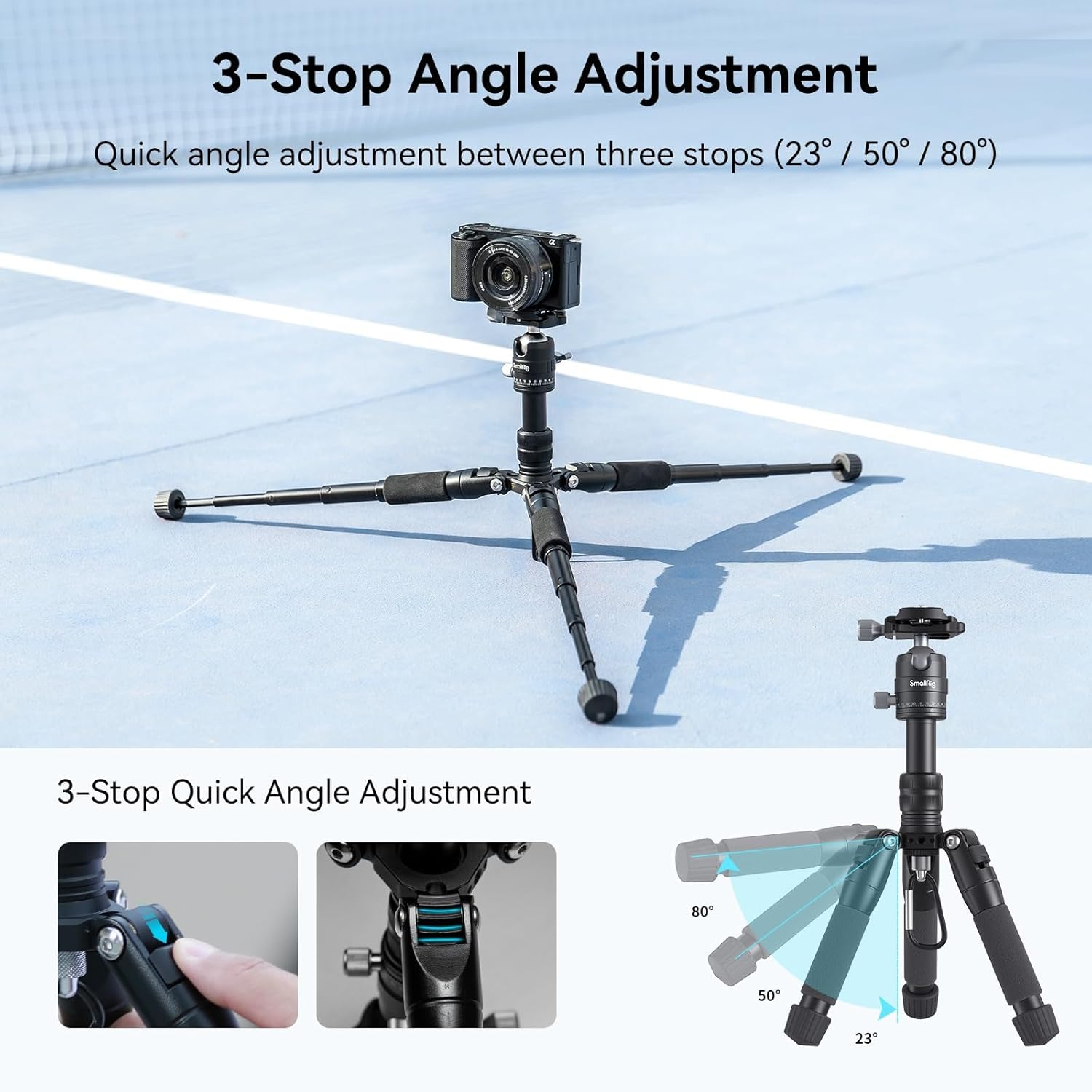
Image 4: Adjusting the leg angles of the tripod.
4.4 Adjusting Height
The tripod's height can be adjusted using its 5-section legs and extendable center column:
- Leg Extension: Rotate the leg locking knob counter-clockwise to loosen, extend the leg sections to the desired length, then rotate clockwise to tighten and lock.
- Center Column Extension: Loosen the locking collar at the base of the center column. Pull the center column upwards to extend, then tighten the collar to secure it.

Image 5: Tripod height adjustments from 17cm to 52cm.
4.5 Inverted Center Column for Low-Angle Shooting
For extremely low-angle shots, the center column can be inverted:
- Unscrew the hook at the bottom of the center column and remove the center column.
- Re-insert the center column upside down into the tripod base.
- Tighten the locking collar to secure the inverted column.
- Attach your camera to the quick release plate on the inverted column.
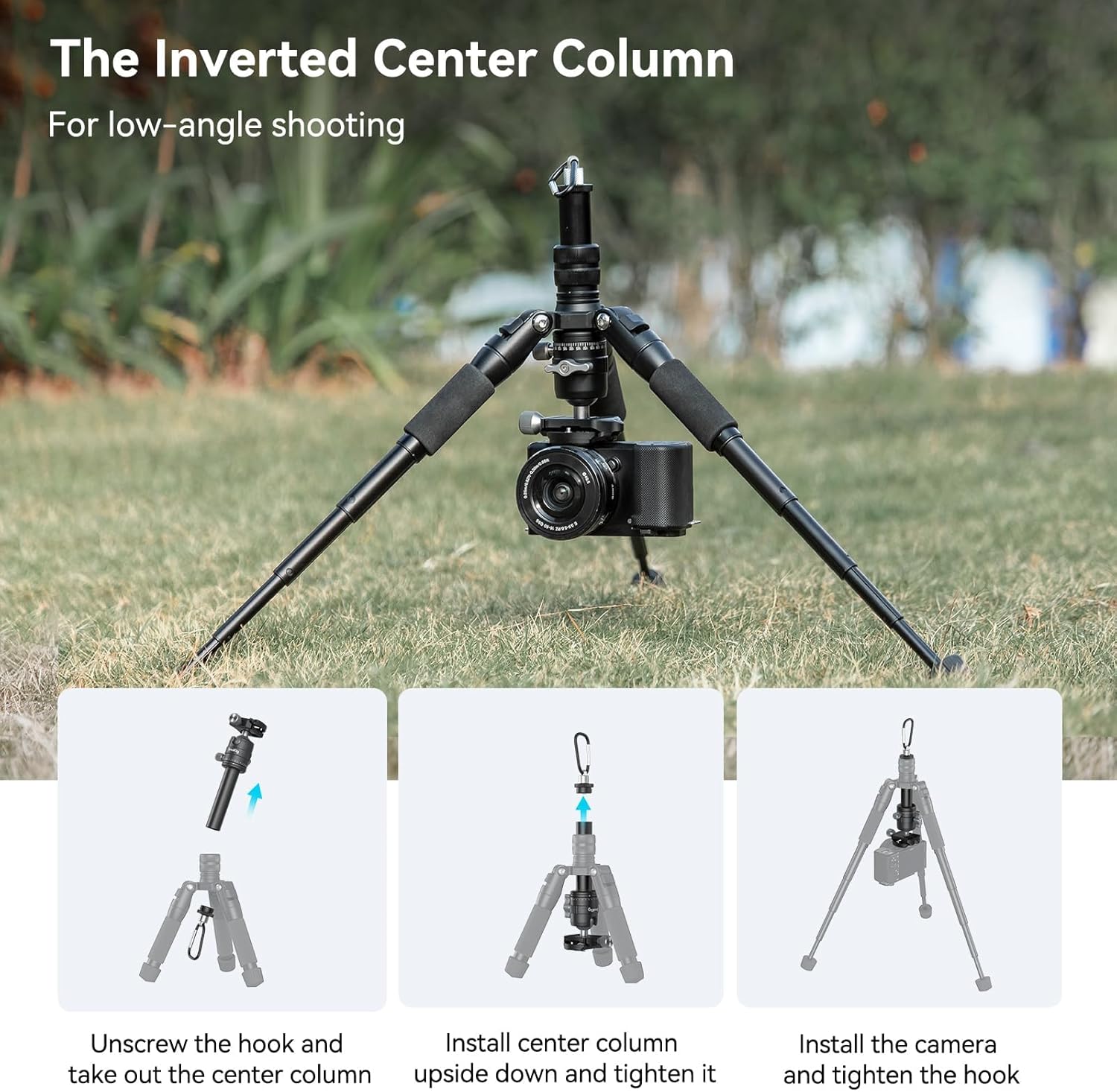
Image 6: Inverting the center column for low-angle shots.
5. Operating Instructions
5.1 Ball Head Operation
The integrated ball head offers precise control over your camera's position:
- Adjusting Angle: Loosen the main locking knob on the ball head to freely adjust the camera's tilt and pan. Tighten the knob to secure the position.
- 360° Panoramic Movement: The ball head features a 360° panoramic base. Loosen the dedicated panoramic locking knob (usually smaller, at the base of the ball head) to rotate the camera horizontally without affecting tilt.
- 90° Vertical Shooting: A dedicated notch allows the camera to be tilted 90° for vertical orientation.
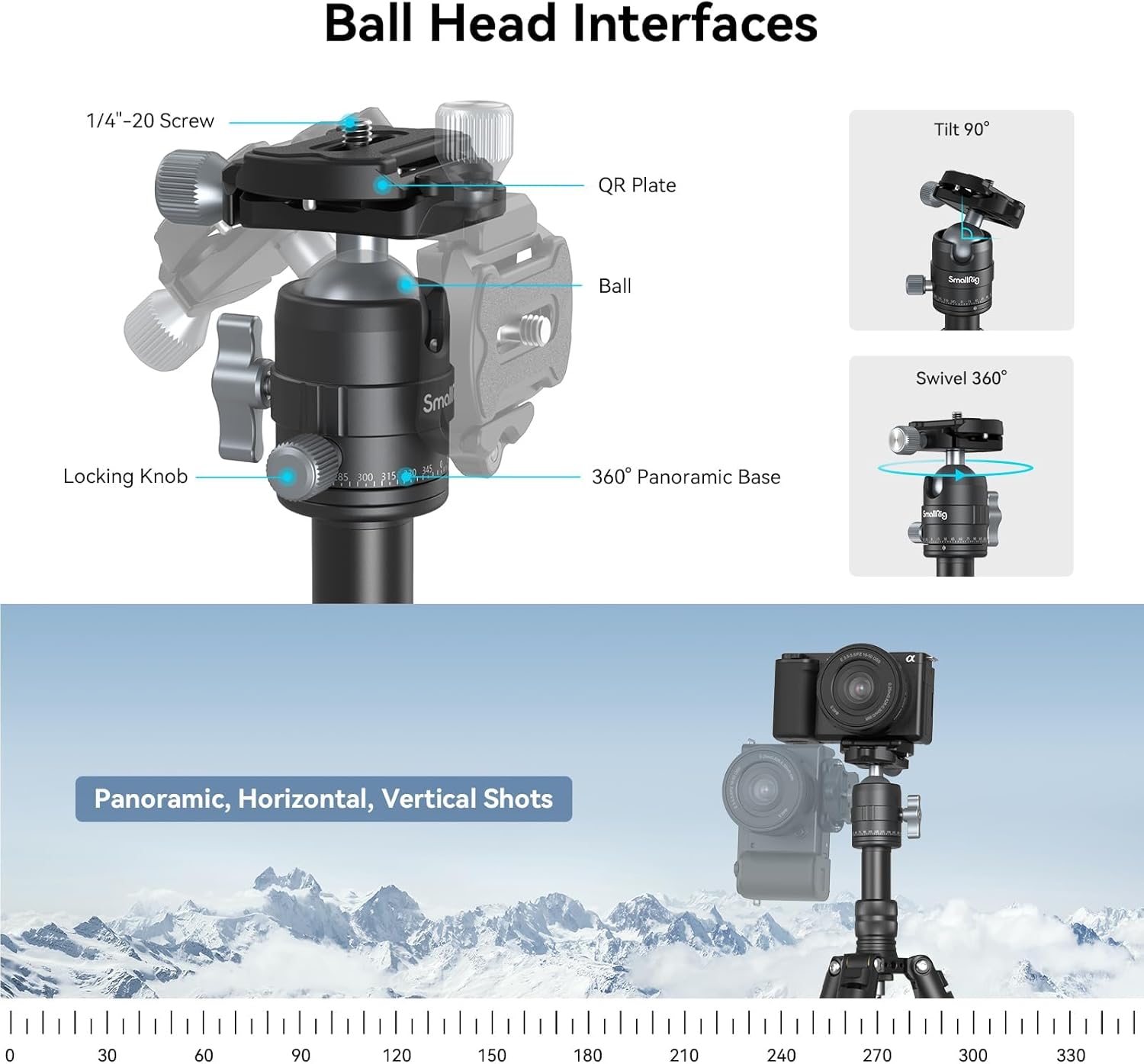
Image 7: Ball head interfaces and adjustment points.
5.2 Expandability
Utilize the 1/4"-20 threaded hole located on the tripod body to attach additional accessories:
- Screw compatible accessories, such as magic arms, directly into the threaded hole.
- Ensure accessories are securely fastened to prevent accidental detachment.

Image 8: Tripod with an accessory mounted on the 1/4"-20 threaded hole.
5.3 Official Product Video
Watch this official video from SmallRig for a visual guide on the VT-20 Mini Tripod's features and usage:
Video 1: SmallRig Aluminum Tripod for DSLR Camera Video Camcorder - Official Product Overview.
6. Maintenance
- Regularly clean the tripod with a soft, dry cloth to remove dust and debris.
- Avoid using harsh chemicals or abrasive materials that could damage the finish.
- Ensure all locking mechanisms are free of obstructions and operate smoothly.
- Store the tripod in a dry, cool place away from direct sunlight and extreme temperatures.
7. Troubleshooting
- Tripod instability: Ensure all leg sections are fully extended and locked, and leg angles are set appropriately for the terrain. Verify the camera is securely mounted to the quick release plate and ball head.
- Stiff leg sections: Check for any debris in the locking mechanisms. Apply a small amount of silicone-based lubricant if necessary, avoiding excessive application.
- Ball head not holding position: Ensure the main locking knob and panoramic locking knob are fully tightened. Verify the camera's weight does not exceed the maximum load capacity (13.2 lbs / 6 kg).
8. Specifications
| Feature | Detail |
|---|---|
| Product Dimensions | 7.09 x 3.46 x 3.15 inches |
| Item Weight | 1.54 pounds (700 Grams) |
| Model Number | 16566 |
| Brand | SMALLRIG |
| Color | Black |
| Compatible Devices | Camcorder, Camera, Smartphone |
| Special Features | Adjustable, Compact, Flexi, Lightweight |
| Material | Aluminum |
| Weight Limit | 13.2 Pounds (6 kg) |
| Maximum Height | 20.5 Inches (52 Centimeters) |
| Tripod Head Type | Ball Heads |
9. Warranty and Support
SmallRig products are designed and manufactured to high-quality standards. For warranty information, technical support, or service inquiries, please refer to the official SmallRig website or contact their customer service directly. Keep your purchase receipt as proof of purchase for warranty claims.


