
1. Introduction
The TOOLIOM TL-135M Pro is a versatile and compact 3-in-1 welding machine, designed for both hobbyists and professionals. It supports Flux MIG, Lift TIG, and Stick welding processes, providing flexibility for various projects. Its intelligent LCD display ensures clear and easy reading of welding parameters, enhancing user control and precision.

Figure 1: Front view of the TOOLIOM TL-135M Pro welding machine.
2. Important Safety Precautions
Always prioritize safety when operating welding equipment. Failure to follow these guidelines may result in serious injury or death.
- Wear Personal Protective Equipment (PPE): Always use a welding helmet with appropriate shade, flame-resistant gloves, protective clothing, and safety shoes.
- Ensure Proper Ventilation: Welding fumes can be hazardous. Work in a well-ventilated area or use a fume extractor.
- Fire Hazards: Keep flammable materials away from the welding area. Have a fire extinguisher readily available.
- Electrical Safety: Ensure the machine is properly grounded. Do not operate in wet conditions. Inspect cables for damage before use.
- Arc Rays: Arc rays can burn eyes and skin. Protect yourself and bystanders.

Figure 2: Emphasizing safety features and precautions for the welding machine.
3. Package Contents
Verify that all items listed below are included in your package:
- TOOLIOM TL-135M Pro MIG Welder
- MIG Gun
- Electrode Holder
- Work Clamp

Figure 3: Standard accessories included with the TL-135M Pro.
4. Product Overview & Controls
The TL-135M Pro features an intuitive control panel designed for ease of use and precise welding adjustments.

Figure 4: Detailed view of the control panel with numbered functions.
- LCD Display: Provides clear digital readout of welding parameters.
- Parameter Switch: Toggles between different adjustable parameters.
- Wire Diameter Switch: Selects between .030" and .035" wire sizes.
- Wire Feed Speed Knob: Adjusts the wire feeding speed.
- Wire Inching Switch: Feeds wire down the torch for setup.
- Weld Mode Switch: Selects between Flux MIG, Lift TIG, and Stick welding modes.

Figure 5: The large LCD display provides clear data for easy readability.
5. Setup
5.1 Power Connection
Connect the welding machine to a standard 110V household voltage outlet. Ensure the power source is stable and capable of handling the machine's power requirements.
5.2 Wire Spool Installation (for Flux MIG)
Open the side panel to access the wire spool compartment. Install either a .030" or .035" flux core welding wire spool. Thread the wire through the feed mechanism and into the MIG gun liner. Use the wire inching switch to feed the wire through the torch head.
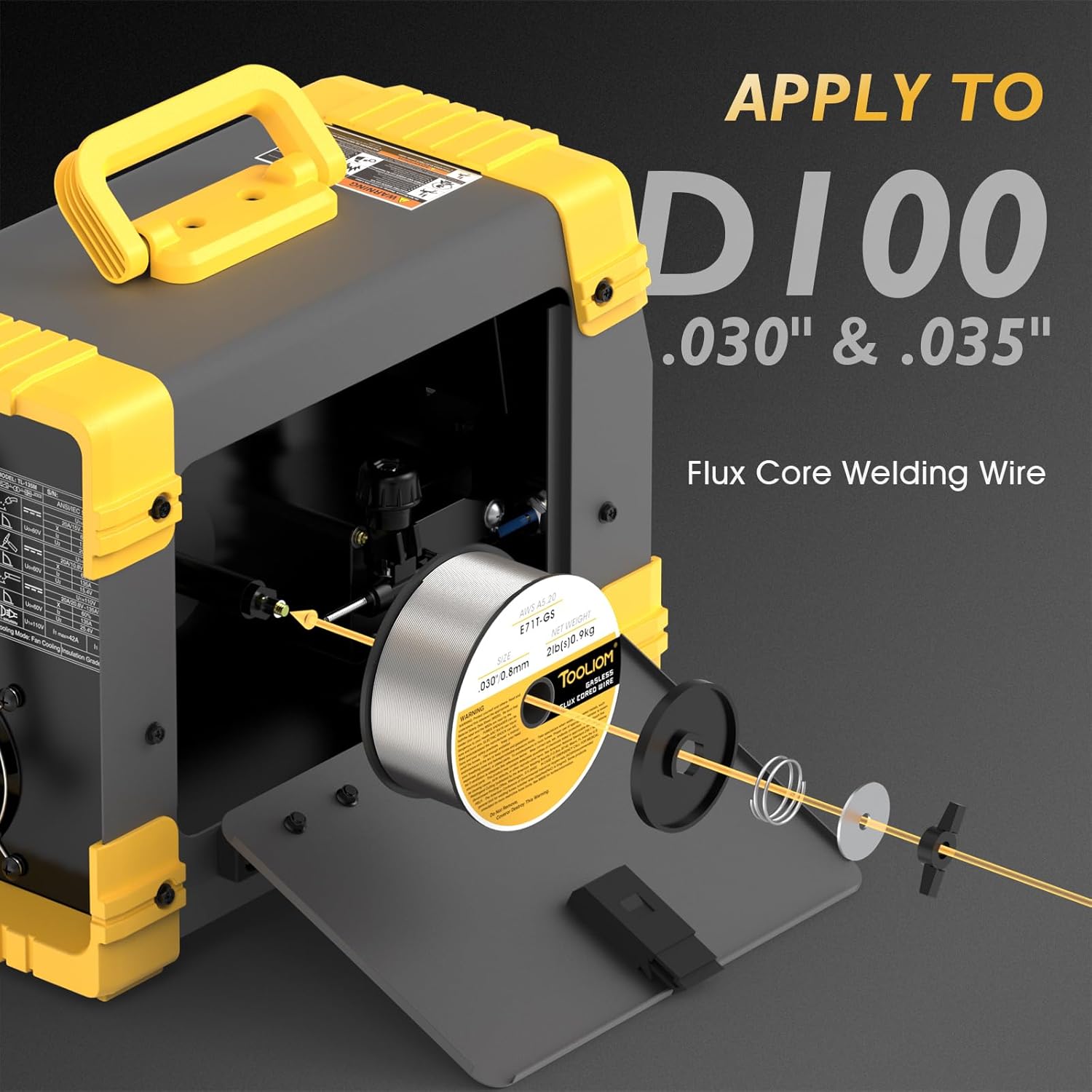
Figure 6: Proper installation of the flux core welding wire spool.
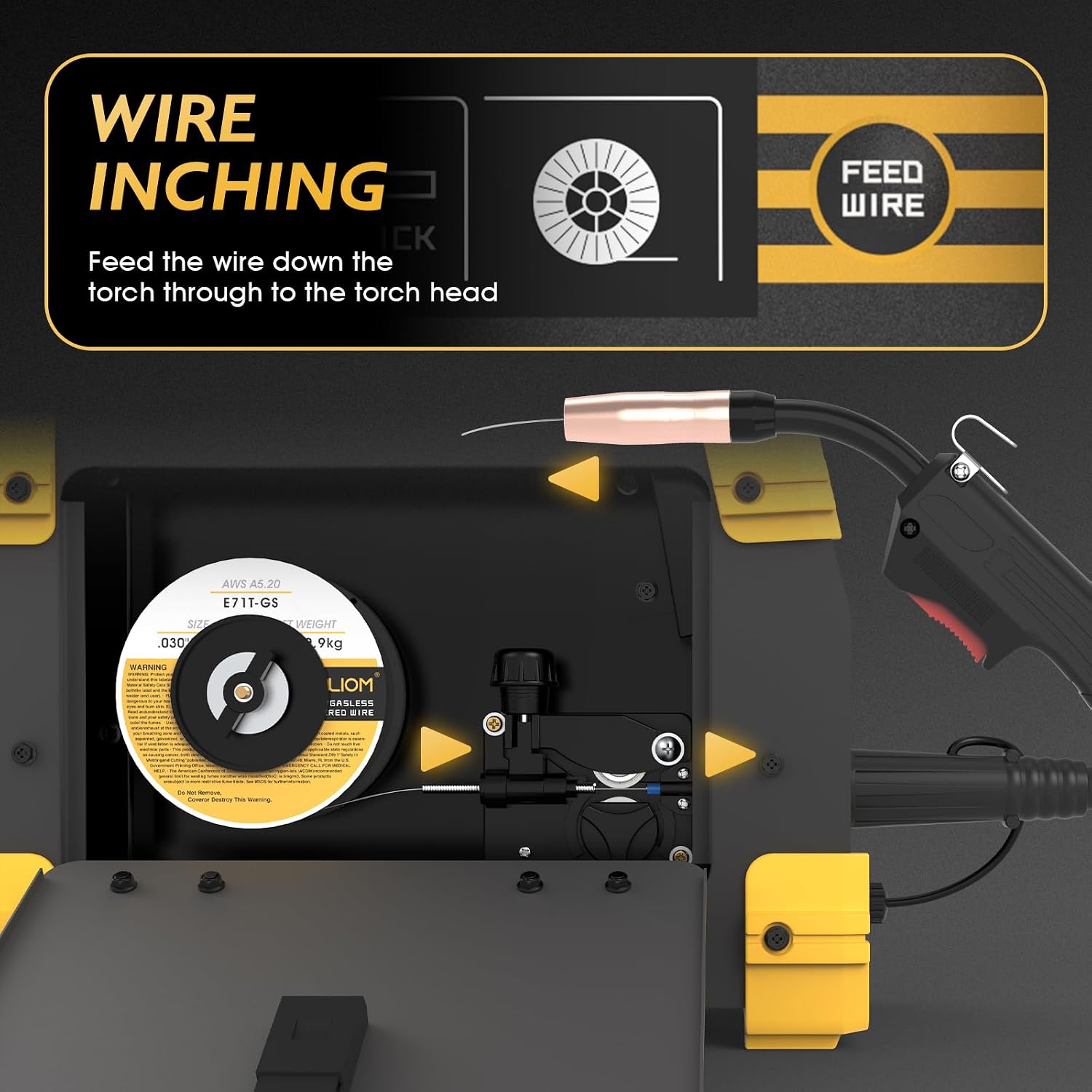
Figure 7: The wire inching function helps in feeding the wire through the torch.
5.3 Connecting Accessories
Connect the appropriate welding accessories based on the desired welding mode:
- MIG Gun: Connect to the designated MIG output terminal.
- Electrode Holder: For Stick welding, connect to the positive (+) terminal.
- Work Clamp: Connect to the negative (-) terminal for most applications.

Figure 8: Visual guide for connecting the MIG gun, Lift TIG torch, and Stick electrode holder.
6. Operating Modes
The TL-135M Pro offers three distinct welding modes for various applications.

Figure 9: Overview of Flux Cored, Lift TIG, and Stick welding modes.
6.1 Flux MIG Welding
Select 'Flux' mode on the weld mode switch. This mode uses flux-cored wire, eliminating the need for external shielding gas. The synergic control automatically adjusts the wire feeding speed based on your settings, simplifying operation for consistent welds.
6.2 Lift TIG Welding
Switch to 'Lift TIG' mode. For Lift TIG welding, a TL-WP-17V-10-25 Lift TIG torch (not included) is required. This mode provides precise arc control for cleaner welds on thinner materials.
6.3 Stick Welding
Choose 'Stick' mode for traditional stick welding. This mode is suitable for a variety of materials and thicknesses, offering robust performance for general fabrication and repair.
Video 1: A user demonstrates cutting and welding with the TOOLIOM MIG Welder, showcasing its practical application.
Video 2: An overview of the TOOLIOM 135A 110V Gasless Flux Core MIG Welder, highlighting its features and capabilities.
7. Maintenance and Care
Regular maintenance ensures the longevity and optimal performance of your welding machine.
- Cleaning: Regularly clean the machine's exterior and ventilation openings to prevent dust and debris buildup. Use compressed air to clear internal components if necessary.
- Cable and Connection Inspection: Periodically check all welding cables, connections, and the power cord for any signs of wear, cuts, or damage. Replace damaged parts immediately.
- Wire Feed System: For Flux MIG, inspect the wire feed rollers and liner for wear or blockages. Clean or replace as needed to ensure smooth wire feeding.
- Torch and Electrode Holder: Clean the MIG gun nozzle and contact tip regularly. For Stick welding, ensure the electrode holder jaws are clean and provide good electrical contact.
8. Troubleshooting
Refer to this section for common issues and their potential solutions.
- No Arc: If there is no arc, first check if the machine is connected correctly to the power source and that all welding cables (work clamp, MIG gun/electrode holder) are securely attached. Ensure the power switch is ON.
- Poor Weld Quality: Check your welding parameters (voltage, wire speed/amperage) against recommended settings for your material thickness and wire type. Ensure proper wire stick-out and clean base metal.
- Wire Feed Problems (MIG): Verify the wire spool is installed correctly and not tangled. Check the tension on the wire feed rollers. Inspect the MIG gun liner for kinks or blockages.
- Overheating: If the machine shuts down due to overheating, allow it to cool down. Ensure adequate ventilation around the machine and avoid exceeding the duty cycle.
9. Technical Specifications
| Feature | Specification |
|---|---|
| Manufacturer | TOOLIOM |
| Part Number | TL-135M |
| Item Weight | 16.2 pounds |
| Package Dimensions | 17.63 x 12.71 x 7.64 inches |
| Item Model Number | TL-135M Pro |
| Style | 135A 110V Flux MIG Welder |
| Power Source | AC |
| Item Package Quantity | 1 |
| Included Components | MIG Welder; MIG Gun; Electrode Holder; Work Clamp |
| Batteries Included? | No |
| Batteries Required? | No |
| Date First Available | November 29, 2023 |
10. Warranty Information and Customer Support
TOOLIOM products typically come with a manufacturer's warranty covering defects in materials and workmanship. Please refer to the warranty card included with your product or visit the official TOOLIOM website for detailed warranty terms and conditions.
For technical assistance, troubleshooting, or parts inquiries, please contact TOOLIOM customer support through their official channels. Keep your purchase receipt and product model number handy for faster service.


