
1. Introduction and Overview
This manual provides instructions for the assembly, operation, and maintenance of your FABATO Double Bed Base. This bed base features an upholstered headboard, integrated LED lighting, two AC power outlets, and two USB charging ports for convenience. It is designed with a metal platform for mattress support and includes under-bed storage space.
Please read this manual thoroughly before assembly and use to ensure proper setup and safe operation.
2. Safety Information
- This product does not include safety rails.
- Do not use this bed base with air mattresses or water beds.
- Do not exceed the recommended weight limit of 900 lbs (408 kg).
- Ensure all connections for electrical components (LED lights, AC/USB outlets) are secure before use.
- Keep children away from small parts during assembly.
- Periodically check all bolts and screws to ensure they remain tight.
3. Package Contents
Before beginning assembly, verify that all parts are present and undamaged. Refer to the included parts list in your packaging for detailed identification.
- Headboard (upholstered with integrated LED, AC, and USB components)
- Footboard
- Side Rails
- Metal Slat System (13 sturdy metal bars)
- Support Legs (9 sturdy legs)
- Assembly Hardware (bolts, screws, washers, Allen wrench)
- Remote Control for LED Lights
- Power Cable for Headboard Electronics
4. Setup and Assembly Instructions
Assembly of the FABATO Double Bed Base is designed to be straightforward, typically completed within one hour. All necessary tools and numbered parts are included. Follow the detailed instructions provided in the separate assembly guide included in your package.
- Unpack Components: Carefully remove all parts from the packaging and lay them out on a clean, soft surface to prevent scratches.
- Assemble Headboard and Footboard: Attach the side rails to the headboard and footboard using the provided hardware. Ensure all connections are secure.
- Install Support Legs: Attach the 9 support legs to the frame as indicated in the assembly guide. These legs help distribute weight and protect your mattress.
- Secure Metal Slats: Place the 13 sturdy metal bars across the frame. Each bar should be anchored to the side rails to prevent movement and noise.
- Connect Power: Once the frame is fully assembled, connect the power cable from the headboard to a suitable wall outlet.
- Final Check: Ensure all bolts are tightened and the frame is stable before placing your mattress. Plastic pads are included to protect your floor from scratches.

Image: The robust metal frame structure of the FABATO Double Bed Base, showing the slat system and support legs.

Image: Diagram illustrating the dimensions of the FABATO Double Bed Base (Length: 206 cm, Width: 137 cm, Headboard Height: 104 cm, Footboard Height: 39 cm) and its 454 kg (900 lbs) weight capacity.
5. Operating Instructions
5.1. LED Headboard Lighting
The integrated LED lights in the headboard offer customizable ambiance. Use the included remote control to manage the lighting features.
- Power On/Off: Press the power button on the remote to turn the LED lights on or off.
- Color Selection: Choose from 20 static colors to match your preference.
- Dynamic Modes: Select from 22 dynamic modes for various lighting effects.
- Brightness Adjustment: Adjust the brightness of the lights using the dedicated controls on the remote.
- Memory Function: The system will memorize your preferred color settings.

Image: The FABATO Double Bed Base with its headboard LED lights illuminated, alongside the remote control for adjusting colors and modes.
5.2. AC Outlets and USB Charging Ports
The headboard is equipped with two AC outlets and two USB power outlets (one Type-C, one standard USB) for convenient charging of your electronic devices.
- AC Outlets: Plug in standard electronic devices requiring AC power.
- USB Ports: Connect your smartphones, tablets, or other USB-powered devices for charging. The USB ports provide 5V/2A output.
- Power Cable: Ensure the bed base's power cable is securely plugged into a wall outlet for these features to function.

Image: Close-up view of the FABATO Double Bed Base headboard, highlighting the integrated USB-A and USB-C charging ports and AC outlets.
6. Maintenance
- Cleaning the Upholstered Headboard: Wipe the upholstered headboard with a damp cloth and mild soap if necessary. Avoid harsh chemicals that may damage the material. The PU leather is designed to be waterproof and easy to clean.
- Cleaning the Metal Frame: Use a soft, dry cloth to dust the metal frame. For stubborn marks, a slightly damp cloth can be used, followed by drying thoroughly.
- Regular Checks: Periodically inspect all bolts and connections to ensure they are tight. Re-tighten if any looseness is detected to maintain stability and prevent noise.
- Under-Bed Storage: The 12.6-inch (32 cm) high storage space under the bed can be used for suitcases and other items. Keep this area tidy for easy access and cleaning.
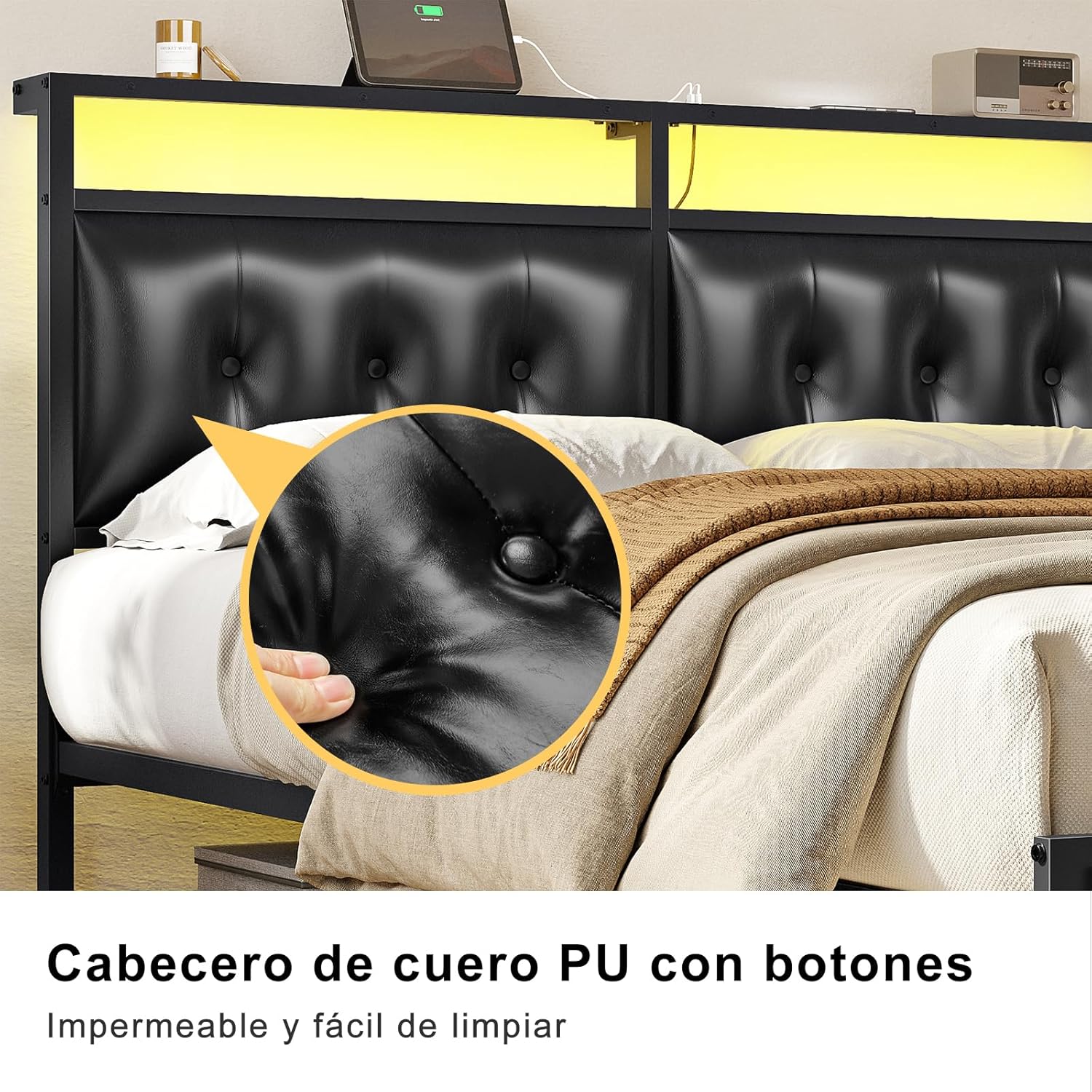
Image: Close-up detail of the upholstered PU leather headboard with button tufting, highlighting its texture and easy-to-clean surface.

Image: View of the under-bed storage area, showing approximately 11.4 inches of clearance suitable for storing boxes or luggage.
7. Troubleshooting
| Problem | Possible Cause | Solution |
|---|---|---|
| LED lights not working |
|
|
| USB/AC outlets not charging |
|
|
| Bed frame is noisy or wobbly |
|
|
8. Specifications
- Brand: FABATO
- Model Numbers: FAQU041, FAFU042
- Size: Matrimonial/Full
- Material: Iron frame, Upholstered headboard (PU leather)
- Product Dimensions (L x W x H): 78.74" x 55.12" x 46.06" (200 cm x 140 cm x 117 cm)
- Item Weight: 35 Kilograms (approx. 77 lbs)
- Maximum Weight Recommendation: 900 Pounds (408 kg)
- Under-Bed Clearance: Approximately 12.6 inches (32 cm)
- Special Features:
- Integrated LED lights (20 static colors, 22 dynamic modes, remote control)
- 2 AC power outlets
- 2 USB charging ports (1 Type-C, 1 USB-A, 5V/2A output)
- Assembly Required: Yes
- Color: Black

Image: A complete view of the assembled FABATO Double Bed Base with its upholstered headboard, LED lighting, and footboard.
9. Warranty and Support
For warranty information or customer support regarding your FABATO Double Bed Base, please refer to the warranty card included with your product or contact the seller directly through your purchase platform. Ensure you have your model number (FAQU041 Y FAFU042) and proof of purchase available when contacting support.
You can visit the official FABATO store for more information: FABATO Store