
Lumena FAN STAND 3Z
LUMENA FAN STAND 3Z User Manual
Wireless Tabletop Fan
Introduction
The LUMENA FAN STAND 3Z is a wireless tabletop fan designed for optimal airflow and convenience. Featuring a quiet BLDC motor, up to 20 hours of wireless operation, and 120-degree rotation, this fan provides a gentle yet powerful breeze. Its award-winning design and easy-to-clean structure make it a perfect addition to any space.

Image: The LUMENA FAN STAND 3Z fan shown alongside its retail packaging and USB-C charging cable. The fan is in Satin Beige color.
Package Contents
- LUMENA FAN STAND 3Z Wireless Tabletop Fan
- USB-C Charging Cable
- User Manual (this document)
Setup
Follow these steps to set up your LUMENA FAN STAND 3Z for first use:
- Unboxing: Carefully remove the fan and all accessories from the packaging.
- Initial Charge: Before first use, fully charge the fan. Connect the provided USB-C cable to the charging port on the fan's base and the other end to a compatible USB power adapter (not included). The charging indicator light will show the charging status.
- Placement: Place the fan on a stable, flat surface. Ensure there is adequate space around the fan for optimal airflow and rotation.
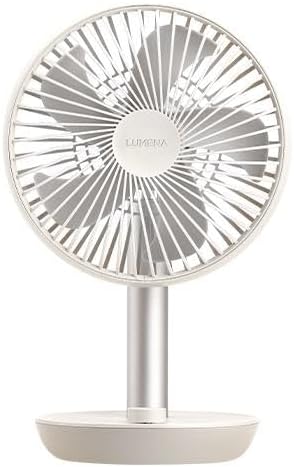
Image: A direct front view of the LUMENA FAN STAND 3Z, highlighting its five-vane blade and protective mesh.
Operating Instructions
The LUMENA FAN STAND 3Z features an intuitive jog dial for easy control.
- Power On/Off: Press the jog dial once to turn the fan on. Press it again to turn the fan off.
- Adjusting Wind Speed: Rotate the jog dial clockwise to increase the wind speed. Rotate it counter-clockwise to decrease the wind speed. The fan has multiple speed settings.
- 120-Degree Rotation: To activate the 120-degree horizontal oscillation, press and hold the jog dial for approximately two seconds. The fan head will begin to rotate from side to side, providing wider air distribution. To stop the oscillation, press and hold the jog dial again for two seconds. When oscillation is stopped, the fan head will return to its front-facing position.
- Battery Indicator: The fan's base includes an LED indicator that shows the current battery level. Refer to the indicator for charging reminders.

Image: The LUMENA FAN STAND 3Z positioned on a table, providing airflow to individuals seated nearby, demonstrating its use in a social setting.

Image: The LUMENA FAN STAND 3Z placed on a round table in a room bathed in natural sunlight, showcasing its aesthetic integration into a living space.
Maintenance and Cleaning
Regular cleaning ensures optimal performance and longevity of your LUMENA FAN STAND 3Z.
- Power Off: Always ensure the fan is turned off and unplugged from the power source before cleaning.
- Exterior Cleaning: Wipe the exterior surfaces of the fan with a soft, damp cloth. Do not use abrasive cleaners, solvents, or harsh chemicals, as these may damage the finish.
- Blade Cleaning: The fan's design allows for easy cleaning of the blades. Carefully remove the front safety mesh (refer to specific instructions if provided in a physical manual for mesh removal, otherwise, clean through the mesh). Use a soft brush or a vacuum cleaner with a brush attachment to remove dust from the blades and inside the mesh.
- Storage: When not in use for extended periods, store the fan in a cool, dry place, away from direct sunlight and extreme temperatures.

Image: A side profile view of the LUMENA FAN STAND 3Z on a table, highlighting its slim design and the jog dial control on the base.
Troubleshooting
| Problem | Possible Cause | Solution |
|---|---|---|
| Fan does not turn on. | Battery is depleted. | Charge the fan using the provided USB-C cable. |
| Fan rotation is not working. | Rotation function not activated. | Press and hold the jog dial for two seconds to activate 120-degree rotation. |
| Weak airflow. | Low speed setting or dirty blades. | Increase the wind speed using the jog dial. Clean the fan blades and mesh. |
| Unusual noise during operation. | Obstruction or loose part. | Turn off the fan and check for any obstructions in the blades or mesh. Ensure the fan is on a stable surface. If the issue persists, contact customer support. |
Specifications
- Model: LUMENA FAN STAND 3Z
- Dimensions: 165 x 268 x 131mm (6.5D x 10.55W x 5.16H inches)
- Weight: 460g (1.01 lbs)
- Battery Capacity: 4,000mAh
- Maximum Usage Time: Up to 20 hours (on lowest setting)
- Maximum Wind Power: 6W
- Wind Reach: Up to 10m
- Horizontal Rotation: 120 degrees
- Low-noise Technology: As low as 13dB
- Material: Aluminum (stand), Matte body
- Charging Port: USB-C
- Color: Satin Beige

Image: A display of multiple LUMENA FAN STAND 3Z fans, including the Satin Beige model, showcasing the product's design and available color variations.
Warranty and Support
LUMENA products are manufactured with high-quality standards. For warranty information, technical support, or service inquiries, please refer to the warranty card included with your product or visit the official LUMENA website. You may also find additional resources and FAQs at the following link: LUMENA Official Support.
Please retain your proof of purchase for warranty claims.
Related documentsFAN STAND 3Z

Ask a question about this manual
Ask about setup, troubleshooting, compatibility, parts, safety, or missing instructions. Manuals+ will review the question and use this page’s manual context to help answer it.