
axion STIM-PRO X9B
axion STIM-PRO X9B TENS/EMS Machine User Manual
Your guide to effective pain relief and muscle stimulation
Introduction
The axion STIM-PRO X9B is a state-of-the-art 4-channel combination device designed for drug-free pain treatment, muscle building, massage, and pelvic floor training. It offers 60 pre-installed programs and 99 adjustable intensity levels per channel, allowing for highly customized therapy. This manual provides essential information for the safe and effective use of your device.

Image: The axion STIM-PRO X9B device, its protective carrying case, and a selection of electrode pads.
Key Features
- Versatile Therapy Options: 60 pre-installed programs covering TENS (Transcutaneous Electrical Nerve Stimulation) for pain relief, EMS (Electrical Muscle Stimulation) for muscle training, massage, and pelvic floor training.
- 4 Independent Channels: Allows for simultaneous treatment of up to four different body areas or muscle groups with individual intensity control.
- Adjustable Intensity: 99 finely adjustable intensity levels per channel for precise control and comfort.
- Dual Program Functionality: Ability to use two different programs simultaneously across the four channels.
- Rechargeable Battery: Long-lasting internal battery, conveniently rechargeable via USB-C.
- Clear Display: Backlit display for easy reading of intensity, countdown timer, and program information.
- Comprehensive Kit: Includes 8 square 5x5 cm and 4 rectangular 10x5 cm electrode pads, charger, and a soft case for portability.

Image: The device screen showing the extensive application options with 60 programs.
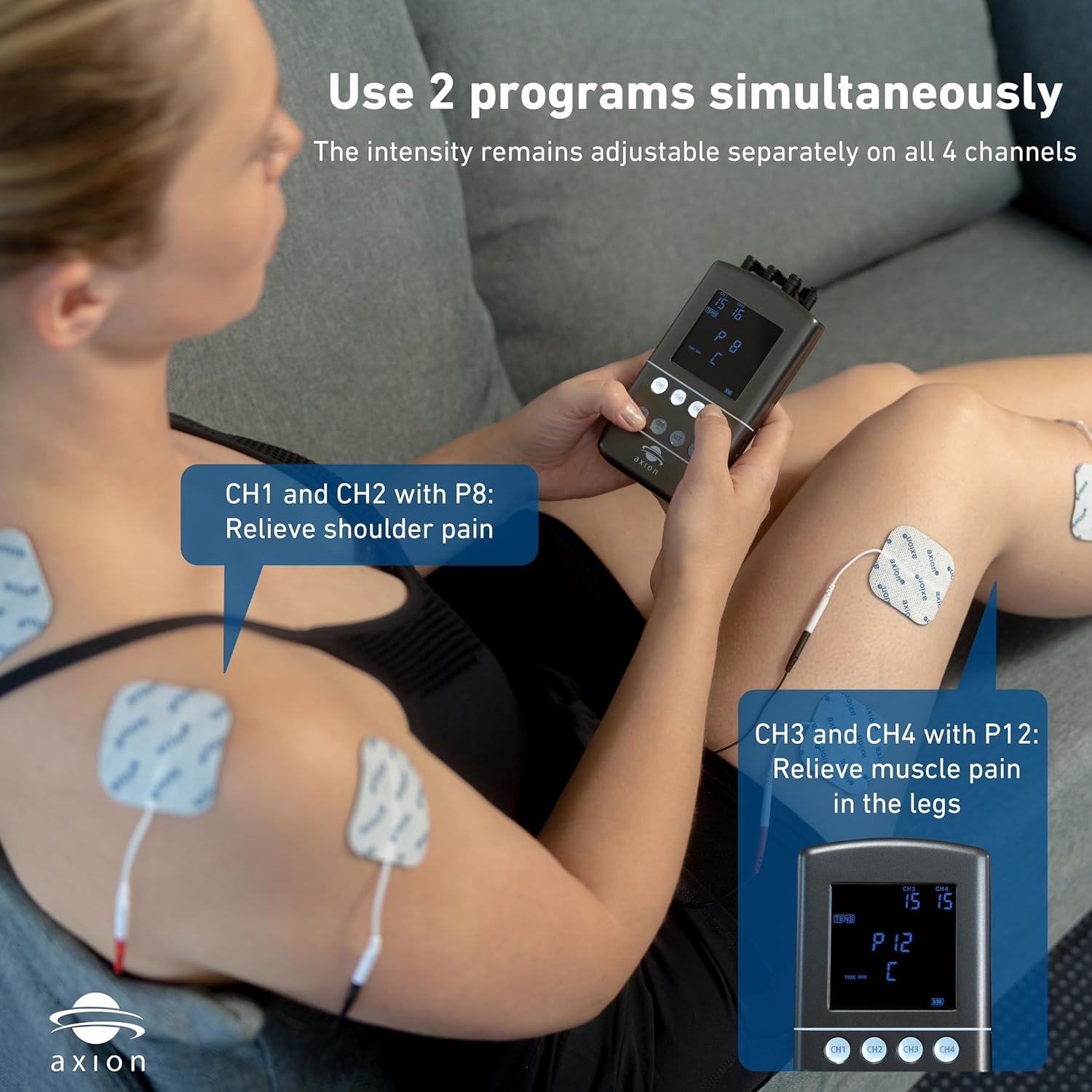
Image: Illustrates the ability to use two programs simultaneously on different body parts.
Safety Information
Before using the axion STIM-PRO X9B, please read all instructions carefully. Consult your physician before use if you have any pre-existing medical conditions, including but not limited to, heart conditions, epilepsy, or if you are pregnant. Do not use the device on open wounds, irritated skin, or near the eyes, mouth, or carotid sinus nerves.
- Keep out of reach of children.
- Do not use while driving or operating machinery.
- Ensure electrodes are properly placed and have good skin contact to avoid discomfort or skin irritation.
- Do not immerse the device in water or use it in excessively humid environments.
- Use only the charger and accessories provided or approved by axion.
Setup
Unpacking the Device
Carefully remove all components from the packaging. Verify that all items listed below are present:
- axion STIM-PRO X9B device
- 8 x 5x5 cm electrode pads
- 4 x 10x5 cm electrode pads
- 4 connection cables
- USB-C charging cable
- Power adapter
- Soft carrying case
- Instruction manual and electrode placement brochure

Image: All components included in the STIM-PRO X9B package.
Charging the Device
Before first use, fully charge the device. Connect the USB-C charging cable to the device and the power adapter, then plug the adapter into a wall outlet. The battery indicator on the display will show charging progress. A full charge typically takes a few hours.
Connecting Electrodes
Connect the electrode cables to the output channels (CH1, CH2, CH3, CH4) on the top of the device. Attach the electrode pads to the other end of the cables. Ensure a secure connection.

Image: The top of the device showing the four output channels and the USB-C charging port.
Electrode Placement
Proper electrode placement is crucial for effective and safe therapy. Refer to the included electrode placement brochure for detailed diagrams and recommendations for various body parts and conditions. Clean and dry the skin area before applying electrodes to ensure good adhesion and conductivity.

Image: Example of electrode pad placement on the upper back.
Operation
Power On/Off
Press and hold the ON/OFF button to turn the device on or off. The backlit display will illuminate upon activation.
Program Selection
Use the SET button to navigate through the available programs (P1-P60). The display will show the program number. Consult the program list in the manual for details on each program's intended use (TENS, EMS, Massage, Pelvic Floor).
Intensity Adjustment
After selecting a program, use the ON+ and OFF- buttons for each channel (CH1, CH2, CH3, CH4) to adjust the intensity. Increase intensity gradually until you feel a comfortable, yet effective, sensation. Avoid setting the intensity too high, which can cause discomfort.
Therapy Modes
The STIM-PRO X9B offers various therapy modes:
- TENS (Transcutaneous Electrical Nerve Stimulation): Primarily used for pain relief by blocking pain signals or stimulating endorphin release.
- EMS (Electrical Muscle Stimulation): Used for muscle strengthening, rehabilitation, and improving muscle tone by causing muscle contractions.
- Massage: Provides relaxing electrical impulses to soothe muscles and improve circulation.
- Pelvic Floor Training: Specific programs designed to strengthen pelvic floor muscles, often used for incontinence issues.

Image: TENS therapy in use for pain relief.

Image: EMS training for muscle stimulation.

Image: Electrical muscle stimulation for massage.

Image: Pelvic floor training with an optional probe.
Maintenance
Cleaning the Device
Wipe the device with a soft, damp cloth. Do not use abrasive cleaners or immerse the device in water. Ensure the device is completely dry before storage or next use.
Electrode Care
After each use, place the electrode pads back on their protective film. Store them in a cool, dry place. If the pads lose their adhesiveness, they may be gently cleaned with a drop of water or replaced. Electrodes are consumable items and will need periodic replacement.
Storage
Store the device and accessories in the provided soft case when not in use to protect them from dust and damage. Avoid extreme temperatures and direct sunlight.
Troubleshooting
| Problem | Possible Cause | Solution |
|---|---|---|
| Device does not turn on. | Low battery; device not charged. | Charge the device fully using the provided charger. |
| No sensation or weak sensation. | Electrodes not properly attached; intensity too low; worn-out electrodes; cable not connected. | Ensure electrodes are firmly on clean, dry skin. Increase intensity gradually. Replace old electrodes. Check cable connections to device and pads. |
| Sensation is uncomfortable or stinging. | Intensity too high; poor electrode contact; electrodes too close together. | Decrease intensity. Re-apply electrodes to ensure full contact. Adjust electrode placement to be further apart. |
| Display is not working correctly. | Software glitch; low battery. | Turn the device off and on again. Charge the device. If problem persists, contact customer support. |
Specifications
| Feature | Detail |
|---|---|
| Model | STIM-PRO X9B |
| Channels | 4 independent channels |
| Programs | 60 pre-installed programs |
| Intensity Levels | 99 per channel |
| Battery | 1 Lithium Ion battery (included) |
| Charging | USB-C |
| Dimensions | Approx. 30.3 x 16.6 x 7.9 cm (Package) |
| Weight | Approx. 980 g (Package) |
| Manufacturer | axion GmbH |
| Country of Origin | Taiwan |
Warranty and Support
The axion STIM-PRO X9B comes with a standard manufacturer's warranty. Please refer to the warranty card included in your package for specific terms and conditions. For technical support, troubleshooting assistance, or warranty claims, please contact axion customer service through their official website or the contact information provided in your product documentation. Always provide your model number (STIM-PRO X9B) and purchase details when seeking support.
Related documentsSTIM-PRO X9B


Ask a question about this manual
Ask about setup, troubleshooting, compatibility, parts, safety, or missing instructions. Manuals+ will review the question and use this page’s manual context to help answer it.