
1. Introduction
Welcome to the user manual for your DOOGEE Smini Rugged Smartphone. This compact yet powerful device is designed for durability and performance, featuring Android 13, a Helio G99 processor, and a robust build. This manual provides essential information to help you set up, operate, maintain, and troubleshoot your device.

Figure 1.1: Front and rear view of the DOOGEE Smini Rugged Smartphone, highlighting its compact design and key specifications like 15GB RAM + 256GB storage and 50MP camera.

Figure 1.2: Overview of the DOOGEE Smini's key features, including IP68/IP69K/MIL-STD-810H ruggedness, Android 13, Helio G99 processor, 15GB RAM, 256GB storage, 50MP camera, 3000mAh battery, fingerprint, and face unlock.
2. Setup
2.1 SIM Card and TF Card Installation
The DOOGEE Smini supports dual Nano-SIM cards or one Nano-SIM card and one TF (microSD) card for expandable storage.
- Locate the SIM card tray on the side of the device.
- Insert the SIM ejector tool into the small hole next to the tray and push gently until the tray pops out.
- Carefully pull out the tray.
- Place your Nano-SIM card(s) and/or TF card into the designated slots on the tray, ensuring the gold contacts face downwards and the cards are correctly oriented.
- Gently push the tray back into the device until it is flush with the side.

Figure 2.1: Illustration of the Nano-SIM and TF card tray, showing how to correctly insert the cards into the device.
2.2 Initial Power On and Basic Settings
To power on your device for the first time:
- Press and hold the Power button (usually on the right side) until the DOOGEE logo appears on the screen.
- Follow the on-screen prompts to select your language, connect to a Wi-Fi network, and set up your Google account.
- You may also be prompted to set up security features like Face ID or fingerprint recognition during this initial setup.
3. Operating Your Device
3.1 Display Features
The DOOGEE Smini features a compact 4.5-inch QHD+ IPS display, designed for comfortable one-handed use while maintaining visual clarity.
- Screen Size: 4.5 inches
- Resolution: 480 x 1170 pixels
- Pixel Density: 281 PPI
- Aspect Ratio: 22:9
- Brightness: 600 nits
- Contrast Ratio: 1000:1

Figure 3.1: Detailed specifications of the DOOGEE Smini's 4.5-inch QHD+ IPS display, including resolution, pixel density, aspect ratio, brightness, and contrast.
3.2 Innovative Rear Display
The DOOGEE Smini includes an innovative rear display that provides quick access to essential information without needing to activate the main screen. This display can show notifications, time, battery status, and music controls.

Figure 3.2: The innovative rear display of the DOOGEE Smini, showing its functionality for quick information access and music control.
3.3 Camera System
Capture high-quality photos and videos with the DOOGEE Smini's versatile camera system.
- Main Camera: 50 Megapixels with AI capabilities
- Macro Camera: 2 Megapixels
- Front Camera: 8 Megapixels
The camera supports various modes, including:
- AI Camera
- Beauty Mode
- Panorama
- HDR (High Dynamic Range)
- Slow Motion
- Night Mode
- Portrait Mode
- Film Mode
- Underwater Mode

Figure 3.3: Overview of the DOOGEE Smini's 50MP+2MP AI dual camera system, showcasing its ability to capture detailed images in various settings.

Figure 3.4: Various camera modes available on the DOOGEE Smini, including AI camera, underwater mode, beauty mode, panorama, HDR, slow motion, night mode, portrait, and film mode.

Figure 3.5: The DOOGEE Smini's dedicated underwater camera mode, allowing for photography in aquatic environments.
3.4 Battery and Charging
The DOOGEE Smini is equipped with a 3000mAh battery, providing reliable power for daily use. It supports 18W fast charging.
- Battery Capacity: 3000 mAh
- Charging: 18W Fast Charging (USB Type-C)
- Battery Composition: Lithium-ion

Figure 3.6: Information on the DOOGEE Smini's 3000mAh large battery and 18W fast charging capability.
3.5 Security Features
The device offers multiple security options to protect your data and privacy.
- Side Fingerprint Recognition: Unlock your phone quickly and securely using the integrated side-mounted fingerprint sensor.
- Face ID: Use facial recognition for convenient and secure unlocking.

Figure 3.7: Close-up of the side-mounted fingerprint sensor on the DOOGEE Smini.

Figure 3.8: Demonstration of Face ID unlocking on the DOOGEE Smini.
3.6 Connectivity and Navigation
The DOOGEE Smini offers comprehensive connectivity and navigation features.
- NFC: Supports Near Field Communication for convenient mobile payments (e.g., Google Pay) and quick pairing with other NFC-enabled devices.
- Wi-Fi: Connect to wireless networks for internet access.
- Cellular: 4G Dual SIM support for reliable mobile data and calls.
- Navigation: Supports GPS, GLONASS, Galileo, Beidou, and AGPS for accurate positioning and navigation.

Figure 3.9: The DOOGEE Smini demonstrating NFC payment functionality.

Figure 3.10: The DOOGEE Smini displaying its navigation capabilities with support for multiple satellite systems.
4. Maintenance and Durability
The DOOGEE Smini is built to withstand harsh environments, featuring advanced ruggedness ratings.
- IP68 Waterproof: Can be submerged in up to 1.5 meters of water for 30 minutes.
- IP69K Dust-proof: Provides complete protection against dust ingress and high-pressure, high-temperature water jets.
- MIL-STD-810H Anti-drop: Certified to military standards for resistance against drops and impacts.

Figure 4.1: Visual representation of the DOOGEE Smini's IP68 waterproof, IP69K dust-proof, and MIL-STD-810H anti-drop capabilities.

Figure 4.2: The DOOGEE Smini demonstrating its durability in various challenging environments, highlighting its IP68, MIL-STD-810H, and IP69K ratings.
4.1 Cleaning Instructions
To maintain your device's performance and appearance:
- Wipe the screen and body with a soft, lint-free cloth.
- For stubborn dirt, slightly dampen the cloth with water. Avoid using harsh chemicals or abrasive materials.
- Ensure all port covers are securely closed before exposing the device to water or dust.
5. Troubleshooting
This section addresses common issues you might encounter with your DOOGEE Smini.
5.1 Device Not Turning On
- Ensure the battery is charged. Connect the device to a charger and wait a few minutes before attempting to power on.
- Press and hold the Power button for at least 10-15 seconds to perform a forced restart.
5.2 Charging Issues
- Verify that the charging cable and adapter are securely connected to both the device and the power outlet.
- Use the original DOOGEE charger and cable if possible.
- Check the charging port for any debris or damage.
5.3 Network Connectivity Problems
- Wi-Fi: Ensure Wi-Fi is enabled and you are within range of a known network. Try forgetting the network and reconnecting.
- Cellular: Check if your SIM card is properly inserted. Verify that mobile data is enabled in settings. If issues persist, contact your mobile carrier.
5.4 Apps Crashing or Freezing
- Close the problematic app and reopen it.
- Clear the app's cache and data in Settings > Apps.
- Ensure your device's software and the app are updated to the latest versions.
6. Specifications
Detailed technical specifications for the DOOGEE Smini Rugged Smartphone.
| Feature | Specification |
|---|---|
| Brand | DOOGEE |
| Model Name | Smini |
| Item Model Number | DOOGEE S mini |
| Color | Black |
| Product Type | Smartphone (Slate) |
| Operating System | Android 13.0 |
| CPU | Helio G99 Octa-core, 2.2 GHz |
| Installed RAM Size | 15 GB (8GB + up to 7GB extended) |
| Memory Storage Capacity | 256 GB (Expandable up to 2TB with TF card) |
| Screen Size | 4.5 Inches |
| Display Resolution | 480 x 1170 pixels (QHD+) |
| Main Camera Resolution | 50 Megapixels |
| Front Camera Resolution | 8 Megapixels |
| Macro Camera Resolution | 2 Megapixels |
| Battery Capacity | 3000 mAh |
| Battery Composition | Lithium-ion |
| Charging | 18W Fast Charging, USB Type C |
| Connectivity | Wi-Fi, 4G, NFC |
| Cellular Technology | 4G |
| Wireless Carrier | All carriers |
| Navigation | GPS, GLONASS, Galileo, Beidou, AGPS |
| Special Features | Camera, Front Camera, GPS, Internet, USB, Wi-Fi, Fingerprint Sensor, Face ID, Rear Display |
| Ruggedness Ratings | IP68, IP69K, MIL-STD-810H |
| Dimensions (approx.) | Height: 133mm, Width: 60mm, Thickness: 13.5mm |
| Weight (approx.) | 155g |
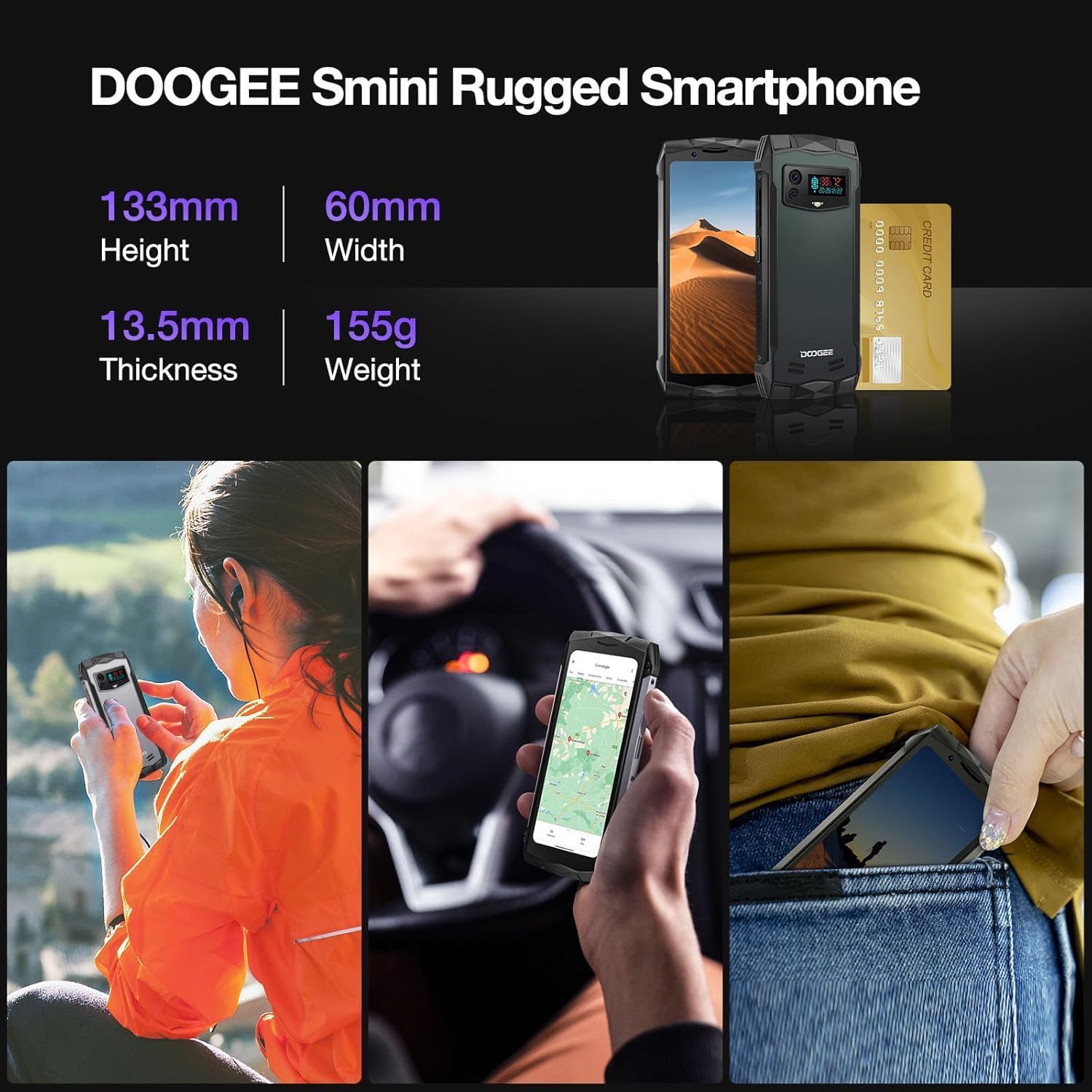
Figure 6.1: Physical dimensions and weight of the DOOGEE Smini Rugged Smartphone.

Figure 6.2: Details on the DOOGEE Smini's 8GB RAM with up to 7GB expandable memory and 256GB ROM with up to 2TB expandable storage.

Figure 6.3: Information about the DOOGEE Smini's Helio G99 Octa-core processor, including its 2.2 GHz speed and 6nm process.

Figure 6.4: List of sensors and features supported by the DOOGEE Smini, including fast charging, sound amplifier, G sensor, proximity sensor, ambient light sensor, compass, and geomagnetism.
7. Warranty and Support
For warranty information and customer support, please refer to the documentation included with your purchase or visit the official DOOGEE website.
- Spare Parts Availability: Information not available.
- Software Updates Guaranteed Until: Information not available.
It is recommended to keep your purchase receipt as proof of purchase for warranty claims.


