
1. Introduction
The AOPUTTRIVER AP-5800S is a versatile 3-in-1 air quality monitor designed to provide accurate measurements of various airborne pollutants. This device is essential for monitoring indoor and outdoor air quality, helping to ensure a healthier environment for you and your family.
It is capable of measuring:
- PM2.5 and PM10: Inhalable particulate matter.
- HCHO: Formaldehyde.
- TVOC: Total Volatile Organic Compounds.
- Additionally, it can detect benzene, carbon monoxide, ammonia, hydrogen, alcohol, and cigarette smoke.
2. Product Overview
2.1 Package Contents

Image: Contents of the AP-5800S package, including the monitor, USB cable, storage bag, and user manual.
Upon unpacking, please ensure all items are present:
- 1 x AOPUTTRIVER AP-5800S Air Quality Monitor
- 1 x USB Charging Cable
- 1 x Storage Bag
- 1 x User Manual
2.2 Device Features

Image: Visual representation of the monitor's key features, including HCHO, PM2.5, TVOC detection, colorful display, low battery indicator, alarm setting, and rechargeable battery.
The AP-5800S monitor includes the following features:
- HCHO, PM2.5, TVOC detection capabilities.
- Colorful LCD display for clear readings.
- Low battery indicator.
- Alarm setting for critical air quality levels.
- USB rechargeable battery for convenience.
- Integrated tripod mounting hole for continuous monitoring.
2.3 Device Components and Dimensions
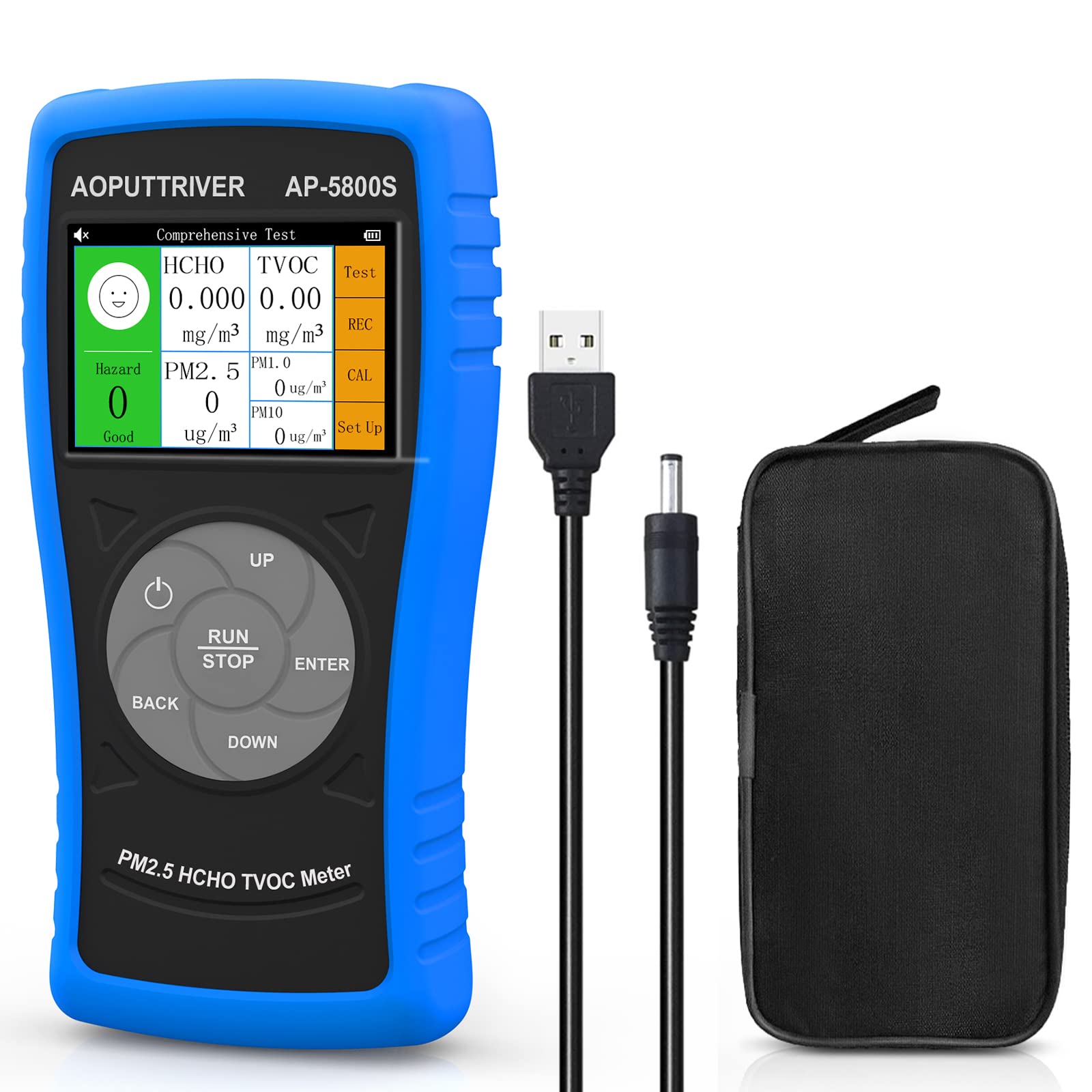
Image: Front view of the AP-5800S monitor, highlighting its compact size with dimensions of 190mm (7.4in) height, 80mm (3.14in) width, and 3.8cm (1.49in) depth.
The device features a compact design for portability and ease of use. Its dimensions are approximately 190mm (7.4 inches) in height, 80mm (3.14 inches) in width, and 3.8cm (1.49 inches) in depth.
2.4 Sensor Location and Charging Port

Image: Close-up view of the top and bottom of the AP-5800S, showing the USB charging port with indicator lights and the air intake vents for the high-precision sensors.
The AP-5800S utilizes high-precision sensors, including a laser PM2.5 sensor, an electrochemical formaldehyde sensor, and a thick film semiconductor gas sensor for TVOC. The air intake vents are located on the device to allow for accurate sampling. The USB charging port is located on the side of the device. A red light indicates charging, and a green light indicates a full charge.
3. Panel Layout and Button Functions
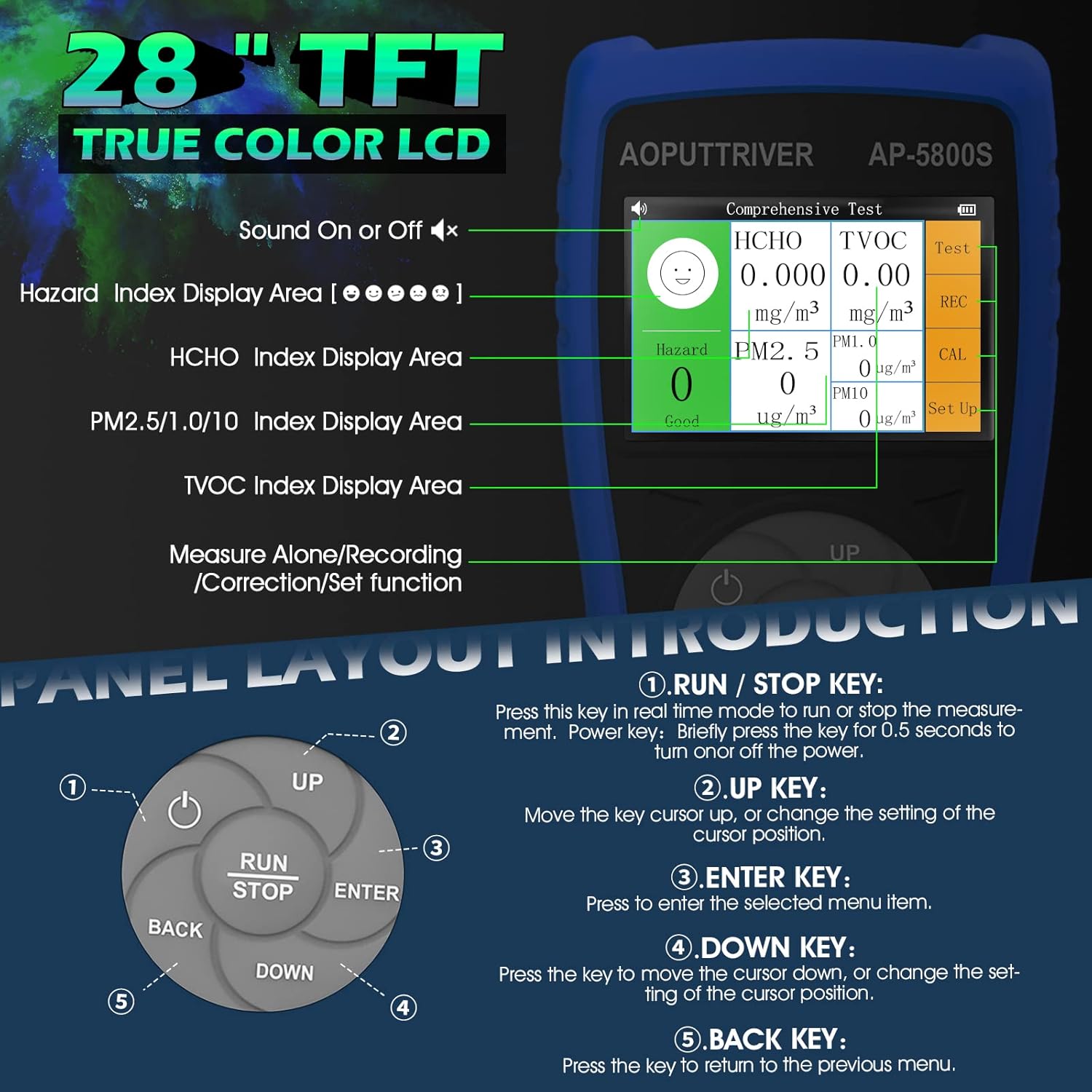
Image: Detailed diagram of the AP-5800S display and control panel, showing the LCD screen with various index display areas and the five-button navigation cluster.
The device features a 2.8-inch TFT True Color LCD for displaying measurement results and settings. The control panel consists of five buttons for navigation and operation.
3.1 Display Areas
- Hazard Index Display Area: Indicates the overall air quality hazard level.
- HCHO Index Display Area: Shows formaldehyde concentration.
- PM2.5/1.0/10 Index Display Area: Displays particulate matter concentrations.
- TVOC Index Display Area: Shows Total Volatile Organic Compound concentration.
3.2 Button Functions
- RUN / STOP Key:
Press this key in real-time mode to run or stop the measurement. Briefly press for 0.5 seconds to turn the device on or off. - UP Key:
Move the cursor up, or change the setting of the cursor position. - ENTER Key:
Press to enter the selected menu item or confirm a setting. - DOWN Key:
Press the key to move the cursor down, or change the setting of the cursor position. - BACK Key:
Press the key to return to the previous menu.
4. Setup
4.1 Initial Charging
Before first use, fully charge the AP-5800S monitor. Connect the provided USB cable to the device's charging port and a compatible USB power source (e.g., computer, power bank, or USB wall adapter). The charging indicator light will be red during charging and turn green when fully charged.
4.2 Power On/Off
- To Power On: Press and hold the RUN / STOP key for approximately 0.5 seconds until the display illuminates.
- To Power Off: Press and hold the RUN / STOP key for approximately 0.5 seconds until the display turns off. The device also features an auto power-off function to conserve battery.
5. Operation
5.1 Performing a Measurement
Once powered on, the device will typically begin real-time measurement automatically. Ensure the device is placed in the area you wish to monitor, away from direct airflow or strong drafts that could affect readings.
- Place the monitor in the desired location.
- Press the RUN / STOP key if the measurement is not already active. The display will show real-time readings for HCHO, TVOC, PM2.5, and PM10.
- Allow a few minutes for the readings to stabilize, especially when moving the device to a new environment.
5.2 Interpreting Readings

Image: Reference table for air quality pollution levels (PM2.5, HCHO, TVOC, PM10) and common sources of HCHO, TVOC, and PM2.5/1.0/10.
The monitor displays concentrations of various pollutants. Refer to the table below for general guidance on air quality levels:
| Parameter | Good | Moderate | Unhealthy | Unhealthy+ | Hazardous | |
|---|---|---|---|---|---|---|
| PM2.5 (µg/m³) | 0-35 | 36-75 | 76-115 | 116-150 | 151-250 | >250 |
| HCHO (mg/m³) | 0-0.08 | 0.081-0.1 | 0.101-0.2 | 0.201-0.5 | 0.501-1.0 | >1 |
| TVOC (mg/m³) | 0-0.5 | 0.5-0.6 | 0.6-1.5 | 1.5-3.0 | 3.0-6.0 | >6.0 |
| PM10 (mg/m³) | 0-50 | 50-100 | 100-200 | 200-300 | 300-400 | >400 |
Common sources of pollutants:
- HCHO: From decorative materials, new furniture, new cars, etc.
- TVOC: From paints and coatings, household chemicals, etc.
- PM2.5/1.0/10: From combustion (coal, oil, natural gas), vehicle emissions, etc.
5.3 Alarm Settings
The AP-5800S includes an alarm function to alert users when pollutant levels exceed predefined thresholds. Refer to the on-screen menu using the UP/DOWN and ENTER keys to configure specific alarm levels for HCHO, TVOC, PM2.5, and PM10.
6. Maintenance
- Cleaning: Use a soft, dry cloth to clean the device. Do not use abrasive cleaners or solvents. Ensure no liquid enters the sensor vents.
- Storage: Store the device in a cool, dry place when not in use. Avoid extreme temperatures and direct sunlight.
- Battery Care: To prolong battery life, avoid fully discharging the device frequently. Charge the device regularly, even if not in constant use.
7. Specifications
| Parameter | Value |
|---|---|
| PM2.5 Measurement Range | 0-999.9 µg/m³ |
| PM2.5 Resolution | 0.1 µg/m³ |
| PM10 Resolution | 0.1 µg/m³ |
| Minimum Particle Size Detected | 0.3 µm |
| Relative Accuracy | ±20% and ±15% µg/m³ |
| Formaldehyde (HCHO) Range | 0-1.00 mg/m³ (Max: 0-2.50 mg/m³) |
| Formaldehyde (HCHO) Resolution | 0.01 mg/m³ |
| Formaldehyde (HCHO) Accuracy | <5% F.S. |
| TVOC Range | 0-10 mg/m³ |
| TVOC Resolution | 0.05 mg/m³ |
| Dimensions (Package) | 28 x 16.4 x 6.4 cm |
| Weight (Package) | 550 grams |
| Manufacturer Reference | UK-AP-5800S-NEW |
8. Troubleshooting
If you encounter issues with your AP-5800S monitor, consider the following:
- Inaccurate Readings: Ensure the device is placed in a stable environment, away from direct drafts, strong odors, or high humidity. Allow time for sensors to stabilize.
- Device Not Powering On: Check the battery level. Connect the device to a USB power source and allow it to charge for at least 30 minutes before attempting to power on again.
- Display Issues: If the display is dim or unresponsive, ensure the battery is charged. If the issue persists, try restarting the device.
- No Readings: Ensure the device is in measurement mode (RUN). If the issue persists, contact customer support.
9. Warranty and Support
The AOPUTTRIVER AP-5800S Air Quality Monitor comes with a 2-year warranty. We are committed to providing lifetime customer service for our products.
If you experience any problems with this product or require technical assistance, please do not hesitate to contact our customer support team. Refer to the contact information provided with your purchase or on the official AOPUTTRIVER website for assistance.