
1. Introduction
Thank you for choosing the ZIYOULANG T60 60% Compact Mechanical Gaming Keyboard. This manual provides comprehensive instructions to help you set up, operate, and maintain your new keyboard. Please read this manual carefully before use to ensure optimal performance and longevity of your device.

Image 1.1: ZIYOULANG T60 keyboard with its coiled USB-C cable.
2. Product Overview
The ZIYOULANG T60 is a high-performance 60% compact mechanical gaming keyboard designed for efficiency and durability. It features a 62-key layout, red axis mechanical switches, and vibrant RGB backlighting.
Key Features:
- Compact 60% Layout: Space-saving design with 62 keys, ideal for gaming and minimalist setups.
- Red Axis Mechanical Switches: Provide a comfortable, linear keystroke with strong tactile feedback and clear sound, suitable for rapid key presses and reduced finger fatigue.
- Durable Construction: Made from high-quality, impact-resistant, and corrosion-resistant ABS material, ensuring a key lifespan of 50 million keystrokes.
- RGB Backlight: Features 19 switchable lighting effects and 64-color rainbow breathing light to customize your gaming environment.
- Two-Color Injection Molded Keycaps: Keycap legends are laser-engraved and produced with two-color injection molding technology, preventing fading over time.
- Full Key Anti-Ghosting: Ensures all key presses are registered accurately, even during intense gaming sessions.
- Metal Aviation Connector Cable: Provides stable and reliable signal transmission, supporting both charging and data transfer.
- Multi-function FN Quick Keys: Allows for instant access to various functions and shortcuts.
- Wide Compatibility: Supports Windows 2000/XP/7/10, VISTA, ME, and Mac OS.

Image 2.1: Overview of ZIYOULANG T60 features.
3. Setup Instructions
Follow these steps to connect and begin using your ZIYOULANG T60 keyboard:
- Unpack the Keyboard: Carefully remove the keyboard and its accessories from the packaging.
- Connect the USB-C Cable: Insert the USB-C end of the provided metal aviation connector cable into the keyboard's USB-C port.
- Connect to Your Device: Plug the USB-A end of the cable into an available USB port on your computer, laptop, tablet, or other compatible device.
- Plug and Play: The keyboard is plug-and-play. Your operating system should automatically detect and install the necessary drivers. No additional software installation is typically required.

Image 3.1: The USB-C cable connects to various devices for stable transmission.
Video 3.1: An unboxing video of the ZIYOULANG T60 keyboard, demonstrating the initial setup and appearance.
4. Operating Instructions
FN Key Combinations:
The ZIYOULANG T60 keyboard utilizes a multi-function FN key to access various shortcuts and controls. Press and hold the FN key, then press the corresponding key for the desired function:
- FN + V: Cycles through 19 different RGB lighting effects.
- FN + [[ / ]]: Adjusts the brightness of the backlight.
- FN + : / ": Adjusts the speed of dynamic lighting effects.
- FN + Right Shift: Toggles the functionality of the arrow keys.
- FN + Other Keys: Refer to the keycap legends for additional multimedia and shortcut functions.

Image 4.1: Illustration of multi-function FN shortcut keys.
Backlight Control:
The keyboard features a vibrant RGB backlight with multiple customization options:
- Changing Modes: Use FN + V to switch between the 19 available lighting effects.
- Adjusting Brightness: Use FN + [[ to decrease brightness and FN + ]] to increase brightness.
- Adjusting Speed: For dynamic lighting effects, use FN + : to decrease speed and FN + " to increase speed.

Image 4.2: Examples of RGB backlight modes.
Anti-Ghosting:
The ZIYOULANG T60 supports full key anti-ghosting in wired mode, ensuring that every key press is registered accurately, even when multiple keys are pressed simultaneously. This prevents input conflicts during fast-paced gaming.

Image 4.3: Anti-ghosting ensures no key conflicts.
Video 4.1: A short preview showcasing different color variations of the ZIYOULANG T60 keyboard.
5. Maintenance
Proper maintenance ensures the longevity and optimal performance of your keyboard.
- Cleaning Keycaps: The ABS keycaps are removable for easy cleaning. Use a keycap puller (not included) to gently remove the keycaps. Clean them with a soft, damp cloth and mild soap if necessary. Ensure they are completely dry before reattaching.
- Cleaning the Keyboard Body: Use a soft, dry cloth to wipe down the keyboard body. For stubborn dirt, a slightly damp cloth can be used, but avoid excessive moisture.
- Dust Removal: Use compressed air to remove dust and debris from between the keys and switches.
- Avoid Liquids: Do not spill liquids on the keyboard. If a spill occurs, immediately disconnect the keyboard and allow it to dry completely before reconnecting.
- Storage: Store the keyboard in a cool, dry place away from direct sunlight and extreme temperatures.

Image 5.1: Removable keycaps facilitate easy cleaning.
6. Troubleshooting
If you encounter any issues with your ZIYOULANG T60 keyboard, please refer to the following common solutions:
- Keyboard Not Responding:
- Ensure the USB-C cable is securely connected to both the keyboard and your device.
- Try connecting the keyboard to a different USB port on your device.
- Test the keyboard on another computer to rule out device-specific issues.
- Backlight Not Working or Incorrect:
- Use FN + [[ / ]] to adjust backlight brightness. It might be set to the lowest level.
- Use FN + V to cycle through different lighting modes.
- Keys Not Registering (Ghosting):
- The keyboard supports full key anti-ghosting in wired mode. Ensure the keyboard is connected via the provided USB-C cable.
- If individual keys are not registering, check for any debris under the keycap. Remove the keycap and clean the switch area.
- Compatibility Issues:
- The keyboard is compatible with Windows 2000/XP/7/10, VISTA, ME, and Mac OS. Ensure your operating system is supported.
- For specific OS versions, ensure all system updates are installed.
If the problem persists after trying these steps, please contact customer support for further assistance.
7. Specifications
| Feature | Description |
|---|---|
| Brand | ZIYOU LANG |
| Model | T60 |
| Key Layout | 62-key, 60% Compact |
| Switch Type | Red Axis Mechanical |
| Connection | Wired (USB-C) |
| Keycap Material | ABS, Two-Color Injection Molded |
| Backlight | RGB, 19 Effects, 64 Colors |
| Anti-Ghosting | Full Key Anti-Ghosting |
| Cable Type | Metal Aviation Connector Cable |
| OS Compatibility | Windows 2000/XP/7/10, VISTA, ME, Mac OS |
| Recommended Use | Gaming, Office, Everyday Use |
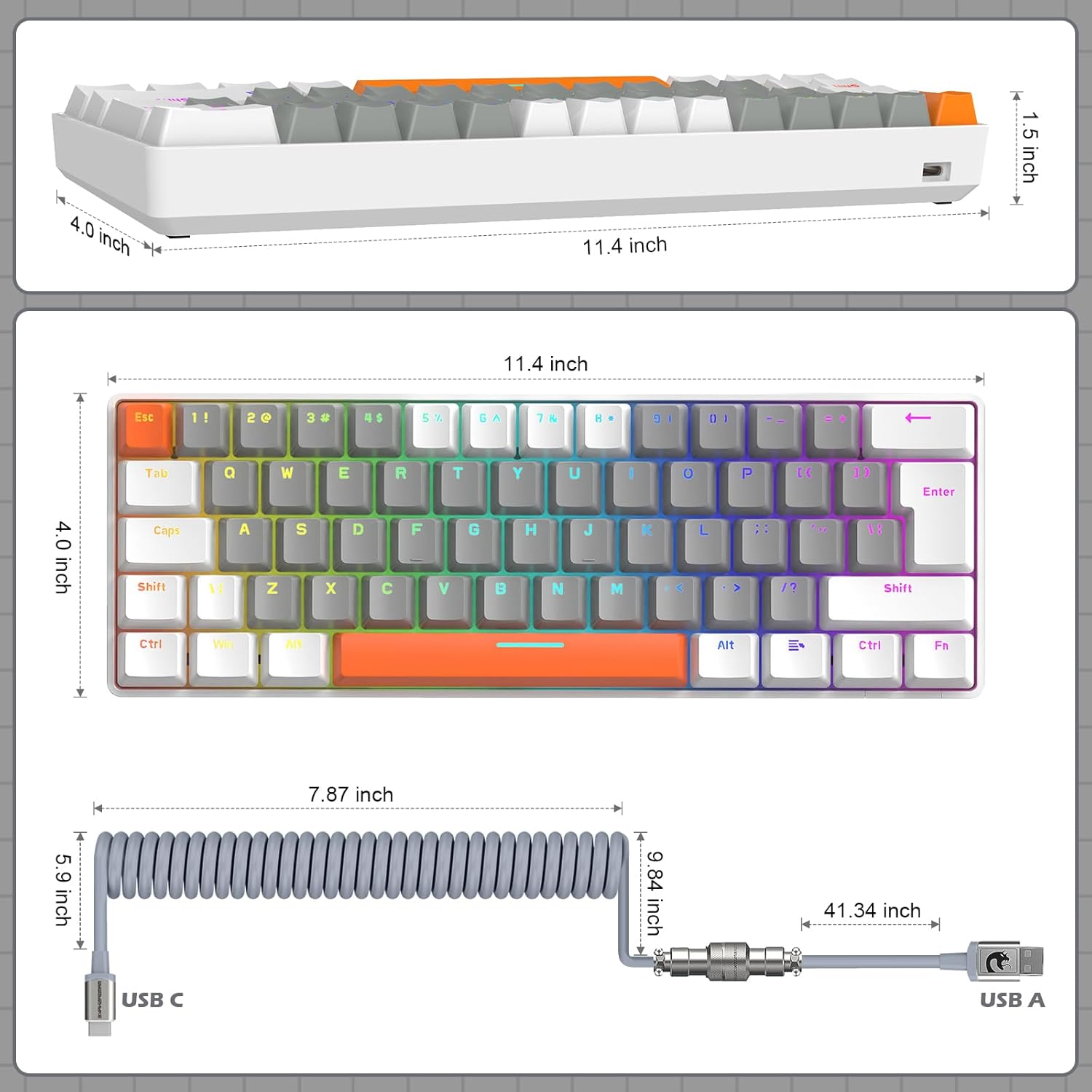
Image 7.1: Dimensions of the ZIYOULANG T60 keyboard and cable.
8. Warranty and Support
For warranty information and customer support, please refer to the documentation included with your purchase or contact the seller directly. Keep your proof of purchase for any warranty claims.
We are committed to providing high-quality products and excellent customer service. If you have any questions or require assistance, do not hesitate to reach out.