
BOMATA BS2000-001B
BOMATA Digital Scale User Manual
Model: BS2000-001B
1. Introduction
Thank you for choosing the BOMATA 0.01g/1kg Upgraded Small Digital Scale. This high-precision digital scale is designed for accurate measurements of small items, suitable for kitchen use, baking, jewelry, and more. It features a larger display, hold function, tare function, and supports 9 different units of measurement. This manual provides detailed instructions for setup, operation, maintenance, and troubleshooting to ensure optimal performance and longevity of your scale.

Image 1.1: BOMATA 0.01g/1kg Digital Scale with included clear cover, AAA batteries, and USB charging cable.
2. Setup
2.1 Unpacking and Initial Inspection
- Carefully remove all components from the packaging.
- Verify that all accessories are present: Digital Scale, USB cable (x1), AAA batteries (x2), Trays (x2), Waterproof sticker (x1).
- Inspect the scale for any visible damage. If damaged, do not use and contact customer support.
2.2 Power Supply
The BOMATA Digital Scale offers dual power supply options: a built-in rechargeable lithium battery or two AAA batteries.
- USB Rechargeable: Connect the provided USB cable to the scale's charging port and a compatible USB power source (e.g., computer, USB wall adapter). The display will indicate charging status.
- AAA Batteries: Open the battery compartment on the underside of the scale and insert the two included AAA batteries, ensuring correct polarity (+/-).

Image 2.1: The scale can be powered by the built-in rechargeable lithium battery via USB or by two AAA batteries.
2.3 Placement
Place the scale on a flat, stable, and level surface to ensure accurate readings. Avoid placing it near strong electromagnetic fields, vibrations, or extreme temperature changes.

Image 2.2: The compact size (5.5 x 4 x 0.7 inches) allows for easy placement and storage.
3. Operating Instructions
3.1 Power On/Off
- Press the Power button (
 ) to turn the scale on.
 - The display will show "0.00g" when ready for use.
- To turn off, press and hold the Power button for a few seconds, or the scale will auto-off after a period of inactivity to save power.
3.2 Unit Conversion
The scale supports 9 units of measurement.
- Press the MODE button (
 ) to cycle through the available units: g (grams), gn (grains), oz (ounces), ozt (troy ounces), dwt (pennyweights), ct (carats), lb (pounds), tl (taels), ml (milliliters - for water, 100ml=102.88g for normal milk).

Image 3.1: The scale offers high precision (0.01g resolution) and a variety of unit conversions for diverse weighing needs.
3.3 Tare Function
The Tare function allows you to subtract the weight of a container, so you only measure the contents.
- Place an empty container on the scale. The display will show its weight.
- Press the T/Z button (
 ). The display will reset to "0.00g".
 - Now, add your items to the container, and the display will show only the net weight of the items.

Image 3.2: Steps for using the Tare function to measure only the contents of a container.
3.4 HOLD Function
The HOLD function allows you to lock the displayed weight, which is useful when weighing large items that might obscure the display.
- Place the item on the scale.
- Press the HOLD button (
 ). The weight reading will be locked on the display.
 - You can now remove the item, and the weight will remain displayed until you press the HOLD button again or the scale auto-offs.
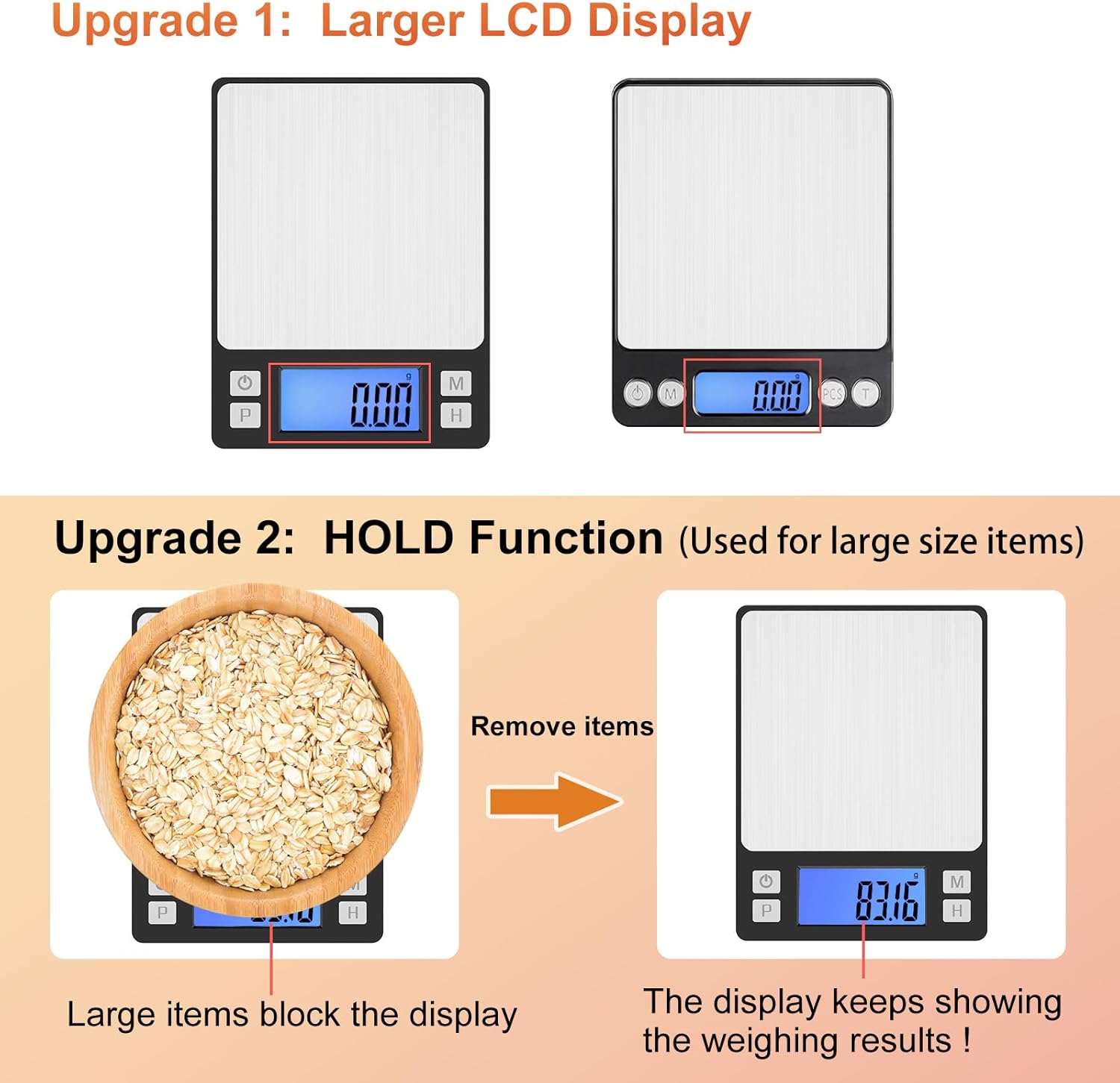
Image 3.3: The upgraded larger LCD display and HOLD function improve readability, especially for large items.
3.5 Counting Function (PCS)
This function allows you to count multiple small items of uniform weight.
- With the scale on and empty, press the PCS button (). The display will show a sample size (e.g., "25").
- Place the corresponding number of items (e.g., 25 pieces) on the scale.
- Press the PCS button again to confirm the sample. The display will now show "PCS" and the number of items.
- You can now add more items, and the scale will count them based on the sample weight.
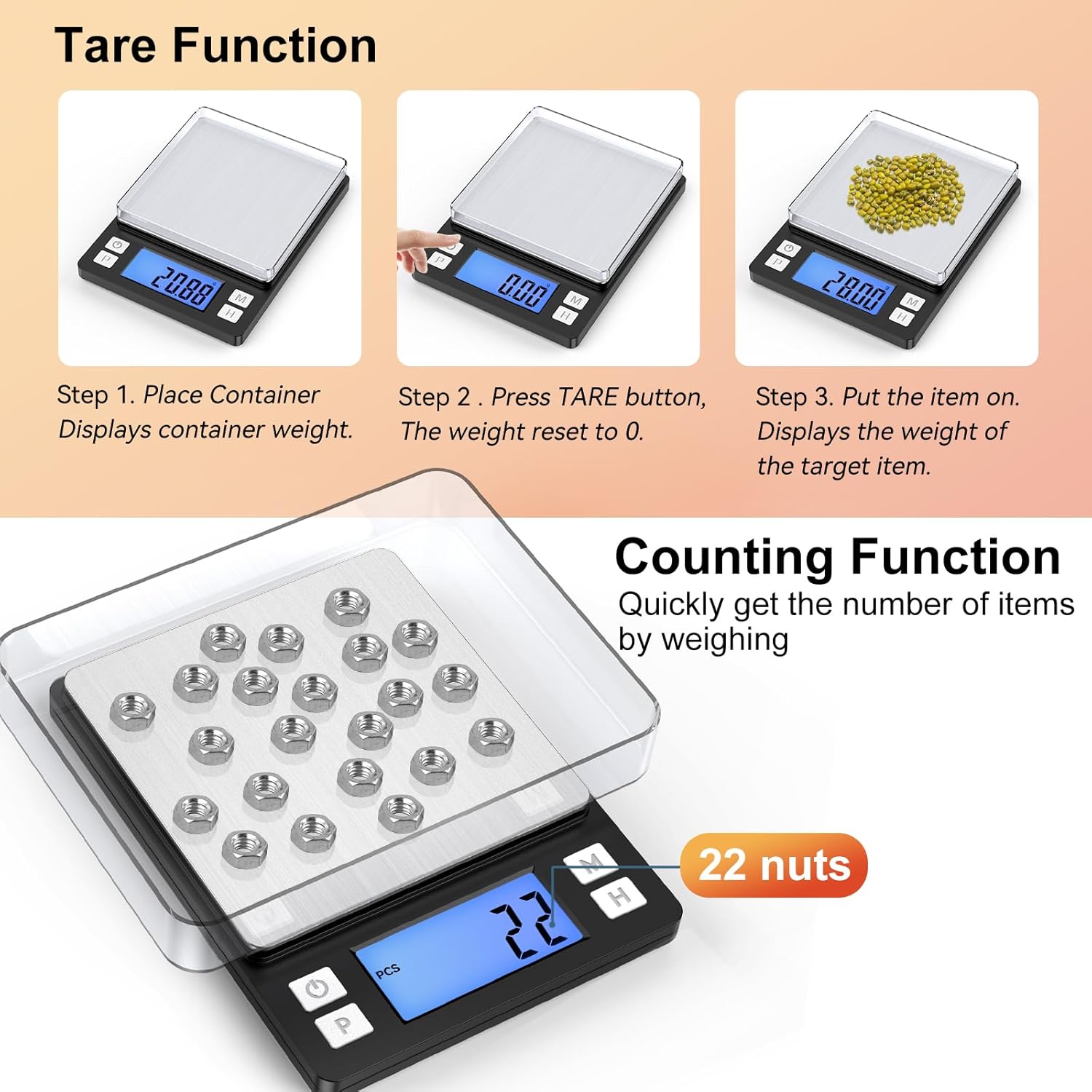
Image 3.4: The scale features both Tare and Counting functions for versatile use.
4. Maintenance and Care
- Cleaning: The stainless steel platform is durable and easy to clean. Wipe the scale with a soft, damp cloth. Do not use abrasive cleaners or immerse the scale in water.
- Waterproof Sticker: A waterproof sticker is included and can be pasted over the operation panel to enhance water resistance and protect the buttons from spills.
- Storage: Store the scale in a cool, dry place. The included trays can be used as protective covers when not in use.
- Battery Care: If using AAA batteries, remove them if the scale will not be used for an extended period to prevent leakage.

Image 4.1: Key features include two trays, a stainless steel platform, an optional waterproof sticker, high-quality ABS material, and a large LCD with backlight.
5. Troubleshooting
If you encounter issues with your scale, please refer to the following common problems and solutions:
| Problem | Possible Cause / Solution |
|---|---|
| Scale does not turn on. | Check battery installation (if using AAA) or charge the built-in lithium battery using the USB cable. |
| Inaccurate readings. | Ensure the scale is on a flat, stable surface. Avoid vibrations or drafts. Recalibrate the scale if necessary (refer to calibration instructions, typically requiring a known weight). |
| Display shows "EEEE". | Overload error. Remove items immediately to prevent damage. |
| Display shows "LO". | Low battery. Recharge the scale or replace the AAA batteries. |
| Weight fluctuates. | Ensure no air currents (e.g., from fans, open windows) are affecting the scale. Check for stable surface. |
| Difficulty removing the protective cover. | The cover is designed to fit snugly for protection. Apply gentle, even pressure when lifting. |
5.1 Calibration
While the scale comes pre-calibrated, recalibration may be needed over time or if readings become inconsistent. Calibration typically requires a precise 1kg weight.
- Turn the scale on.
- Press and hold the MODE button until "CAL" appears on the display.
- Press MODE again. The display will show the required calibration weight (e.g., "1000.00g").
- Place the exact calibration weight (e.g., 1kg) on the center of the platform.
- Wait for the display to show "PASS" and return to normal weighing mode. Calibration is complete.
6. Specifications
| Feature | Detail |
|---|---|
| Brand | BOMATA |
| Model Number | BS2000-001B |
| Capacity | 1000g (1kg) |
| Readout Accuracy | 0.01g |
| Display Type | LCD with Backlight |
| Units of Measurement | g, gn, oz, ozt, dwt, ct, lb, tl, ml |
| Material | Stainless Steel (Platform), High Quality ABS (Body) |
| Power Supply | Built-in Rechargeable Lithium Battery, 2x AAA Batteries (included) |
| Product Dimensions | 5.5 x 4 x 0.7 inches |
| Item Weight | 10.5 ounces |
| Functions | Tare, Hold, Counting (PCS), Auto-off |
7. Warranty and Support
BOMATA products are manufactured with high-quality materials and undergo strict quality control. For warranty information, please refer to the terms provided at the time of purchase or contact your retailer.
If you require technical support, have questions about your product, or need assistance with troubleshooting beyond what is covered in this manual, please contact BOMATA customer service through the retailer's platform or the official BOMATA website. Please have your model number (BS2000-001B) and purchase details ready when contacting support.
For more information and other products, visit the BOMATA Store.
Ask a question about this manual
Ask about setup, troubleshooting, compatibility, parts, safety, or missing instructions. Manuals+ will review the question and use this page’s manual context to help answer it.