
Brifit EU-WA138
Brifit Bluetooth Temperature and Humidity Sensor User Manual
Model: EU-WA138
1. Introduction and Overview
The Brifit Bluetooth Temperature and Humidity Sensor provides real-time monitoring of environmental conditions. Designed for various indoor applications, this device connects to your smartphone via Bluetooth, offering accurate data and historical records. It is suitable for use in bedrooms, greenhouses, incubators, and musical instrument rooms to maintain optimal conditions.


2. Product Features
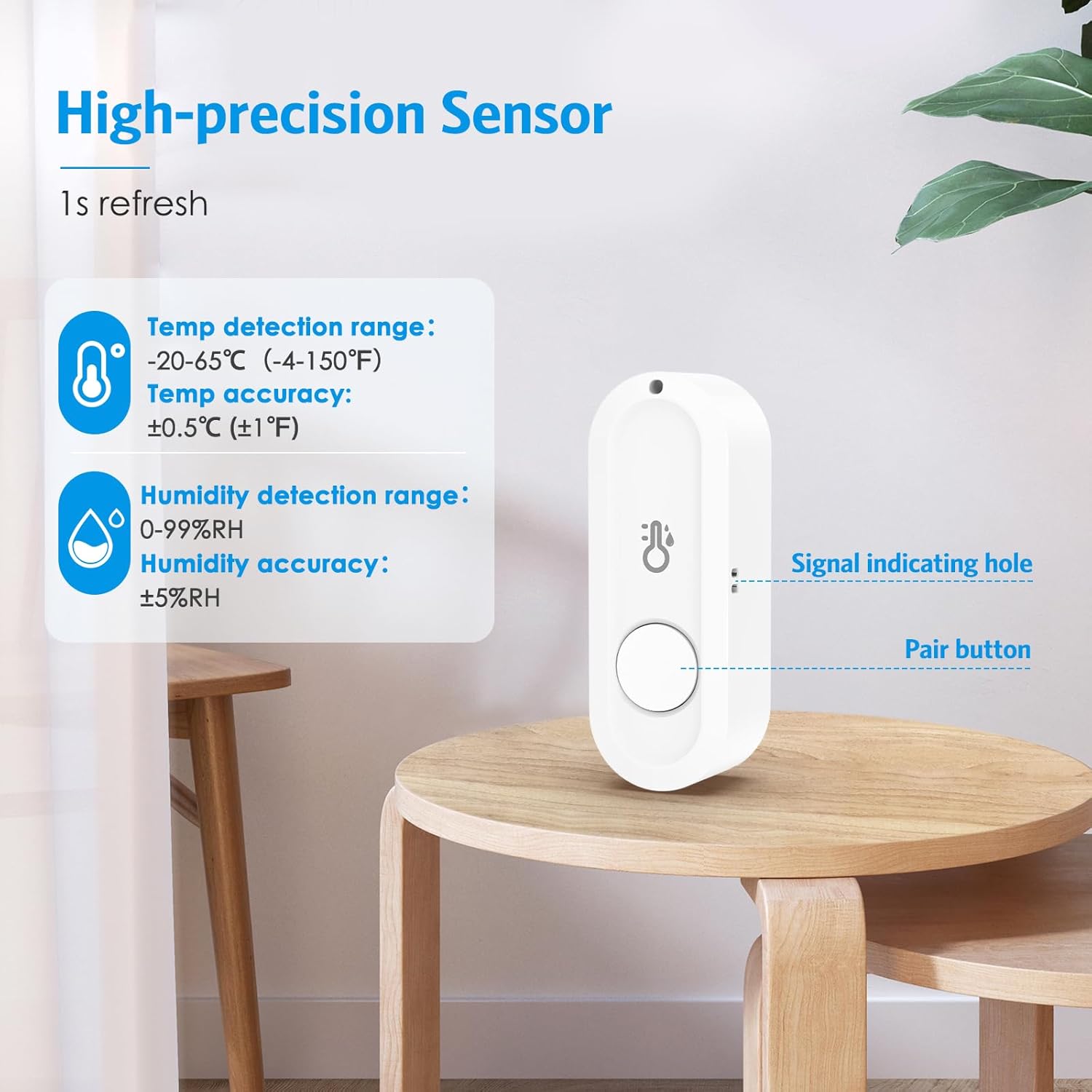
- Smart App Control: Monitor temperature and humidity data in real-time via Bluetooth connection using the dedicated smart application. The measurable temperature range is -20°C to 65°C (-4°F to 150°F), and the humidity range is 0% RH to 99% RH.
- Fast & High Precision: Equipped with a high-quality sensor, the device offers a temperature accuracy of ±0.5°C/±1°F and humidity accuracy of ±5% RH. Data updates occur once per second for enhanced precision. The system supports sharing sensor data with family members and allows a single mobile phone to manage multiple wireless temperature sensors.
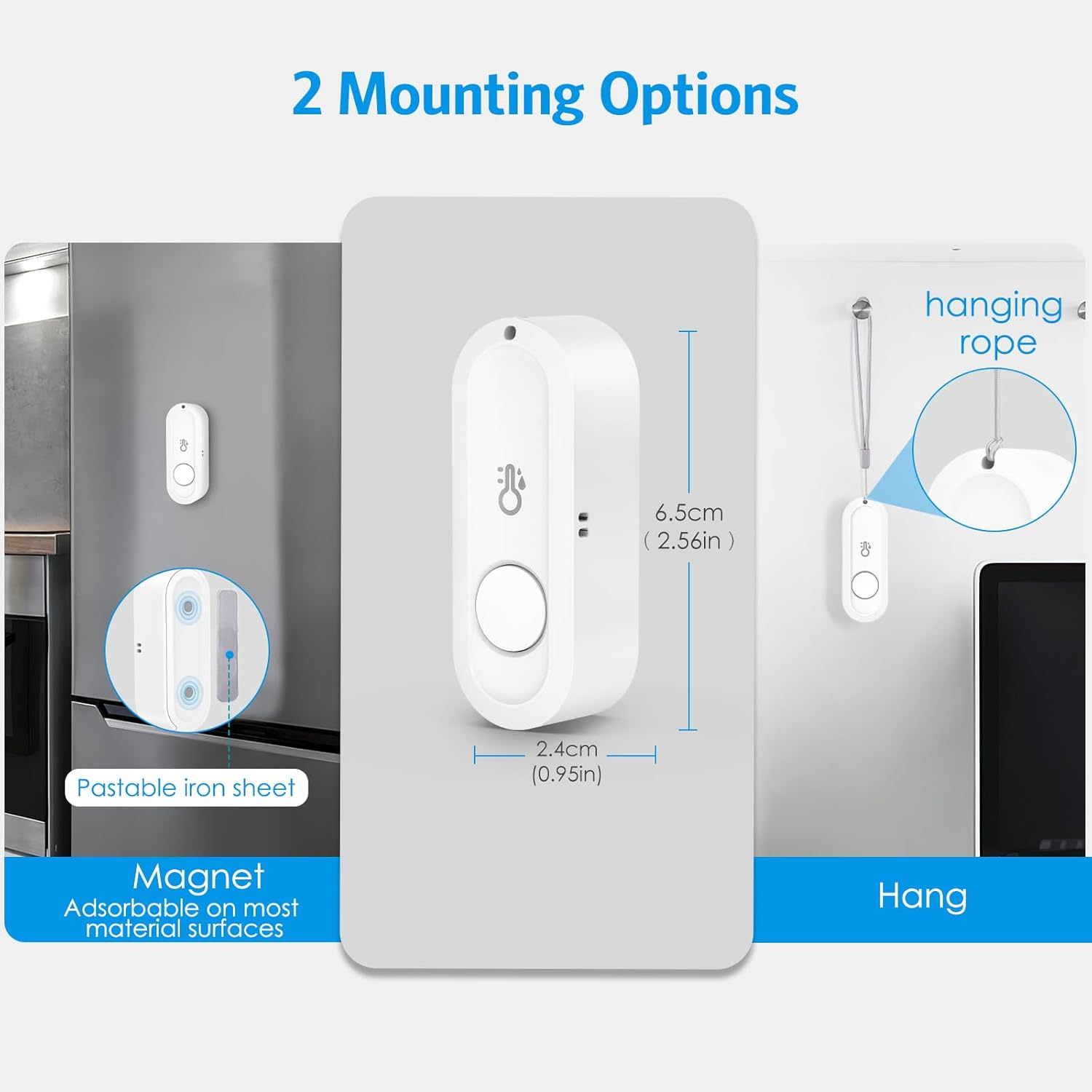
- Mini & Portable Design: The wireless Bluetooth thermometer features a compact design, optimizing space and convenience. It includes a lanyard for easy attachment to various objects. The device also has a magnetic backing, and an adhesive magnetic sheet is provided for placement on non-magnetic surfaces.

3. Setup
- Unboxing: Carefully remove the sensor(s) and any accessories (lanyard, adhesive magnetic sheets) from the packaging.
- Battery Installation: Each sensor requires one AAA battery (not included). Open the battery compartment on the back of the device and insert the battery, ensuring correct polarity.
- App Download: Download the 'Sensor Blue' application from your smartphone's app store (available for iOS and Android).
- Pairing:
- Ensure Bluetooth is enabled on your smartphone.
- Open the 'Sensor Blue' application.
- If the app does not automatically detect the sensors, press and hold the central button on the sensor until a red LED flashes. The app should then discover the device for pairing.
- Placement: Position the sensor in your desired location. You can use the integrated magnet to attach it to metallic surfaces, or use the provided adhesive magnetic sheets for non-magnetic surfaces. Alternatively, use the lanyard to hang the sensor.
4. Operating Instructions
4.1 Real-time Monitoring
Once paired, the 'Sensor Blue' app will display real-time temperature and humidity readings from your sensor(s). The data refreshes approximately once per second.
4.2 Data Logging and Export
The app allows for professional data recording and analysis:
- Recording Intervals: Customize data logging intervals from 0 to 60 minutes.
- Recording Duration: Select a recording duration of up to 600 days.
- Data Export: Export historical records in batches as CSV files for further analysis.
Note: After setting the recording parameters, you must manually click 'Start' within the app for data logging to begin.


4.3 Alerts and Calibration
The app allows you to set custom temperature and humidity ranges. If the readings exceed or fall below these predefined thresholds, you will receive instant notifications on your smartphone. The app also supports calibration to fine-tune the sensor for more accurate readings.

5. Maintenance
- Battery Replacement: When the battery level is low, replace the AAA battery in the sensor. Ensure the device is powered off before opening the battery compartment.
- Cleaning: Use a soft, dry cloth to clean the exterior of the sensor. Do not use liquid cleaners or abrasive materials.
- Storage: Store the sensor in a cool, dry place when not in use for extended periods. Remove the battery if storing for several months.
- Water Resistance: The product is NOT waterproof. Do not place the Bluetooth thermometer in a refrigerator or a container filled with water, as this will damage the device.
6. Troubleshooting
- Connection Issues: The effective Bluetooth range is approximately 50 meters in open environments. Physical obstacles (walls, furniture) can significantly reduce this distance or prevent a connection. Ensure your smartphone is within range and there are no major obstructions.
- Data Not Recording: After configuring recording settings in the app, you must explicitly click the 'Start' button to initiate data logging. The sensor has a limited data storage capacity. Once full, it retains recorded data until you transfer it to your phone and manually start a new recording session.
- App Disconnection: To conserve battery life, the app may enter a background operating mode when your phone screen is off, locked, or when other applications are in use, leading to a temporary disconnection from the thermo-hygrometer. Reconnecting typically takes a few seconds when you reopen the app.
- Inaccurate Readings: If you suspect inaccurate readings, use the calibration feature within the 'Sensor Blue' app to reconfigure the sensor for more precise measurements.
7. Specifications
| Feature | Specification |
|---|---|
| Model Number | EU-WA138 |
| Dimensions | 7.5 x 7 x 3 cm |
| Weight | 60 grams |
| Temperature Range | -20°C to 65°C (-4°F to 150°F) |
| Temperature Accuracy | ±0.5°C (±1°F) |
| Humidity Range | 0% RH to 99% RH |
| Humidity Accuracy | ±5% RH |
| Power Source | 1 x AAA Battery (not included) |
| Connectivity | Bluetooth |
| Usage Environment | Indoor |
| Special Feature | Magnetic mounting, Lanyard attachment |
8. Warranty Information
Warranty information for this product is not explicitly specified in the provided documentation. Please refer to the retailer or manufacturer's official website for details regarding warranty coverage and terms.
9. Support Information
For technical support, product inquiries, or further assistance, please visit the Brifit official website or contact their customer service department. Contact details are typically available on the product packaging or the manufacturer's website.
Related documentsEU-WA138


Ask a question about this manual
Ask about setup, troubleshooting, compatibility, parts, safety, or missing instructions. Manuals+ will review the question and use this page’s manual context to help answer it.