
HARDELL A41-HDRT0012-01
HARDELL 12V Cordless Rotary Tool Instruction Manual
Model: A41-HDRT0012-01
Brand: HARDELL
1. Introduction
This manual provides essential information for the safe and effective operation, maintenance, and troubleshooting of your HARDELL 12V Cordless Rotary Tool. Please read this manual thoroughly before using the tool to ensure proper handling and to maximize its lifespan.
2. Safety Information
Always adhere to the following safety precautions to prevent injury or damage to the tool:
- Eye Protection: Always wear safety glasses or goggles to protect against flying debris.
- Hand Protection: Use appropriate gloves when handling accessories or materials.
- Work Area: Ensure your work area is well-lit and free from clutter. Keep children and bystanders away.
- Ventilation: Work in a well-ventilated area, especially when sanding or cutting materials that produce dust.
- Secure Workpiece: Always secure the workpiece firmly to prevent movement during operation.
- Proper Accessories: Use only accessories designed for rotary tools and ensure they are correctly installed.
- Avoid Overloading: Do not apply excessive pressure to the tool, as this can cause overheating or damage.
- Battery Safety: Use only the provided charger and battery. Do not expose the battery to extreme temperatures or moisture.
- Storage: Store the tool and accessories in a dry, secure place, out of reach of children.
3. Package Contents
Your HARDELL 12V Cordless Rotary Tool kit includes the following items:
- 1x HARDELL 12V Cordless Rotary Tool
- 1x Accessories Case
- 1x Black Tool Bag
- 94x Rotary Tool Accessories (including grinding stones, sanding pads, felt wheels, etc.)
- 1x Lithium Ion Battery (pre-installed)
- 1x Charging Cable (USB-C)

Figure 1: HARDELL 12V Cordless Rotary Tool and its comprehensive accessory kit.

Figure 2: Detailed view of the 94 accessories, categorized for various applications.
4. Product Overview
The HARDELL 12V Cordless Rotary Tool is a versatile, handheld device designed for precision tasks such as engraving, sanding, polishing, cutting, carving, and drilling. It features a powerful 12-volt motor and a rechargeable Lithium-Ion battery for cordless operation.
Key Features:
- Cordless Operation: Powered by a 12V Lithium-Ion battery for maximum portability.
- Variable Speed Control: 6 convenient speed settings ranging from 5,000 to 30,000 RPM, allowing for precise control across different materials and tasks.
- Compact and Lightweight: Weighing only 1.1 pounds and measuring 10 x 1.9 x 2.7 inches, it is designed for comfortable extended use with minimal vibration.
- Versatile Accessory Compatibility: Two collet sizes accommodate a wide range of bits and attachments for various applications.
- Battery Indicator: Integrated lights display the battery charge status.
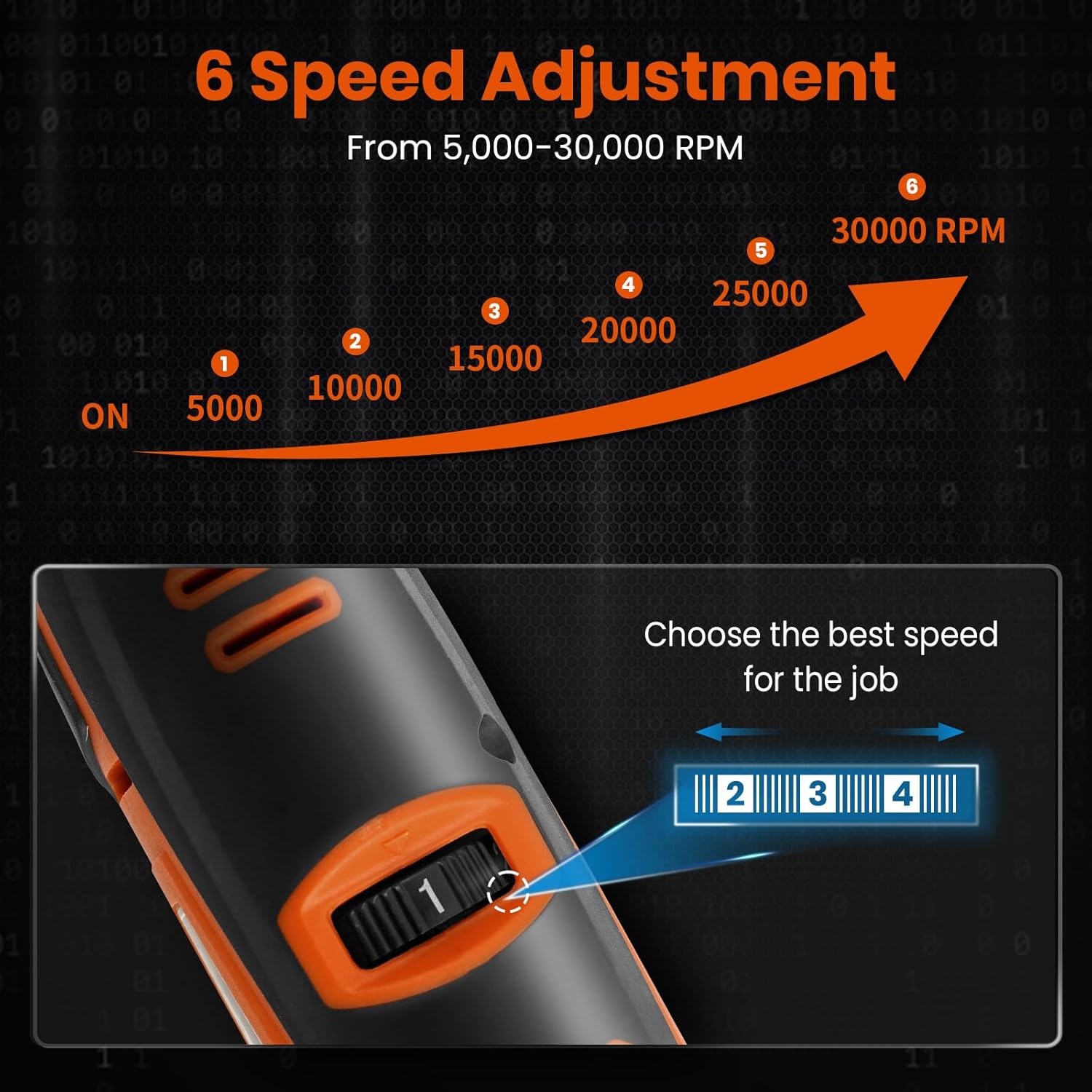
Figure 3: 6-Speed Adjustment Dial for optimal performance.
5. Setup
5.1 Charging the Battery
Before first use, fully charge the rotary tool's integrated Lithium-Ion battery. The tool comes with a USB-C charging port.
- Connect the provided USB-C charging cable to the tool's charging port.
- Connect the other end of the cable to a compatible USB power adapter (not included) or a USB port on a computer.
- The battery indicator lights will illuminate to show the charging progress.
- Red light: Battery charge is below 10%.
- Yellow light: Battery charge is between 10% and 30%.
- Green light: Battery charge is above 30%.
- All lights solid green: Battery is fully charged.
- Once fully charged, disconnect the charging cable.

Figure 4: Fast Charging and Battery Indicator.
5.2 Installing Accessories
The tool uses collets to secure various accessories. Two collet sizes are included to accommodate different shank diameters.
- Ensure the tool is turned OFF.
- Press and hold the shaft locking button located near the collet. This locks the shaft to prevent rotation.
- Unscrew the collet nut using the provided collet wrench.
- Insert the desired accessory into the collet, ensuring it is fully seated. If the accessory shank does not fit, select the appropriate collet size.
- While still holding the shaft locking button, tighten the collet nut firmly with the collet wrench until the accessory is secure. Do not overtighten.
- Release the shaft locking button.

Figure 5: Quick Accessory Disassembly and Installation.

Figure 6: Easy Accessory Replacement and Installation of Cut-Off Wheels/Sandpaper.
6. Operating Instructions
6.1 Turning On/Off and Speed Adjustment
- To turn the tool ON, slide the power switch to the 'ON' position.
- Adjust the desired speed using the 6-speed adjustment dial. Start with a lower speed and gradually increase as needed for the task and material.
- To turn the tool OFF, slide the power switch to the 'OFF' position.
6.2 Recommended Uses
The HARDELL rotary tool is suitable for a variety of applications:
- Engraving: Use engraving bits for detailed work on various surfaces.
- Sanding: Attach sanding drums or discs for smoothing and shaping.
- Polishing: Utilize felt wheels and polishing compounds for a high-gloss finish.
- Cutting: Employ cut-off wheels for precise cuts on light materials.
- Carving: Use carving bits for intricate designs on wood, plastic, or soft metals.
- Drilling: Insert appropriate drill bits for small holes.

Figure 7: Sanding a resin block with the rotary tool.

Figure 8: Drilling into wood with the rotary tool.
7. Maintenance
7.1 Cleaning
- Always disconnect the tool from any power source and remove any accessories before cleaning.
- Wipe the tool's exterior with a clean, damp cloth. Do not use harsh chemicals or abrasive cleaners.
- Use a soft brush or compressed air to clear dust and debris from the ventilation openings.
- Clean accessories after each use to maintain their effectiveness and prolong their lifespan.
7.2 Storage
- Store the rotary tool and its accessories in the provided accessories case and black tool bag.
- Keep the tool in a dry environment, away from direct sunlight, moisture, and extreme temperatures.
- For long-term storage, ensure the battery is partially charged (around 50%) to maintain battery health. Recharge every 3-6 months if not in use.
8. Troubleshooting
| Problem | Possible Cause | Solution |
|---|---|---|
| Tool does not turn on. | Battery is depleted. | Charge the battery fully. |
| Tool loses power during operation. | Low battery charge. | Recharge the battery. |
| Accessory is loose or wobbles. | Collet nut not tightened properly or incorrect collet size. | Ensure collet nut is tightened firmly. Use the correct collet size for the accessory shank. |
| Tool overheats. | Excessive pressure applied or prolonged use. | Reduce pressure. Allow the tool to cool down before resuming use. Ensure ventilation openings are clear. |
| Reduced performance. | Worn-out or dull accessory. | Replace the accessory. |
9. Specifications
| Feature | Detail |
|---|---|
| Brand | HARDELL |
| Model Number | A41-HDRT0012-01 |
| Voltage | 12 Volts |
| Power Source | Battery Powered (1 Lithium Ion battery included) |
| Minimum Rotational Speed | 5,000 RPM |
| Maximum Rotational Speed | 30,000 RPM |
| Item Weight | 1.1 Pounds |
| Product Dimensions (L x W x H) | 10 x 1.9 x 2.7 inches |
| Color | Orange-12v |
| Special Features | Cordless, Keyless Chuck, Multi Use, Variable Speed |
| Recommended Uses | Carving, Cutting, Drilling, Engraving, Grinding, Polishing, Sanding |
10. Warranty and Support
For warranty information or technical support, please contact HARDELL customer service through the retailer where the product was purchased. Keep your purchase receipt as proof of purchase.
You may also visit the official HARDELL store on Amazon for more information and contact options: HARDELL Amazon Store
Related documentsA41-HDRT0012-01


Ask a question about this manual
Ask about setup, troubleshooting, compatibility, parts, safety, or missing instructions. Manuals+ will review the question and use this page’s manual context to help answer it.