
MoVols AP-1200
MoVols AP-1200 Water Pump Instruction Manual
Model: AP-1200 | Brand: MoVols
Product Overview
The MoVols AP-1200 is an essential water pump accessory designed for ice making machines. It is specifically compatible with Watoor and HICON Commercial Ice Machine HZB-506080 models. This pump is engineered for direct replacement, ensuring easy installation and optimal performance. It is constructed from durable and environmentally friendly materials to ensure longevity and efficiency in your ice machine system.
- Direct Replacement: Designed for easy installation, directly replacing old parts.
- Durable Construction: Made from safe and environmentally friendly materials for long-lasting use.
- Enhanced Efficiency: Timely replacement of this component helps extend equipment service life and improve overall efficiency.
Product Components


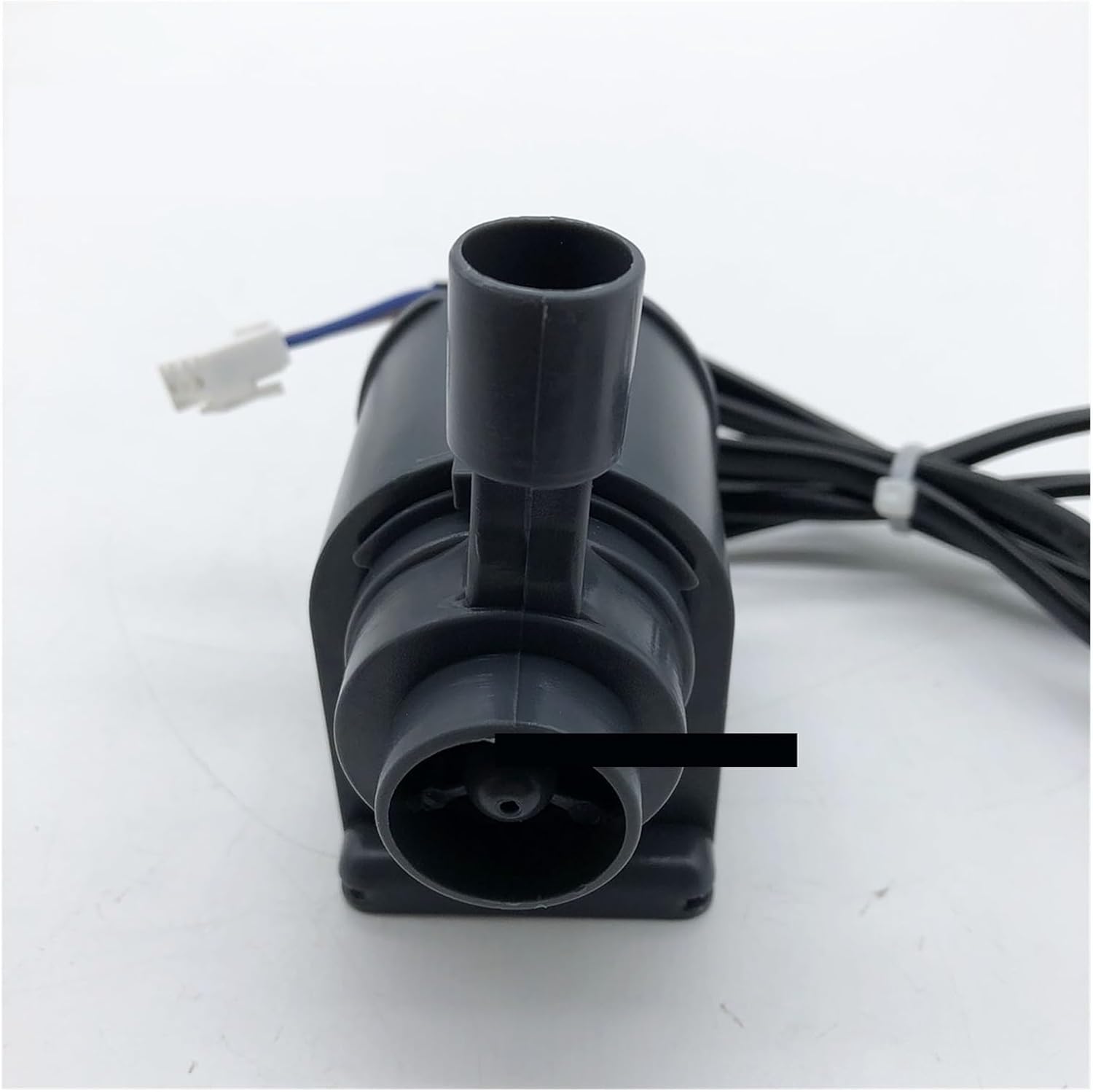


Specifications
| Attribute | Value |
|---|---|
| Motor Model | AP-1200 |
| Brand | MoVols |
| Frequency | 50Hz |
| Power | 8.5W |
| Voltage | 220V-240V |
| Lift (Max) | 0.65m |
| Flow (Max) | 600L/H |
| Material | Polypropylene (PP) |
| Item Weight | 50 Grams (1.76 ounces) |
| Package Dimensions | 1.18 x 0.79 x 0.39 inches |
| Power Source | Corded Electric |
Setup and Installation
The MoVols AP-1200 water pump is designed for straightforward replacement in compatible ice machines. Follow these general guidelines for installation:
- Safety First: Before beginning any installation or replacement, ensure the ice machine is completely disconnected from its power source to prevent electrical shock.
- Access the Pump: Locate the existing water pump within your ice machine. This may require removing access panels or covers. Refer to your ice machine's specific service manual for exact location and access procedures.
- Disconnect Old Pump: Carefully disconnect the electrical wiring and any water hoses or tubing connected to the old pump. Note the orientation and connection points for reinstallation.
- Remove Old Pump: Unmount the old pump from its position.
- Install New Pump: Position the MoVols AP-1200 pump in the same location and mount it securely.
- Connect Wiring: Reconnect the electrical wiring to the new pump. Ensure connections are secure and match the original configuration. The pump uses a standard electrical connector as shown in Figure 6.
- Connect Hoses: Reattach all water hoses and tubing to the appropriate inlet and outlet ports on the new pump. Ensure all connections are tight to prevent leaks.
- Test: Once installed, replace any access panels. Reconnect the ice machine to power and perform a test cycle to verify proper pump operation and check for any leaks.
Note: If you are unsure about any step, it is recommended to consult a qualified technician or refer to your ice machine's specific service manual.
Operating Principles
The MoVols AP-1200 water pump is a critical component in the ice production cycle of compatible ice machines. Its primary function is to circulate water within the machine, typically from a reservoir to the ice-making evaporator plate.
- Water Circulation: The pump draws water from the machine's water reservoir.
- Delivery to Evaporator: It then pumps this water upwards (lift of 0.65m) and through a distribution system to flow over the cold evaporator plate.
- Ice Formation: As water flows over the cold surface, it freezes, forming ice cubes or sheets. Excess water drains back into the reservoir for recirculation.
- Continuous Operation: The pump operates continuously during the ice-making cycle to ensure a steady flow of water for efficient ice production.
The pump's flow rate of 600L/H ensures adequate water supply for the ice-making process, contributing to the machine's overall efficiency.
Maintenance
Regular maintenance of the water pump is crucial for the longevity and efficient operation of your ice machine. While the AP-1200 is designed for durability, periodic checks can prevent issues.
- Power Disconnection: Always disconnect the ice machine from power before performing any maintenance.
- Inspect for Debris: Periodically inspect the pump's inlet (as shown in Figure 4 and 5) and filter area (Figure 2) for any accumulation of mineral deposits, scale, or other debris. Blockages can reduce flow and strain the pump motor.
- Cleaning: If debris is present, carefully remove the filter cover and clean the impeller and filter screen using a soft brush and mild, food-safe descaling solution if necessary. Rinse thoroughly with clean water.
- Check Connections: Ensure all electrical connections and water hose connections are secure and free from corrosion or leaks.
- Timely Replacement: As indicated by the manufacturer, replacing parts in a timely manner can significantly extend the service life of your equipment and maintain its efficiency. If the pump shows signs of reduced performance or unusual noise, consider replacement.
Troubleshooting
If your ice machine is experiencing issues related to water circulation, the AP-1200 water pump may be a factor. Here are some common problems and potential solutions:
| Problem | Possible Cause | Solution |
|---|---|---|
| Pump not running | No power; Loose electrical connection; Motor failure. | Check ice machine power supply. Verify pump's electrical connections are secure. If power is present and connections are good, the pump motor may need replacement. |
| Low water flow or no water flow | Clogged inlet/filter; Kinked or blocked hose; Impeller obstruction; Low water level in reservoir. | Inspect and clean the pump's inlet and filter. Check all water hoses for kinks or blockages. Ensure the ice machine's water reservoir has sufficient water. |
| Unusual noise from pump | Debris in impeller; Worn bearings; Pump running dry. | Disconnect power and inspect the impeller for any foreign objects. Ensure the pump is submerged in water if designed to be. If noise persists, the pump may be failing and require replacement. |
| Water leaks around pump | Loose hose connections; Cracked housing; Damaged seals. | Tighten all hose clamps and connections. Inspect the pump housing for any visible cracks. If seals are damaged, the pump may need replacement. |
If troubleshooting steps do not resolve the issue, it is recommended to contact customer support or a qualified technician.
Customer Support and Warranty
For any questions, technical assistance, or support regarding your MoVols AP-1200 Water Pump, please contact our professional after-sales service team. We aim to reply to inquiries as soon as possible, typically within 24 hours.
Return Policy: This product is subject to a 30-day refund/replacement return policy from the date of purchase. Please refer to your purchase documentation for specific terms and conditions.
While specific warranty details are not provided in this manual, our commitment is to ensure your satisfaction with our products. For any concerns, please reach out to us.
Ask a question about this manual
Ask about setup, troubleshooting, compatibility, parts, safety, or missing instructions. Manuals+ will review the question and use this page’s manual context to help answer it.