
CYBORIS 165-MG-SJ-DE-JZG-0118-A-222
CYBORIS Retro Bluetooth Speaker User Manual
Model: 165-MG-SJ-DE-JZG-0118-A-222
1. Introduction
The CYBORIS Retro Bluetooth Speaker combines vintage aesthetics with modern audio technology. This device features a natural wood grain design, dual 20W speakers for stereo sound, and multiple playback options including Bluetooth 5.1, FM radio, U disk, TF card, and AUX input. It is designed for both high-quality audio playback and as a decorative item for home or office.
2. Package Contents
Please check the box for the following items:
- Speaker body
- User Manual
- AUX cable (1x)
- Type-C charging cable (1x)
3. Product Overview
Familiarize yourself with the speaker's components and controls.

Front view of the CYBORIS Retro Bluetooth Speaker, showcasing its vintage design and speaker grille.

Detailed view of the speaker's controls and ports, including the power switch, rotary tuner, charging port, U disk socket, TF card socket, AUX audio jack, mode switch, play/pause button, and track/volume controls.
Controls and Ports:
- Power Switch / Light Switch: Turns the speaker on/off and controls the decorative lights.
- Rotary Dial: Used to search for FM radio stations.
- Charge Port (Type-C): For connecting the charging cable.
- U Disk Socket: For playing audio from a USB flash drive.
- TF Card Socket: For playing audio from a TF (MicroSD) card.
- AUX Audio Cable Jack: For connecting external audio devices via AUX cable.
- Mode Switching / TWS Interconnection: Cycles through input modes (Bluetooth, FM, AUX, U Disk, TF Card) and initiates True Wireless Stereo pairing.
- Play/Pause / Answer/Hang Up: Controls media playback and phone calls.
- Previous Song / Decrease Volume: Short press for previous track, long press to decrease volume.
- Next Song / Increase Volume: Short press for next track, long press to increase volume.
4. Setup
4.1 Charging the Speaker
Before first use, fully charge the speaker.
- Connect the provided Type-C charging cable to the speaker's charge port.
- Connect the other end of the cable to a USB power adapter (not included) or a computer's USB port.
- The charging indicator light will illuminate. Once fully charged, the light may change color or turn off.
Note: The speaker features intelligent shunt safe charging via its Type-C interface. A full charge provides approximately 10 hours of continuous playback at 50% volume.

Rear view of the speaker showing the Type-C charging port and other input options.
4.2 Powering On/Off
To power on the speaker, press and hold the Power Switch for approximately 1 second until you hear an audible prompt. To power off, press and hold the Power Switch again.
5. Operating Instructions
5.1 Bluetooth Mode
- Power on the speaker. It will automatically enter Bluetooth pairing mode (indicated by a flashing light or audible prompt).
- On your device (smartphone, tablet, laptop), enable Bluetooth and search for available devices.
- Select "CYBORIS Speaker" (or similar name) from the list to pair.
- Once paired, you will hear a confirmation sound, and the indicator light will become solid.
- You can now play audio from your device through the speaker.
Note: The Bluetooth 5.1 connection offers a stable signal up to 18 meters.

Icon representing Wireless 5.1 Bluetooth connectivity.
5.2 FM Radio Mode
- Power on the speaker. Press the "Mode" button until you hear the FM radio prompt.
- Extend the telescopic antenna for better reception.
- Rotate the large rotary dial on the front to manually search for FM radio stations.
Tip: For optimal FM reception, adjust the antenna position.
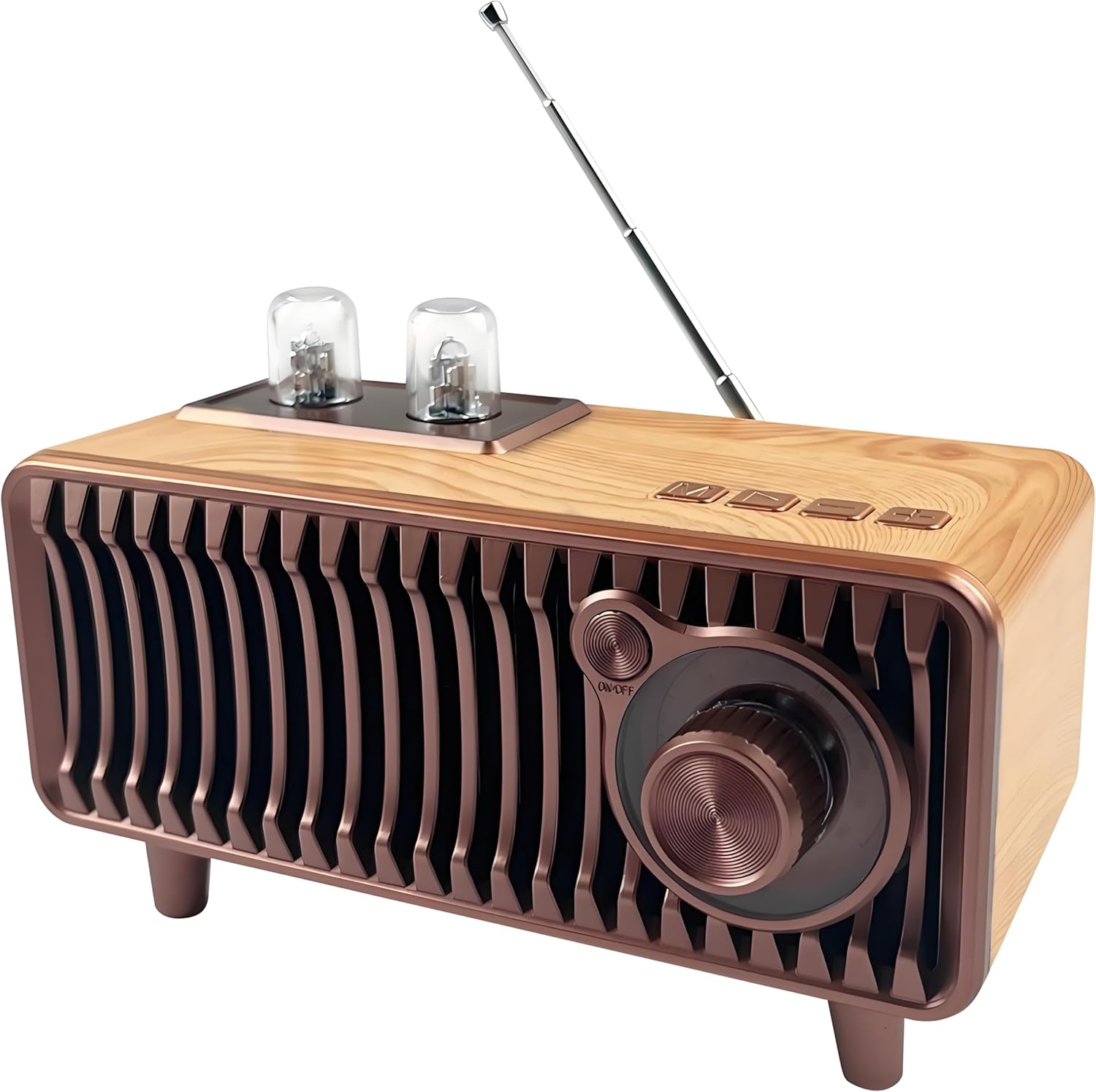
The speaker with its FM radio antenna extended, highlighting the rotary tuning knob.
5.3 U Disk / TF Card / AUX Mode
The speaker supports playback from USB flash drives, TF (MicroSD) cards, and external devices via AUX cable.
- Insert your U disk into the U Disk socket or your TF card into the TF Card socket.
- Alternatively, connect an external audio device (e.g., MP3 player, phone) to the AUX Audio Cable Jack using the provided AUX cable.
- Press the "Mode" button to cycle through the input sources until the desired mode (U Disk, TF Card, or AUX) is selected.
- Playback will begin automatically or can be controlled using the Play/Pause and track buttons.

Image illustrating the speaker's multiple playback modes: U Disk, TF Card, and AUX wired connection.
5.4 Volume and Track Control
- Increase Volume: Long press the "Next Song" button.
- Decrease Volume: Long press the "Previous Song" button.
- Next Track: Short press the "Next Song" button.
- Previous Track: Short press the "Previous Song" button.
- Play/Pause: Short press the "Play/Pause" button.
5.5 Decorative Lights
The speaker features colorful decorative lights that can pulse with music. To turn these lights off or on, short press the Power Switch.

Close-up of the speaker's top, showing the decorative lights illuminated in blue.
6. Maintenance
- Keep the speaker away from water and excessive moisture. This product is not water resistant.
- Clean the speaker with a soft, dry cloth. Do not use abrasive cleaners or solvents.
- Avoid exposing the speaker to extreme temperatures or direct sunlight for prolonged periods.
- Store the speaker in a cool, dry place when not in use.
7. Troubleshooting
| Problem | Possible Cause | Solution |
|---|---|---|
| Speaker does not power on. | Battery is depleted. | Charge the speaker fully using the provided Type-C cable. |
| No sound from speaker. | Volume is too low; incorrect mode selected; device not paired (Bluetooth). | Increase volume; press "Mode" button to select correct input; re-pair Bluetooth device. |
| Poor FM radio reception. | Antenna not extended or poor signal area. | Fully extend the telescopic antenna and try repositioning the speaker. |
| Bluetooth device cannot connect. | Speaker not in pairing mode; device too far; interference. | Ensure speaker is in Bluetooth mode and pairing; move device closer; restart both devices. |
8. Specifications
| Feature | Detail |
|---|---|
| Brand | CYBORIS |
| Model Number | 165-MG-SJ-DE-JZG-0118-A-222 |
| Connectivity Technology | Bluetooth 5.1 |
| Special Feature | Vintage Rotary FM Radio |
| Speaker Maximum Output Power | 20 Watts |
| Audio Output Mode | Stereo |
| Product Dimensions (L x W x H) | 7" x 3.8" x 3.9" (17.8cm x 9.7cm x 9.9cm) |
| Item Weight | 0.69 Kilograms (1.52 lbs) |
| Power Source | Battery Powered (1 Lithium Polymer battery included) |
| Battery Life | Approx. 10 hours at 50% volume |
| Supported Media | Bluetooth, FM Radio, U Disk, TF Card, AUX |
| Enclosure Material | Walnut Wood |
| Water Resistance Level | Not Water Resistant |
9. Warranty & Support
9.1 Warranty Information
This CYBORIS product comes with a 1 Year Warranty from the date of purchase. This warranty covers manufacturing defects. It does not cover damage caused by misuse, accidents, unauthorized modifications, or normal wear and tear. Please retain your proof of purchase for warranty claims.
9.2 Customer Support
For technical assistance, troubleshooting, or warranty inquiries, please contact CYBORIS customer support through the retailer where the product was purchased.
Ask a question about this manual
Ask about setup, troubleshooting, compatibility, parts, safety, or missing instructions. Manuals+ will review the question and use this page’s manual context to help answer it.