
Ortis KJ-022
Ortis Smart Pool Timer (Model KJ-022) Instruction Manual
Efficient Automation for Your Pool and Landscape Equipment
Introduction
Thank you for choosing the Ortis Smart Pool Timer. This device is designed to simplify the management of your pool equipment, such as pumps and filters, as well as landscape lighting, by providing automated timing cycles. Please read this manual thoroughly before installation and operation to ensure safe and optimal performance.

Ortis Swimming Pool Timer Switch for automated control.
Important Safety Information
- WARNING: Connect a maximum of 2 appliances to the protector.
- Verify that the wall outlet and appliance plug are in good condition before use.
- Do not immerse the timer in water.
- Ensure the timer is installed in a location protected from direct heavy rain, or take measures to cover unused outlets.
- Always unplug the timer from the power source before cleaning or performing any maintenance.
- Keep out of reach of children.
Product Overview
The Ortis Smart Pool Timer features dual grounded outlets, a UL Listed plug, and intuitive one-button control for setting timing cycles. It is designed for durability and ease of use.

Detailed view of the Ortis Programmable Timer, highlighting the UL Listed Plug, Control Switch, 2 Grounded Outlets, and Mounting Hole.
- Dual Outlets: Allows simultaneous connection of two devices, such as a pump and a salt chlorine system. Total current output up to 15A.
- One-Button Control: Simplifies programming and manual ON/OFF operation.
- Timing Cycles: Selectable durations of 2H, 4H, 6H, 8H, 12H, and 24H.
- Power-Off Memory: Retains settings after a power interruption.
- Mounting Options: Can be mounted using a screw hole on the back or external screw tabs.
Setup
1. Physical Installation
The Ortis Smart Pool Timer offers two methods for installation:
- Keyhole Mounting: Use the keyhole slot on the back of the timer to hang it on a screw or hook.
- Screw Tab Mounting: Utilize the two external screw tabs for a more secure installation. Screws and wall anchors are typically included.

The timer can be installed using either the keyhole slot or the external screw tabs for secure placement.
Choose a location that is easily accessible, protected from direct weather exposure, and close to the power outlet and appliances you intend to control.
2. Power Connection
- Plug the timer's three-prong power cord into a standard 120V/15A 60Hz grounded wall outlet.
- Connect your pool pump, filter, landscape lights, or other compatible appliances into the two grounded outlets on the timer. Ensure the total current draw does not exceed 15A.

The Ortis timer allows simultaneous connection of a pump and a salt chlorine system, providing 15A max multiple device connection.
Operating Instructions
The Ortis Smart Pool Timer features a simple one-button interface for programming and manual control.
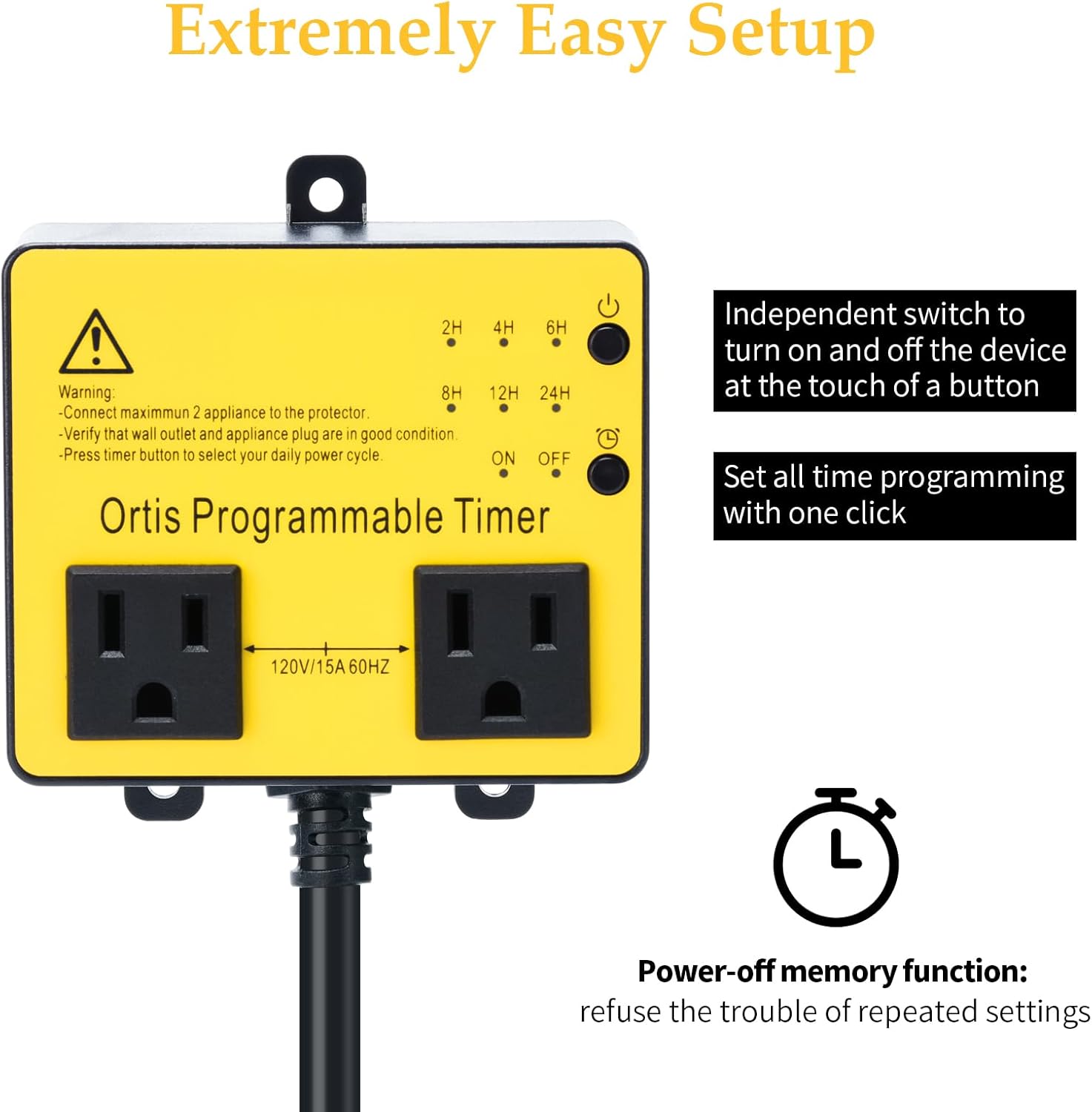
The timer features an independent ON/OFF switch and a timer button for setting programming with one click.
1. Setting the Timer Cycle
- Locate the timer button (often marked with a clock icon or "Timer").
- Press the timer button repeatedly to cycle through the available timing options: 2H, 4H, 6H, 8H, 12H, 24H.
- An indicator light (LED) next to the selected duration will illuminate, confirming your choice.
- Once a duration is selected, the timer will activate the connected appliances for that period. After the set time, it will turn off and then automatically turn back on 24 hours later for the same duration. For example, if you set it for 4H at 8:00 AM, it will run until 12:00 PM, then turn on again at 8:00 AM the next day.
The timer offers multiple timing cycles: 2H, 4H, 6H, 8H, 12H, and 24H, indicated by LED lights.
2. Manual ON/OFF Control
- Locate the ON/OFF button.
- Press this button to manually turn the connected appliances ON or OFF, overriding any active timer setting.
- Note: If you manually turn the timer OFF and then back ON, the previously set timing cycle will restart from the moment you turn it ON. This means the 24-hour cycle will reset based on the new ON time.
Maintenance
- Cleaning: Disconnect the timer from the power outlet before cleaning. Wipe the exterior with a soft, damp cloth. Do not use harsh chemicals or abrasive cleaners.
- Environmental Protection: While designed for outdoor use, it is recommended to protect the timer from direct and heavy rain. If an outlet is not in use, ensure it is covered to prevent water ingress, which could trip circuits.
- Inspection: Periodically inspect the power cord, plug, and outlets for any signs of damage or wear. Discontinue use if any damage is found and contact support.
Troubleshooting
| Problem | Possible Cause | Solution |
|---|---|---|
| Timer does not turn on/off at the set time. | Timer cycle was reset or not properly set. | Ensure the timer button was pressed to select the desired duration. Remember that manually turning the unit ON/OFF will reset the 24-hour cycle. |
| Connected appliance does not receive power. | Timer is OFF, power outage, or appliance issue. | Check if the timer is manually OFF. Verify the wall outlet has power. Check the appliance's power cord and functionality. |
| Timer resets after a power interruption. | This model has a power-off memory function, but a complete power loss might affect the exact timing of the 24-hour cycle. | Reprogram the timer after a power outage if precise timing is critical. The duration setting should be retained, but the start time of the 24-hour cycle might shift. |
| Circuit trips during rain. | Water ingress into unused outlets. | Ensure all unused outlets are properly covered or protected from rain. Consider relocating the timer to a more sheltered area. |
Specifications
| Feature | Detail |
|---|---|
| Brand | Ortis |
| Model Number | KJ-022 |
| Color | Yellow |
| Material | Plastic |
| Product Dimensions (D x W x H) | 2.3"D x 1.6"W x 2.3"H |
| Item Weight | 0.3 Pounds |
| Voltage/Current/Frequency | 120V/15A 60Hz |
| Number of Settings | 6 (2H, 4H, 6H, 8H, 12H, 24H) |

Dimensions of the Ortis Programmable Timer: 3.1 inches height, 3.8 inches width, 1.5 inches depth, with an 18.1-inch power cord length.
Warranty and Support
For warranty information or technical support, please refer to the product packaging or contact the manufacturer, FJKJ INC., directly. Keep your purchase receipt for warranty claims.
For further assistance, you may also contact the seller through the platform where the product was purchased.
Ask a question about this manual
Ask about setup, troubleshooting, compatibility, parts, safety, or missing instructions. Manuals+ will review the question and use this page’s manual context to help answer it.