1. Introduction
Welcome to the QCY H2 Pro Wireless Over-Ear Headphones user manual. These headphones offer a blend of advanced features and user-friendly design, providing a high-quality audio experience. Key features include Bluetooth 5.3 connectivity, 40mm drivers, 43dB hybrid Active Noise Cancellation, and an extended battery life of up to 70 hours.

Image 1.1: Front view of the QCY H2 Pro Wireless Over-Ear Headphones in black.
2. Package Contents
Verify that all items are present in your package:
- QCY H2 Pro Wireless Over-Ear Headphones
- USB-C Charging Cable
- 3.5mm Audio Cable
- User Manual (this document)
3. Setup
3.1 Charging the Headphones
Before first use, fully charge your QCY H2 Pro headphones. Connect the provided USB-C charging cable to the charging port on the headphones and the other end to a USB power source (e.g., computer, wall adapter). The indicator light will show charging status and turn off or change color when fully charged. A full charge takes approximately 1.5 to 2 hours and provides up to 70 hours of playback.

Image 3.1: Side view of the QCY H2 Pro headphones, highlighting the charging port and control buttons.
3.2 Powering On/Off
- Power On: Press and hold the Multi-function button (usually the power button) for approximately 3 seconds until the indicator light flashes.
- Power Off: Press and hold the Multi-function button for approximately 5 seconds until the indicator light turns off.
3.3 Bluetooth Pairing
- Ensure the headphones are powered off.
- Press and hold the Multi-function button for 5-7 seconds until the indicator light flashes red and blue alternately, indicating pairing mode.
- On your device (smartphone, tablet, computer), enable Bluetooth and search for new devices.
- Select "QCY H2 Pro" from the list of available devices.
- Once connected, the indicator light will flash blue slowly or turn off.
The QCY H2 Pro supports Bluetooth 5.3 for a stable connection up to 10 meters. It also features multipoint connection, allowing you to connect to two devices simultaneously.
4. Operating the Headphones
4.1 Basic Controls
The QCY H2 Pro headphones feature intuitive controls located on the earcups.
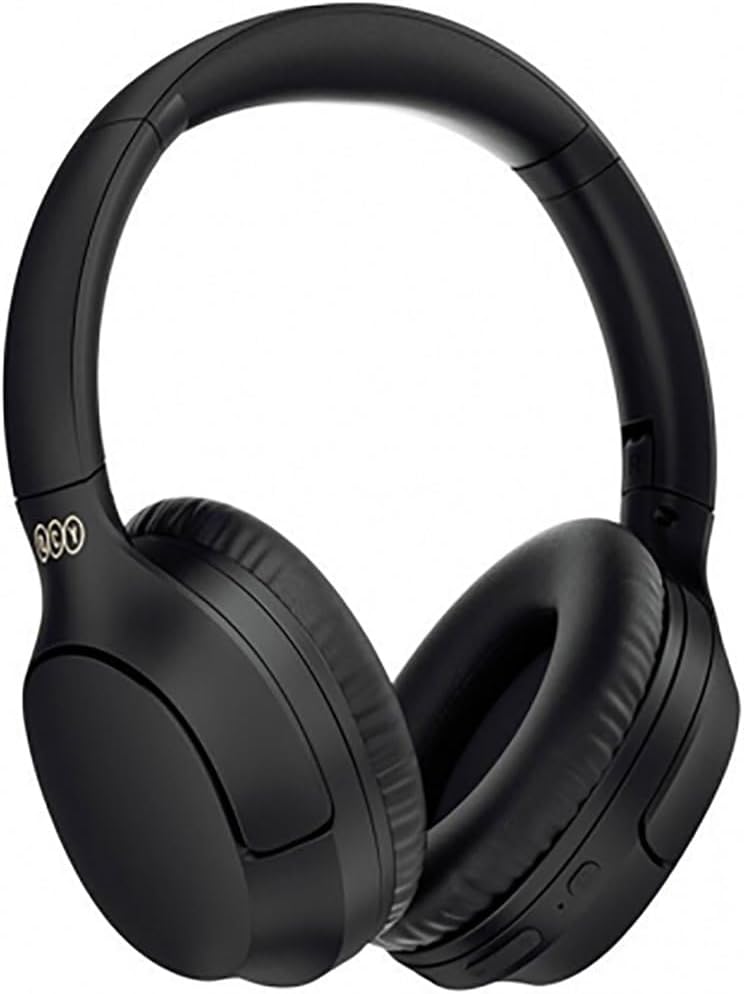
Image 4.1: Close-up of the right earcup of the QCY H2 Pro headphones, detailing the control buttons.
- Play/Pause: Single press the Multi-function button.
- Volume Up: Short press the '+' button.
- Volume Down: Short press the '-' button.
- Next Track: Long press the '+' button.
- Previous Track: Long press the '-' button.
- Answer/End Call: Single press the Multi-function button.
- Reject Call: Long press the Multi-function button.
- Voice Assistant: Triple press the Multi-function button.
4.2 Active Noise Cancellation (ANC)
The QCY H2 Pro features 43dB hybrid Active Noise Cancellation to reduce ambient noise. To activate or deactivate ANC, locate the dedicated ANC button (refer to product diagram for exact location) and press it. The indicator light will confirm ANC status.
4.3 Bass Mode
Enhance your audio experience with the Bass Mode, providing richer lows and improved sound quality. Activate Bass Mode with a single button control (refer to product diagram for exact button).
4.4 Gaming Mode (Low Latency)
For an optimized gaming experience, activate Gaming Mode to reduce audio latency to as low as 0.078 seconds. This ensures audio-video synchronization for flawless gameplay. This mode is typically activated by a specific button press combination (refer to product diagram or QCY app for exact method).
4.5 Wired Connection (3.5mm Audio Jack)
You can use the QCY H2 Pro headphones with a wired connection. Connect one end of the 3.5mm audio cable to the headphone's audio jack and the other end to your audio source. This mode is useful when the battery is depleted or for devices without Bluetooth connectivity.
5. Maintenance
5.1 Cleaning
- Use a soft, dry, lint-free cloth to clean the headphones.
- Do not use abrasive cleaners, solvents, or spray cleaners directly on the headphones.
- Gently wipe earcups and headband.
5.2 Storage
- Store the headphones in a cool, dry place away from direct sunlight and extreme temperatures.
- Avoid placing heavy objects on the headphones.
5.3 Battery Care
- To prolong battery life, avoid fully discharging the headphones frequently.
- Charge the headphones regularly, even if not in use for extended periods.
6. Troubleshooting
| Problem | Possible Cause | Solution |
|---|---|---|
| Headphones do not power on. | Low battery. | Charge the headphones fully. |
| Cannot pair with device. | Headphones not in pairing mode; Bluetooth off on device; device too far. | Ensure headphones are in pairing mode (flashing red/blue). Turn on Bluetooth on your device. Move device closer to headphones. Clear previous pairings on device and headphones. |
| No sound or low volume. | Volume too low; incorrect audio source; headphones not connected. | Increase volume on headphones and device. Check if headphones are properly connected via Bluetooth or 3.5mm cable. Select QCY H2 Pro as the audio output on your device. |
| ANC not working effectively. | ANC not activated; improper fit. | Ensure ANC is activated. Adjust headphones for a snug fit over your ears. |
| Intermittent connection. | Interference; device too far; obstacles. | Move closer to the paired device. Avoid environments with strong Wi-Fi or other Bluetooth signals. |
6.1 Factory Reset
If you experience persistent issues, a factory reset may resolve them. Consult the official QCY support resources or the QCY app for specific instructions on how to perform a factory reset for the H2 Pro model, as this procedure can vary.
7. Specifications
| Feature | Detail |
|---|---|
| Model Name | QCY H2 Pro |
| Model Number | QCYH2Pro-01 |
| Headphone Type | Over-Ear |
| Driver Size | 40mm |
| Bluetooth Version | 5.3 |
| Battery Life | Up to 70 hours |
| Charging Time | Approximately 1.5 - 2 hours |
| Connectivity | Bluetooth, 3.5mm Audio Jack |
| Active Noise Cancellation (ANC) | Yes (43dB hybrid) |
| Multipoint Connection | Yes |
| Low Latency Mode | Yes (0.078 seconds for gaming) |
| ENC Call Noise Cancelling | Yes |
| Product Dimensions | 10 x 1.27 x 5 cm |
| Weight | 220 g |
| Impedance | 600 Ohm |
| Manufacturer | QCY |
| Country of Origin | China |
8. Warranty and Support
For warranty information, technical support, or further assistance, please refer to the official QCY website or contact their customer service. Keep your proof of purchase for warranty claims.
You can visit the official QCY store for more information: QCY Official Store