
Kastar BA-4B-F570T-51
Kastar NP-F570T USB-C Battery 4-Pack Instruction Manual
Model: BA-4B-F570T-51
Introduction
Thank you for choosing the Kastar NP-F570T USB-C Battery 4-Pack. These high-capacity lithium-ion batteries are designed as reliable replacements for various camera and camcorder equipment, offering convenient USB-C direct charging. This manual provides essential information for the safe and effective use, maintenance, and troubleshooting of your new batteries.
Product Features
- Direct USB-C / TYPE-C fast charging capability.
- High Capacity: 2900mAh (21.5Wh) Lithium-Ion battery.
- Voltage: 7.4V.
- Built-in safety features: Over-charge, over-discharge, over-voltage, over-current, and over-heating protection circuit.
- UL1642 & CE safety standards compliant.
- Designed for extended run time and improved cycle life.
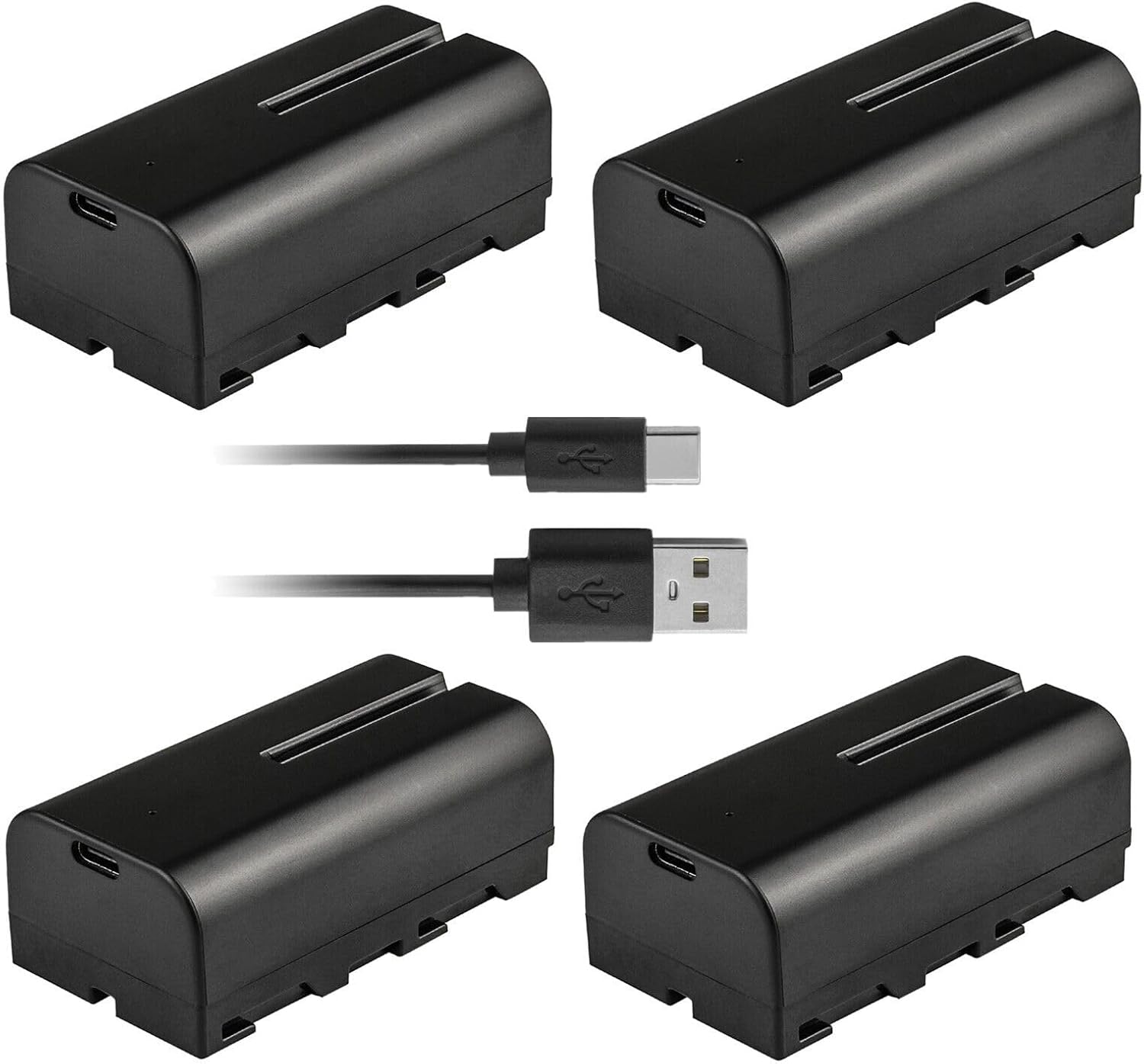
Image Description: This image displays the four Kastar NP-F570T batteries included in the pack, along with two USB-C to USB-A charging cables. Each battery is black with a rectangular shape, featuring a USB-C port on one end. The cables are black with standard USB-A connectors on one end and USB-C connectors on the other.
Setup and Charging
Before first use, it is recommended to fully charge the batteries. The Kastar NP-F570T batteries can be charged directly using a USB-C cable and a compatible USB-C power adapter (not included).
- Locate the USB-C port on the side of the battery.
- Insert the USB-C end of the charging cable into the battery's USB-C port.
- Connect the other end of the charging cable (USB-A or USB-C, depending on your cable) to a compatible USB power source (e.g., wall adapter, power bank, computer USB port).
- The battery will begin charging. Refer to your device's manual or the battery's indicator (if present) for charging status.
- Once fully charged, disconnect the battery from the power source.

Image Description: This close-up image shows a single Kastar NP-F570T battery from an angled perspective. The prominent feature is the USB-C charging port located on the front end of the battery, indicating its direct charging capability.
Operating Instructions
These batteries are designed as replacements for various camera and camcorder equipment that utilize NP-F type batteries. Ensure the battery is fully charged before inserting it into your device.
- Identify the battery compartment on your compatible device (e.g., camera, camcorder, LED light, monitor).
- Align the battery with the battery slot, ensuring the contacts match correctly.
- Gently slide the battery into the compartment until it clicks into place or is securely seated.
- Close the battery compartment door, if applicable.
- Power on your device.
To remove the battery, follow the reverse steps, typically by pressing a release latch or button and sliding the battery out.
Maintenance and Storage
- Store batteries in a cool, dry place away from direct sunlight and extreme temperatures.
- Avoid fully discharging the batteries for extended periods. For long-term storage, charge them to approximately 50-70% capacity.
- Clean battery contacts periodically with a dry, soft cloth to ensure good connection.
- Do not expose batteries to water or excessive moisture.
- Do not disassemble, crush, or puncture the batteries.
- Dispose of depleted or damaged batteries according to local regulations for lithium-ion batteries.

Image Description: This image shows the label on a Kastar NP-F570T battery. The label displays the brand "Kastar", model "NP-F550T/570T", voltage "7.4V", capacity "2900mAh 21.5Wh", and "Li-ion Battery Pack". It also includes caution symbols and text warnings such as "Do not incinerate. Do not disassemble. Do not short-circuit. Dispose of properly. Do not expose to high temperatures 140°F/60°C."
Troubleshooting
| Problem | Possible Cause | Solution |
|---|---|---|
| Battery not charging via USB-C. | Faulty cable or adapter; dirty USB-C port; battery fully charged. | Try a different USB-C cable and power adapter. Clean the USB-C port gently. Check if the battery is already fully charged. |
| Device not powering on with battery. | Battery not fully charged; incorrect insertion; battery contacts are dirty; battery is incompatible. | Ensure battery is fully charged. Re-insert the battery correctly, ensuring contacts align. Clean battery contacts. Verify device compatibility (see Compatibility section). |
| Battery does not fit my device. | Device is not compatible with NP-F570T batteries or specific dimensions. | Refer to the "Compatibility" section and your device's manual to confirm that your equipment is designed to use NP-F570T type batteries. Physical fit issues may indicate incompatibility. |
| Short battery life. | Battery not fully charged; high power consumption of device; battery degradation. | Ensure battery is fully charged before use. Reduce power consumption settings on your device if possible. Consider replacing the battery if it's old or frequently used. |
Specifications
- Model: BA-4B-F570T-51
- Battery Type: Lithium-Ion
- Battery Voltage: 7.4V
- Battery Capacity: 2900mAh (21.5Wh)
- Product Dimensions: 3.02 x 1.64 x 2.78 inches
- Item Weight (per battery): Approximately 1 pound (total for 4-pack)
- Manufacturer: Kastar
- Country of Origin: China
Compatibility
The Kastar NP-F570T batteries are designed to be compatible with a range of camera and camcorder equipment that use NP-F series batteries. Please verify your device's battery requirements before purchase and use.
Known Compatible Models:
- GVM: GT-60D, GT-80WD, GT-120WD, GT-J80D, GT-J120D, SLIDER-80, SLIDER-120, GR-80QD, GR-120QD, GVM-1.5D, GVM-2D, WS-2D-80, GVM-3D, 3D WY-2V
- edelkrone: SliderONE v2, Slide Module v3 Control Attachment, Target Module
- Konova: P1, P180CM, P160CM, K-Series S2
- NEEWERR: Wireless Electronic Video Slider (39.4"), VS-80CC, ER1-80/ER1-100
- Acebil: X-Motor
- YC Onionn: Hot Dog Bun, Chocolate Pro Cheese, CHIPS 3.0 Motorized Slide Dolly
- IFOOTAGEE: Shark Slider Mini, Nano
- CAME-TV: Motorized Parallax Slider
- ZEAPON: Motorized Micro 2, Micro 3
Note: This list is not exhaustive. Always check your device's manual for specific battery requirements.
Safety Information
Please read and follow these safety precautions to prevent injury or damage to the batteries and connected devices:
- Do not incinerate or expose batteries to fire.
- Do not disassemble or modify the battery pack.
- Do not short-circuit the battery terminals.
- Avoid exposing batteries to temperatures above 140°F (60°C).
- Keep batteries out of reach of children and pets.
- If the battery leaks, swells, or emits an unusual odor, discontinue use immediately and dispose of it properly.
- Use only compatible charging cables and adapters.
Warranty and Support
Kastar products are designed for quality and reliability. The product packaging indicates an 18-month warranty. For specific warranty details or technical support, please visit the official Kastar website or contact their customer service. Keep your purchase receipt as proof of purchase.

Image Description: This image shows the white retail packaging box for Kastar batteries. The box features the Kastar logo, "HIGH CAPACITY Battery for Camera & Camcorder" text, and graphics of a camera, "NO MEMORY EFFECT", "100% Compatible", "HIGH STABILITY", and an "18 Months warranty" icon. There's also a section on the side titled "Help us Improve!" with a message to the customer.
For further assistance, you may visit the Kastar Store on Amazon: Kastar Store
Related documentsBA-4B-F570T-51

Ask a question about this manual
Ask about setup, troubleshooting, compatibility, parts, safety, or missing instructions. Manuals+ will review the question and use this page’s manual context to help answer it.