
UPBRIGHT Belkin G1S0002 19V Power Supply
UpBright 19V AC/DC Adapter User Manual
Model: Belkin G1S0002 19V Power Supply
Compatible with Belkin G1S0002, G1S0001, G1S0002tt-BLK Soundform Elite Hi-Fi Smart Speaker + Wireless Charger
1. Product Overview
The UpBright 19V AC/DC Adapter is designed to provide stable and efficient power to compatible devices, primarily Belkin Soundform Elite Hi-Fi Smart Speakers. This adapter converts alternating current (AC) from a wall outlet into direct current (DC) required by your device, ensuring reliable operation.

This image displays the UpBright 19V AC/DC adapter unit along with its detachable power input cable and the DC output cable with a barrel connector.
2. Setup Instructions
Follow these steps to properly set up your UpBright AC/DC Adapter:
- Unpack the Adapter: Carefully remove the adapter and all cables from the packaging.
- Connect the AC Power Cord: If detachable, connect the AC power cord (the one with the wall plug) firmly into the adapter's input port.
- Connect to Device: Insert the DC output barrel connector of the adapter into the power input port of your Belkin Soundform Elite speaker or other compatible device. Ensure a secure fit.
- Plug into Power Outlet: Plug the AC power cord into a standard wall power outlet (100-240VAC, 50/60Hz).
- Verify Power: Once connected, your device should receive power. Refer to your device's manual for specific power indicators.

The image shows the UpBright AC adapter connected to a standard wall power outlet, indicating the power input connection.

This image illustrates the UpBright AC adapter's compatibility with two Belkin Soundform Elite Hi-Fi Smart Speakers, one in black and one in white, demonstrating its intended use.
3. Operating Guidelines
The UpBright 19V AC/DC Adapter operates by converting the incoming AC voltage from your wall outlet into a stable 19V DC output, suitable for your compatible electronic devices. It is designed for continuous operation within its specified parameters.
- Input Voltage: The adapter supports a wide input voltage range of 100-240VAC at 50/60Hz, making it suitable for worldwide use with appropriate plug adapters (not included unless specified).
- Output Power: It provides a stable 19V DC output with a current rating of 3.4A to 3.42A, delivering a total power output of 65W.
- Safety Features: The adapter incorporates multiple protection mechanisms including Over Voltage Protection (OVP), Over Current Protection (OCP), and Short Circuit Protection (SCP) to safeguard both the adapter and your connected device.
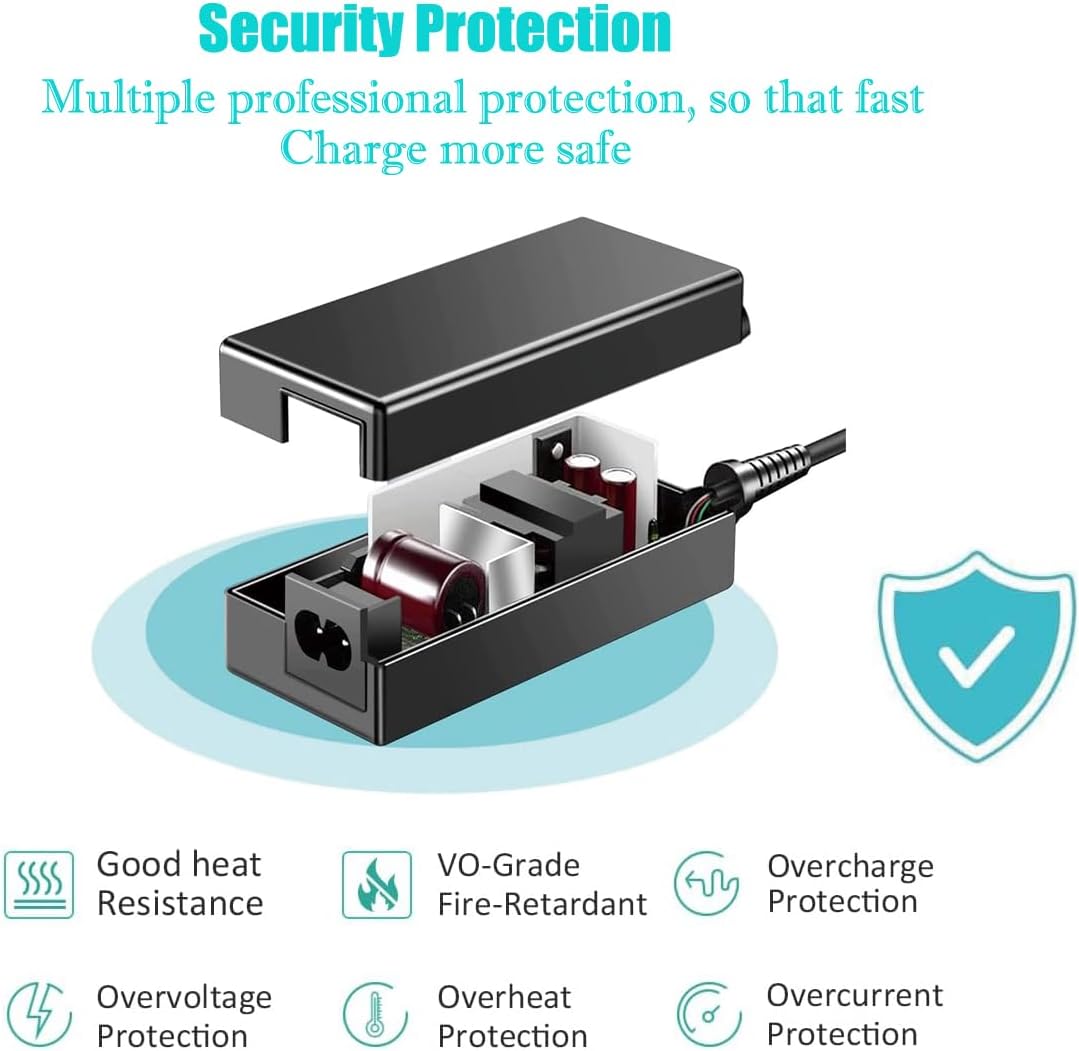
This diagram highlights the internal components and multiple protection features of the UpBright AC adapter, including good heat resistance, fire-retardant material, overcharge, overvoltage, overheat, and overcurrent protection.
4. Maintenance and Care
To ensure the longevity and optimal performance of your UpBright AC/DC Adapter, please observe the following maintenance guidelines:
- Keep Dry: Avoid exposing the adapter to moisture, rain, or liquids.
- Temperature Control: Do not operate the adapter in extremely hot or cold environments. Ensure adequate ventilation around the adapter during use.
- Cable Management: Avoid bending, twisting, or crimping the power cords excessively. Do not place heavy objects on the cables.
- Cleaning: Disconnect the adapter from the power outlet and the device before cleaning. Use a soft, dry cloth to wipe the surface. Do not use liquid cleaners or aerosols.
- Storage: When not in use for extended periods, store the adapter in a cool, dry place away from direct sunlight.
5. Troubleshooting
If you encounter issues with your UpBright AC/DC Adapter, consider the following common troubleshooting steps:
- No Power to Device:
- Ensure the adapter is securely plugged into a working wall outlet. Test the outlet with another device.
- Verify that the DC barrel connector is fully inserted into your device's power port.
- Check for any visible damage to the adapter or cables. If damaged, discontinue use.
- Intermittent Power:
- Ensure all connections are tight and stable.
- Avoid placing the adapter in areas where it might be easily disturbed or where cables could be strained.
- Adapter Overheating:
- While some warmth is normal, excessive heat may indicate an issue. Ensure the adapter is in a well-ventilated area and not covered.
- Verify that your device's power requirements do not exceed the adapter's specifications.
If these steps do not resolve the issue, please refer to the Warranty and Support section for further assistance.
6. Specifications
Detailed technical specifications for the UpBright 19V AC/DC Adapter:
| Specification | Value |
|---|---|
| Product Dimensions | 6 x 4 x 2 inches |
| Item Weight | 9 ounces |
| Input Voltage | 100-240VAC (50/60Hz) |
| Output Voltage | 19V DC |
| Output Current | 3.4A - 3.42A |
| Wattage | 65 Watts |
| Connector Type | Barrel Connector |
| Compatible Devices | Belkin Soundform Elite Hi-Fi Smart Speakers |
| Model Number | Belkin G1S0002 19V Power Supply |
| Safety Certifications | FCC, CECCCROHS |
7. Warranty and Support
UpBright stands behind the quality of its products. Your UpBright 19V AC/DC Adapter comes with the following warranty and support:
- Refund Policy: 30 days refund period from the date of purchase.
- Exchange Policy: 24 months exchange warranty for manufacturing defects.
For warranty claims, technical support, or any inquiries regarding your product, please contact UpBright customer service. You may also visit the official UPBRIGHT Store on Amazon for more information.

This image displays various AC power cord plug types (US, EU, UK, AU) that may be included with the adapter, along with a representation of the UpBright Limited Warranty Certificate.
Related documentsBelkin G1S0002 19V Power Supply

Ask a question about this manual
Ask about setup, troubleshooting, compatibility, parts, safety, or missing instructions. Manuals+ will review the question and use this page’s manual context to help answer it.