
1. Important Safety Information
Read all instructions before using the appliance. Keep this manual for future reference. Always follow basic safety precautions to reduce the risk of fire, electric shock, or injury to persons.
- This appliance is intended for household use only.
- Do not allow children to play with, on, or inside the appliance.
- Ensure the appliance is properly grounded.
- Do not operate the dishwasher if it is damaged or malfunctioning.
- Use only detergents and rinse aids specifically designed for dishwashers.
- Keep detergents and rinse aids out of the reach of children.
- Sharp items should be loaded with handles up to reduce the risk of cuts.
- Do not touch the heating element during or immediately after use.
- Disconnect the appliance from the power supply before cleaning or performing maintenance.
2. Product Overview
The SIEMENS SN25ZI08CE is a freestanding dishwasher designed for efficient and convenient dishwashing. It features Home Connect for remote control, VarioSpeed for faster cycles, and flexible loading options.

Image: Front view of the SIEMENS SN25ZI08CE freestanding dishwasher.
Key Features:
- Capacity: 14 place settings
- Dimensions (WxHxD): Approximately 60 cm x 84.5 cm x 60 cm
- Energy Class: B
- Noise Level: 40 dB
- Programs: 6 wash programs with 4 additional options
- Connectivity: Home Connect for remote operation
- Speed: VarioSpeed function for faster wash and dry cycles
- Loading: Flexible baskets and a dedicated cutlery drawer
- Convenience: Delayed start function
3. Setup
3.1 Unpacking and Placement
Carefully remove the dishwasher from its packaging. Ensure all packing materials are removed. Place the freestanding dishwasher on a level, stable surface near water and power connections. Allow adequate space for door opening and ventilation.
3.2 Water Connection
- Connect the water inlet hose to a cold water supply with a 3/4-inch thread. Ensure the connection is tight to prevent leaks.
- Connect the drain hose to a suitable drain pipe or sink trap. Ensure the hose is not kinked or obstructed.
3.3 Electrical Connection
Connect the power cable to a properly grounded electrical outlet. The appliance operates on 230 Volts. Do not use extension cords or adapters.
3.4 Initial Use
- Before the first wash, fill the rinse aid dispenser and, if applicable, the salt reservoir according to the instructions in the full manual.
- Run an empty wash cycle to clean the interior of the appliance.
4. Operating Instructions
This section provides guidance on how to operate your SIEMENS SN25ZI08CE dishwasher for optimal cleaning results.
4.1 Loading Dishes
Proper loading ensures effective cleaning and drying. The dishwasher features flexible baskets and a dedicated cutlery drawer.

Image: Interior view of the dishwasher with baskets for loading dishes.
- Lower Basket: Ideal for large items like plates, serving dishes, and pots.
- Upper Basket: Suitable for glasses, cups, and smaller bowls. The basket is adjustable for height.
- Cutlery Drawer: Use the dedicated drawer for forks, knives, and spoons to ensure thorough cleaning and prevent scratching.

Image: Close-up of the cutlery drawer, showing organized placement of utensils.

Image: Lower basket loaded with plates and glasses, demonstrating efficient use of space.

Image: Upper basket loaded with various glasses, showing secure placement.
4.2 Adding Detergent and Rinse Aid
Open the detergent dispenser and add the recommended amount of dishwasher detergent. Fill the rinse aid dispenser as needed to ensure streak-free drying.
4.3 Program Selection and Options
The control panel allows you to select from 6 wash programs and 4 additional options.

Image: Close-up of the dishwasher's control panel, showing program indicators and buttons.
- Program Buttons: Press the desired program button to select a wash cycle.
- VarioSpeed Plus: This option significantly reduces wash and dry times while maintaining cleaning performance.
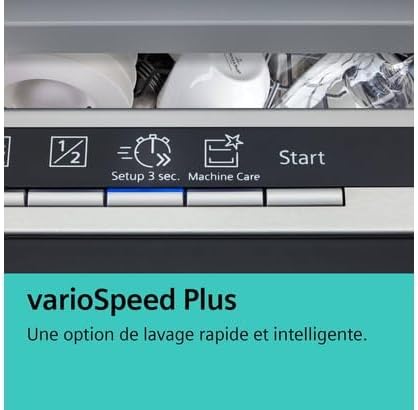
Image: Detail of the control panel highlighting the VarioSpeed Plus option for rapid washing.
4.4 Home Connect Functionality
The SIEMENS SN25ZI08CE is equipped with Home Connect, allowing you to control and monitor your dishwasher remotely via a smartphone app. Refer to the Home Connect app instructions for pairing and usage details.
5. Maintenance
Regular maintenance ensures the longevity and optimal performance of your dishwasher.
5.1 Cleaning the Filters
The filter system prevents food particles from recirculating and clogging the drain. Clean the filters regularly (e.g., weekly or bi-weekly) by removing them, rinsing under running water, and brushing away any debris. Reassemble correctly before use.
5.2 Cleaning the Spray Arms
Check the spray arm nozzles for any blockages. If necessary, remove the spray arms and clear any clogged holes with a thin object like a toothpick.
5.3 Exterior and Interior Cleaning
- Wipe the exterior surfaces with a soft, damp cloth. Do not use abrasive cleaners.
- Clean the interior of the dishwasher periodically using a dishwasher cleaner or by running a hot cycle with a cup of white vinegar placed in the upper rack.
- The dishwasher features a 'Machine Care' function. Refer to the control panel or full manual for instructions on using this specialized cleaning program.
5.4 Salt and Rinse Aid Refill
Monitor the indicator lights for salt and rinse aid. Refill as necessary using only dishwasher-specific salt and rinse aid.
6. Troubleshooting
Before contacting customer service, consult this section for solutions to common issues.
| Problem | Possible Cause | Solution |
|---|---|---|
| Dishwasher does not start | No power supply; Door not closed properly; Program not selected. | Check power connection; Ensure door is latched; Select a wash program and press Start. |
| Dishes are not clean | Improper loading; Clogged spray arms; Insufficient detergent; Clogged filters. | Reload dishes correctly; Clean spray arm nozzles; Add more detergent; Clean filters. |
| Water remains in the dishwasher | Clogged drain hose or filter; Drain pump malfunction. | Clean filters and check drain hose for kinks; If problem persists, contact service. |
| White streaks on dishes | Too much rinse aid; Water hardness setting incorrect. | Reduce rinse aid dosage; Adjust water hardness setting (refer to full manual). |
| Dishwasher is noisy | Dishes rattling; Foreign object in pump; Improper installation. | Rearrange dishes; Check for foreign objects; Ensure proper leveling. |
7. Specifications
Detailed technical specifications for the SIEMENS SN25ZI08CE dishwasher.
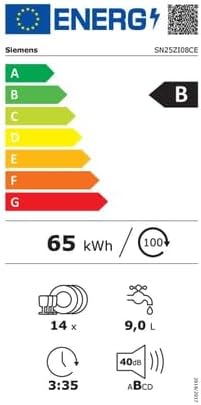
Image: Energy efficiency label for the SIEMENS SN25ZI08CE dishwasher, showing energy class B, 65 kWh/100 cycles, 14 place settings, 9.0 L water, 3:35 cycle duration, and 40 dB noise level.
| Feature | Specification |
|---|---|
| Brand | SIEMENS |
| Model Number | SN25ZI08CE |
| Installation Type | Freestanding |
| Dimensions (WxHxD) | 60 cm x 84.5 cm x 60 cm |
| Capacity | 14 Place Settings |
| Water Consumption per Cycle | 9.0 Liters |
| Energy Class | B |
| Energy Consumption (per 100 cycles) | 65 kWh |
| Noise Level | 40 dB |
| Number of Programs | 6 |
| Special Functions | Adjustable basket, Quick wash (VarioSpeed Plus), Home Connect |
| Color | Stainless Steel |
| Voltage | 230 Volts |
| Included Components | Power cable, Drying system |
8. Warranty and Support
For warranty information and customer support, please refer to the documentation provided with your appliance at the time of purchase or visit the official SIEMENS website. Keep your proof of purchase for warranty claims.


