
1. Introduction
Thank you for choosing the Fande-Aire 72-inch Ceiling Fan with Lights and Remote, Model FD-2472. This manual provides essential information for the safe installation, operation, and maintenance of your new ceiling fan. Please read all instructions carefully before beginning installation and retain this manual for future reference.
This modern ceiling fan is designed for both indoor and outdoor use, featuring 8 blades, 9 integrated LED lights with 3 color temperature options, 6 reversible speeds, and convenient remote and mobile app control.

Figure 1: General view of the Fande-Aire 72-inch ceiling fan, showcasing its design with 8 blades and integrated lighting.
2. Safety Information
To reduce the risk of electrical shock, fire, or personal injury, always follow these basic safety precautions:
- Read all instructions carefully before installing the fan.
- Ensure the installation site is suitable for the fan's weight and size. The ceiling structure must be capable of supporting the fan's weight (approximately 12.36 kg / 27.25 lbs).
- All electrical connections must be performed by a qualified electrician and comply with local codes and ordinances.
- Disconnect power at the main circuit breaker or fuse box before beginning installation or performing any maintenance.
- Do not operate the fan with damaged wiring or if any components are missing or damaged.
- Ensure the fan blades are at least 7 feet (2.13 meters) from the floor and have adequate clearance from walls or other obstructions.
- Do not insert objects into the path of the rotating blades.
- Use only replacement parts specified by the manufacturer.
3. Package Contents
Verify that all components are present and undamaged before proceeding with installation. If any parts are missing or damaged, contact customer support.
- Fan Motor Assembly
- Fan Blades (8)
- Downrod (10" and 20" options)
- Canopy
- Mounting Bracket
- LED Light Kit (9 lights)
- Remote Control with Wall Mount
- Hardware Pack (screws, wire nuts, etc.)
- User Manual

Figure 2: Overview of the 72-inch ceiling fan, highlighting the 8 blades, 9 LED lights, and available downrod lengths (10" and 20").
4. Specifications
| Feature | Detail |
|---|---|
| Model Number | FD-2472 |
| Fan Size | 72 inches (182.88 cm) |
| Dimensions (L x W x H) | 182.88 x 182.88 x 53.34 cm (72 x 72 x 21 inches) |
| Weight | 12.36 kg (27.25 lbs) |
| Number of Blades | 8 |
| Number of Lights | 9 (Integrated LED) |
| Color Temperature (CCT) | 3 Options: Warm (3000K), Natural (4000K), White (6000K) |
| Fan Speeds | 6 (Reversible) |
| Motor Type | Ultra-Quiet DC Motor |
| Noise Level | Less than 30dB |
| Voltage | 120 Volts |
| Wattage | 85 Watts |
| Control Method | Remote Control, Mobile APP Control (Bluetooth) |
| Timer Settings | 1 hour, 4 hours, 8 hours |
| Airflow | 5,615 Cubic Feet Per Minute (CFM) |
| Airflow Efficiency | 198 Cubic Feet Per Minute Per Watt |
| Estimated Yearly Energy Cost | $8 (based on 12 cents per kWh and 6.4 hours use per day, excluding lights) |

Figure 3: Energy Guide information for the ceiling fan, detailing estimated energy cost and airflow performance.
5. Installation
5.1 Pre-Installation Checks
- Ensure power is disconnected at the circuit breaker.
- Verify the ceiling junction box is securely mounted and capable of supporting the fan's weight.
- Confirm the ceiling height is at least 9 feet (2.74 meters) for optimal performance and safety.
- Ensure the ceiling angle is not more than 15 degrees.
- For rooms with a short side of 12 feet or more, and a long side of 15 feet or more, this 72-inch fan is suitable.

Figure 4: Installation guidelines, including recommended ceiling dimensions and a close-up of the LED light kit wiring connection. Ensure the terminal plug is inserted correctly to avoid damage.
5.2 Mounting the Fan
- Attach the mounting bracket to the ceiling junction box using the provided screws.
- Assemble the downrod to the motor housing, ensuring all screws are tightened securely.
- Carefully lift the fan assembly and hang it from the mounting bracket.
- Connect the electrical wires according to the wiring diagram in the full instruction manual (typically black to black, white to white, ground to ground).
- Secure the canopy to the mounting bracket, covering the wiring connections.
- Attach the fan blades to the motor housing. Ensure all blade screws are firmly tightened.
- Install the LED light kit, connecting the terminal plug. Ensure the plug is inserted in the correct direction to prevent damage.
Note: For detailed step-by-step instructions and wiring diagrams, refer to the comprehensive installation guide included in your product packaging.
6. Operating Instructions
Your Fande-Aire ceiling fan can be controlled via the included remote control or a mobile application.
6.1 Remote Control Operation
The remote control allows you to adjust fan speed, light settings, and fan direction.
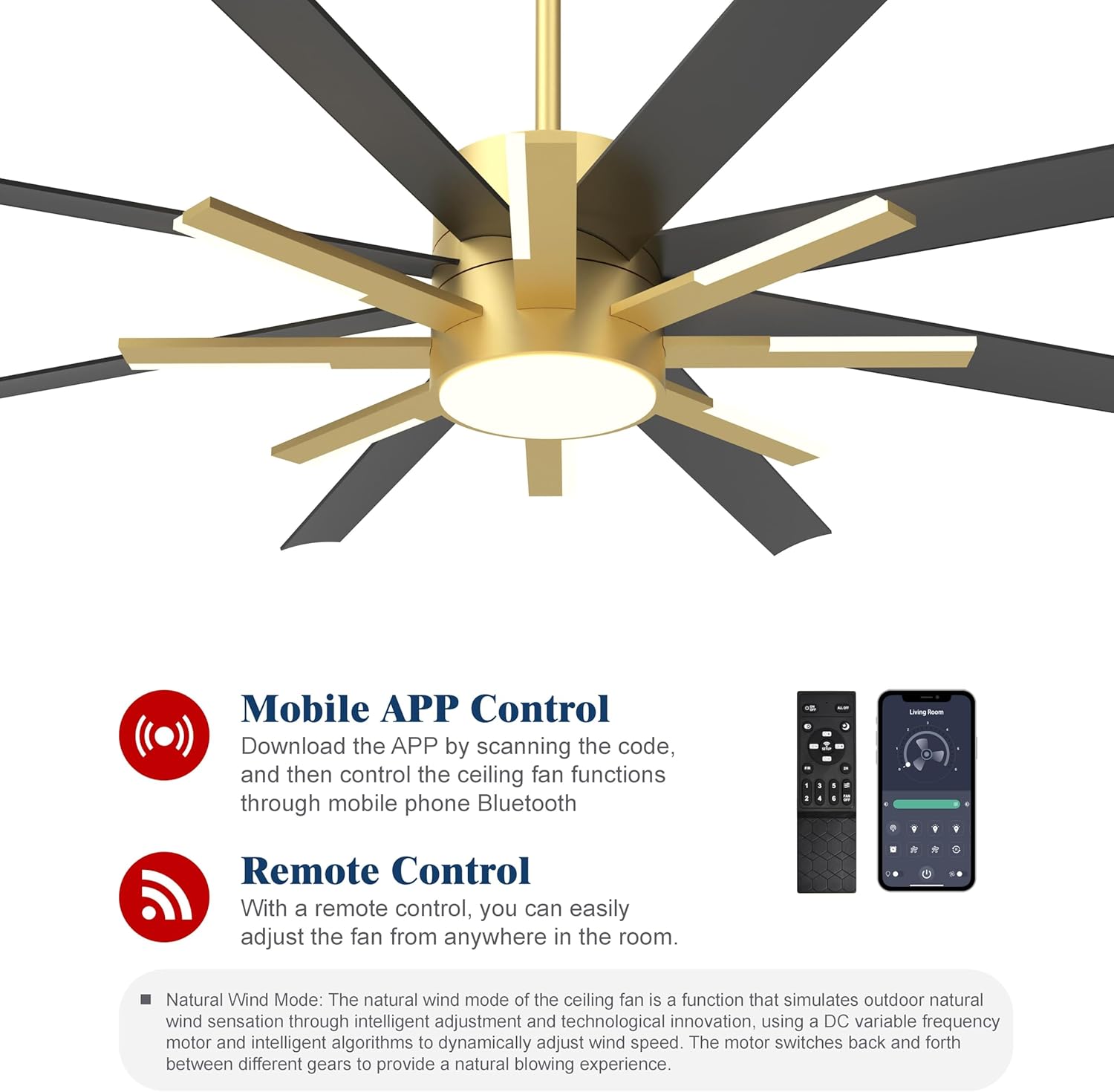
Figure 5: Remote control and mobile application interface for fan operation. The remote provides direct control, while the app offers additional features like natural wind mode.
- Power On/Off: Press the power button to turn the fan and light on or off.
- Fan Speed: Use the speed buttons to cycle through 6 fan speeds.
- Light On/Off: Press the light button to turn the LED lights on or off.
- Color Temperature (CCT) Adjustment: Press the CCT button to switch between Warm (3000K), Natural (4000K), and White (6000K) light.
- Dimming: The lights are dimmable. Refer to the remote control diagram for specific dimming buttons.
- Fan Direction (Reversible): Press the reverse button to change the fan's direction for summer (downward airflow) or winter (upward airflow).
- Timer: Set the fan to turn off after 1, 4, or 8 hours using the timer buttons.
- Natural Wind Mode: Activates a mode that simulates varying wind speeds to create a more natural and comfortable breeze.

Figure 6: Illustration of the three adjustable color temperatures for the integrated LED lights: Warm (3000K), Natural (4000K), and White (6000K).

Figure 7: The fan's reversible function for year-round use, along with its ultra-quiet DC motor (less than 30dB) and programmable timer settings (1, 4, 8 hours).
6.2 Mobile APP Control
For enhanced control, download the dedicated mobile application. Scan the QR code provided in your product packaging or search for the app in your device's app store. The app connects via Bluetooth and offers all remote control functions, plus additional features like the Natural Wind Mode.
- Download the APP: Scan the QR code from the manual or product packaging.
- Connect via Bluetooth: Follow the in-app instructions to pair your fan.
- Control Functions: Access fan speed, light settings, CCT, dimming, reverse function, and timer settings directly from your smartphone.
- Natural Wind Mode: This feature simulates varying wind speeds to create a more natural and comfortable breeze.
7. Maintenance
Regular maintenance ensures the longevity and optimal performance of your ceiling fan.
- Cleaning: Periodically wipe the fan blades and motor housing with a soft, damp cloth. Do not use abrasive cleaners or solvents.
- Blade Tightness: Check blade screws annually to ensure they are secure. Loose blades can cause wobbling and noise.
- Light Kit: The LED lights are integrated and generally do not require replacement. If issues arise, contact customer support.
- Dust Accumulation: Dust can affect fan performance and light output. Keep the fan clean.
- Power Disconnection: Always disconnect power at the circuit breaker before cleaning or performing any maintenance.
8. Troubleshooting
If you experience issues with your Fande-Aire ceiling fan, refer to the following common problems and solutions:
| Problem | Possible Cause | Solution |
|---|---|---|
| Fan does not start | No power to the fan; Loose wire connections; Remote control battery low. | Check circuit breaker; Ensure all wire connections are secure (refer to Figure 4 for terminal plug connection); Replace remote control batteries. |
| Fan wobbles | Loose blade screws; Unbalanced blades; Loose mounting bracket. | Tighten all blade screws; Use a balancing kit (not included) if necessary; Ensure mounting bracket is securely fastened to the ceiling. |
| Lights do not work or flicker | Loose light kit wiring; Defective LED module; Power issue. | Check the terminal plug connection for the light kit (refer to Figure 4); Ensure it is inserted correctly and not damaged. If problem persists, contact customer support. |
| Remote control not working | Low battery; Remote not paired; Obstruction between remote and receiver. | Replace batteries; Refer to the full manual for remote pairing instructions; Ensure clear line of sight. |
| Fan makes excessive noise | Loose screws; Motor issue; Blades hitting an obstruction. | Check and tighten all screws; Ensure no obstructions are in the fan's path. If noise persists, contact customer support. |
Tip: If the fan cannot rotate or stops after a slight rotation, it is often due to poor wire contact causing insufficient current. It is necessary to check the connection of the wire plug terminal or cut off the terminal and connect it with electrical tape.
9. Warranty and Support
Fande-Aire products are manufactured to high-quality standards. For warranty information, please refer to the warranty card included with your product or visit the official Fande-Aire website. If you require technical assistance or have questions not covered in this manual, please contact Fande-Aire customer support.
- Customer Support: Refer to your product packaging or the official Fande-Aire website for contact details.
- Online Resources: Check the Fande-Aire website for FAQs, additional troubleshooting guides, and product registration.
