
1. Product Overview
The Lamshaw ID208 Plus Smart Watch Magnetic USB Charging Cable is a replacement charger designed for specific smartwatch models. It features a magnetic connector for easy attachment and a standard USB-A plug for power sources. This cable is built for durability and efficient charging.

Image: Two magnetic USB charging cables, black in color, coiled neatly.

Image: A smartwatch with the magnetic charging cable connected, illustrating the magnetic attachment point.
2. Setup and Connection
To set up your Lamshaw ID208 Plus charging cable, follow these simple steps:
- Identify the Charging Port: Locate the magnetic charging contacts on the back of your compatible smartwatch (e.g., WMK ID208 Plus 1.8 Inches, Quican ID208 Plus 1.8 Watch, Fitpolo ID208 Plus 1.8'' Smart Watch).
- Connect the Magnetic End: Align the magnetic end of the charging cable with the charging contacts on your smartwatch. The magnets will automatically attract and secure the connection. Ensure the pins are correctly aligned.
- Connect the USB End: Insert the USB-A plug of the charging cable into a compatible power source. This can be a USB wall adapter (1A output recommended), a computer's USB port, a laptop's USB port, or a power bank.

Image: A detailed view of the magnetic charging pins and the USB-A connector of the cable.
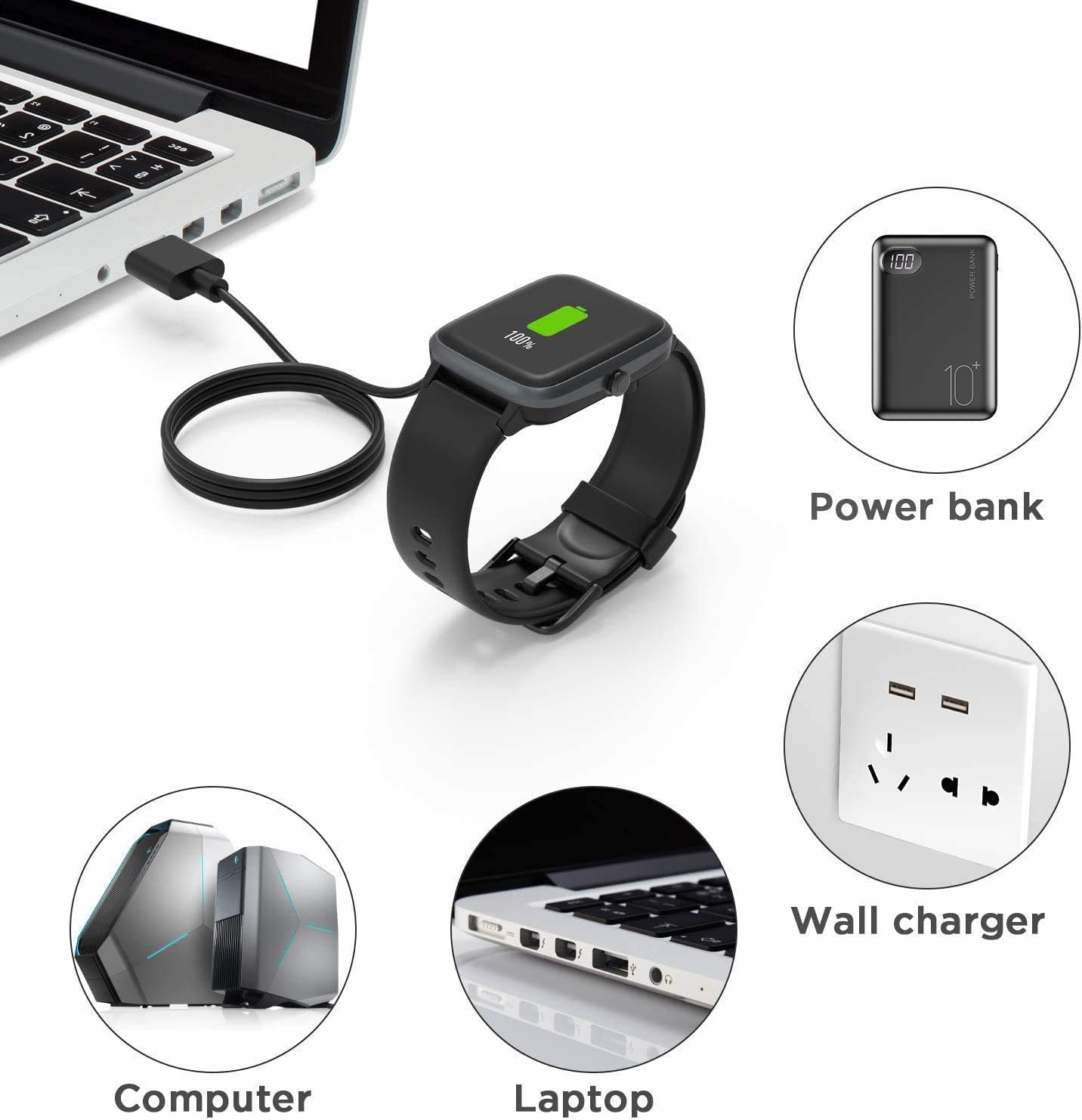
Image: Illustrations showing the smartwatch charging from a computer, laptop, power bank, and wall charger.
3. Operating Instructions
Once connected, your smartwatch should indicate that it is charging. The charging process is straightforward:
- Charging Indication: The smartwatch display will typically show a charging icon or battery percentage increasing.
- Charging Time: A full charge typically takes approximately 2.5 hours when using a 1A output current power source.
- Battery Life: After a full charge, your smartwatch can achieve up to 30 days of standby time or 7 days of typical usage time, depending on the smartwatch model and usage patterns.

Image: A smartwatch being charged, with an overlay indicating 2.5 hours for a full charge with 1A output current.

Image: A smartwatch charging, highlighting its potential for 30 days standby and 7 days usage time on a full charge.
4. Maintenance and Care
To ensure the longevity and optimal performance of your charging cable, please observe the following maintenance guidelines:
- Storage: The flexible PVC cable is designed to be easy to roll and convenient for storage. Avoid sharp bends or kinks that could damage the internal wires.
- Cleaning: Keep the magnetic contacts and USB connector clean and free of dust or debris. Use a soft, dry cloth for cleaning.
- Material Durability: The cable features ABS+PC durable materials and pure copper probes for rapid and stable conduction. Handle with care to prevent physical damage.
- Protection Features: The charger is equipped with built-in protections against over-current, over-voltage, over-charging, and high temperatures. While these features enhance safety, always use the charger responsibly and disconnect once charging is complete.

Image: A diagram illustrating the cable's components, including pure copper probes, ABS+PC material, flexible PVC cable, and its length of 3.3 feet (1 meter).

Image: A graphic detailing the charger's safety features: Over-Current Protection, Over-Voltage Protection, Over-Charging Protection, and High Temperature Protection.
5. Troubleshooting
If you encounter issues while using your charging cable, refer to the following common problems and solutions:
| Problem | Possible Cause / Solution |
|---|---|
| Smartwatch is not charging. |
|
| Charging is slow. |
|
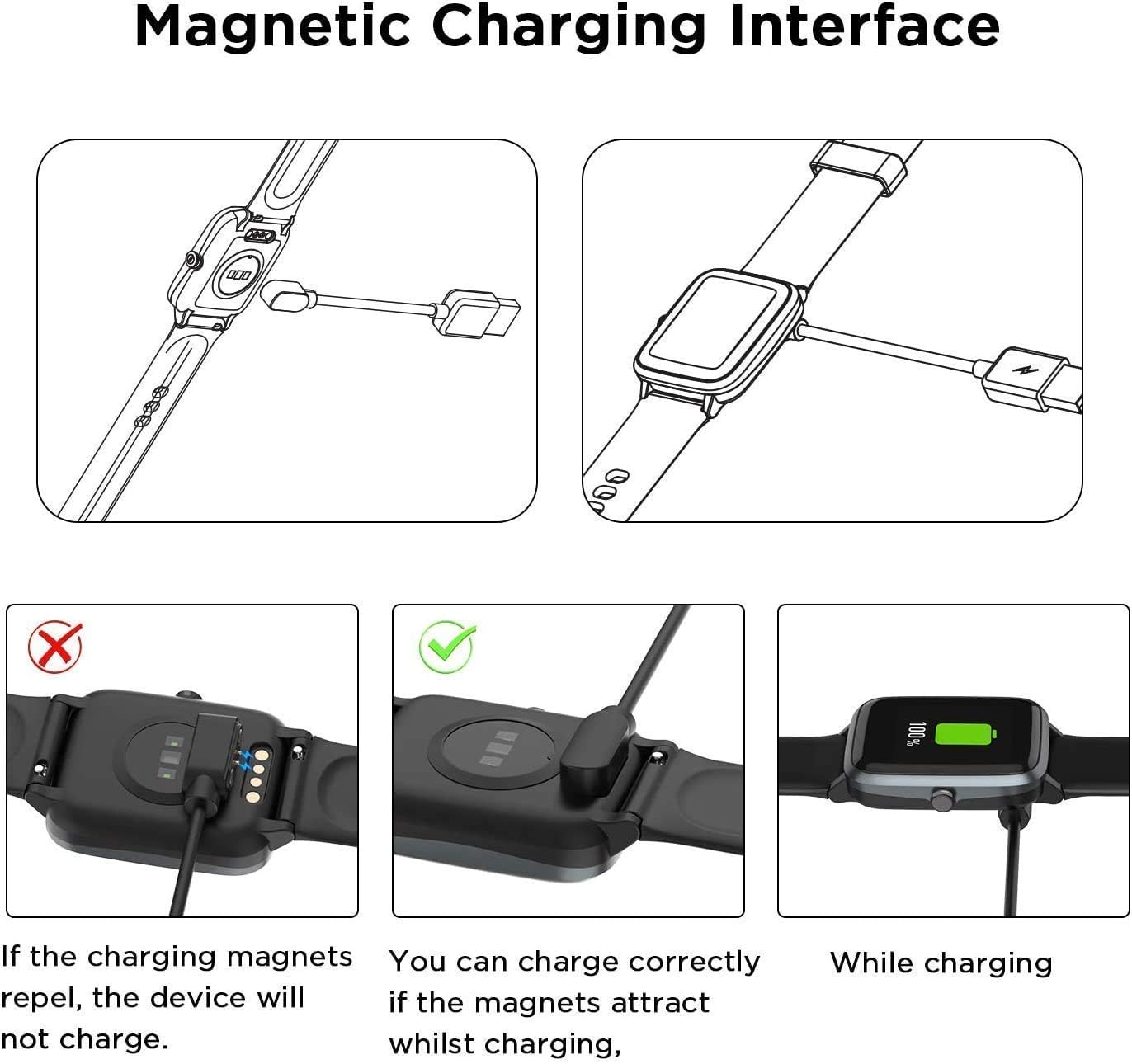
Image: A visual guide demonstrating the correct magnetic charging connection (magnets attract) versus an incorrect connection (magnets repel).
6. Specifications
| Feature | Specification |
|---|---|
| Brand | Lamshaw |
| Model Number | 1 |
| Connector Type | Micro USB, USB (USB-A) |
| Cable Type | USB |
| Compatible Devices | Smart Watch (specifically ID208 Plus/WMK ID208 Plus 1.8 Inches/Quican ID208 Plus 1.8 Watch/Fitpolo ID208 Plus 1.8'' Smart Watch) |
| Color | Black |
| Connector Gender | Male-to-Male |
| Shape | Round |
| Number of Pins | 8 (on magnetic end) |
| Unit Count | 1.0 Count (per cable) |
| Indoor/Outdoor Usage | Indoor, Outdoor |
| Outer Material | Rubber or Plastic (Flexible PVC) |
| Item Weight | 1.06 ounces |
| Package Dimensions | 6.1 x 3.43 x 0.47 inches |
| Cable Length | 3.3 feet / 1 meter |
7. Warranty and Support
Information regarding product warranty and customer support is not provided within this manual. Please refer to the product packaging or the retailer's website for details on warranty coverage and how to contact customer support for assistance.