1. Introduction
The Anchilly SF-104 Digital Temperature Controller is designed for precise and reliable temperature regulation in various applications. This intelligent thermostat provides accurate control over heating or cooling cycles, featuring a clear digital display for easy monitoring and adjustment. This manual provides comprehensive instructions for the safe and efficient operation of your SF-104 controller.
2. Safety Information
Please read all safety warnings and instructions carefully before installation and operation. Failure to follow these instructions may result in electric shock, fire, or serious injury.
- Ensure the power supply matches the controller's specifications (250VAC).
- All wiring should be performed by a qualified electrician in accordance with local electrical codes.
- Do not operate the controller in environments with excessive moisture or corrosive gases.
- Disconnect power before performing any maintenance or wiring.
- Keep the device away from children.
3. Product Overview
The SF-104 is a versatile digital thermostat suitable for air-cooled cryogenic freezers and cold storage applications. It integrates temperature control, defrost heating wire control, and evaporator fan control.
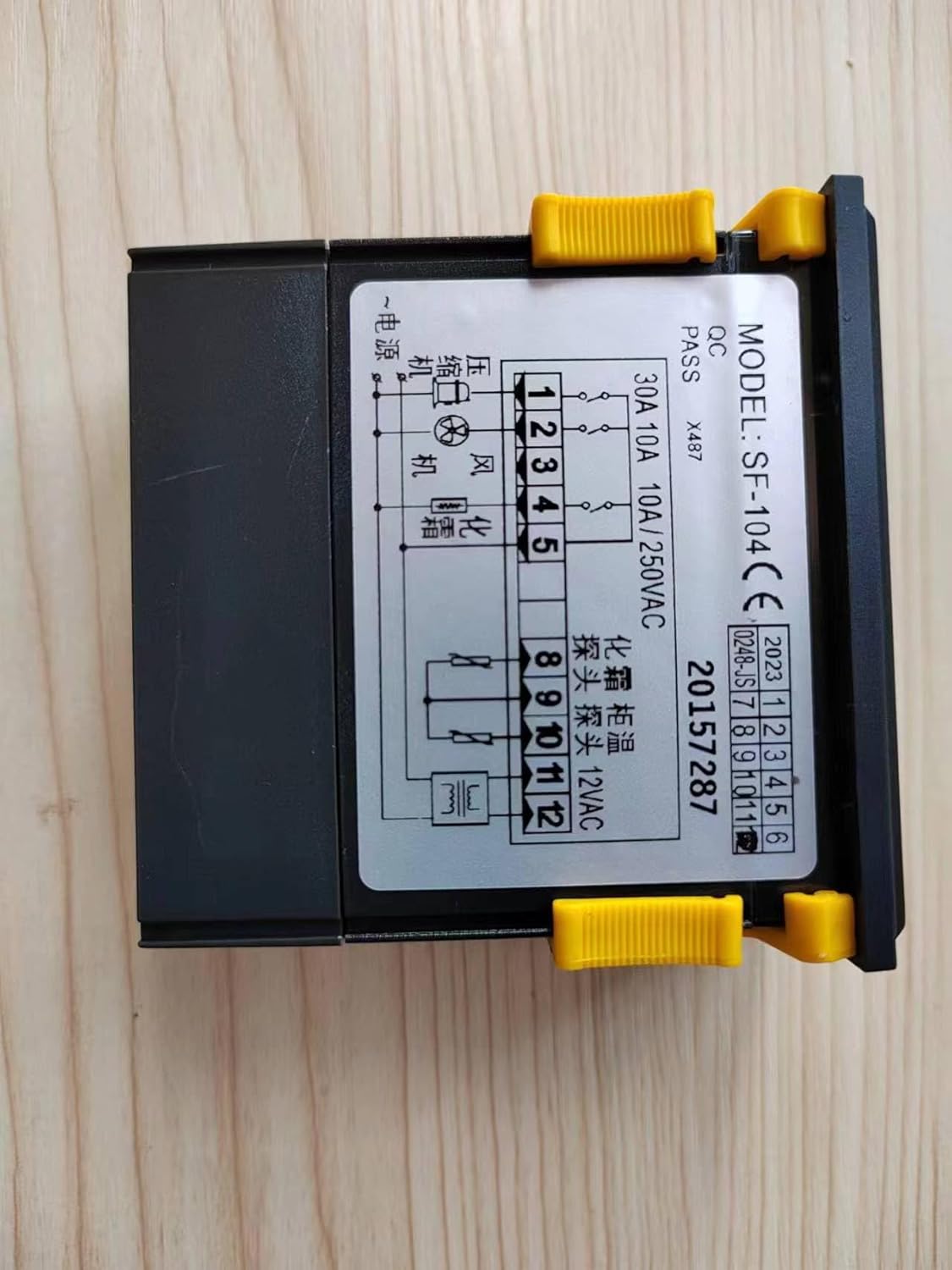
Figure 3.1: Front view of the SF-104 Temperature Controller with its digital display and detailed wiring diagram for various connections.

Figure 3.2: Included components: SF-104 controller, power transformer, and two temperature sensing probes.
4. Features
- Precise Temperature Control: Accurate and reliable regulation.
- Digital Display: Clear and easy-to-read temperature readings.
- Defrost Control: Automatic/manual electric defrost and time/temperature terminated defrost.
- Compressor Protection: Compressor delay start function.
- Parameter Lock: Prevents accidental changes to settings.
- Self-Diagnosis: Built-in diagnostic capabilities.
- Factory Reset: Key operation to restore default values.
5. Specifications
| Parameter | Value |
|---|---|
| Measuring Temperature Display Range | -45 ~ 45°C |
| Measurement Accuracy | ± 1°C |
| Overall Dimensions (L x W x D) | 77mm x 35mm x 60mm |
| Working Environment Temperature | -10 ~ 60°C |
| Relative Humidity | 20% to 90% (no condensation) |
| Temperature Sensing Probes | Two, 2 meters long |
| Compressor Relay | Normally open 20A/250VAC (1HP) |
| Defrost Heating Wire Relay | Normally open 10A/250VAC |
| Evaporator Fan Relay | Normally open 5A/250VAC |
| Display Type | Digital |
| UPC | 764015363115 |
6. Setup
6.1 Wiring Diagram
Refer to the wiring diagram on the product label for correct connections. Ensure all connections are secure and insulated.
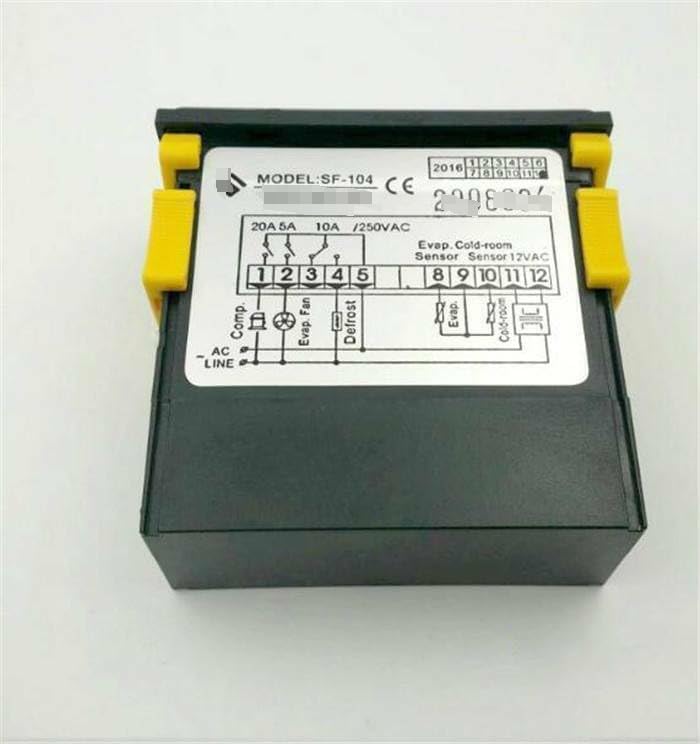
Figure 6.1: Side view of the SF-104 controller, highlighting the terminal block for electrical wiring.
6.2 Sensor Installation
Install the two temperature sensing probes in the desired locations for accurate temperature measurement. One probe is typically for the cold room temperature, and the other for the evaporator.
6.3 Power Connection
Connect the controller to a stable 250VAC power source. Verify all connections before applying power.
7. Operating Instructions
7.1 Basic Operation
Once powered on, the digital display will show the current temperature. Use the control buttons (not explicitly detailed in input, but implied by "Key operation") to navigate menus and adjust settings.
7.2 Setting Temperature
Access the temperature setting menu to define your desired temperature range. The controller will then activate the compressor or defrost functions as needed to maintain this range.
7.3 Defrost Control
The SF-104 supports automatic and manual defrost cycles. Configure defrost parameters such as duration and frequency through the settings menu. Defrost can be terminated by time or temperature.
7.4 Parameter Lock
To prevent unauthorized or accidental changes, utilize the parameter lock function. Refer to the specific key combination or menu option for locking/unlocking parameters.
8. Maintenance
- Cleaning: Regularly clean the controller's exterior with a soft, dry cloth. Do not use abrasive cleaners or solvents.
- Sensor Inspection: Periodically check the temperature sensing probes for damage or corrosion. Ensure they are securely installed.
- Wiring Check: Annually inspect all electrical connections for tightness and signs of wear.
- Environmental Conditions: Ensure the operating environment remains within specified temperature and humidity ranges to prolong the device's lifespan.
9. Troubleshooting
| Problem | Possible Cause | Solution |
|---|---|---|
| Controller not powering on | No power supply; Loose wiring; Blown fuse | Check power source; Verify all wiring connections; Inspect and replace fuse if necessary. |
| Inaccurate temperature reading | Damaged sensor; Improper sensor placement | Inspect sensor for damage and replace if faulty; Reposition sensor for accurate measurement. |
| Compressor not activating | Temperature setting too high; Compressor delay active; Faulty relay | Adjust temperature setting; Wait for delay to expire; Consult a technician for relay check. |
| Defrost not working | Defrost parameters incorrect; Faulty heating element; Faulty relay | Review and adjust defrost settings; Check heating element continuity; Consult a technician. |
| "Self-diagnosis" error code | Internal fault detected | Refer to specific error code documentation (if available) or contact customer support. Try restoring factory values. |
For issues not listed above, or if troubleshooting steps do not resolve the problem, please contact customer support.
10. Warranty and Support
10.1 Warranty Information
This product comes with a standard manufacturer's warranty. Please retain your proof of purchase for warranty claims. The warranty typically covers defects in materials and workmanship under normal use. It does not cover damage caused by misuse, accident, unauthorized modification, or improper installation.
10.2 Customer Support
For technical assistance, troubleshooting, or warranty inquiries, please contact Anchilly customer support. Provide your product model (SF-104) and a detailed description of the issue when contacting support.
Note: Specific contact details are not provided in this manual. Please refer to the product packaging or the manufacturer's official website for the most current support information.