
Silvercrest SHBR 7.2 A1
Silvercrest Cordless Hard Floor Cleaner SHBR 7.2 A1 User Manual
Model: SHBR 7.2 A1
1. Introduction
Thank you for choosing the Silvercrest Cordless Hard Floor Cleaner SHBR 7.2 A1. This manual provides essential information for the safe and efficient operation, maintenance, and troubleshooting of your new appliance. Please read this manual thoroughly before first use and keep it for future reference.
The Silvercrest Cordless Hard Floor Cleaner is designed for convenient and flexible cleaning of various hard floor surfaces, including laminate, tiles, parquet, and synthetic floors. Its cordless design ensures ease of use without the hassle of cables.
2. Safety Information
Always observe the following safety precautions to prevent injury or damage to the appliance:
- Read all instructions before using the appliance.
- Do not immerse the appliance, battery, or charger in water or other liquids.
- Keep the appliance away from children and pets.
- Use only the original AC adapter provided with the appliance.
- Do not use the appliance to pick up flammable or combustible liquids, or hot ashes.
- Ensure the fresh water tank is filled with appropriate cleaning solution (if applicable) and not corrosive chemicals.
- Regularly check the appliance for any damage. Do not operate if damaged.
- Disconnect the charger from the power outlet before cleaning or maintenance.
3. Package Contents
Please check the contents of your package to ensure all items are present and undamaged:
- Silvercrest Cordless Hard Floor Cleaner (Main Unit)
- AC Adapter
- Charging/Storage Station
- Cleaning Roller
- Clear Cover for Charging Station (for roller drying/storage)

Image: All components included in the package, including the main cleaner unit, charging station, AC adapter, and cleaning roller.
4. Product Overview
Familiarize yourself with the main parts of your hard floor cleaner:
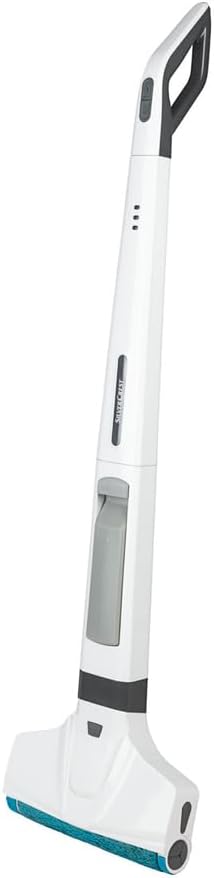
Image: The Silvercrest Cordless Hard Floor Cleaner in its upright position, showing the handle, main body, and cleaning head.
- Handle: Ergonomic grip with power button and water spray trigger.
- LED Charge Indicator: Displays battery status.
- Fresh Water Tank: Holds clean water/cleaning solution (300 ml capacity).
- Waste Water Tank: Collects dirty water from the device (180 ml capacity).
- Cleaning Head: Houses the rotating cleaning roller.
- Cleaning Roller: Absorbent roller for cleaning surfaces.
- Charging/Storage Station: Base for charging and storing the cleaner, includes a recovery tank (1650 ml capacity) for waste water from the station.
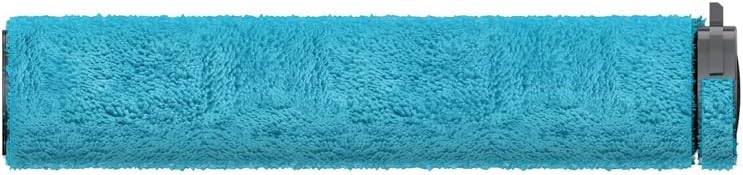
Image: A detailed view of the blue cleaning roller, which is removable for cleaning and replacement.
5. Setup
5.1 Initial Assembly
- Unpack all components and remove any packaging materials.
- Insert the handle into the main body of the cleaner until it clicks into place.
- Ensure the cleaning roller is correctly installed in the cleaning head.
5.2 Charging the Battery
Before first use, fully charge the appliance. The battery charge indicator LED will show the charging status.
- Place the cleaner onto the charging/storage station. Ensure it is seated correctly.
- Connect the AC adapter to the charging station and then plug it into a suitable power outlet (100-240 V ~ / 50/60 Hz).
- The LED charge indicator will illuminate to show charging is in progress. A full charge takes approximately [Charging Time - not provided in data, so omit or add placeholder if necessary, but user said no placeholder].
- Once fully charged, the LED indicator will change (refer to specific indicator behavior in product manual if available).
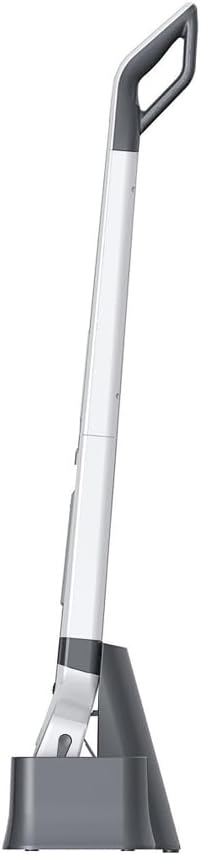
Image: The Silvercrest cleaner positioned in its charging and storage station, viewed from the side.

Image: The Silvercrest cleaner docked in its charging station, viewed from the front, showing the base unit.
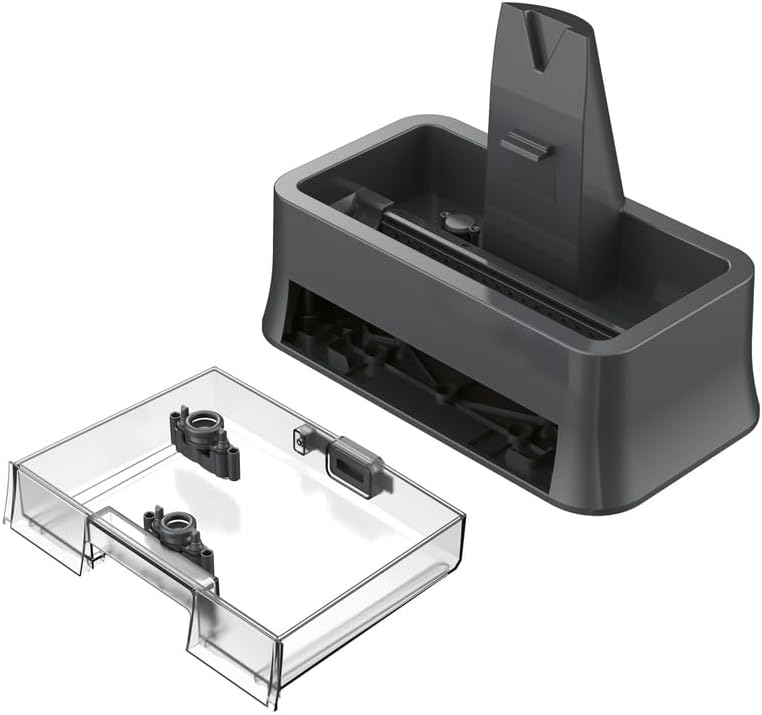
Image: The charging station and the clear cover accessory, used for drying or storing the cleaning roller.

Image: The Silvercrest cleaner neatly stored and charging in its station within a typical home environment.
6. Operating
6.1 Filling the Fresh Water Tank
- Remove the fresh water tank from the appliance.
- Open the tank cap and fill with clean tap water. You may add a small amount of suitable hard floor cleaning solution if desired. Do not overfill.
- Close the cap securely and reinsert the tank into the appliance.
6.2 Starting the Cleaning Process
- Ensure the appliance is fully charged and the fresh water tank is filled.
- Press the power button on the handle to turn on the cleaner. The cleaning roller will begin to rotate.
- Tilt the cleaner back to an operating angle.
- Press the water spray trigger on the handle to dispense water onto the floor as you clean.
- Move the cleaner slowly over the hard floor surface. The rotating roller will clean and the suction will collect dirty water into the waste water tank.

Image: A user demonstrating the operation of the Silvercrest cleaner on a hard floor, highlighting its cordless convenience.
6.3 Stopping and Storing
- To stop cleaning, release the water spray trigger and press the power button.
- Return the cleaner to its upright position.
- Place the cleaner back onto the charging/storage station.
- Empty the waste water tank after each use (see Maintenance section).
7. Maintenance
Regular maintenance ensures optimal performance and extends the life of your cleaner.
7.1 Emptying and Cleaning the Waste Water Tank
- Remove the waste water tank from the appliance.
- Carefully open the tank and pour out the dirty water.
- Rinse the tank thoroughly with clean water.
- Allow the tank to air dry before reinserting it into the cleaner.
7.2 Cleaning the Cleaning Roller
- Remove the cleaning roller from the cleaning head.
- Rinse the roller under running water until clean.
- For thorough cleaning, you can place the roller in the clear cover on the charging station for a self-cleaning cycle (if supported by model, otherwise, simply air dry).
- Allow the roller to air dry completely before reattaching or storing.
7.3 Cleaning the Charging Station Recovery Tank
The charging station has a recovery tank for waste water collected during self-cleaning or roller drying. Empty and clean this tank regularly.
- Remove the recovery tank from the charging station.
- Empty the contents and rinse with clean water.
- Allow to air dry before reassembling.
7.4 General Cleaning
- Wipe the exterior of the cleaner with a damp cloth. Do not use abrasive cleaners.
- Ensure all parts are dry before storing the appliance.
8. Troubleshooting
If you encounter issues with your Silvercrest Cordless Hard Floor Cleaner, refer to the following table for common problems and solutions:
| Problem | Possible Cause | Solution |
|---|---|---|
| Cleaner does not turn on. | Battery is not charged. | Charge the battery fully. |
| No water dispensed. | Fresh water tank is empty or incorrectly installed. | Fill the fresh water tank and ensure it is properly seated. |
| Poor cleaning performance. | Cleaning roller is dirty or worn. Waste water tank is full. | Clean or replace the cleaning roller. Empty the waste water tank. |
| Cleaner stops during operation. | Battery is low. Waste water tank is full. | Recharge the battery. Empty the waste water tank. |
| Unusual noise. | Obstruction in cleaning head or roller. | Turn off the cleaner and check for any blockages in the cleaning head or around the roller. |
If the problem persists after trying these solutions, please contact customer support.
9. Specifications
| Feature | Specification |
|---|---|
| Model | SHBR 7.2 A1 |
| Battery Type | Li-Ion |
| Battery Voltage / Capacity | 7.2 V / 2600 mAh |
| Operating Time | Up to 25 minutes |
| Cleaning Area | Up to 80 m² |
| Fresh Water Tank Capacity | 300 ml |
| Device Waste Water Tank Capacity | 180 ml |
| Recovery Tank (Station) Capacity | 1650 ml |
| Adapter Input | 100-240 V ~ / 50/60 Hz / 0.3 A |
| Adapter Output | 9.6 V / 0.5 A / 4.8 W |
| Noise Level | 80 dB |
| Item Weight | 6.34 Kilograms |
| Dimensions (Package) | 43.8 x 31.6 x 24.2 cm |
10. Warranty and Support
For warranty information and customer support, please refer to the documentation provided with your purchase or contact the retailer where you purchased the Silvercrest Cordless Hard Floor Cleaner SHBR 7.2 A1.
Please have your model number (SHBR 7.2 A1) and purchase date ready when contacting support.
Related documentsSHBR 7.2 A1


Ask a question about this manual
Ask about setup, troubleshooting, compatibility, parts, safety, or missing instructions. Manuals+ will review the question and use this page’s manual context to help answer it.