
Introduction
Thank you for choosing the PrimeCables Electric Height Adjustable Standing Desk. This manual provides essential information for the safe assembly, operation, and maintenance of your new workstation. Please read these instructions carefully before use and retain them for future reference. This desk is designed to offer a versatile and ergonomic workspace, allowing seamless transitions between sitting and standing positions.
Important Safety Information
To ensure safe operation and prevent injury, please observe the following safety guidelines:
- Weight Capacity: Do not exceed the rated load capacity of 80 kg (176 lbs). Overloading can cause instability and damage.
- Anti-Collision System: The desk is equipped with an anti-collision setting. Ensure this feature is active to prevent damage or injury if the desk encounters an obstruction during height adjustment.
- Child Safety Lock: Utilize the child safety lock feature, especially in environments where children or pets are present, to prevent unintended operation.
- Clearance: Ensure there is adequate clearance around the desk during height adjustments to avoid pinching or crushing hazards.
- Power Supply: Use only the provided power adapter. Do not modify the power cord or plug.
- Stability: Place the desk on a level surface. Do not sit or stand on the desk.
- Maintenance: Regularly inspect all components for wear or damage. Do not operate the desk if any parts are damaged.
Product Overview and Key Features
The PrimeCables Electric Height Adjustable Standing Desk offers a robust and adaptable workspace. Key features include electric height adjustment, a stable dual-beam bar, and a user-friendly control panel with memory presets and safety functions.

Image 1: The PrimeCables Electric Standing Desk in a typical office setup, featuring a spacious desktop, two monitors, and a lamp. This image illustrates the desk's overall appearance and its capacity to accommodate multiple devices.

Image 2: A diagram illustrating the dimensions of the PrimeCables Electric Standing Desk. The desktop measures 140 cm (55.12 inches) in length and 60 cm (23.62 inches) in width. The height is adjustable from 71 cm (27.95 inches) to 118 cm (46.46 inches).
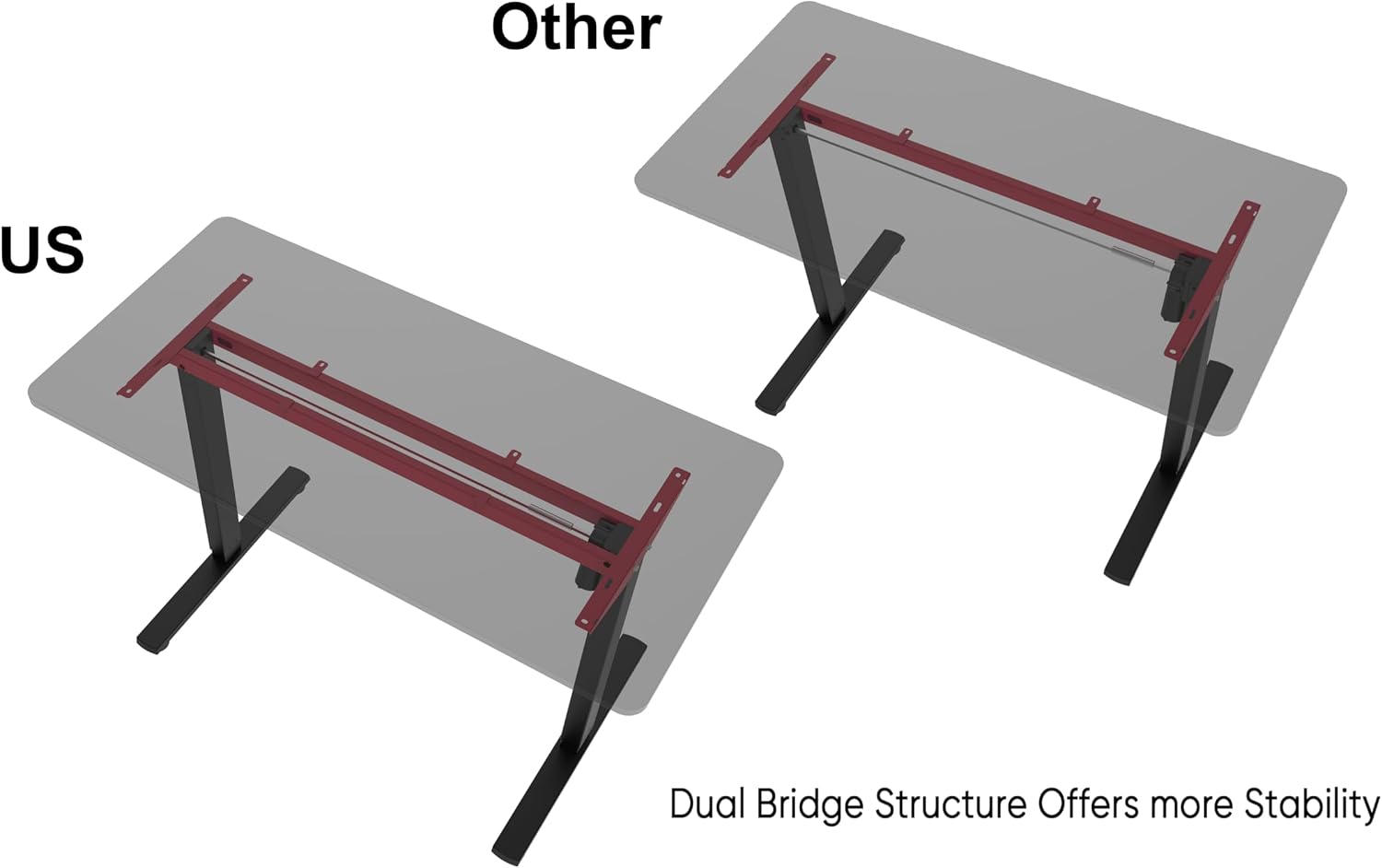
Image 3: A visual comparison highlighting the desk's dual bridge structure (labeled 'US') versus a standard single-beam design (labeled 'Other'). The dual bridge design enhances stability and load capacity, ensuring the desk remains steady even at higher elevations.
Setup and Assembly
While specific assembly steps are not detailed here, the desk is designed for straightforward setup. Please refer to the separate assembly guide included in your product packaging for detailed, step-by-step instructions. General tips for assembly include:
- Unpack all components and verify against the parts list in your assembly guide.
- Assemble the desk frame first, ensuring all screws are securely tightened.
- Attach the desktop to the assembled frame.
- Connect the control panel and power supply according to the diagrams.
- Perform an initial calibration or reset if instructed by the assembly guide.
Operating Instructions
Control Panel Functions

Image 4: A close-up view of the smart control panel for the PrimeCables Electric Standing Desk. It features an LED display and buttons for up/down control, two memory settings (1 and 2), child safety lock activation, and anti-collision sensitivity adjustment.
- Up and Down Control: Use the Up (▲) and Down (▼) buttons to manually adjust the desk height. Release the button to stop at the desired height.
- Memory Settings (1/2): To save a preferred height, adjust the desk to the desired position, then press and hold one of the memory buttons (1 or 2) until the LED display confirms the setting is saved. To recall a saved height, simply press the corresponding memory button.
- Child Safety Lock: Activate the child safety lock by pressing and holding the designated lock button (often indicated by a lock icon or specific combination, refer to your assembly guide for exact instructions). This prevents accidental height adjustments. Repeat the action to unlock.
- Anti-Collision Sensitivity Adjustment: The desk features an anti-collision system. The sensitivity can typically be adjusted via the control panel (refer to your assembly guide for specific steps). This function detects obstacles and stops the desk's movement to prevent damage or injury.
Anti-Collision Feature

Image 5: This image demonstrates the anti-collision sensitivity feature. As the desk lowers, it automatically detects the computer tower placed beneath it and stops movement, preventing a collision. This safety mechanism protects both the desk and surrounding objects.
The anti-collision system automatically detects resistance during height adjustment. If an object is detected, the desk will stop and slightly reverse its movement to prevent impact. This feature is crucial for safety and protecting your equipment.
Quiet and Smooth Height Adjustment

Image 6: The PrimeCables standing desk is shown adjusting its height, illustrating its quiet and smooth gliding mechanism. The arrows indicate the range of height adjustment, from approximately 28 inches to 46.5 inches, highlighting the seamless transition between sitting and standing positions.
The desk's electric motor ensures quiet and smooth transitions between sitting and standing heights, minimizing disruption in your workspace.
Maintenance
Regular maintenance helps prolong the life and performance of your standing desk:
- Cleaning: Wipe the desktop and frame with a soft, damp cloth. Avoid abrasive cleaners or harsh chemicals.
- Inspection: Periodically check all screws and bolts to ensure they are tight. Retighten if necessary.
- Cable Management: Ensure power cables and other cords are neatly managed and do not interfere with the desk's movement.
- Motor Care: Do not attempt to lubricate or open the motor housing. If you suspect a motor issue, contact customer support.
Troubleshooting
If you encounter issues with your desk, refer to the following common problems and solutions:
- Desk Not Moving:
- Check if the power cord is securely plugged into both the desk and the wall outlet.
- Ensure the child safety lock is not activated.
- Perform a reset (refer to your assembly guide for specific reset procedures, often involves holding down a button until the desk moves to its lowest point and back up).
- Uneven Height Adjustment:
- Ensure the desk is not overloaded or unevenly loaded.
- Perform a reset or calibration as per your assembly guide.
- Error Codes on LED Display:
- Note the error code and consult your assembly guide or contact customer support for specific solutions.
- Anti-Collision System Too Sensitive/Not Sensitive Enough:
- Adjust the anti-collision sensitivity via the control panel as described in the operating instructions or your assembly guide.
If these steps do not resolve the issue, please contact PrimeCables customer support.
Specifications
| Feature | Detail |
|---|---|
| Brand | PrimeCables |
| Model Number | Cab-PC-08451-all |
| Desktop Size | 140 x 60 cm (55.12 x 23.62 inch) |
| Height Range | 710-1180 mm (27.95 - 46.46 inch) |
| Motor Quantity | 1 |
| Load Capacity | 80 kg (176 lbs) |
| Special Features | Adjustable Height, Electric, Ergonomic, Standing Desk with Dual Bridge, Anti-Collision, Child Safety Lock, Memory Presets |
| Material | Metal, Walnut Wood (Desktop), Maple Wood (Top material type) |
| Color | Vintage |
Warranty and Support
For warranty information, please refer to the documentation included with your purchase or visit the official PrimeCables website. If you require technical assistance, have questions about assembly, or need to report a defect, please contact PrimeCables customer support. Ensure you have your model number (Cab-PC-08451-all) and proof of purchase available when contacting support.
You can typically find support contact details on the PrimeCables website or within your product packaging.


