
1. Introduction
This manual provides instructions for the assembly, operation, maintenance, and troubleshooting of your LITFAD LT1206939S Modern Brown Wood Office Desk. Please read these instructions carefully before assembly and use to ensure proper function and safety.

Image 1.1: Overview of the LITFAD Modern Brown Wood Office Desk.
2. Safety Information
Always assemble this desk on a stable, level surface. Ensure all parts are securely fastened before use. This desk is heavy and may tip over if not properly anchored to the wall. Do not exceed the maximum weight recommendation of 150 pounds on the working surface. Always follow the included instructions for safe assembly and use.
- Ensure all screws and fasteners are tightened securely.
- Do not stand or sit on the desk.
- Keep small parts away from children during assembly.
- Avoid placing hot items directly on the desk surface without protection.
3. Product Components
Before beginning assembly, verify that all components listed in the packaging are present and undamaged. The desk includes the following main parts:
- Desktop Panel
- Drawer Unit (with 3 drawers, one locking)
- Cabinet Unit
- Sled Base Supports
- Assembly Hardware (screws, dowels, cam locks, etc.)
- Assembly Tools (basic tools for assembly are included)
4. Setup and Assembly
Assembly of the LITFAD LT1206939S desk typically requires one person and includes all necessary tools. Follow the step-by-step instructions provided in the separate assembly guide included with your product packaging. A general overview of the assembly process is as follows:
- Unpack and Identify Parts: Carefully remove all components from the packaging and lay them out on a clean, soft surface to prevent scratches. Compare them with the parts list in your assembly guide.
- Assemble Base Structures: Begin by assembling the drawer unit and the cabinet unit according to the detailed diagrams.
- Attach Sled Base: Secure the sled base supports to the assembled drawer and cabinet units.
- Mount Desktop: Carefully place the desktop panel onto the assembled base structures, aligning all pre-drilled holes. Secure the desktop using the provided hardware.
- Install Drawers: Insert the assembled drawers into their respective slides within the drawer unit.
- Final Checks: Ensure all connections are tight and the desk is stable before placing any items on it.
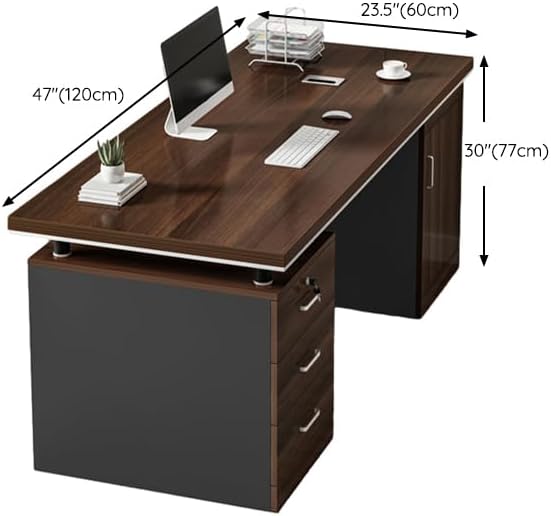
Image 4.1: Desk dimensions for planning placement and assembly.
5. Operating Instructions
Your LITFAD office desk is designed for functionality and convenience in a home or professional office environment.
5.1. Drawer Usage
The desk features three drawers for storage. The top drawer includes a locking mechanism for securing important documents or personal items. Use the provided key to lock and unlock this drawer.

Image 5.1: Detail of the three drawers, highlighting the locking top drawer.
5.2. Cabinet Usage
The integrated cabinet provides additional storage space, suitable for larger items or a computer tower. The cabinet door opens to reveal an open storage area.
5.3. Wire Management
A wire hole is integrated into the desk design to help manage cables from your computer, monitor, and other electronic devices, keeping your workspace tidy and organized.

Image 5.2: Detail of the wire hole for cable organization.
6. Maintenance
Proper care will extend the life and appearance of your desk.
- Cleaning: Wipe surfaces with a soft, damp cloth. Avoid harsh chemicals or abrasive cleaners, which can damage the wood finish.
- Spills: Clean up spills immediately to prevent staining or water damage.
- Protection: Use coasters for drinks and desk pads for writing or computer equipment to protect the surface from scratches and heat.
- Fasteners: Periodically check and tighten all screws and fasteners to ensure the desk remains stable.
7. Troubleshooting
If you encounter any issues with your desk, refer to the following common problems and solutions:
- Desk Wobbles: Ensure all assembly screws are fully tightened. Check that the desk is on a level surface. Adjust any leveling feet if present.
- Drawers Stick: Check that the drawer slides are properly aligned and free of obstructions. Ensure the drawer is not overloaded.
- Lock Not Working: Verify the key is fully inserted and turned correctly. Ensure no items are obstructing the locking mechanism inside the drawer.
- Missing Parts: If any parts were missing upon unboxing, contact customer support immediately with your product model number and a description of the missing part.
8. Specifications
| Feature | Detail |
|---|---|
| Brand | LITFAD |
| Model Number | LT1206939S |
| Product Dimensions (D x W x H) | 23.6" x 47.2" x 30.3" |
| Color | Brown |
| Material | Wood |
| Desk Design | Computer Desk |
| Number of Drawers | 3 |
| Locking Drawer | Yes (1) |
| Number of Cabinets | 1 |
| Special Features | Scratch Resistant, Wire Hole |
| Maximum Weight Recommendation | 150 Pounds |
| Assembly Required | Yes |
| Assembly Tools Included | Yes |
9. Warranty Information
This LITFAD office desk comes with a Limited Warranty. The specific terms and duration of the warranty may vary. Please refer to the warranty card included in your product packaging or contact customer support for detailed information regarding parts, labor, and comprehensive coverage.
10. Customer Support
If you have any questions, require assistance with assembly, or encounter any issues not covered in this manual, our customer service team is available to help. Please have your model number (LT1206939S) ready when contacting support.
For support, please refer to the contact information provided in your product packaging or visit the official LITFAD website. Our 24/7 customer services will guide you along if it doesn't work.