
1. Product Overview
The MEDca Rechargeable Digital Hearing Aids are Behind-The-Ear (BTE) devices designed to provide clear sound for individuals with moderate to severe hearing loss. These amplifiers feature 16-channel digital processing and noise cancellation for an enhanced listening experience.
Key features include:
- 16-Channel Precision Tuning: Expertly tuned to human speech frequencies for crystal-clear sound.
- Noise Cancellation: Upgraded digital chip effectively handles background noise.
- Squeal-Free Design: Redesigned receiving openings and modified speaker placement to prevent whistling and feedback.
- 40 dB Sound Gain: Provides significant amplification for improved hearing.
- Extended Battery Life: Up to 30 hours of usage per charge, with an additional 150 hours of backup power from the charging case.
- Versatile Listening Modes: Three distinct modes for various environments.
- Lightweight and Discreet: Weighing only 2g, designed for comfortable and prolonged wear.
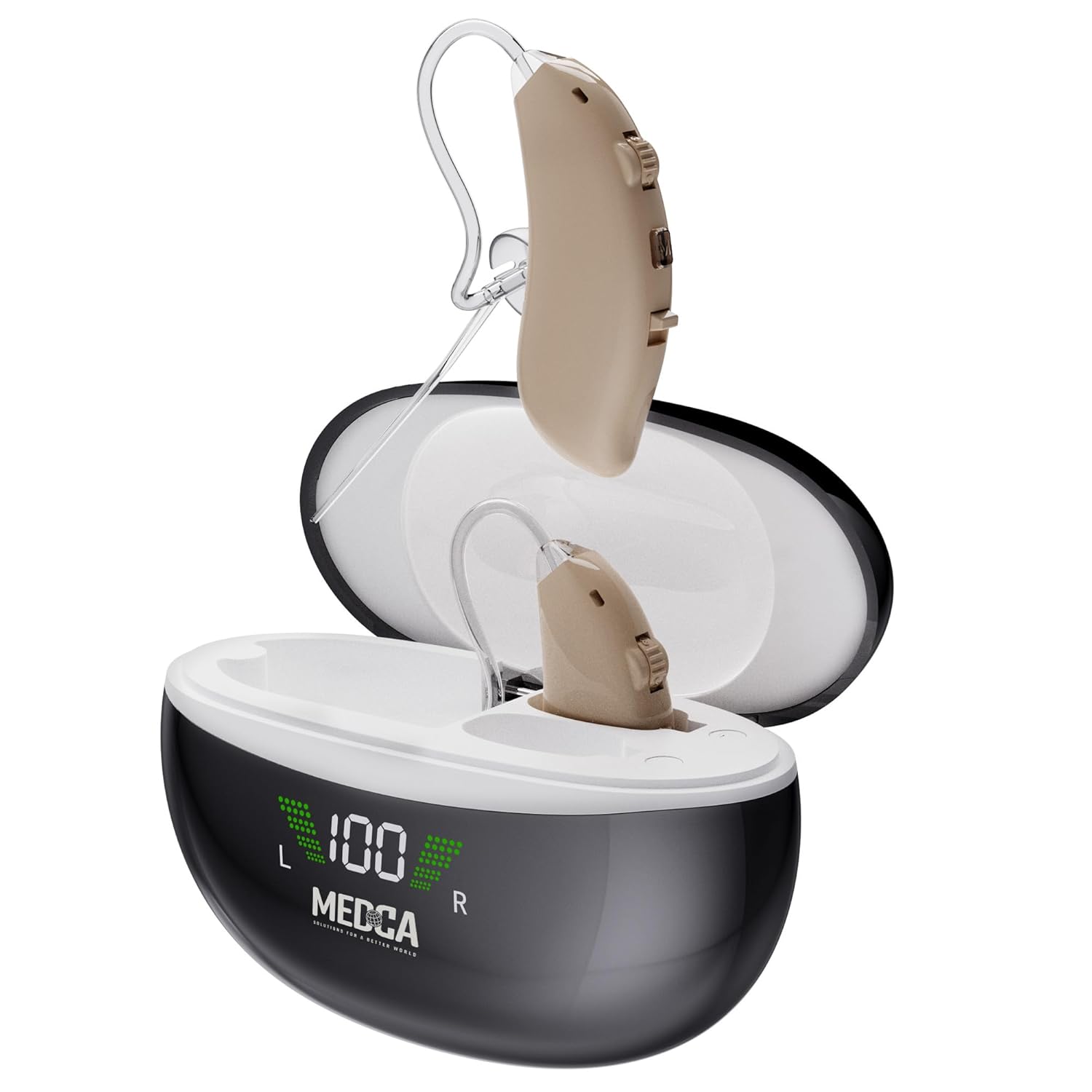
Figure 1: MEDca Rechargeable Digital Hearing Aids and Charging Case.
2. What's in the Box
Your MEDca hearing aid package includes the following items:
- 1 Pair of Rechargeable Hearing Aids
- 1 LED Intelligent Recharging Case
- 6 Ear Domes (S/M/L sizes)
- 1 USB to USB-C Charging Cable
- 1 Cleaning Brush
- 1 Instruction Manual (this document)

Figure 2: Package Contents.
3. Components and Controls
Familiarize yourself with the different parts and controls of your hearing aids and charging case:
- Sound Tube: Connects the hearing aid to the ear dome.
- Microphone Input: Captures sound from your environment.
- Volume Control: Buttons to increase (Up) or decrease (Down) the sound volume.
- Program Switch (M button): Allows selection between 3 listening programs.
- Power Switch (On/Off): Turns the hearing aid on or off.
- Charging Port (on hearing aid): Located at the bottom of the hearing aid for charging when placed in the case.
- Ear Dome: Soft silicone tip that fits into your ear canal.
- Charging Bin: Compartments within the charging case for the hearing aids.
- Charging Display: LED indicator on the case showing battery levels.
- Charging Port (on case): USB-C port for charging the case itself.
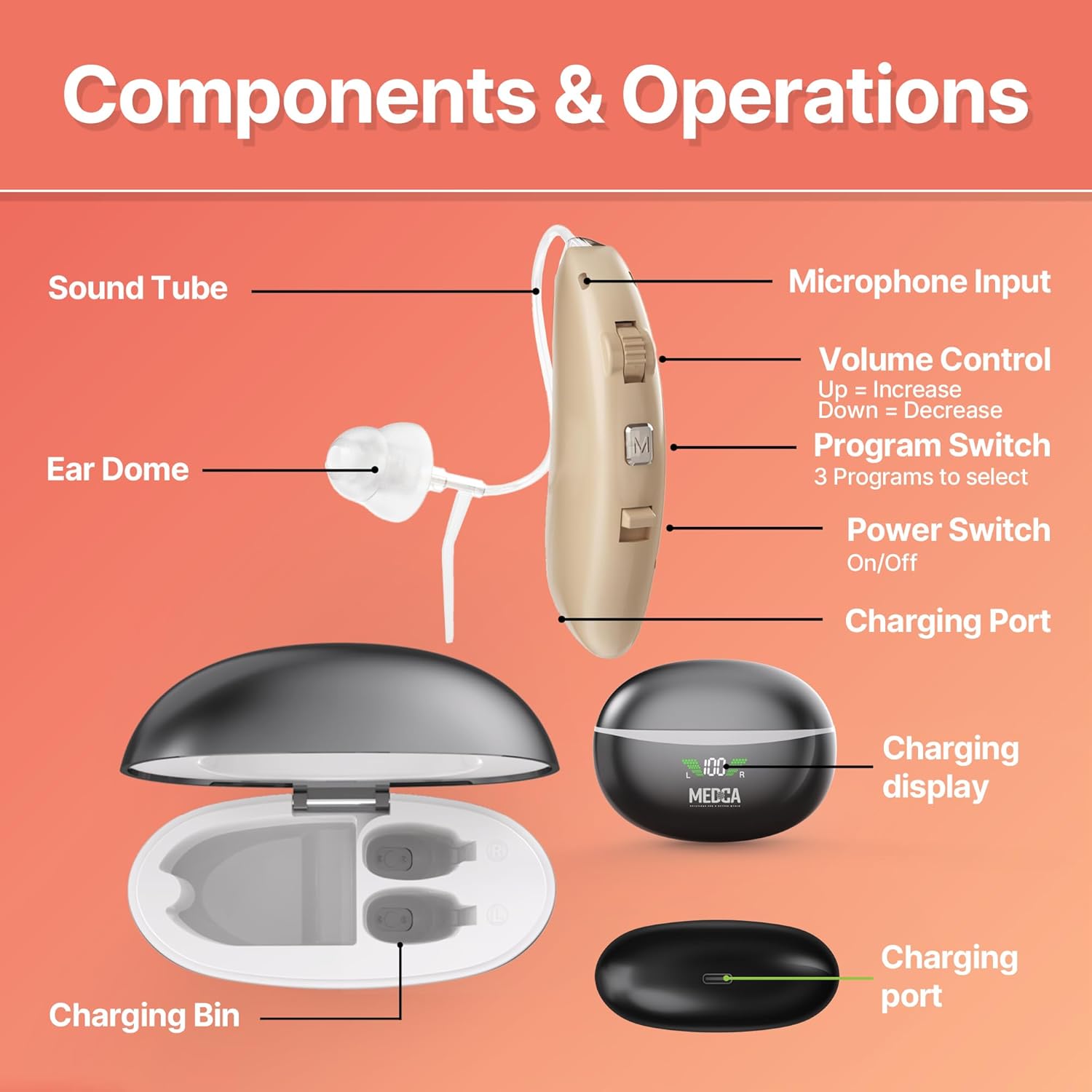
Figure 3: Hearing Aid Components and Controls.
For a visual guide on the product's features and handling, please watch the video below:
Video 1: Digital Hearing Amplifier Overview. This video demonstrates the physical aspects of the hearing aids and charging case, highlighting their design and ease of use.
4. Setup
4.1 Initial Charging
- Before first use, ensure both the charging case and the hearing aids are fully charged.
- Connect the USB-C charging cable to the charging port on the case and plug the other end into a 5V1A adapter (not included).
- Place the hearing aids into their respective charging bins in the case. Ensure they are turned OFF for proper charging.
- The LED display on the case will indicate the charging status. A full charge for the hearing aids takes approximately 1.5 hours. The case itself takes about 6 hours to fully charge.
4.2 Selecting and Attaching Ear Domes
Choose the ear dome size (S, M, L) that provides the most comfortable and secure fit in your ear canal. A proper fit is crucial for optimal sound quality and to prevent feedback.
- Gently remove the pre-attached ear dome if it does not fit.
- Select an appropriate size from the provided ear domes.
- Carefully push the new ear dome onto the sound tube until it is securely attached.
4.3 Wearing the Hearing Aids
- Place the main body of the hearing aid behind your ear.
- Gently insert the ear dome into your ear canal until it feels snug and comfortable.
- Adjust the sound tube to ensure it sits comfortably and securely.
5. Operating Modes
Your MEDca hearing aids offer three distinct listening modes to adapt to various sound environments. Press the 'M' button on the hearing aid to cycle through these modes:
- Normal Mode: Ideal for watching television or engaging in daily conversations in quiet to moderately noisy settings.
- Indoor Mode: Designed for enhanced clarity in bustling indoor environments such as parties, meetings, or public spaces. This mode focuses on reducing ambient noise.
- Outdoor Mode: Optimized for outdoor use, this mode helps manage wind noise and other environmental sounds, providing clearer hearing for activities like walking or cycling.

Figure 4: Three Modes for Easy Adjustment.
6. Charging Instructions
The intelligent charging case provides convenient and extended power for your hearing aids.
- Working Time: Up to 30 hours of continuous use on a single charge.
- Battery Backup: The charging case provides an additional 350 hours of backup power, allowing for multiple recharges on the go.
- Charging Time (Hearing Aids): Approximately 1.5 hours for a full charge.
- Charging Time (Case): Approximately 6 hours to fully charge the case.
- Overcharge Protection: The charging system includes circuits to prevent overcharging, ensuring battery longevity.

Figure 5: Battery Life and Charging Details.
7. Maintenance
Regular cleaning and proper care will ensure the longevity and optimal performance of your hearing aids.
- Daily Cleaning: Use the provided cleaning brush to gently remove any earwax or debris from the ear domes and microphone input.
- Wipe Down: Use a soft, dry cloth to wipe the main body of the hearing aids and the charging case. Do not use water or cleaning solutions directly on the devices.
- Storage: When not in use, store the hearing aids in their charging case in a cool, dry place.
- Avoid Moisture: Protect your hearing aids from excessive moisture, humidity, and extreme temperatures. Remove them before showering, swimming, or using hairspray.
- Ear Dome Replacement: Replace ear domes regularly or if they become damaged or discolored to maintain hygiene and sound quality.
8. Troubleshooting
If you encounter any issues with your hearing aids, please refer to the following common troubleshooting steps:
- No Sound or Low Volume:
- Ensure the hearing aid is turned on.
- Check the volume level and increase it if necessary.
- Verify that the ear dome is clean and free of earwax. Replace if clogged.
- Ensure the hearing aid is fully charged.
- Whistling or Feedback:
- Ensure the ear dome is properly seated in your ear canal and forms a tight seal.
- Try a different size ear dome for a better fit.
- Reduce the volume if it is too high.
- Charging Issues:
- Confirm that the charging cable is securely connected to both the case and the power source.
- Ensure the hearing aids are turned OFF when placed in the charging case.
- Check the LED display on the charging case to confirm it is receiving power and indicating charging status.
- Clean the charging contacts on both the hearing aids and the case.
- Distorted Sound:
- Clean the ear dome and microphone input.
- Try switching to a different listening mode.
- Ensure the hearing aid is fully charged.
If these steps do not resolve the issue, please contact customer support for further assistance.
9. Specifications
| Feature | Detail |
|---|---|
| Item Model Number | GM-105S |
| Batteries | 2 Lithium Polymer batteries (included) |
| Manufacturer | MEDca |
| Power Source | Battery Powered |
| Special Feature | Rechargeable |
| Package Dimensions | 4.92 x 3.7 x 1.73 inches; 6.38 ounces |
10. Warranty and Support
Specific warranty details are not provided in the product information. For warranty claims, technical support, or any product-related inquiries, please contact MEDca customer service directly or refer to the contact information provided with your purchase documentation.
You may also visit the MEDca Store on Amazon for additional product information and support resources.