
1. Introduction
Thank you for choosing the Corberó CSBCH950W 9 kg Heat Pump Dryer. This manual provides essential information for the safe and efficient operation, installation, and maintenance of your appliance. Please read these instructions carefully before using the dryer and keep them for future reference.
For detailed safety information, please refer to the official safety document: Safety Information (PDF).

Figure 1.1: Corberó CSBCH950W Heat Pump Dryer in a modern laundry room.
2. Safety Instructions
Your safety and the safety of others are paramount. Always follow basic safety precautions when using electrical appliances. This section highlights general safety guidelines. For a complete list of safety warnings and instructions, consult the dedicated safety document provided with your appliance.
- Ensure the dryer is properly grounded and connected to an appropriate power supply.
- Do not allow children to play on or in the appliance.
- Never operate the dryer with a damaged power cord or plug.
- Clean the lint filter after every cycle to prevent fire hazards.
- Do not dry items that have been soiled with flammable substances.
- Always unplug the appliance before cleaning or performing maintenance.
3. Product Overview
The Corberó CSBCH950W is a 9 kg front-load heat pump dryer designed for efficient and gentle drying. Key features include an A+++ energy rating, an intuitive LED display, 15 diverse drying programs, a delayed start function, and an anti-crease option. Its low noise level of 64 dB ensures quiet operation.
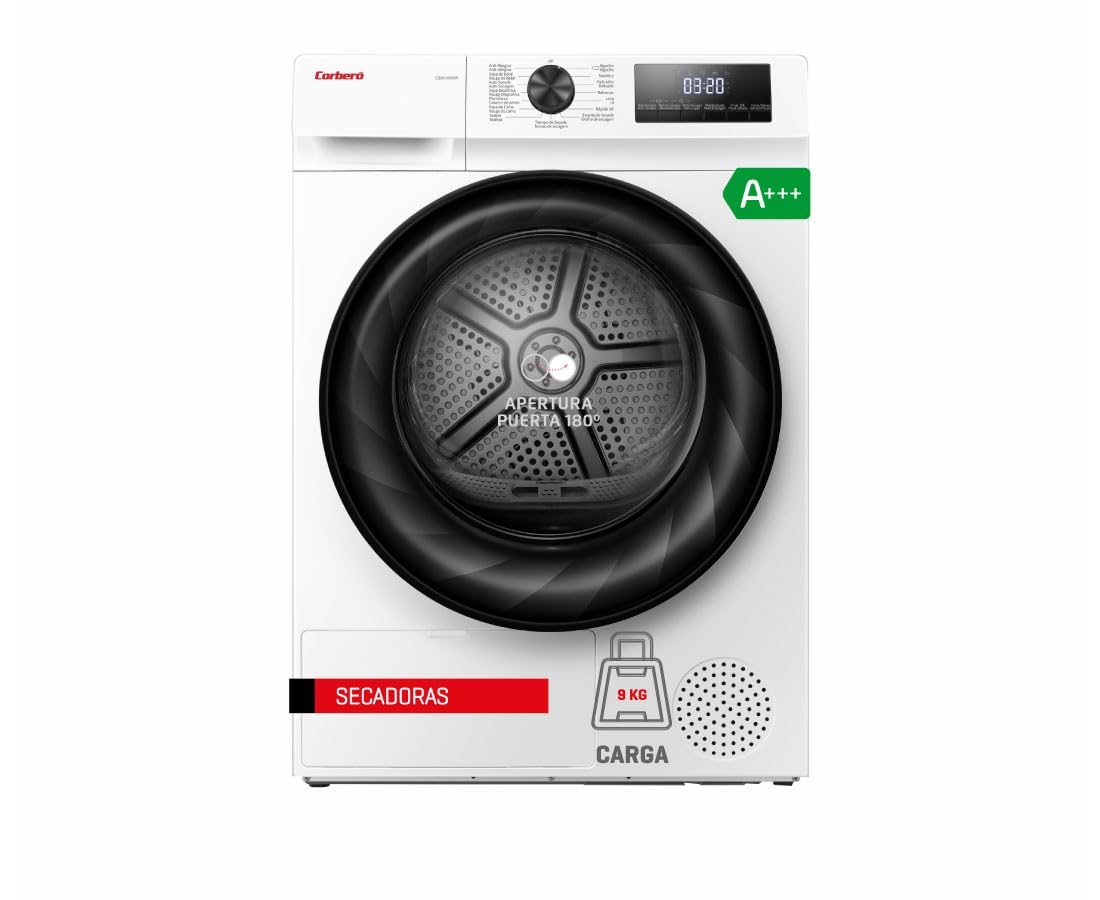
Figure 3.1: Front view of the Corberó CSBCH950W dryer, highlighting its modern design.
4. Setup and Installation
4.1 Unpacking
Carefully remove all packaging materials, including polystyrene, plastic bags, and any protective films from the appliance. Inspect the dryer for any damage incurred during transit. Keep packaging materials out of reach of children.
4.2 Location and Leveling
Place the dryer on a firm, level floor. Ensure there is adequate ventilation around the appliance. Do not install the dryer in areas where the temperature may fall below 5°C, as this can affect performance. Adjust the leveling feet at the bottom of the dryer to ensure it is stable and perfectly level. An unlevel dryer can cause excessive vibration and noise.
4.3 Electrical Connection
Connect the dryer to a properly grounded electrical outlet. Ensure the voltage and frequency match the specifications on the rating plate of the appliance. Do not use extension cords or multiple socket adapters. If the power cord is damaged, it must be replaced by the manufacturer, its service agent, or similarly qualified persons to avoid a hazard.
4.4 Drainage
This heat pump dryer collects condensed water in a removable tank. Ensure the water tank is correctly inserted before operation. For continuous drainage, you may connect a drain hose (if supplied) to a suitable drain point, following the instructions in the full manual.
5. Operating Instructions
5.1 Control Panel Overview
The control panel features a program selection dial, an LED display, and touch buttons for various functions and settings.

Figure 5.1: Program selection dial with various drying options.

Figure 5.2: LED display showing cycle time and function buttons.
5.2 Loading Laundry
Open the dryer door and load laundry into the drum. Do not overload the dryer; ensure items can tumble freely. Sort laundry by fabric type and desired drying level for optimal results. Close the door firmly.

Figure 5.3: Loading laundry into the dryer drum.
5.3 Program Selection
Turn the program selection dial to choose one of the 15 available drying programs. Common programs include:
- Cotton Drying: For cotton items.
- Synthetic Drying: For synthetic and mixed fabrics.
- Mix: For mixed loads of cotton and synthetics.
- Wool: Gentle drying for wool items.
- Quick 15: A short cycle for small loads or quick refresh.
- Anti-Allergy (Steam): Uses steam to reduce allergens.
- Refresh (Steam): To refresh clothes without full washing.
- Drum Clean: For cleaning the dryer drum.
5.4 Adjusting Options
After selecting a program, you can adjust additional options using the touch buttons:
- Drying Level: Adjust the desired dryness level (e.g., extra dry, cupboard dry, iron dry).
- Delayed Start: Press this button repeatedly to set a delay for the start of the cycle (e.g., 3, 6, 9 hours).
- Anti-Crease: Activates a gentle tumbling phase at the end of the cycle to minimize wrinkles, reducing the need for ironing.
5.5 Starting and Pausing a Cycle
Press the Start/Pause button to begin the selected drying cycle. To pause the cycle, press the Start/Pause button again. This allows you to add or remove items. Press it once more to resume the cycle.
6. Maintenance
Regular maintenance ensures optimal performance and extends the lifespan of your dryer.
6.1 Cleaning the Lint Filter
The lint filter must be cleaned after every drying cycle. Open the dryer door, remove the filter located inside the door opening, and remove any accumulated lint. Rinse under running water if necessary and ensure it is completely dry before reinserting.
6.2 Emptying the Water Tank
The condensed water is collected in a tank, usually located at the top left of the appliance. Empty the water tank after each cycle. Pull out the tank, pour out the water, and reinsert it firmly.

Figure 6.1: Access point for the condenser water tank or filter.
6.3 Cleaning the Condenser Filter
The condenser filter should be cleaned periodically, typically every few weeks or months depending on usage. Refer to the full instruction manual for specific steps on how to access and clean the condenser filter.
6.4 Exterior Cleaning
Wipe the exterior surfaces of the dryer with a soft, damp cloth. Do not use abrasive cleaners or solvents.
7. Troubleshooting
If you encounter issues with your dryer, refer to the following common troubleshooting steps before contacting service.
- Dryer not starting: Check if the power cord is securely plugged in, the door is fully closed, and a program has been selected.
- Poor drying results: Ensure the lint filter is clean, the water tank is empty, and the selected program is appropriate for the load type and desired dryness level. Avoid overloading.
- Unusual noise: Verify the dryer is level. Check for any foreign objects in the drum or filters.
- Error codes on display: Note the error code and consult the full instruction manual for specific solutions. If the issue persists, contact customer support.
8. Specifications
Technical data for the Corberó CSBCH950W Heat Pump Dryer:
| Feature | Specification |
|---|---|
| Model Number | CSBCH950W |
| Capacity | 9 kg |
| Energy Efficiency Class | A+++ |
| Dimensions (D x W x H) | 66 cm x 59.5 cm x 84.5 cm |
| Weight | 54 kg |
| Noise Level | 64 dB |
| Number of Programs | 15 |
| Material (Drum) | Stainless Steel |
| Components Included | Dryer unit |

Figure 8.1: EU Energy Label for Corberó CSBCH950W.
9. Warranty and Support
9.1 Manufacturer's Warranty
This Corberó CSBCH950W dryer comes with a three-year manufacturer's warranty. This warranty covers defects in materials and workmanship under normal use. Please retain your proof of purchase for warranty claims.
9.2 Customer Support
For technical assistance, service requests, or questions regarding your appliance, please contact your retailer or the official Corberó customer support. Refer to your purchase documentation for contact details.
