
WONNIE W-BR142
WONNIE W-BR142 Portable Blu-ray DVD Player User Manual
Model: W-BR142
Introduction
Thank you for choosing the WONNIE W-BR142 Portable Blu-ray DVD Player. This manual provides essential information for setting up, operating, and maintaining your device. Please read it thoroughly before use to ensure optimal performance and longevity of your player.
1. Package Contents
Before you begin, please verify that all items are present in the package:
- 1x WONNIE 16.9" Portable Blu-ray DVD Player (Model: W-BR142)
- 1x Remote Control
- 1x AC Adapter
- 1x RCA Cable
- 1x Car Charger
- 1x User Manual
Video: This video demonstrates the unboxing process and shows all the items included in the WONNIE W-BR142 Portable Blu-ray DVD Player package, including the player, remote control, AC adapter, RCA cable, car charger, and user manual.
2. Setup
2.1 Powering On and Charging
The player is equipped with a built-in 5000mAh rechargeable battery, providing approximately 4-5 hours of playback. To charge the device or power it directly:
- AC Adapter: Connect the AC adapter to the DC IN 12V port on the player and plug it into a standard wall outlet.
- Car Charger: For use in a vehicle, connect the car charger to the DC IN 12V port and plug it into your car's cigarette lighter socket.

Image: The WONNIE portable Blu-ray DVD player can be powered by its internal 5000mAh battery, an AC adapter for home use, or a car charger for on-the-go entertainment.
2.2 Disc Insertion
To insert a disc:
- Gently press the 'OPEN' button or slide the disc cover to open the disc compartment.
- Place the Blu-ray or DVD disc onto the spindle with the label side facing up.
- Close the disc cover firmly until it clicks into place.
2.3 Connecting to an External Display (TV/Projector)
The player supports both HDMI and AV output for connecting to a larger screen.
- HDMI Output: Use an HDMI cable (not included) to connect the player's HDMI OUT port to your TV or projector's HDMI IN port. Set your TV/projector to the corresponding HDMI input. The player's screen will turn off automatically for optimal viewing on the external display.
- AV Output: Use the included RCA cable to connect the player's AV OUT port to your TV's AV IN ports (Yellow for video, Red/White for audio). Set your TV to the corresponding AV input.
Video: This video demonstrates how to connect the WONNIE portable Blu-ray DVD player to a TV using an HDMI cable for an enhanced viewing experience. It shows plugging in the HDMI cable and selecting the correct input on the TV.
3. Operating Instructions
3.1 Basic Controls
The player features intuitive control buttons on the device itself and a remote control for convenient operation.

Image: The player features smooth and responsive control buttons for media playback, volume adjustment, and menu navigation.
3.2 Media Playback
The player supports a wide range of disc and digital media formats:
- Disc Formats: BD, BD-R, BD-RE, DVD, DVD+R/RW, DVD-R/RW, CD, CD-R/RW, VCD, SVCD (Blu-ray Discs: Region A/1; Standard DVDs: All Regions).
- USB/Micro SD Card: Supports USB 2.0 and Micro SD cards up to 32GB (FAT32). Playback of HD video up to 1920x1080@30fps, picture (JPG, PNG, GIF), audio (MP3/WMA/WAV), and video (MOV, AVI, MPG, MPEG, FLV, VOB, ASF) formats.

Image: The player offers wide format compatibility for discs, USB drives, and Micro SD cards, allowing playback of various audio, video, and image files.
3.3 Swivel Screen Functionality
The 14.1-inch screen can rotate 270° and flip 180°, allowing you to adjust the viewing angle for maximum comfort.
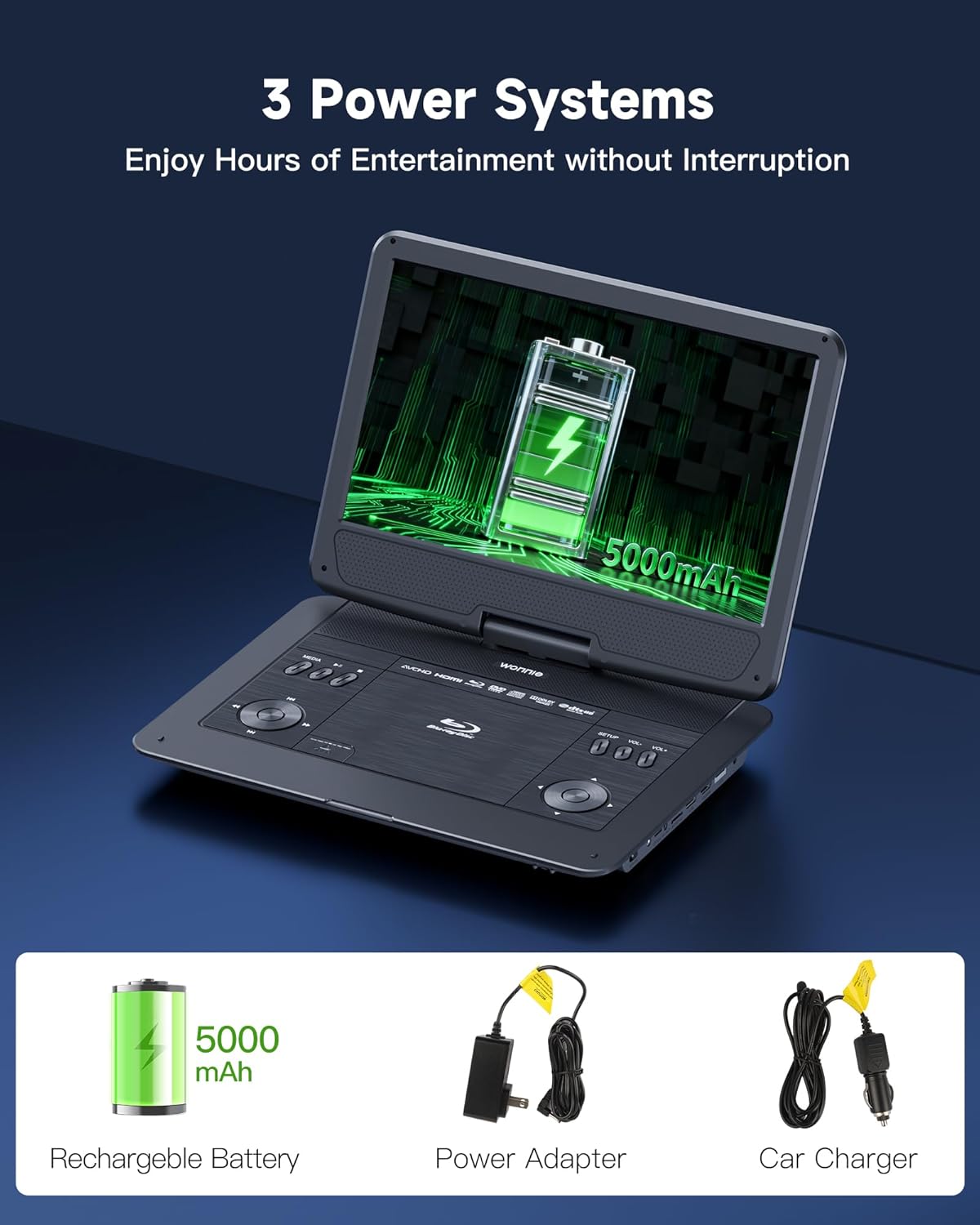
Image: The flexible screen can be flipped 180 degrees and swiveled 270 degrees to achieve the optimal viewing angle in any situation.
3.4 Last Memory Function
The player supports a resume playback function. To enable this, ensure you remove the disc before turning off the device. The player will then resume from where you left off when powered on again.
3.5 Audio Options
Enjoy rich, three-dimensional sound through the dual high-performance speakers. For private listening, plug earphones into the 3.5mm headphone jack.

Image: The player features dual high-performance speakers for an immersive audio experience. A 3.5mm headphone jack is also available for private listening.
4. Maintenance
4.1 General Care
- Keep the player away from direct sunlight, heat sources, and excessive moisture.
- Avoid dropping the device or subjecting it to strong impacts.
- Do not disassemble the player; this will void the warranty.
4.2 Cleaning
- Use a soft, dry cloth to clean the exterior of the player.
- For the screen, use a soft, lint-free cloth specifically designed for electronics screens. Do not use abrasive cleaners or solvents.
- To clean the disc lens, use a specialized DVD/Blu-ray lens cleaning disc.
5. Troubleshooting
If you encounter any issues with your WONNIE W-BR142 player, please refer to the following common solutions:
| Problem | Possible Cause | Solution |
|---|---|---|
| Player does not power on | Low battery or power connection issue | Ensure the player is fully charged or connected to a power source (AC adapter or car charger). Check power switch is in 'ON' position. |
| Disc not playing/"No Disc" error | Incorrect disc format, dirty/scratched disc, or disc not inserted correctly. | Verify disc compatibility (Blu-ray Region A/1, DVD All Regions). Clean the disc. Reinsert the disc correctly. |
| No picture on external TV/projector | Incorrect input selection on TV, loose cable connection, or faulty cable. | Ensure TV/projector is set to the correct HDMI or AV input. Check cable connections. Try a different HDMI/AV cable. |
| No sound | Volume too low, mute activated, or external audio device issue. | Increase volume on the player and/or external device. Check if mute is active. Ensure headphones/external speakers are properly connected. |
| Remote control not working | Dead batteries or obstructed signal. | Replace remote control batteries. Ensure no obstacles between the remote and the player's IR sensor. |
6. Specifications
| Feature | Detail |
|---|---|
| Brand | WONNIE |
| Model Number | W-BR142 |
| Screen Size | 14.1 Inches |
| Display Type | LCD |
| Native Resolution | 1920x1080 (1080P Full HD) |
| Disc Media Support | BD, BD-R, BD-RE, DVD, DVD+R/RW, DVD-R/RW, CD, CD-R/RW, VCD, SVCD (Blu-ray: Region A/1; Standard DVDs: All Regions) |
| Digital Media Support | USB 2.0, Micro SD card (up to 32GB FAT32); Video (MOV, AVI, MPG, MPEG, FLV, VOB, ASF up to 1920x1080@30fps), Audio (MP3/WMA/WAV), Picture (JPG, PNG, GIF) |
| Connectivity Technology | HDMI OUT, AV OUT, USB, Micro SD, Headphone Jack |
| Audio Output Mode | Surround (Dual Speakers) |
| Battery | Built-in 5000mAh rechargeable battery (4-5 hours playback) |
| Item Weight | 2.27 Kilograms |
7. Warranty and Support
WONNIE offers a new replacement/refund for reasons within 365 days from the date of purchase and professional technical support.
If you have any questions about your portable DVD player, please reach out to us directly via the "Get Product Support" option on the Amazon order page or contact our after-sales email. If any parts are missing or the item arrives damaged, we will send you a replacement.
Ask a question about this manual
Ask about setup, troubleshooting, compatibility, parts, safety, or missing instructions. Manuals+ will review the question and use this page’s manual context to help answer it.