
1. Introduction
This manual provides essential information for the safe and efficient operation of your YITRANIC 3500W Pure Sine Wave Inverter. Please read all instructions carefully before installation and use. Retain this manual for future reference.
The YITRANIC 3500W Pure Sine Wave Inverter converts 12V DC battery power into 120V AC household power, suitable for a wide range of electronic devices and appliances. It features a pure sine wave output, ensuring compatibility with sensitive electronics, and includes a wireless LCD remote control for convenient monitoring and operation.

Image 1.1: YITRANIC 3500W Pure Sine Wave Inverter and included accessories.
2. Safety Information
WARNING: Failure to follow these safety instructions may result in electric shock, fire, serious injury, or death.
- Do not open the inverter casing. There are no user-serviceable parts inside.
- Ensure proper ventilation around the inverter. Do not block ventilation openings.
- Keep the inverter away from water, moisture, flammable materials, and corrosive substances.
- Connect the inverter only to a 12V DC power source. Do not connect to 24V or higher DC sources.
- Ensure all connections are tight and secure to prevent loose connections and overheating.
- Do not exceed the inverter's rated continuous power output (3500W) or peak power output (7000W).
- Always disconnect the inverter from the battery before performing any maintenance or cleaning.
- This device is not intended for use by persons (including children) with reduced physical, sensory or mental capabilities, or lack of experience and knowledge, unless they have been given supervision or instruction concerning use of the appliance by a person responsible for their safety.
3. Package Contents
Verify that all items are present in your package:
- YITRANIC 3500W 12V Pure Sine Wave Inverter
- 2 x Battery Cables (Red and Black)
- 2-in-1 Remote Controller (Wired and Wireless)
- Wireless Receiver for Remote Control
- 16.4ft (5m) Remote Cable
- Charging Cable (USB)
- Backup Fuses
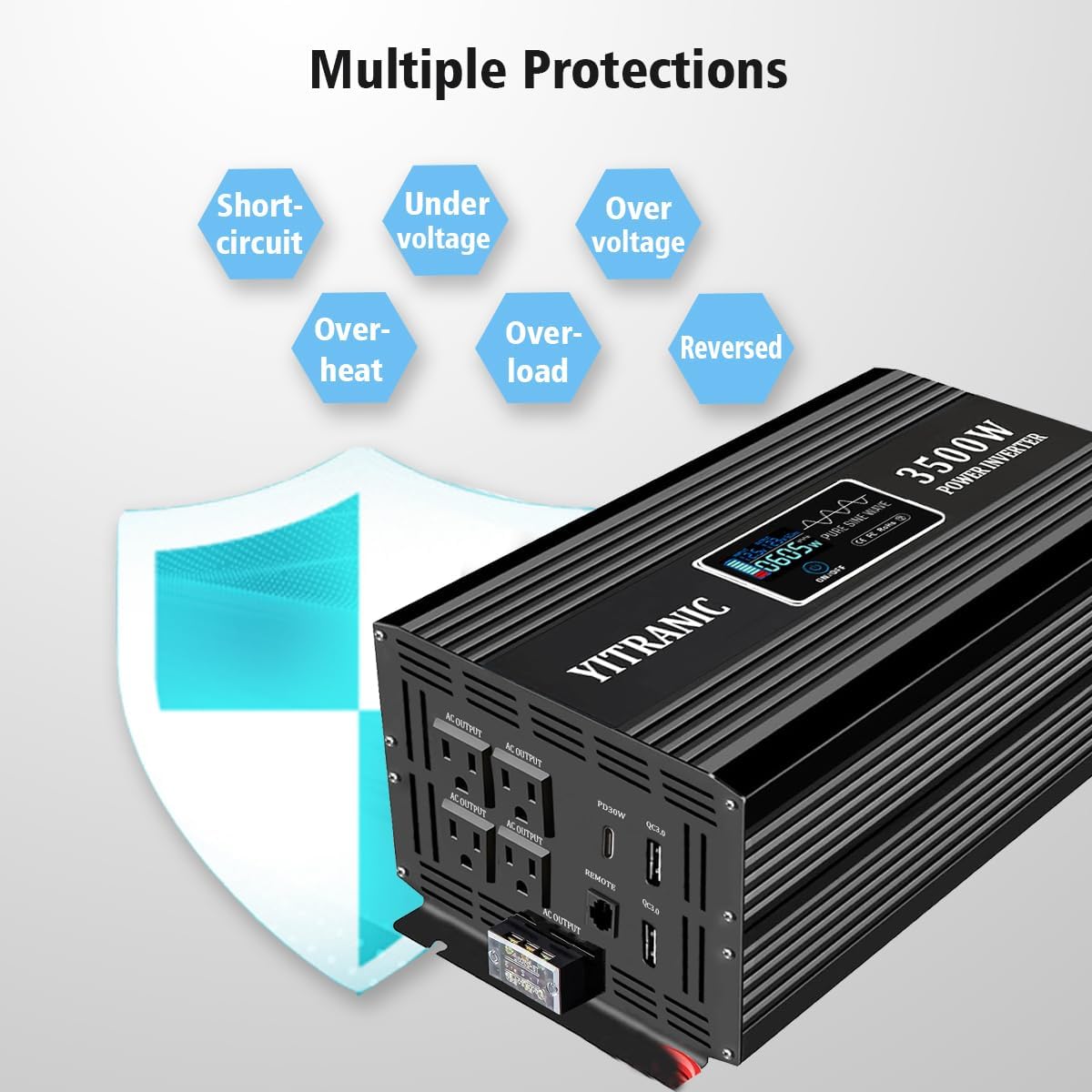
Image 3.1: Contents of the YITRANIC 3500W Inverter package.
4. Product Overview
The YITRANIC 3500W Pure Sine Wave Inverter is designed to provide reliable AC power from a 12V DC source. Key features include:
- Pure Sine Wave Output: Delivers clean and stable electricity, suitable for sensitive electronics like CPAP machines, laptops, and medical equipment.
- High Power Output: Provides 3500W continuous power and 7000W peak power.
- Versatile Outputs: Equipped with 4 standard AC outlets, 2 QC3.0 USB ports (5V 2.1A), and 1 PD30W Type-C port.
- Hardwire Port: For direct connection to high-power appliances.
- Wireless LCD Remote Control: Monitor and control the inverter from up to 164ft (50m) wirelessly or 16.4ft (5m) with the wired connection. Displays input/output voltage, power usage, and error codes.
- Advanced Protection: Built-in safeguards against over-voltage, low-voltage, overload, short circuits, and overheating.
- Smart Cooling Fan: Operates only when necessary to maintain optimal temperature and reduce noise.

Image 4.1: Front panel details of the inverter, highlighting output ports and controls.

Image 4.2: Inverter's temperature-controlled cooling fan.

Image 4.3: Pure Sine Wave vs. Modified Sine Wave comparison.
5. Setup and Installation
5.1 Choosing a Location
Select a dry, well-ventilated area for the inverter. Ensure there is sufficient space around the unit for airflow and cooling. Avoid direct sunlight, heat sources, and areas with excessive dust or debris.
5.2 Battery Connection
- Ensure the inverter's power switch is in the OFF position.
- Connect the red battery cable to the positive (+) terminal of the inverter and the positive (+) terminal of the 12V DC battery.
- Connect the black battery cable to the negative (-) terminal of the inverter and the negative (-) terminal of the 12V DC battery.
- Ensure all connections are tight and secure. Loose connections can cause overheating and damage.
IMPORTANT: Incorrect polarity will damage the inverter and void the warranty.
5.3 Remote Control Setup
The inverter comes with a 2-in-1 remote controller that can be used wirelessly or wired.
- Wireless Mode: Insert the wireless receiver into the "REMOTE" port on the inverter. The remote control will automatically pair.
- Wired Mode: Connect the 16.4ft remote cable from the remote controller to the "REMOTE" port on the inverter.

Image 5.1: Remote control connection options (wireless and wired).
6. Operating Instructions
6.1 Powering On/Off
- After ensuring all connections are secure, press and hold the ON/OFF switch on the inverter for 1-2 seconds to turn it on. The LCD display will illuminate.
- Alternatively, use the ON/OFF button on the remote control. Press and hold for approximately 1 second to power on or off.
- To turn off the inverter, press and hold the ON/OFF switch/button again for 1-2 seconds.
6.2 Connecting Appliances
- Plug your AC appliances into the standard AC outlets on the inverter.
- For devices requiring fast charging, use the QC3.0 USB ports or the PD30W Type-C port.
- For high-power appliances (loads ≥ 13A), use the hardwire port for a direct connection. Consult a qualified electrician for hardwire installations.
- Ensure the total wattage of all connected appliances does not exceed 3500W.

Image 6.1: Inverter in use, demonstrating remote control functionality.
6.3 Monitoring with the LCD Remote
The LCD remote control displays real-time information:
- Input Voltage: Shows the current DC voltage from your battery.
- Output Voltage: Displays the AC output voltage (120V).
- Output Power: Indicates the current power consumption of connected devices in watts.
- Error Codes: Displays specific codes if a fault occurs (e.g., OV for over-voltage, LV for low-voltage, OT for over-temperature, OL for overload, SC for short circuit).
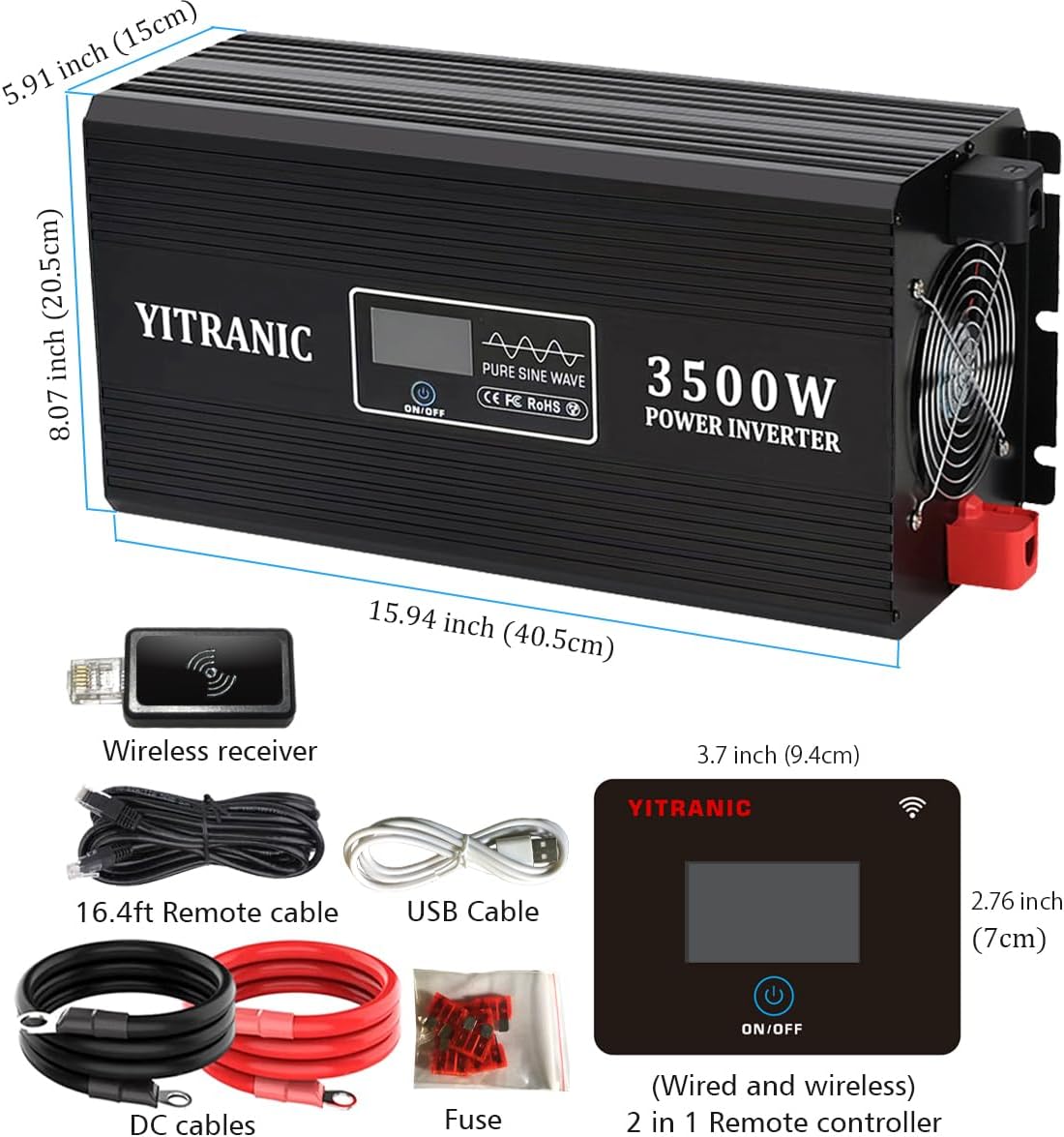
Image 6.2: LCD remote control display showing operational parameters.
7. Maintenance
- Cleaning: Periodically clean the exterior of the inverter with a dry, soft cloth. Do not use liquids or abrasive cleaners.
- Ventilation: Ensure the cooling fan and ventilation openings are free from dust and obstructions. Clean with compressed air if necessary.
- Connections: Regularly check battery and output connections for tightness. Loose connections can lead to power loss or overheating.
- Storage: If storing the inverter for an extended period, disconnect it from the battery and store it in a cool, dry place.
8. Troubleshooting
If you encounter issues with your inverter, refer to the following table:
| Problem | Possible Cause | Solution |
|---|---|---|
| Inverter does not turn on. |
|
|
| No AC output. |
|
|
| Remote control not working. |
|
|
| LCD displays error code (e.g., OV, LV, OT, OL, SC). |
|
|
Image 8.1: LCD display showing potential error indicators.
9. Specifications
| Feature | Specification |
|---|---|
| Model | YITRANIC 3500W |
| Continuous Power | 3500 Watts |
| Peak Power | 7000 Watts |
| Input DC Voltage | 12V DC |
| Output AC Voltage | 120V AC |
| Output Waveform | Pure Sine Wave |
| AC Outlets | 4 Standard US Outlets |
| USB Output | 2 x QC3.0 (5V 2.1A) |
| Type-C Output | 1 x PD30W |
| Remote Control Range (Wireless) | Up to 164 ft (50m) |
| Remote Control Cable Length | 16.4 ft (5m) |
| Product Dimensions | 15.94 x 8.07 x 5.91 inches (40.5 x 20.5 x 15 cm) |
| Item Weight | 16.72 pounds (7.58 kg) |
| Manufacturer | YITRANIC |
Image 9.1: Inverter and remote control dimensions.
10. Warranty and Support
For warranty information and technical support, please refer to the documentation included with your purchase or contact YITRANIC customer service directly. Contact details are typically available on the manufacturer's official website or through your retailer.
Please have your model number (YITRANIC 3500W) and purchase date available when contacting support.