Introduction
Thank you for choosing the OPPSK Battery Powered Stage Par Lights. This 2-pack of 4IN1 RGBW Full Color LED lights offers versatile lighting solutions for various events, including DJ shows, weddings, parties, and church stage lighting. Featuring a powerful rechargeable battery, multiple control modes, and easy installation, these lights are designed to enhance any atmosphere. This manual provides detailed instructions for setup, operation, maintenance, and troubleshooting to ensure optimal performance and longevity of your product.

Image: A banner displaying the text 'RECHARGEABLE STAGE PAR LIGHT' with a stage lighting setup in the background, highlighting the product's primary function.
Safety Information
Please read and understand all safety instructions before using this product. Failure to follow these instructions may result in electric shock, fire, or serious injury.
- Keep the device away from water or other liquids.
- Do not block any ventilation openings. Install in accordance with the manufacturer's instructions.
- Do not install near any heat sources such as radiators, heat registers, stoves, or other apparatus (including amplifiers) that produce heat.
- Only use attachments/accessories specified by the manufacturer.
- Unplug this apparatus during lightning storms or when unused for long periods of time.
- Refer all servicing to qualified service personnel. Servicing is required when the apparatus has been damaged in any way.
Package Contents
Ensure all items are present and in good condition upon opening the package:
- 2 x OPPSK Rechargeable Stage Par Lights
- 2 x IR Remote Controls
- Power Adapters
- User Manual
Product Overview
The OPPSK Rechargeable Stage Par Lights are designed for ease of use and versatility. Each unit features a robust aluminum housing for durability and efficient heat dissipation without a fan, ensuring quiet operation. Below are the key components and their functions:

Image: A detailed diagram showing the front and back panels of the par light, labeling the Battery Indicator, Digital Display, Menu, Up, Down, Enter, MIC buttons on the front, and Power ON/OFF switch, DMX IN/OUT ports, and POWER IN port on the back. It also illustrates the remote control buttons and their functions.
- LED Lamps: 4IN1 RGBW full-color LEDs for vibrant lighting.
- Digital Display: Shows current mode, DMX address, and battery status.
- Control Buttons: Menu, Up, Down, Enter, and MIC for direct control and settings adjustment.
- DMX Ports: DMX IN and DMX OUT for professional DMX control.
- Power Input: For charging and continuous power supply.
- IR Remote Sensor: Receives signals from the included remote control.

Image: Two black triangular stage par lights are shown with their red LEDs illuminated. Two white remote controls are displayed next to them, indicating a 2-pack product.
Dimensions

Image: A diagram showing the dimensions of the triangular par light: 10.6 inches (L) x 7.7 inches (W) x 6.5 inches (H).
Setup
Charging the Lights
The OPPSK Par Lights come with a built-in 4400mAh rechargeable battery, allowing for wireless operation. Before first use, or when the battery indicator shows low power, fully charge the lights.
- Connect the provided power adapter to the POWER IN port on the back of the light.
- Plug the adapter into a standard electrical outlet.
- The battery indicator on the LCD display will show charging status.
- A full charge takes approximately 5 hours.

Image: An illustration showing the battery run times for single color (26 hours), double color (8 hours), and all colors (6 hours). It also depicts the light being charged and the battery indicator on the LCD display.

Image: A close-up of the power adapter plugged into an outlet, with a red light indicating charging status.
Placement and Installation
The versatile design of the OPPSK Par Lights allows for various placement and installation options:
- Stand on the floor: The triangular design allows the light to stand upright on any flat surface, ideal for uplighting walls or corners.
- Lie on the floor: Position the light horizontally for broader wash effects or to illuminate specific areas.
- Mounted on a truss: Use an M8 light hook (not included) to securely mount the light to a truss system for elevated lighting effects.
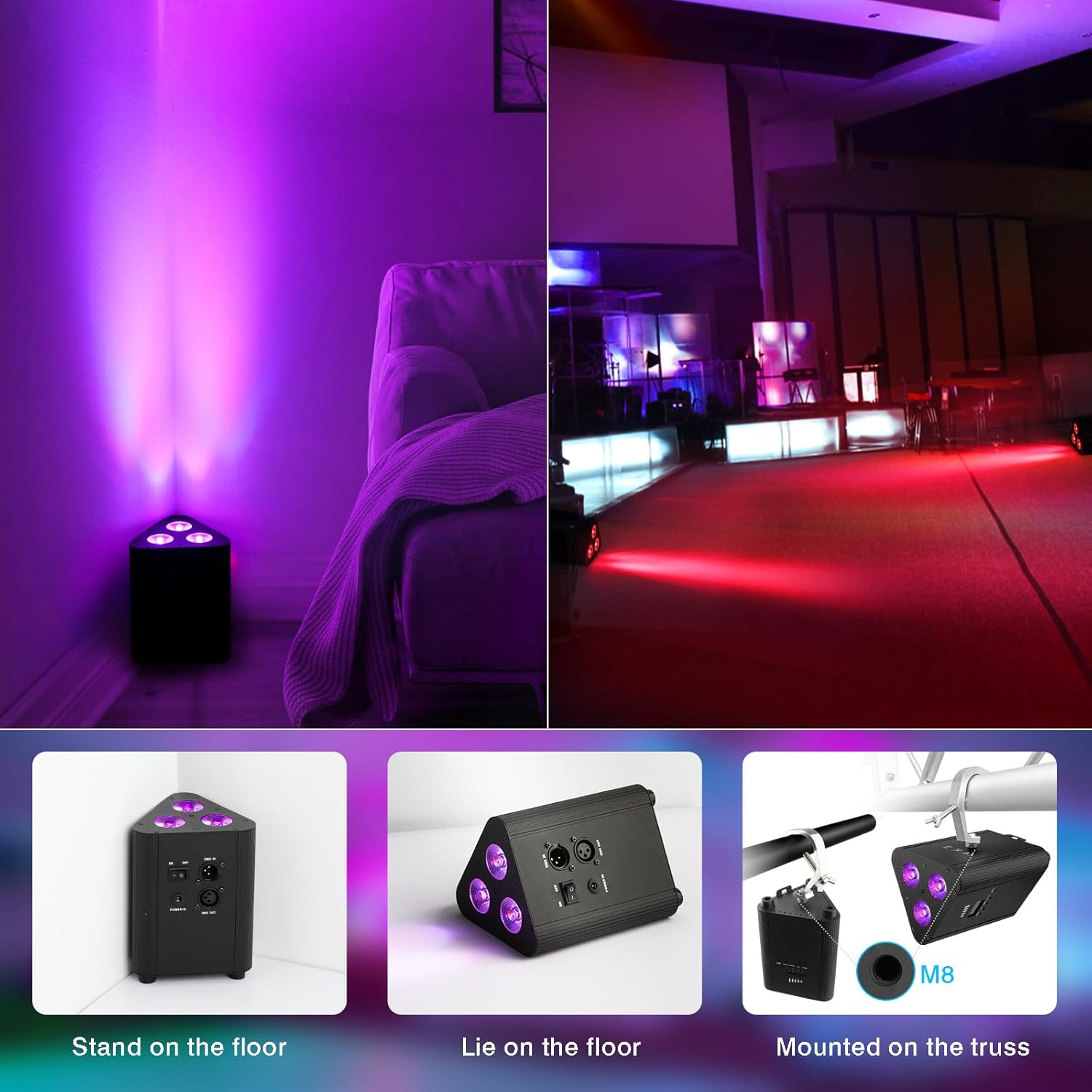
Image: Three illustrations demonstrating different installation methods: standing on the floor, lying on the floor, and mounted on a truss using an M8 hook.
Operating Instructions
The OPPSK Par Lights offer multiple control modes to suit your lighting needs. You can control them via the included IR remote, the buttons on the unit, or through DMX control.
Control Modes
The LED par light features 6 distinct control modes:
- Auto Mode: Cycles through pre-programmed lighting sequences automatically.
- Strobe Mode: Creates a flashing light effect with adjustable speed.
- Fade Mode: Smoothly transitions between colors.
- Master-Slave Mode: Connect multiple lights, where one acts as the master controlling the others.
- Sound Mode: Lights react to the beat of music or ambient sound via the built-in microphone.
- DMX Mode: For professional control using a DMX controller (DMX channels: 4, 6, or 8).

Image: A remote control is shown with buttons for Auto, Strobe, Fade, Sound, and Master-Slave modes, along with a scene depicting a room illuminated with various colors, controlled by the remote.
Remote Control Operation
The IR remote control provides convenient wireless operation. Ensure direct line of sight to the light's sensor for optimal performance.
- Power ON/OFF: Use the red and green power buttons.
- Brightness/Speed: Adjust with the '+' and '-' buttons.
- Color Selection: Press R (Red), G (Green), B (Blue), W (White), A (Amber), UV (Purple) for static colors. Numbered buttons (0-9) may correspond to pre-set colors or DMX addresses.
- Mode Selection: Buttons for Auto, Strobe, Fade, and Sound modes.
- Remote Range: The remote control has a range of 16.4ft (5m) and a 160° angle. Ensure the remote is aligned with the light bead panel.

Image: An illustration showing the remote control's effective range (16.4ft) and angle (160°) relative to the light. A note reminds users to remove the insulating sheet before use.
DMX Control
For advanced lighting setups, connect the lights to a DMX controller using standard DMX cables. Refer to your DMX controller's manual for specific programming instructions. The lights support 4, 6, or 8 DMX channels.
Brightness and Strobe Adjustment
You can adjust the brightness from 0-100% and the strobe speed using the remote control or the buttons on the light unit.

Image: A visual representation of light beams at different brightness levels, indicating the 'Brightness Adjustable' feature.
Sound Activated Mode
In Sound Mode, the lights will change colors and patterns in response to ambient sound or music, creating a dynamic visual experience.

Image: A par light next to a speaker, with musical notes and light patterns emanating, illustrating the sound-activated feature.
Color Options and Applications
The 4IN1 RGBW LEDs allow for a wide spectrum of colors and combinations, suitable for various applications.

Image: A collage showing the par light emitting various single and mixed colors, including red, green, blue, white, amber, and purple.

Image: A four-panel image showing the par light being used in different settings: a stage performance, wall washing, a mobile DJ setup, and wireless lighting for an event.

Image: A panoramic image showcasing the par lights illuminating a stage with vibrant colors and a party scene with dynamic lighting.
Maintenance
Proper maintenance ensures the longevity and optimal performance of your OPPSK Par Lights.
- Cleaning: Regularly wipe the exterior with a soft, dry cloth. Do not use harsh chemicals or abrasive cleaners. Ensure the light is off and unplugged before cleaning.
- Storage: When not in use, store the lights in a cool, dry place, away from direct sunlight and extreme temperatures.
- Battery Care: For long-term storage, charge the battery to about 50% every 3 months to maintain battery health.
Troubleshooting
If you encounter any issues with your OPPSK Par Lights, refer to the table below for common problems and solutions.
| Problem | Possible Cause | Solution |
|---|---|---|
| Light does not turn on | Battery is depleted; Power switch is off; Power adapter not connected. | Charge the light fully; Ensure power switch is ON; Check power adapter connection. |
| Remote control not working | Remote battery is dead; No line of sight; Remote too far from light. | Replace remote battery; Ensure direct line of sight to the light's sensor; Move closer to the light (within 16.4ft). |
| Colors/modes not changing | Incorrect mode selected; DMX conflict (if applicable). | Verify the selected mode on the light or remote; Check DMX settings and connections. |
| Light is not bright enough | Brightness setting is low. | Increase brightness using the remote or unit buttons. |
Specifications
Detailed technical specifications for the OPPSK Rechargeable Stage Par Lights:
| Feature | Specification |
|---|---|
| Brand | OPPSK |
| Model Number | HYT |
| Color | Black |
| Shape | Triangular |
| Material | Aluminum |
| Light Source Type | LED (4IN1 RGBW) |
| Power Source | Battery Powered |
| Item Weight | 5.3 Pounds |
| Number of Batteries | 6 Lithium Ion batteries (included) |
| Voltage | 3.7 Volts |
| Maximum Compatible Light Source Wattage | 50 Watts |
| Mounting Type | Wall Mount (also floor stand/lie) |
| Number of Light Sources | 2 (per pack) |
| Product Dimensions | 10.6"L x 7.7"W x 6.5"H |
| Single Color Run Time | 26 hours |
| Double Color Run Time | 8 hours |
| All Colors Run Time | 6 hours |
| Recharge Time | 5 hours |
| Control Modes | Auto, Strobe, Fade, Master-Slave, Sound, DMX |
| DMX Channels | 4, 6, or 8 |
| Remote Control Range | 16.4ft (5m) at 160° |
Warranty and Support
OPPSK is committed to providing a satisfying shopping experience and service. We offer 12 months of quality maintenance and lifetime after-sales support for our products. For any questions, concerns, or technical assistance, please contact our customer support team through the retailer's platform or the official OPPSK website.
For more information about OPPSK and our product range, please visit the OPPSK Store on Amazon.


