
1. Introduction
Welcome to the Surfola SF530Max Action Camera user manual. This guide provides detailed instructions on how to set up, operate, and maintain your new action camera. The SF530Max is designed to capture your adventures in stunning 4K at 60 frames per second (fps) with a 24MP photo resolution. It features a responsive touch panel, dual color screens for versatile shooting, built-in Wi-Fi, and comes with a wired microphone for superior audio recording. Its robust design, including a waterproof case, allows for use in various environments up to 40 meters deep.
2. Product Overview
2.1 Package Contents
Please check the package to ensure all items are present:
- Surfola SF530Max Action Camera
- Waterproof Case
- Wired External Microphone
- 32GB U3 Micro SD Card
- Rechargeable Batteries (x2)
- Battery Charger
- Wrist-mounted Remote Control
- Various Mounting Accessories (e.g., helmet mounts, bicycle mount, adhesive pads)
- USB Charging Cable
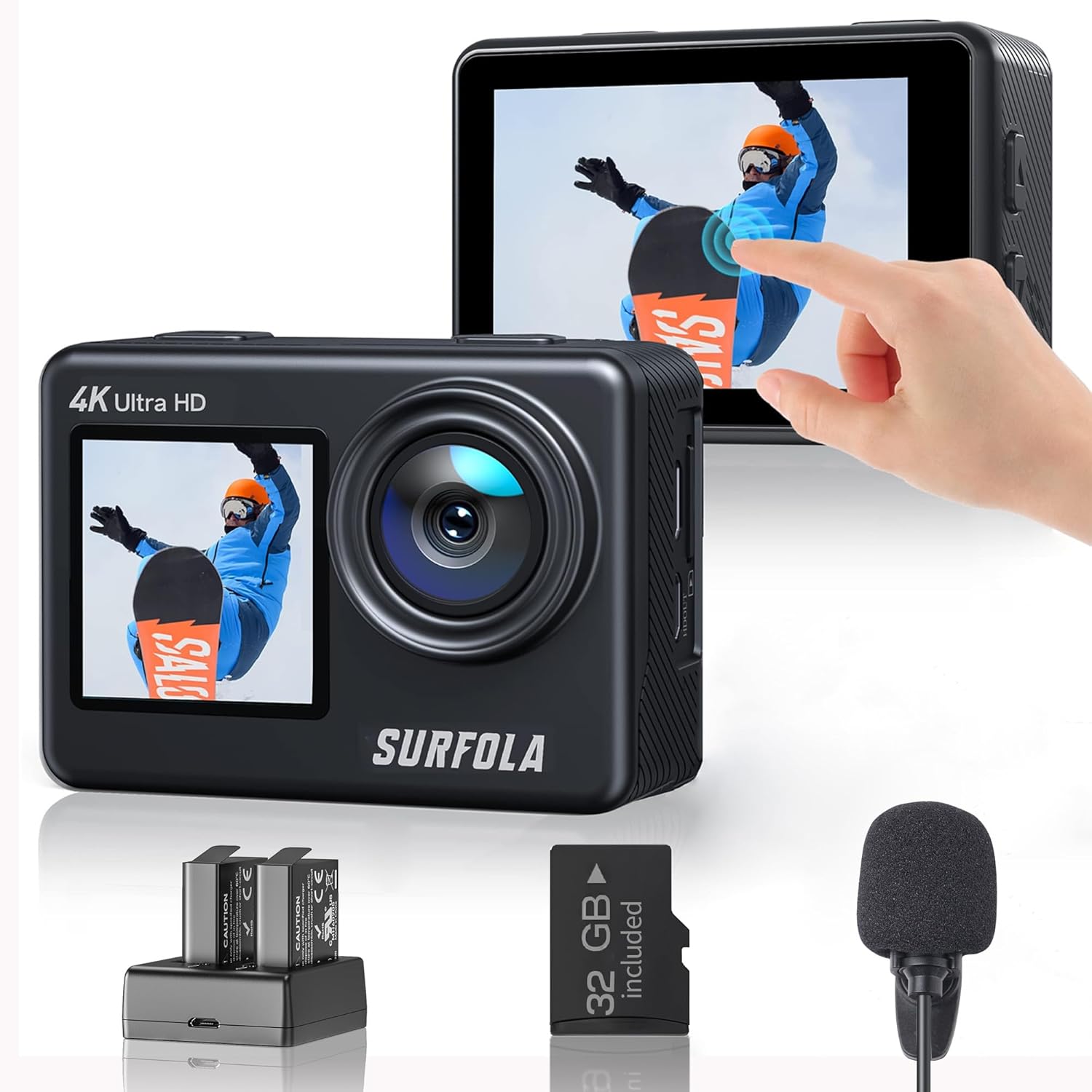
Image: The Surfola SF530Max Action Camera shown with its primary accessories: two batteries, a battery charger, a 32GB microSD card, and a wired external microphone.

Image: A comprehensive set of mounting accessories for the Surfola action camera, including helmet mounts, adhesive pads, and various connectors, laid out on a blue and white surface.
2.2 Camera Components
The SF530Max features a user-friendly design with intuitive controls and displays:
- Front Screen (1.4-inch): Ideal for vlogging and selfies, allowing you to frame yourself perfectly.
- Rear Touch Screen (2.0-inch): A responsive touch panel for easy navigation through menus, settings, and playback.
- Lens: High-quality 7-layer optical glass lens with a SONY CMOS sensor for crisp images and videos.
- Ports: Includes USB and HDMI ports for connectivity, and a dedicated port for the external wired microphone.

Image: The Surfola SF530Max Action Camera demonstrating its dual-screen functionality. The top image shows the front 1.4-inch screen in use for a selfie, while the bottom image shows the rear 2.0-inch touch screen displaying a landscape, being operated by a finger.
3. Setup
3.1 Battery Installation and Charging
To install the batteries, open the battery compartment cover on the bottom of the camera. Insert the two provided 1050mAh batteries, ensuring correct polarity. To charge, place the batteries into the included dual-slot battery charger and connect it to a USB power source using the USB cable. The indicator lights on the charger will show the charging status. A full charge provides approximately 8 hours of use.

Image: The Surfola SF530Max Action Camera with its battery compartment open, showing a battery being inserted. Next to it, the dual-slot battery charger is shown with two 1050mAh batteries charging, indicating the power capacity.
3.2 MicroSD Card Installation
Locate the microSD card slot on the side of the camera. Insert the included 32GB U3 microSD card until it clicks into place. It is recommended to format the card within the camera's settings before first use to ensure optimal performance and compatibility.

Image: The Surfola SF530Max Action Camera with a 32GB microSD card floating next to it, indicating that the card is included and ready for immediate use.
3.3 Waterproof Case Usage
The included waterproof case allows the SF530Max to be used safely underwater up to a depth of 40 meters. Before each use, ensure the case is clean and free of debris, and that the seals are properly seated. Close the case securely. This case also provides protection against dust, cold, and impact.

Image: A child swimming underwater, with the Surfola SF530Max Action Camera encased in its waterproof housing, demonstrating its capability to record clear footage up to 40 meters deep.
3.4 Wired Microphone Connection
Connect the wired external microphone to the designated port on the camera. This microphone significantly enhances audio quality by increasing sound volume by 100% compared to the built-in microphone and features noise cancellation to filter out low-frequency sounds like wind, air conditioning, or traffic noise. Both the wired and built-in microphones can be used, offering flexibility for various recording scenarios.
3.5 Remote Control Setup
The wrist-mounted remote control allows for easy operation of the camera from a distance. Simply power on the camera and the remote; they should pair automatically. This is particularly useful for outdoor sports like skiing, skydiving, bungee jumping, or mountain biking, where direct camera access might be difficult.

Image: A person on a ski slope holding a selfie stick with the Surfola action camera mounted, demonstrating the ease of remote operation using the wrist-mounted remote control for capturing moments during outdoor activities.
4. Operation
4.1 Power On/Off
To power on the camera, press and hold the Power/Mode button. To power off, press and hold the same button again.
4.2 Basic Video Recording and Photo Capture
Use the 2.0-inch rear touch screen to navigate between video and photo modes. In video mode, press the Shutter/OK button to start recording; press again to stop. In photo mode, press the Shutter/OK button to capture a still image. The intuitive touch interface simplifies operation compared to traditional action cameras with multiple buttons.

Image: A hand interacting with the 2.0-inch touch screen of the Surfola SF530Max Action Camera, demonstrating its intuitive control for capturing moments in 4K resolution.
4.3 Dual Screen Functionality
The SF530Max allows seamless switching between the front and rear screens. This feature is particularly useful for vlogging, self-portraits, or any situation where you need to see yourself while recording. The front screen ensures you are always in frame, making it ideal for content creation on platforms like Instagram and YouTube.
4.4 Wi-Fi Connectivity
Activate the Wi-Fi function in the camera settings. Download the dedicated app on your smartphone to connect to the camera. This allows you to remotely control the camera, view live footage, and easily transfer photos and videos to your device for instant sharing with family and friends.
5. Modes and Settings
The SF530Max offers a variety of shooting modes and customizable settings to suit different scenarios:
- Loop Recording: Records video continuously, overwriting the oldest files when the memory card is full.
- Time-Lapse: Captures a series of photos at set intervals and stitches them into a video, ideal for capturing slow-changing scenes.
- Slow Motion: Records video at a higher frame rate, allowing for smooth slow-motion playback.
- Burst Shooting: Captures multiple still images in quick succession, perfect for fast-moving subjects.
- Car Mode: Functions as a dashcam, automatically starting recording when the vehicle starts.
- Filters: Apply creative filters such as Sepia, Black & White, and Negative to your footage.
- 8x Digital Zoom: Magnify distant subjects without losing detail, ensuring you don't miss any beautiful scenery during your travels.
- EIS (Electronic Image Stabilization): Reduces blur and shakiness in your videos, providing smoother and more stable footage, especially during dynamic activities.
6. Maintenance
Proper maintenance ensures the longevity and optimal performance of your Surfola SF530Max Action Camera:
- Cleaning the Lens and Screen: Use a soft, lint-free cloth specifically designed for optics to clean the camera lens and screens. Avoid abrasive materials or harsh chemicals.
- Battery Care: Store batteries in a cool, dry place. Avoid fully discharging batteries for extended periods. If not using the camera for a long time, charge the batteries to about 50% before storage.
- Waterproof Case Care: After using the waterproof case in saltwater, rinse it thoroughly with fresh water and allow it to air dry. Inspect the O-ring seal regularly for any signs of damage or debris.
- Firmware Updates: Periodically check the official Surfola website for any available firmware updates. Updates can improve performance, add new features, or fix bugs. Follow the instructions provided with the update carefully.
7. Troubleshooting
If you encounter issues with your Surfola SF530Max, refer to the following common problems and solutions:
| Problem | Possible Cause | Solution |
|---|---|---|
| Camera does not power on. | Low or depleted battery. | Charge batteries fully. Ensure batteries are inserted correctly. |
| Recording stops unexpectedly. | SD card full or slow write speed. | Delete unnecessary files or format the SD card. Use a high-speed (U3) microSD card. |
| Poor audio quality. | External microphone not connected properly or damaged. | Ensure the wired microphone is securely plugged in. Test with the built-in microphone. |
| Wi-Fi connection issues. | Incorrect Wi-Fi settings or interference. | Ensure Wi-Fi is enabled on the camera and your smartphone. Restart both devices. Check for app updates. |
| Image/Video blurry or distorted. | Lens dirty or protective film still on. EIS not enabled or insufficient for extreme motion. | Clean the lens. Ensure EIS is enabled in settings. For very shaky footage, consider additional stabilization equipment. |
8. Specifications
Detailed technical specifications for the Surfola SF530Max Action Camera:
| Feature | Specification |
|---|---|
| Brand | Surfola |
| Model Number | SF530Max |
| Video Capture Resolution | 4K (60fps) |
| Still Image Resolution | Up to 24MP |
| Photo Sensor Technology | CMOS (SONY Sensor) |
| Lens | 7-layer Optical Glass Lens |
| Zoom Ratio (Optical) | 8X |
| Focal Length (Telephoto) | 2.1 millimeters |
| Aperture (Wide Angle) | 2.5 f |
| Image Stabilization | Digital (EIS) |
| Display | 2.0-inch Touch Panel (Rear), 1.4-inch Front Screen |
| Waterproof Depth | 40m (with included waterproof case) |
| Battery Type | 1050mAh Rechargeable (x2 included) |
| Storage Media | Micro SD Card (32GB U3 included, supports up to 128GB) |
| Video Capture Format | MP4 |
| Audio Formats Supported | AAC, MP3 |
| Connectivity Technology | HDMI, Wi-Fi, Ethernet (via adapter, not included) |
| Special Features | Remote Control, Lightweight Design |
| Product Dimensions | 6 x 3 x 4.2 cm; 570 g |
9. Warranty and Support
Surfola is committed to providing high-quality products and excellent customer service.
9.1 Product Warranty
Your Surfola SF530Max Action Camera comes with a standard 12-month product warranty from the date of purchase. In case of any malfunction or defect, Surfola will provide an exchange or refund as deemed appropriate. For official Surfola website members, the warranty is automatically extended to 24 months.

Image: A graphic illustrating Surfola's warranty policy, indicating a 12-month product warranty plus an additional 12-month extended warranty for registered members, ensuring peace of mind after purchase.
9.2 Customer Support
For any questions regarding your product, delivery, or technical assistance, please feel free to contact Surfola customer support. Our team is dedicated to assisting you with any inquiries you may have.
Note: All Surfola group products (sports cameras, projectors, portable players, etc.) comply with the technical standards stipulated by the Electrical Appliance and Material Safety Act (PSE).