
WnewTools MDS8207
WnewTools MDS8207 Intelligent 2 in 1 Digital Oscilloscope Multimeter User Manual
Model: MDS8207
Introduction
The WnewTools MDS8207 is an advanced 2-in-1 portable test instrument combining the functionalities of a digital oscilloscope and a true RMS multimeter. Designed for both professional and novice users, it offers a 40MHz bandwidth oscilloscope with a 200Msps real-time sampling rate, alongside a 6000-count multimeter for precise measurements. This device is engineered for quick and accurate fault detection in circuits, making it an essential tool for electronic engineers in various applications including outdoor research, production, debugging, and repair.
Key features include automatic measurement capabilities for both oscilloscope and multimeter functions, a high-contrast HD display, and the ability to measure high and low voltage signals up to 2400Vp-p. The MDS8207 also supports data storage for DMM readings and DSO waveforms, enhancing usability and analysis.
Package Contents
- 1 x MDS8207 Multimeter Oscilloscope Unit
- 1 Pair of Test Pens (Probes)
- 1 x English User Manual (This document)
Product Overview

Figure 1: The MDS8207 unit shown with its included test leads and a display demonstrating a capacitance measurement of 95.70 µF. The main screen also shows an oscilloscope waveform.
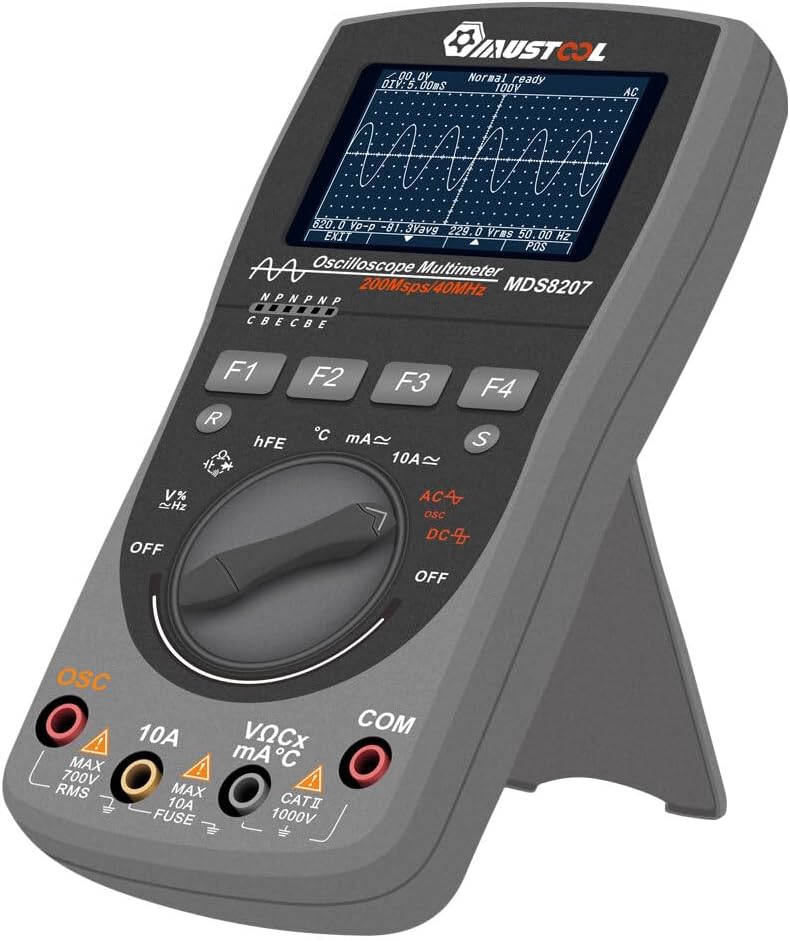
Figure 2: The MDS8207 device positioned on its integrated kickstand, providing a stable viewing angle for desktop use. The display shows an oscilloscope waveform.

Figure 3: A detailed front view of the MDS8207, highlighting the display screen with an oscilloscope waveform, the rotary selector switch, and the function buttons (F1-F4).

Figure 4: The MDS8207 displaying a voltage reading of 229.0V, alongside an image illustrating the bottom casing of the device, showing the battery compartment or stand mechanism.
Setup
Battery Installation
The MDS8207 is powered by 3 AA batteries. To install or replace batteries:
- Locate the battery compartment cover on the rear of the device.
- Open the cover by sliding or unscrewing it (refer to Figure 4 for general location).
- Insert 3 AA batteries, ensuring correct polarity (+/-) as indicated inside the compartment.
- Close the battery compartment cover securely.
Connecting Test Leads
The device comes with a pair of test leads for measurements. Connect them as follows:
- Insert the black test lead into the "COM" (Common) input jack.
- Insert the red test lead into the appropriate input jack based on the desired measurement:
- "VΩCx mA°C" for voltage, resistance, capacitance, small current (mA), temperature, and diode/continuity tests.
- "10A" for large current measurements (up to 10A).
- "OSC" for oscilloscope measurements.
Operating Instructions
Power On/Off
To power on the device, rotate the central selector switch from the "OFF" position to any desired measurement function. To power off, rotate the switch back to "OFF". The device also features an optional manual or automatic shutdown function.
Multimeter Functions (DMM)
The MDS8207 offers a comprehensive range of multimeter functions. Rotate the central selector switch to the desired measurement type:
- AC/DC Voltage (V): Measure AC or DC voltage. The device supports automatic range selection.
- AC/DC Current (A/mA): Measure AC or DC current. Use the 10A input for high currents.
- Resistance (Ω): Measure electrical resistance.
- Capacitance (Cx): Measure capacitance.
- Frequency (Hz) / Duty Cycle (%): Measure signal frequency and duty cycle.
- Diode Test / Continuity Test: Test diodes and check for circuit continuity.
- Transistor (hFE): Test transistor gain.
- Temperature (°C): Measure temperature (requires appropriate probe, not explicitly listed as included but function is present).
The DMM functions include True RMS measurement and can display maximum/minimum values simultaneously. The device can store up to 100 sets of DMM data.
Oscilloscope Functions (DSO)
To use the oscilloscope function, rotate the central selector switch to the "OSC" position. The MDS8207 features a 40MHz bandwidth and 200Msps real-time sampling rate.
- Automatic Measurement: Press the "AUTO" button (F1) to automatically display a perfect waveform. The secondary display will show Vpp, Vavg, and Vrms simultaneously. This eliminates the need for manual adjustment of signal, period, or amplitude.
- Trigger Modes: Select from Auto, Normal, or Single trigger modes using the function buttons (F2, F3, F4). The "Single" mode allows locking and saving non-periodic signals.
- Waveform Storage: The device can store up to 50 sets of DSO data. Users can select storage locations for important waveforms.
- High Voltage Measurement: The MDS8207 can directly measure high and low voltage signals, up to 2400Vp-p.

Figure 5: An illustrative diagram highlighting the multi-functionality of the MDS8207 as a 2-in-1 multimeter and oscilloscope, emphasizing its key features such as automatic range, high-speed sampling, and waveform display.
Maintenance
Cleaning
To clean the device, use a soft, damp cloth. Do not use abrasive cleaners or solvents. Ensure the device is powered off and disconnected from any circuits before cleaning.
Battery Replacement
Replace batteries when the low battery indicator appears on the display. Refer to the "Battery Installation" section under Setup for detailed instructions.
Storage
When not in use for extended periods, remove the batteries to prevent leakage. Store the device in a cool, dry place, away from direct sunlight and extreme temperatures.
Troubleshooting
- Device does not power on:
- Check if batteries are installed correctly and have sufficient charge. Replace if necessary.
- Ensure the rotary switch is moved from the "OFF" position to a function.
- No reading on display:
- Verify test leads are securely connected to the correct input jacks and the circuit under test.
- Ensure the correct measurement function is selected on the rotary switch.
- Check if the fuse is blown, especially for current measurements (MAX 10A FUSE).
- Oscilloscope waveform is unstable or incorrect:
- Press the "AUTO" button to allow the device to automatically adjust the waveform.
- Check the selected trigger mode (Auto, Normal, Single) and adjust as needed for the signal type.
- Ensure the input signal is within the device's measurement range (e.g., max 2400Vp-p).
- Inaccurate multimeter readings:
- Ensure proper connection of test leads and correct function selection.
- Verify the battery level; low battery can affect accuracy.
- For resistance or continuity, ensure the circuit is de-energized.
Specifications
The following table outlines the general characteristics and detailed specifications of the WnewTools MDS8207.

Figure 6: A comprehensive table detailing the general characteristics, multimeter measurement ranges with accuracy, and oscilloscope specifications of the MDS8207.
General Characteristics
- Display: HD display screen, high-contrast (white character on black background)
- Battery: 3 x AA batteries
- Dimensions: Approximately 8.66 x 5.91 x 3.15 inches (Package Dimensions)
- Weight: Approximately 13.1 ounces
- Automatic Shutdown: Optional
- Data Storage: 100 sets of DMM data, 50 sets of DSO data
Multimeter Specifications
- Counts: 6000 Counts True RMS
- DC Voltage: 600.0mV ~ 1000V
- AC Voltage: 600.0mV ~ 750V (True RMS)
- DC Current: 600.0mA ~ 6.000A, 10A
- AC Current: 600.0mA ~ 6.000A, 10A (True RMS)
- Resistance: 600.0Ω ~ 60.00MΩ
- Capacitance: 60.00nF ~ 60.00mF
- Frequency: 9.999Hz ~ 9.999MHz
- Temperature: -20°C ~ 250°C
- Diode Test: Open circuit voltage about 3V, maximum test current about 2mA
- On-off Test: Judgment resistance about 50Ω
- Fuse: 500mA/250V, 10A/250V
Oscilloscope Specifications
- Analog Bandwidth: DC 40MHz
- Real-time Sampling Rate: 200Msps/S
- Vertical Resolution: 8 bits
- Number of Channels: 1
- Input Impedance: 10MΩ
- Trigger Mode: Auto/Normal/Single
- Automatic Measurement: VPP, Vmax, Vmin, Vavg, Vrms, Frequency
- Highest Measurable Voltage: 2400Vp-p
Warranty and Support
For warranty information and technical support, please refer to the documentation provided with your purchase or contact WnewTools customer service directly. Details for contacting support are typically found on the product packaging or the official WnewTools website.
Manufacturer: Wnew
Part Number: PANN1496130
ASIN: B0CNS351J4
UPC: 769902952465
Ask a question about this manual
Ask about setup, troubleshooting, compatibility, parts, safety, or missing instructions. Manuals+ will review the question and use this page’s manual context to help answer it.