
1. Introduction
The Retekess TT125 Wireless Tour Guide System is designed to facilitate clear and efficient communication in group settings such as tours, conferences, and educational environments. This system operates on a 2.4G frequency, ensuring stable and high-fidelity audio transmission. It features a long-lasting battery, one-button operation for ease of use, and a wide working range to accommodate various activity scales. This manual provides detailed instructions for setting up, operating, and maintaining your TT125 system.
Video: An overview of the key functions and applications of the Retekess TT125 Wireless Tour Guide System.
2. What's in the Box
Upon unpacking your Retekess TT125 system, please verify that all components are present:
- 2 x TT125 Transmitters
- 2 x Lavalier Microphones
- 30 x TT125 Receivers
- 30 x D-shaped Earphones
- 32 x Lanyards
- 1 x 32-slot Charging Case
- 2 x Instruction Manuals
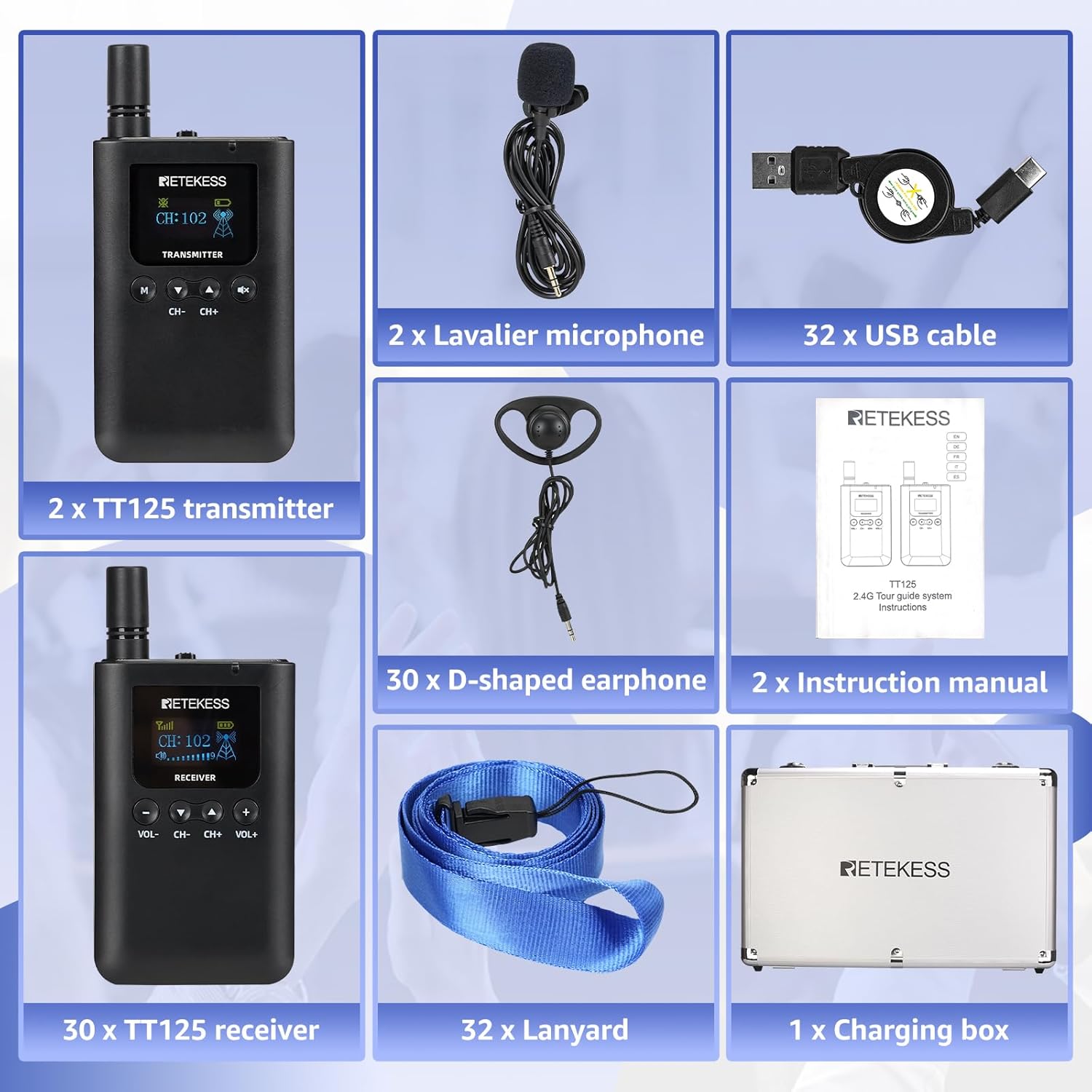
Image: All components included in the Retekess TT125 Wireless Tour Guide System package.
3. Product Overview
3.1. Transmitter (TT125)
The transmitter is used by the speaker or guide to broadcast audio. It features a built-in microphone and a port for an external lavalier microphone. The display shows the current channel and battery status.

Image: Retekess TT125 Transmitter with external lavalier microphone connected. The display shows channel information and battery level.
3.2. Receiver (TT125)
The receiver is distributed to participants, allowing them to hear the transmitted audio through the connected D-shaped earphone. It includes volume controls and a channel display.

Image: Retekess TT125 Receiver, highlighting its large capacity battery and clear display for channel and volume.
3.3. 32-slot Charging Case
The robust charging case provides a convenient and safe way to store and charge multiple transmitters and receivers simultaneously. It is designed for durability and ease of transport.

Image: The 32-slot charging case for the TT125 system, showing its internal layout for devices.
4. Setup
4.1. Charging the Devices
Before initial use, fully charge all transmitters and receivers. The devices can be charged individually using the provided USB Type-C cables or collectively using the 32-slot charging case.
- Individual Charging: Connect the Type-C charging cable to the charging port on the device and to a USB power adapter (not included).
- Charging Case: Place the transmitters and receivers into their respective slots in the charging case. Connect the charging case to a power source. The charging indicator on each device will show charging status.
A full charge takes approximately 3 hours. A fully charged transmitter provides up to 18 hours of use, while a receiver can last 80-100 hours.
Video: Demonstrates how to charge the Retekess TT125 devices using the Type-C port.
4.2. Wearing the Devices and Earphones
Both transmitters and receivers are designed for comfortable wear during extended periods.
- Transmitter/Receiver: Attach a lanyard to the device for hands-free carrying around the neck. The devices also feature a back clip for attaching to clothing.
- D-shaped Earphone: Connect the D-shaped earphone to the 3.5mm headphone jack on the receiver. The earphone is designed to fit comfortably over either ear.
Video: Illustrates the correct way to wear the Retekess TT125 receiver and D-shaped earphone.
4.3. One-Key Pairing
The TT125 system supports one-key pairing for quick and easy synchronization of channels between the transmitter and receivers.
- Ensure both the transmitter and receivers are powered on.
- On the transmitter, long-press the 'M' button (Menu/Pairing button) for quick pairing.
- The receivers will automatically synchronize to the transmitter's channel.
Video: Demonstrates the one-key pairing and mute functions of the Retekess TT125 system.
5. Operating Instructions
5.1. Power On/Off
To power on or off the device, press and hold the power button until the screen illuminates or turns off.
5.2. Channel Selection
The TT125 system offers up to 999 optional channels, allowing multiple groups to operate simultaneously in the same location without interference. After pairing, the receivers will automatically follow the transmitter's channel. If manual channel adjustment is needed on the transmitter, use the CH- and CH+ buttons.

Image: Illustration of how 999 channels can be used to support multiple tour groups concurrently.
5.3. Volume Adjustment
Receivers feature 9 levels of volume adjustment. Use the VOL- and VOL+ buttons on the receiver to adjust the listening volume to a comfortable level.

Image: Close-up of the receiver's controls, indicating volume adjustment buttons.
5.4. Mute Function
The transmitter includes a one-key mute function. Press the mute button on the transmitter to temporarily stop audio transmission to all connected receivers. Press it again to resume transmission.
5.5. Working Range
The system provides a wide working range of up to 180 meters (591 feet) in open outdoor environments, making it suitable for large-scale activities and tours. Obstacles and environmental factors may affect the actual range.

Image: Visual representation of the system's effective working distance between transmitter and multiple receivers.
6. Maintenance
- Cleaning: Use a soft, dry cloth to clean the devices. Avoid using harsh chemicals or abrasive cleaners.
- Battery Care: To prolong battery life, avoid fully discharging the devices frequently. Charge them regularly, even if not in constant use. Store devices with a partial charge if storing for long periods.
- Storage: Store the system in a cool, dry place, away from direct sunlight and extreme temperatures. Use the provided charging case for organized and protected storage.
- Handling: Handle devices with care to prevent damage from drops or impacts.
7. Troubleshooting
| Problem | Possible Cause | Solution |
|---|---|---|
| No sound from receiver |
|
|
| Interference or poor sound quality |
|
|
| Transmitter not broadcasting |
|
|
8. Specifications
| Feature | Detail |
|---|---|
| Model Number | TT125 |
| Item Weight | 26.2 pounds (total package) |
| Product Dimensions | 22.44 x 13 x 18.89 inches (package) |
| Batteries | 3 Lithium Ion batteries required (included) |
| Battery Type | Lithium Ion |
| Power Source | Battery Powered |
| Color | Black |
| Compatible Devices | Headset |
| Connector Type | Aux (for earphones), USB Type-C (for charging) |
| Transmitter Battery Life | Up to 18 hours |
| Receiver Battery Life | Up to 80-100 hours |
| Charging Time | Approximately 3 hours |
| Working Range | 180m / 591ft (open air) |
| Channels | 999 optional channels |
9. Warranty and Support
For warranty information and technical support, please refer to the official Retekess website or contact their customer service directly. Keep your purchase receipt as proof of purchase for any warranty claims.
You can visit the Retekess Store for more information: Retekess Store on Amazon.