
SOWTECH BD-CG011
SOWTECH Anti-static Conical Burr Coffee Grinder
Model: BD-CG011
Product Overview
The SOWTECH Anti-static Conical Burr Coffee Grinder is designed to provide precise and consistent coffee grounds for various brewing methods. Featuring 38 grind settings and a precision timer, it ensures optimal flavor extraction for your favorite coffee beverages.

Image: SOWTECH Conical Burr Coffee Grinder with coffee beans and ground coffee.
Video: Official SOWTECH Conical Burr Coffee Bean Grinder demonstration, showing quick installation, large capacity bean silo, electrostatic anti-stick toner cartridge, 38-gear adjustment, custom time settings, even powder output, and easy cleaning of durable tapered burrs.
Parts Identification

Image: Diagram illustrating the components of the SOWTECH coffee grinder, including the coffee bean box lid, coffee bean box, removable upper conical burr, coarseness adjustment ring, housing, Start/Stop button, timer selection wheel, scoop with brush, coffee powder lid, and coffee powder jar.
- Coffee bean box lid: Covers the bean hopper.
- Coffee bean box: Holds whole coffee beans (up to 160g capacity).
- Removable upper conical burr: Grinding component that can be removed for cleaning.
- Coarseness adjustment ring: Used to select one of 38 grind settings.
- Housing: Main body of the grinder.
- Start/Stop button: Initiates or stops the grinding process.
- Timer selection wheel: Adjusts grinding time from 5 to 60 seconds.
- Scoop with Brush: Dual-purpose tool for scooping beans and cleaning burrs.
- Coffee powder lid: Covers the ground coffee container.
- Coffee powder jar: Collects the ground coffee. Features anti-static properties.
Setup Instructions
Unpacking and Initial Setup
- Carefully remove all components from the packaging.
- Wash the coffee bean box, coffee powder jar, and lids with warm soapy water. Rinse thoroughly and dry completely before assembly.
- Ensure the main unit (housing) is clean and dry.
Assembly
- Place the coffee powder jar into its designated slot in the grinder's housing.
- Insert the removable upper conical burr into the grinding chamber.
- Place the coffee bean box onto the top of the grinder, aligning it correctly. Rotate until it locks into place.
- Fill the coffee bean box with whole coffee beans. The maximum capacity is 160g.
- Place the coffee bean box lid on top.

Image: Close-up of the SOWTECH coffee grinder showing the 38 precise grinding settings for various coffee types like Espresso, Mocca, Filter, Pour Over, and French Press.
Operating Instructions
Selecting Grind Setting
- The grinder offers 38 precise grind settings. Rotate the coarseness adjustment ring to select your desired grind size.
- Settings 1-5 are ideal for Espresso (fine grind).
- Settings 6-15 are suitable for Mocca (medium-fine grind).
- Settings 16-20 are recommended for Filter coffee (medium grind).
- Settings 21-30 are for Pour Over (medium-coarse grind).
- Settings 31-38 are best for French Press (coarse grind).

Image: View of the SOWTECH coffee grinder's internal stainless steel conical burr grinding core, highlighting its high hardness and performance for uniform grinding.
Setting Grinding Time
- Use the timer selection wheel to set the desired grinding duration. The timer can be set from 5 to 60 seconds.
- Adjust the time based on the amount of coffee you need and your preferred strength.

Image: SOWTECH coffee grinder on a wooden table with coffee beans and a cup of coffee, illustrating the timed grinding function for accurate and consistent results.
Grinding Coffee
- Ensure the coffee bean box is filled and the coffee powder jar is correctly in place.
- Press the Start/Stop button to begin grinding. The grinder will operate for the set duration.
- Once grinding is complete, remove the coffee powder jar. The anti-static design minimizes mess.

Image: Close-up of ground coffee collected in the SOWTECH grinder's powder jar, demonstrating the anti-static feature that prevents powder from sticking to the container walls.
Maintenance and Cleaning
Regular cleaning ensures optimal performance and extends the life of your coffee grinder.
Cleaning the Burrs
- Unplug the grinder from the power outlet before cleaning.
- Remove the coffee bean box and the upper conical burr.
- Use the provided brush to clean any residual coffee grounds from the burrs and the grinding chamber.
- The conical burrs are durable and designed for easy cleaning.
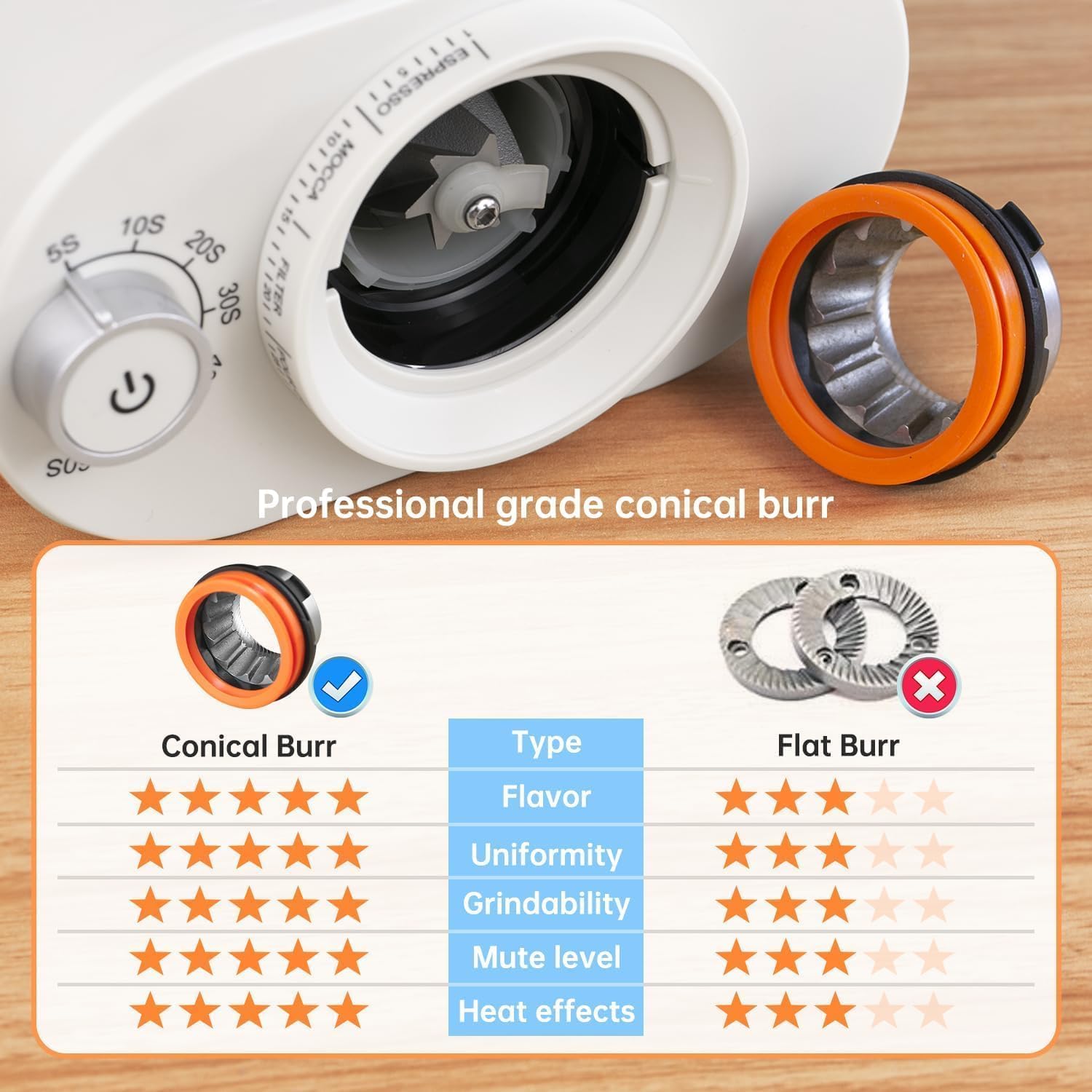
Image: Visual comparison highlighting the benefits of conical burr grinders over flat burr grinders in terms of flavor, uniformity, grindability, mute level, and heat effects.

Image: A hand using the provided brush to clean the removable conical burr, demonstrating the ease of maintenance for the SOWTECH coffee grinder.
Cleaning Other Components
- Wipe the exterior of the grinder housing with a damp cloth. Do not immerse the main unit in water.
- The coffee bean box and coffee powder jar can be washed with warm soapy water and rinsed thoroughly. Ensure they are completely dry before reassembling.
Troubleshooting
| Problem | Possible Cause | Solution |
|---|---|---|
| Grinder does not start. | Not plugged in; Bean box not properly locked; Overheat protection activated. | Ensure power cord is securely plugged in; Rotate bean box until it clicks into place; Allow grinder to cool down for 30 minutes if used continuously. |
| Inconsistent grind. | Burrs are dirty or clogged; Incorrect grind setting for bean type. | Clean the burrs thoroughly using the provided brush; Adjust grind setting to a finer or coarser level as needed. |
| Ground coffee sticks to container. | High static electricity (less likely due to anti-static feature). | Tap the container gently after grinding; Ensure container is completely dry before use. |
| Grinder is unusually loud. | Foreign object in grinding chamber; Burrs are loose. | Unplug and inspect grinding chamber for foreign objects; Ensure burrs are securely in place. |
Specifications
- Brand: SOWTECH
- Model Number: BD-CG011
- Color: Beige
- Product Dimensions: 6.9"L x 4.1"W x 11.2"H
- Item Weight: 3.4 pounds
- Voltage: 120 Volts
- Grind Settings: 38 precise settings
- Bean Hopper Capacity: Approximately 160g
- Features: Anti-static powder box, Precision timer (5-60 seconds), Durable stainless steel conical burrs.
Warranty Information
For detailed warranty information, please refer to the warranty card included with your product or visit the official SOWTECH website. Keep your purchase receipt as proof of purchase for any warranty claims.
Customer Support
If you have any questions or require assistance with your SOWTECH coffee grinder, please contact SOWTECH customer support. You can find contact details on the official SOWTECH website or through your retailer.
As stated in the product features: "If you have any questions about our products, we will respond within 24 hours and solve any of your problems."
Related documentsBD-CG011


Ask a question about this manual
Ask about setup, troubleshooting, compatibility, parts, safety, or missing instructions. Manuals+ will review the question and use this page’s manual context to help answer it.