
1. Introduction
Thank you for choosing the Furmax Gaming Chair. This chair is designed to provide an ergonomic and comfortable experience for extended periods of gaming or work. Featuring RGB LED lights, a massage function, and a reclining backrest with a footrest, this manual will guide you through the assembly, operation, and maintenance of your new gaming chair.

Image: The Furmax Gaming Chair in its full form, showcasing its ergonomic design and RGB LED strips along the edges.
2. Safety Information
- Ensure all components are securely fastened before use.
- Do not stand on the chair or use it as a step stool.
- Keep children and pets away from the chair during assembly.
- Do not expose the chair to direct sunlight or extreme temperatures.
- Avoid using abrasive cleaners; wipe clean with a damp cloth.
- The maximum weight capacity for this chair is 330 lbs (150 kg).
3. Package Contents
Verify that all parts are present before beginning assembly. If any parts are missing or damaged, please contact customer service.

Image: An exploded view of the Furmax Gaming Chair highlighting its key components: Comfort Headrest, Massage Lumbar Support, Linkage Arms, Stretchable Footrest, Mute Casters, and Certified Gas Lift.
- Backrest with RGB LED Lights
- Seat Cushion with Footrest
- Armrests (pre-attached to seat)
- Headrest Pillow
- Lumbar Support Pillow with Massage Function
- Gas Lift Cylinder
- Star Base
- Casters (wheels)
- Assembly Hardware (screws, washers, Allen key)
- Remote Control for LED Lights
- Instruction Manual
4. Setup (Assembly)
Assembly typically takes approximately 20 minutes and does not require additional tools beyond what is provided. Follow the detailed instructions included in your package for step-by-step guidance.

Image: A diagram illustrating the product dimensions of the Furmax Gaming Chair, including seat width, backrest height, and overall footprint.
- Attach the casters to the star base.
- Insert the gas lift cylinder into the center hole of the star base.
- Place the seat cushion onto the gas lift cylinder.
- Attach the backrest to the seat cushion using the provided screws.
- Install the headrest and lumbar support pillows. The lumbar support pillow can be adjusted vertically to fit your comfort needs.
- Connect the USB cables for the LED lights and massage function to a power source (e.g., a USB power adapter or power bank, not included).
5. Operating Instructions
5.1. LED Light Effects
The gaming chair features vibrant RGB LED lights with multiple modes and color options. Use the included remote control to customize your lighting experience.

Image: A visual guide to the LED light effects, showing the remote control for mode, brightness, and color adjustments, and indicating the USB power connection.
- Mode Control: Cycle through 358 RGB light modes.
- Brightness Control: Adjust the intensity of the lights.
- Color Control: Select from 7 static monochrome options.
- Ensure the USB cable is connected to a power source for the lights to function.
5.2. Massage Function
The lumbar support pillow includes a massage function to help alleviate fatigue during long sessions.
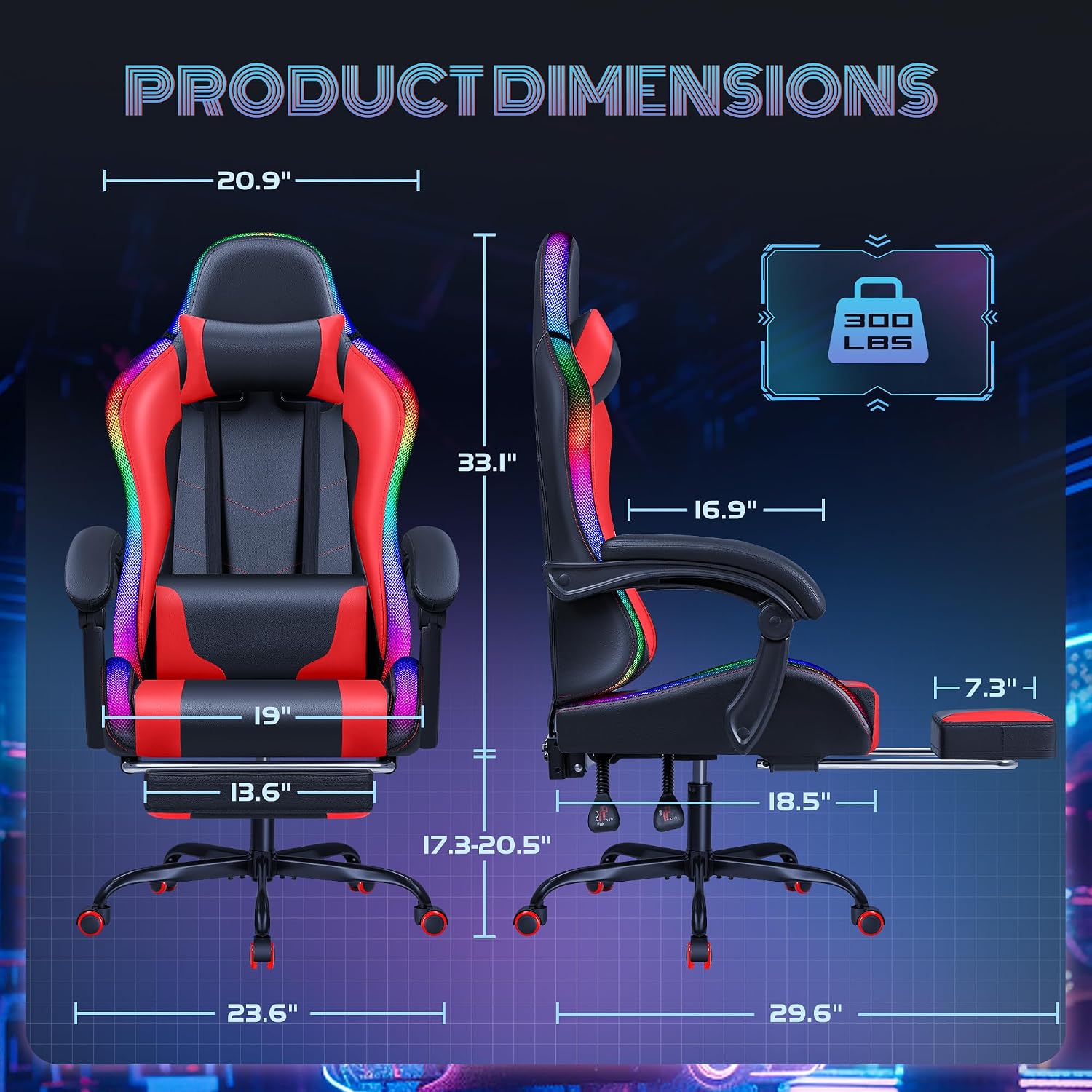
Image: A close-up of the lumbar support pillow with massage icons, emphasizing its spine-friendly design and fatigue relief benefits, along with the ergonomic backrest.
- Connect the USB cable from the lumbar pillow to a power source.
- Activate the massage function via the integrated controls or remote (if applicable).
- Adjust the position of the lumbar pillow for optimal comfort.
5.3. Recline and Footrest Adjustment
The chair offers adjustable recline and a retractable footrest for maximum relaxation.

Image: The Furmax Gaming Chair with its footrest extended and backrest reclined, illustrating its suitability for daily work, mobile gaming, and napping, with icons for reclining and height adjustment.
- Recline: Use the lever on the side to adjust the backrest angle from 90 to 135 degrees.
- Footrest: Pull out the footrest from beneath the seat for leg extension. Push it back in when not in use.
- Height Adjustment: Use the lever under the seat to raise or lower the chair height.
- Swivel: The 360-degree swivel seat and base allow for easy movement.
6. Maintenance
- Cleaning: Wipe the chair's PU leather surface with a soft, damp cloth. Avoid harsh chemicals or abrasive materials.
- Fasteners: Periodically check and tighten all screws and bolts to ensure stability.
- Casters: Keep casters clean from debris to ensure smooth rolling.
7. Troubleshooting
| Problem | Possible Cause | Solution |
|---|---|---|
| Chair wobbles/unstable | Loose screws or uneven assembly. | Check and tighten all assembly screws. Ensure the base is on a flat surface. |
| Gas lift not working | Gas lift cylinder malfunction or improper installation. | Ensure the gas lift is fully inserted into the base and seat mechanism. If problem persists, contact support. |
| LED lights not turning on | USB power not connected or remote control battery low. | Ensure USB cable is securely connected to a powered USB port. Check/replace remote control battery. |
| Massage function not working | USB power not connected. | Ensure USB cable from lumbar pillow is securely connected to a powered USB port. |
If you encounter any issues not listed here, please refer to the Warranty and Support section for assistance.
8. Specifications
| Feature | Detail |
|---|---|
| Brand | Furmax |
| Model Name | Gaming Chair with Massage and RGB LED Lights |
| Color | Led Red |
| Product Dimensions | 23.6"D x 23.6"W x 50.4"H |
| Maximum Weight Recommendation | 330 Pounds |
| Back Style | Solid Back |
| Special Feature | Ergonomic, RGB LED Lights, Massage, Reclining, Footrest |
| Product Care Instructions | Wipe Clean |
| Seat Depth | 18.5 inches |
| Chair Backrest Width | 20.9 Inches |
| Fill Material | Sponge |
| Furniture Finish | Leather (PU) |
| Furniture Base Movement | Swivel |
| Reclining Position Count | 4 (90-135 degrees) |
9. Warranty and Support
Furmax is committed to providing quality products and customer satisfaction. For any questions, concerns, or assistance with your product, please contact our professional customer service team. Information regarding specific warranty details can typically be found on the product packaging or the official Furmax website.
We are here to help you with any problems you may encounter with your Furmax Gaming Chair.


