
Introduction
The OUPES Mega 2 is a versatile and powerful portable power station designed to meet diverse energy needs, from home backup during power outages to off-grid adventures in RVs and camping. Featuring a 2048Wh base capacity, expandable up to 10.24kWh with additional batteries, and a robust 2500W AC output (5400W surge), it provides reliable power for high-wattage devices. Its advanced LiFePO4 battery ensures long-lasting performance, complemented by rapid 1600W AC charging and up to 2100W solar input capabilities. Control and monitoring are made easy with its WiFi/Bluetooth app.
Safety Instructions
- Do not disassemble, repair, or modify the unit. Incorrect reassembly may cause fire or electric shock.
- Do not place the unit near fire or expose it to heat. Keep out of direct sunlight.
- Do not charge, use, or store the unit in a bathroom or in an area exposed to rain or moisture.
- Use only the original charger and cables provided or approved by OUPES.
- Ensure proper ventilation during use and charging to prevent overheating.
- Keep out of reach of children and pets.
- In case of abnormal operation, immediately turn off the unit and disconnect all power sources.
What's in the Box
- 1x OUPES Mega 2 Power Station (2500W/2048Wh)
- 1x AC Charging Cable
- 1x Car Lighter to Anderson Cable
- 1x DC7909 to Anderson Cable
- 1x MC.4 to Anderson Cable
- 1x Anderson Extension Cable
Product Overview
Front Panel
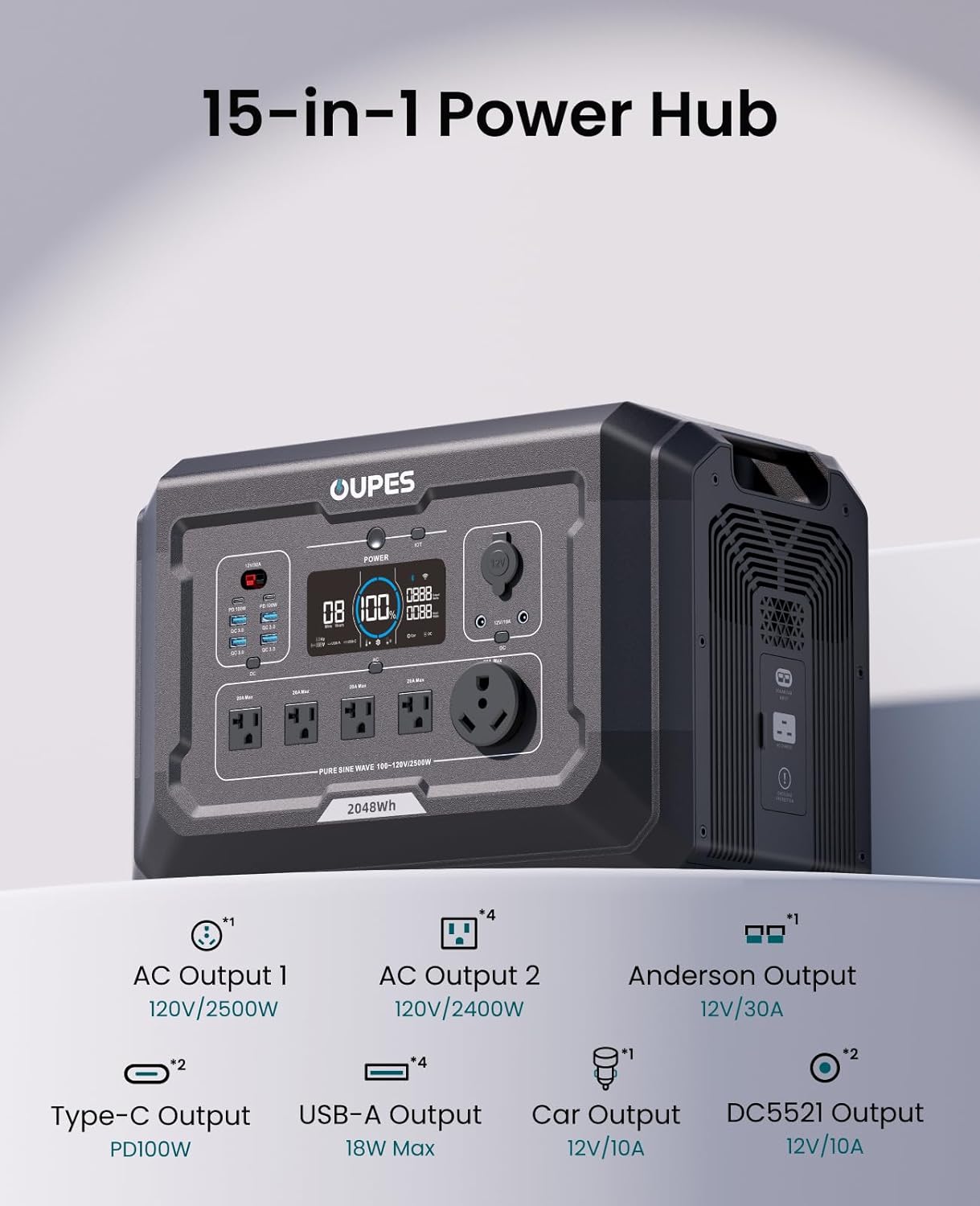
The front panel of the OUPES Mega 2 features a comprehensive array of output ports and a clear display for monitoring status.

- Display Screen: Shows battery percentage, input/output wattage, remaining runtime, and active ports.
- Power Button: Turns the unit on/off.
- IoT Button: Activates Wi-Fi/Bluetooth for app control.
- USB Ports: Includes 2x PD 100W USB-C ports and 4x 18W USB-A (QC 3.0) ports for charging various devices.
- 12V/30A Anderson Output: Dedicated port for direct RV battery charging.
- AC Outlets: 1x 120V/2500W AC outlet and 4x 120V/2400W AC outlets for high-wattage appliances.
- 12V Car Lighter Port: Standard 12V/10A car outlet.
- DC Outputs: 2x 12V/10A DC5521 ports.
Rear Panel
The rear panel houses the main input ports for charging the power station.

- Solar/Car Input: Supports 12-150V DC, 15A Max input for solar panels or car charging.
- AC Charge Input: Supports 100-120V AC, 16A Max input for fast wall charging.
- Overload Protection Button: Resets the unit in case of an overload.
Setup
Initial Charging (AC Charging)
Before first use, fully charge your OUPES Mega 2. The unit supports 1600W AC fast charging, allowing it to reach full capacity in approximately 1.5 hours.
- Connect the provided AC charging cable to the AC Charge Input port on the rear of the unit.
- Plug the other end of the AC charging cable into a standard wall outlet.
- The display will show the charging progress.

You can also adjust the charging speed (high/low) directly on the unit. Refer to the video below for detailed instructions.
Video 1: How to set charging speed for the OUPES Mega 2. This video demonstrates the steps to switch between high and low charging modes.
Solar Charging
The OUPES Mega 2 supports up to 2100W solar input for efficient off-grid charging. Use the provided MC.4 to Anderson cable to connect your solar panels.
- Connect your solar panels to the MC.4 to Anderson cable. Ensure correct polarity (red to positive, black to negative).
- Plug the Anderson connector into the Solar/Car Input port on the rear of the Mega 2.
- Position your solar panels in direct sunlight for optimal charging.

For connecting multiple solar panels in series, refer to the following video for proper wiring and connection instructions.
Video 2: How to connect OUPES solar panels to Mega Series power stations. This video provides a step-by-step guide for connecting solar panels.
Video 3: How to connect multiple solar panels in series. This video illustrates the process of daisy-chaining solar panels for increased voltage input.
Battery Expansion
The OUPES Mega 2's capacity can be expanded up to 10.24kWh by connecting up to four B2 Smart Extra Batteries (sold separately). This allows for extended power supply for multi-day needs.

Video 4: Overview of the OUPES Mega 2's expandable battery system. This video highlights the ease of connecting additional battery modules.
Operating Instructions
Turning On/Off
To turn the OUPES Mega 2 on, press and hold the "POWER" button for a few seconds until the display illuminates. To turn it off, press and hold the "POWER" button again until the display turns off.
Using AC/DC/USB Outputs
Once the unit is powered on, activate the desired output sections by pressing their respective buttons (e.g., "AC" button for AC outlets, "DC" button for DC/USB ports). The display will indicate which sections are active.
The Mega 2 can power a wide range of devices. For example, it can charge a tablet 62+ times, run a Wi-Fi router for 190+ hours, or power a refrigerator for 4-7 days.


App Control (WiFi/Bluetooth)
Monitor power usage, adjust settings, and update firmware remotely using the OUPES app. Activate the IoT button on the unit to connect via WiFi or Bluetooth.

UPS Function
The Uninterruptible Power Supply (UPS) function allows the Mega 2 to switch to backup power in ≤20ms during grid outages, protecting sensitive electronics from power interruptions.

Video 5: Demonstration of the OUPES Mega 2's UPS function. This video shows how quickly the unit provides backup power.
Maintenance
- Store the unit in a cool, dry place away from direct sunlight and heat sources.
- For long-term storage, charge the unit to 50-80% every 3-6 months to maintain battery health.
- Clean the exterior with a dry, soft cloth. Do not use abrasive cleaners or immerse the unit in water.
- Ensure ventilation vents are clear of dust and debris for optimal cooling.
Troubleshooting
| Problem | Possible Cause | Solution |
|---|---|---|
| Unit not turning on | Battery depleted; Power button not held long enough. | Charge the unit; Press and hold the power button for 3-5 seconds. |
| No output from AC/DC/USB ports | Output ports not activated; Overload protection triggered. | Press the respective AC/DC/USB button to activate; Press the Overload Protection button on the rear. |
| Slow charging speed | Charging speed set to low; Solar input insufficient. | Adjust charging speed to high via the unit's settings or app; Ensure solar panels are in direct sunlight and correctly configured. |
| App not connecting | Bluetooth/WiFi not enabled on unit or device; App requires update. | Ensure IoT button is active; Check device's Bluetooth/WiFi settings; Update app to the latest version. |
Specifications
| Feature | Detail |
|---|---|
| Brand | OUPES |
| Model Name | Mega 2 |
| Base Capacity | 2048Wh |
| Expandable Capacity | Up to 10.24kWh (with 4x B2 Smart Extra Batteries) |
| AC Output | 2500W (5400W Surge) |
| AC Fast Charging | 1600W (1.5 hours to full) |
| Solar Input | Up to 2100W (12-150V DC, 15A Max) |
| Battery Type | LiFePO4 |
| Cycle Life | 3500+ cycles |
| UPS Function | ≤20ms switchover |
| Weight | 45.8 lbs |
| Dimensions (L x W x H) | 18.1"L x 10.6"W x 12"H |
| Total Power Outlets | 15 |
Warranty & Support
The OUPES Mega 2 Portable Power Station comes with a 5-Year Warranty, demonstrating OUPES' commitment to quality and customer satisfaction. For any inquiries, technical assistance, or warranty claims, please contact OUPES customer service directly. Lifetime support is provided for all OUPES products.
You can visit the official OUPES store on Amazon for more information and support: OUPES Store


