
Introduction
The Creative Zen Hybrid Pro (Classic) are wireless over-ear headphones designed for an immersive audio experience. Featuring LE Audio, Ultra-low Latency (ULL) mode, Hybrid Active Noise Cancellation (ANC), and Ambient Mode, these headphones offer versatile listening options. This manual provides instructions for setup, operation, maintenance, and troubleshooting to ensure optimal use of your device.

Image: Creative Zen Hybrid Pro (Classic) Wireless Over-Ear Headphones.
What's in the Box
Verify that all items are present in your package:
- Creative Zen Hybrid Pro (Classic) Headphones
- BT-L3 Wireless LE Audio Transmitter (Dongle)
- Detachable Boom Microphone
- USB-C Charging Cable
- 3.5mm Audio Cable
- User Manual

Image: Creative Zen Hybrid Pro (Classic) Headphones with the BT-L3 LE Audio Transmitter and detachable boom microphone.
Product Overview
Familiarize yourself with the main components and controls of your headphones.
Key Features:
- LE Audio with Ultra-low Latency (ULL) Mode: For enhanced audio immersion and lag-free performance.
- Hybrid Active Noise Cancellation (ANC): Reduces up to 98% of ambient noise.
- Ambient Mode: Allows you to hear your surroundings.
- Long Battery Life: Up to 100 hours (ANC off) or 80 hours (ANC on).
- 40mm Titanium-Coated Dynamic Drivers: Delivers powerful cinematic audio.
- Bluetooth 5.3 & Multipoint Connectivity: Seamless wireless streaming and connection to two devices simultaneously.
- Detachable Boom Mic: For clear voice communication.
- Foldable Design & Swivel Earcups: Enhances portability and comfort.

Image: Illustration of Next-Gen Bluetooth LE Audio technology with LC3 and LC3+ codecs, highlighting Ultra-low Latency (ULL) mode.
Setup
1. Charging the Headphones
Before first use, fully charge your headphones. Connect the provided USB-C charging cable to the headphone's charging port and the other end to a USB power source (e.g., computer, wall adapter). The LED indicator will show charging status and turn off when fully charged.
2. Powering On/Off
- Power On: Press and hold the Power button for approximately 2 seconds until the LED indicator lights up.
- Power Off: Press and hold the Power button for approximately 4 seconds until the LED indicator turns off.
3. Bluetooth Pairing
- Ensure the headphones are powered off.
- Press and hold the Power button for 4-6 seconds until the LED indicator flashes blue and red, indicating pairing mode.
- On your device (smartphone, tablet, computer), enable Bluetooth and search for new devices.
- Select "Creative Zen Hybrid Pro" from the list of available devices.
- Once connected, the LED indicator will show a steady blue light or flash blue slowly.
4. LE Audio Pairing with BT-L3 Transmitter
For Ultra-low Latency (ULL) mode and LE Audio functionality, use the included BT-L3 Wireless LE Audio Transmitter.
- Plug the BT-L3 transmitter into a USB-C port on your computer or gaming console.
- Power on your Creative Zen Hybrid Pro headphones. They will automatically attempt to connect to the BT-L3 transmitter.
- The LED on the BT-L3 transmitter and headphones will indicate a successful connection.
5. Attaching the Boom Microphone
The detachable boom microphone can be connected to the dedicated 2.5mm port on the left earcup for enhanced voice clarity during calls or gaming.

Image: Detachable boom microphone with an indicator light.
Operating Instructions
1. Active Noise Cancellation (ANC) and Ambient Mode
Toggle between noise control modes using the dedicated ANC button:
- Hybrid ANC: Activates noise cancellation, reducing external sounds.
- Ambient Mode: Allows external sounds to pass through, keeping you aware of your surroundings.
- Off: Disables both ANC and Ambient Mode.

Image: User experiencing audio with ANC or Ambient Mode enabled.
2. Media Controls
Use the buttons on the earcup to control audio playback:
- Play/Pause: Single press the Multi-function button.
- Next Track: Double press the Multi-function button.
- Previous Track: Triple press the Multi-function button.
- Volume Up/Down: Use the dedicated Volume buttons.
3. Call Management
- Answer/End Call: Single press the Multi-function button.
- Reject Call: Press and hold the Multi-function button for 2 seconds.
4. Multipoint Connectivity
The headphones can connect to two Bluetooth devices simultaneously. To switch between devices, pause audio on the currently playing device and start playback on the second device. The headphones will automatically switch the audio source.

Image: Multipoint connectivity diagram showing headphones connected to multiple devices.
5. Broadcast Mode
Utilizing LE Audio, Broadcast mode allows you to share your audio with an unlimited number of other LE Audio-compatible devices. Refer to your device's LE Audio settings for activation and management of broadcast streams.

Image: Broadcast mode allowing limitless audio sharing.
6. Product Video Overview
Video: An overview of the Creative Zen Hybrid Pro Wireless Headphones, showcasing key features and design.
Battery Life and Charging
The Creative Zen Hybrid Pro (Classic) offers extended battery performance:
- Up to 100 hours with ANC off.
- Up to 80 hours with ANC on.
- Full charge time is approximately 2 hours.
Note: Actual battery life may vary based on usage, settings, volume level, and environmental conditions.

Image: Battery life specifications and charging time.
Maintenance
To ensure the longevity and optimal performance of your headphones, follow these maintenance guidelines:
- Cleaning: Use a soft, dry cloth to wipe the earcups and headband. Do not use harsh chemicals or abrasive materials.
- Storage: When not in use, store the headphones in a cool, dry place, preferably in their carrying case, to protect them from dust and damage.
- Avoid Moisture: While the headphones are water-resistant, avoid prolonged exposure to water or high humidity.
- Cable Care: Handle cables gently to prevent damage to connectors.
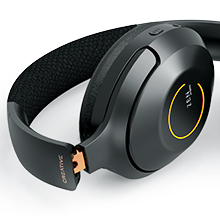
Image: Foldable earcup design for compact storage.
Troubleshooting
If you encounter issues with your Creative Zen Hybrid Pro (Classic) headphones, refer to the following common solutions:
| Problem | Solution |
|---|---|
| Headphones do not power on. | Ensure the headphones are charged. Connect to a power source using the USB-C cable. |
| Cannot pair via Bluetooth. | Ensure headphones are in pairing mode (flashing blue/red LED). Turn off and on Bluetooth on your device. Forget previous pairings and try again. |
| No sound or low volume. | Check headphone and device volume levels. Ensure headphones are correctly paired and selected as the audio output. |
| ANC is not effective. | Ensure ANC mode is activated. Check for proper fit of earcups to create a good seal. |
| Boom mic not working. | Ensure the boom mic is securely attached to the 2.5mm port. Check microphone settings on your connected device. |
Specifications
| Feature | Detail |
|---|---|
| Brand | Creative |
| Model Name | Creative Zen Hybrid Pro (Classic) |
| Model Number | EF1040 |
| Connectivity Technology | Wireless (Bluetooth 5.3, LE Audio) |
| Bluetooth Version | 5.3 |
| Bluetooth Range | 10 meters |
| Noise Control | Hybrid Active Noise Cancellation |
| Audio Driver Size | 40 millimeters |
| Audio Latency | ~20 milliseconds (ULL mode) |
| Battery Life (ANC Off) | Up to 100 hours |
| Battery Life (ANC On) | Up to 80 hours |
| Control Method | Buttons, Touch |
| Ear Placement | Over Ear |
| Weight | 282 g |
| Additional Features | Foldable, Detachable Boom Mic, Multipoint Connectivity, Broadcast Mode |
Warranty and Support
Creative products are covered by a limited warranty. For detailed warranty information, technical support, and frequently asked questions, please visit the official Creative support website.
You can find more information and support resources at: Creative Official Store on Amazon


