1. Introduction
Thank you for choosing the Pro'sKit MT-1510 Pocket Smart Multimeter. This compact, card-type multimeter is designed for precise electrical measurements, featuring True RMS for accurate readings of non-sinusoidal waveforms, a large LCD for clear display, and Non-Contact Voltage (NCV) detection for enhanced safety. This manual provides essential information for safe and effective use of your device.
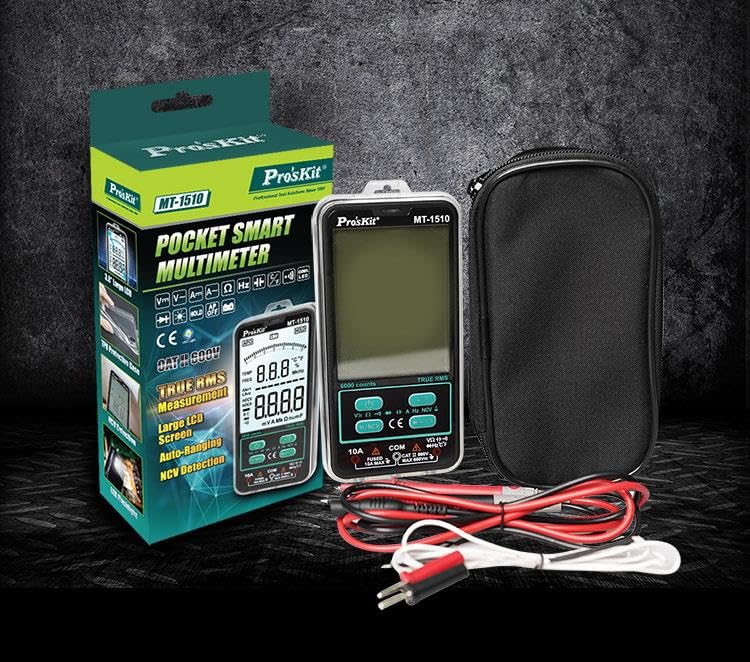
Image 1.1: The Pro'sKit MT-1510 Pocket Smart Multimeter, including its retail packaging, protective case, and test leads.
2. Safety Information
Always adhere to basic safety precautions when using this multimeter to prevent personal injury or damage to the device. Read all instructions carefully before use.
- Do not exceed the maximum input values for any function.
- Do not use the meter if it or the test leads appear damaged.
- Exercise extreme caution when working with voltages above 30V AC RMS, 42V peak, or 60V DC. These voltages pose a shock hazard.
- Always disconnect the test leads from the circuit before changing functions.
- Ensure the correct function and range are selected for the measurement.
- Replace the battery immediately when the low battery indicator appears to ensure accurate readings.
- Do not operate the meter in explosive gas, vapor, or dusty environments.
3. Product Overview
3.1. Components and Display
The MT-1510 features a user-friendly design with a large display and intuitive controls.
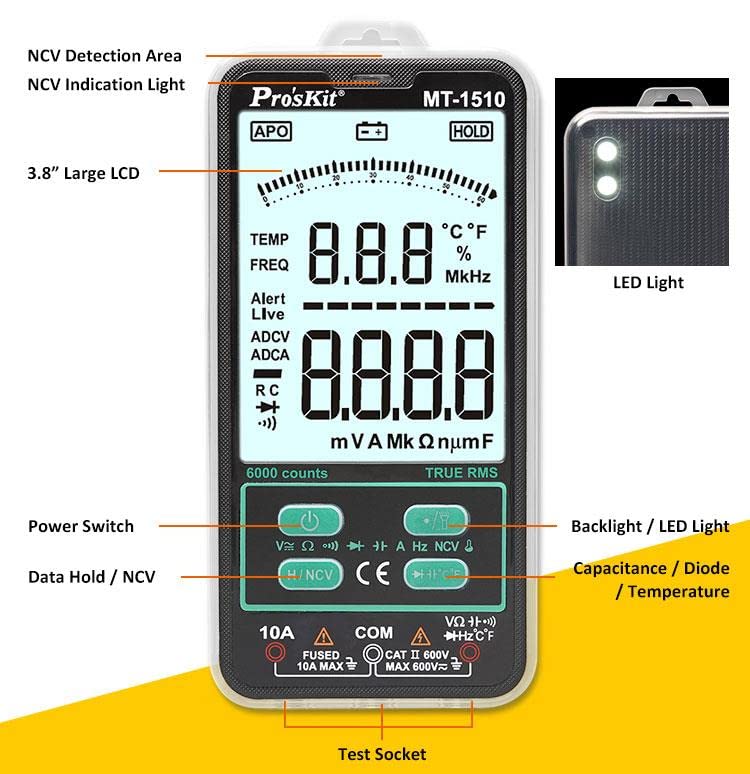
Image 3.1: Front view of the MT-1510 with key components labeled for easy identification.
- NCV Detection Area: Top part of the meter for non-contact voltage sensing.
- NCV Indication Light: Illuminates during NCV detection.
- 3.8" Large LCD: Provides clear readings with backlight.
- LED Light: Integrated flashlight for illuminating dark work areas.
- Power Switch: Turns the device on/off.
- Data Hold / NCV Button: Toggles data hold or activates NCV mode.
- Backlight / LED Light Button: Controls display backlight and LED flashlight.
- Capacitance / Diode / Temperature Button: Selects these measurement modes.
- Test Sockets: For connecting test leads (10A, COM, VΩHz).
3.2. Triple Display
The MT-1510 features a triple display, allowing you to view multiple measurement parameters simultaneously, such as main reading, sub-reading (e.g., frequency), and a simulated analog bar graph.
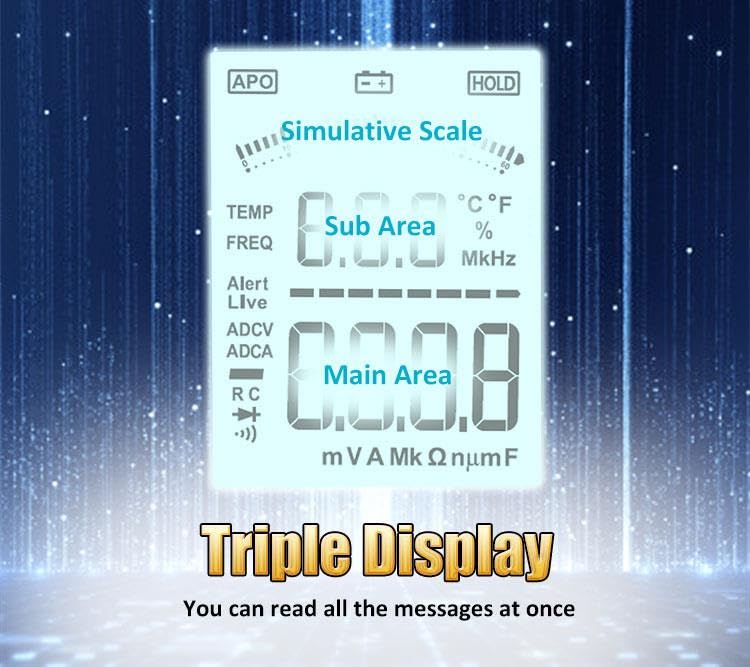
Image 3.2: The triple display interface, showing the main measurement area, sub-area, and a simulative scale.
4. Setup
4.1. Battery Installation
The multimeter requires AAA batteries for operation. To install or replace batteries:
- Ensure the multimeter is powered off and test leads are disconnected.
- Locate the battery compartment cover on the back of the device.
- Use a screwdriver to open the battery compartment.
- Insert the AAA batteries, observing the correct polarity (+/-) as indicated inside the compartment.
- Securely close the battery compartment cover.

Image 4.1: Internal view of the MT-1510, showing the battery compartment and fuse for overload protection.
4.2. Initial Power On
Press the Power Switch button to turn on the multimeter. The display will illuminate, and the device will perform a self-test before entering the default measurement mode.
5. Operating Instructions
5.1. Understanding True RMS
The MT-1510 features True RMS measurement, which is crucial for accurately measuring AC voltages and currents, especially for non-sinusoidal waveforms (e.g., square waves, triangle waves, sawtooth waves) commonly found in modern electronics. Unlike average-responding meters, True RMS meters measure the actual heating effect of a waveform, providing a more precise reading regardless of the waveform's shape.

Image 5.1: Illustration demonstrating the difference between general meter measurement and True RMS measurement for non-sinusoidal waveforms.
5.2. Basic Measurements (DCV, ACV, DCA, ACA)
To perform basic voltage and current measurements:
- Connect the black test lead to the COM jack and the red test lead to the VΩHz jack for voltage measurements, or the 10A jack for current measurements.
- Select the appropriate function (DCV, ACV, DCA, ACA) using the function buttons. The meter features auto-ranging, simplifying range selection.
- Connect the test leads to the circuit or component under test.
- Read the measurement value on the display.

Image 5.2: Examples of DC Voltage (DCV), AC Voltage (ACV), DC Current (DCA), and AC Current (ACA) measurements.
5.3. Resistance, Continuity, Capacitance, and Diode Test
These functions are essential for component testing and circuit analysis.
- Resistance: Connect leads to the component. The display shows resistance in Ohms (Ω), Kilo-ohms (kΩ), or Mega-ohms (MΩ).
- Continuity: For checking circuit continuity. A low resistance (typically less than 50Ω) will trigger an audible buzzer.
- Capacitance: Connect leads to the capacitor. The meter measures capacitance in Farads (F), microfarads (µF), or nanofarads (nF).
- Diode Test: Measures the forward voltage drop of a diode.
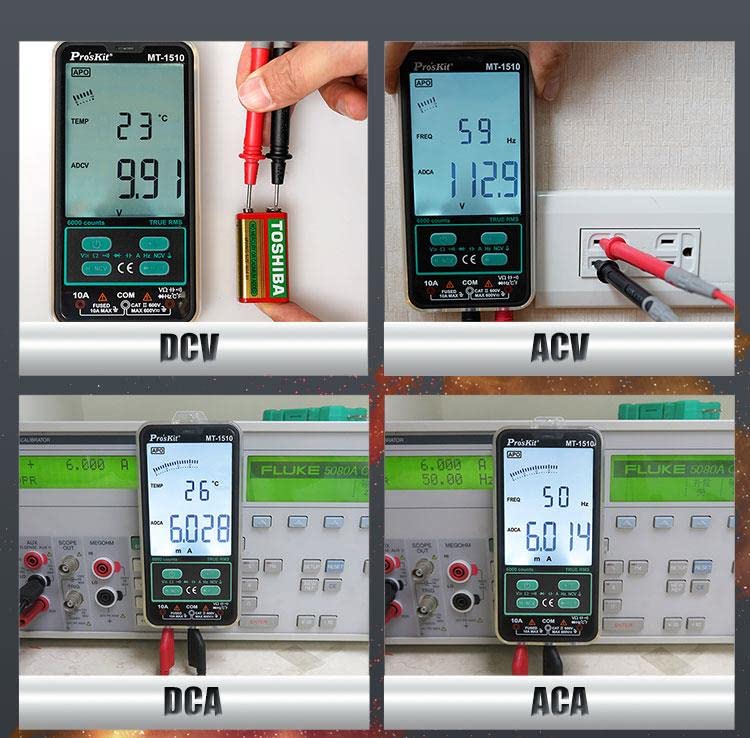
Image 5.3: Examples of Resistance, Buzzer (Continuity), Capacitance, and Diode measurements.
5.4. Non-Contact Voltage (NCV) Detection
The NCV function allows for safe detection of AC voltage without direct contact with wires or terminals.
- Press the NCV button to activate the mode.
- Place the top of the multimeter (NCV detection area) near the conductor.
- The NCV indication light will illuminate, and an audible alarm will sound, with intensity increasing as the meter gets closer to the voltage source.

Image 5.4: The multimeter performing Non-Contact Voltage (NCV) detection.

Image 5.5: How to differentiate between Live and Null wires using NCV detection.
5.5. Temperature Measurement
The MT-1510 can measure temperature. Connect the temperature probe (if included) to the appropriate jacks and select the temperature function.

Image 5.6: The multimeter displaying a temperature measurement.
5.6. Data Hold Function
Press the 'HOLD' button to freeze the current reading on the display. Press it again to release the hold and resume live measurements.

Image 5.7: The multimeter display indicating the Data Hold function is active.
5.7. Auto-Off Feature
To conserve battery life, the MT-1510 automatically powers off after approximately 10 minutes of inactivity. Press any button to wake the device.

Image 5.8: The multimeter's auto-off feature, designed to save battery life.
5.8. LED Flashlight
The integrated LED flashlight provides extra illumination in dimly lit work areas. Press the Backlight/LED Light button to toggle the flashlight on or off.

Image 5.9: The integrated LED flashlight providing illumination.
6. Maintenance
6.1. Cleaning
Wipe the case with a damp cloth and mild detergent. Do not use abrasives or solvents. Keep the test leads clean and free of debris.
6.2. Fuse Replacement
If the current measurement function fails, the fuse may need replacement. Refer to the specifications for the correct fuse type (10A 250V). Always disconnect power and test leads before opening the meter to replace the fuse.
6.3. TPU Protective Case
The multimeter comes with a TPU protective case, offering shockproof, anti-slip, and soft grip properties. Keep the case on the multimeter during use to protect it from accidental drops and impacts.

Image 6.1: The flexible TPU protective case for the multimeter.
7. Troubleshooting
| Problem | Possible Cause | Solution |
|---|---|---|
| Meter does not power on. | Dead or incorrectly installed batteries. | Check battery polarity; replace batteries. |
| No reading or 'OL' (Overload) displayed. | Incorrect range selected (if not auto-ranging), open circuit, or measurement exceeds meter's capacity. | Ensure proper connection; check for open circuits; verify measurement is within meter's range. |
| Inaccurate readings. | Low battery, dirty test leads, or external interference. | Replace batteries; clean test leads; move away from strong electromagnetic fields. |
| Current measurement not working. | Blown fuse. | Replace the fuse (refer to Section 6.2). |
8. Specifications
| Feature | Detail |
|---|---|
| Model Number | QD-Pro-MT-1510-C |
| Measurement Type | Multimeter (True RMS) |
| Display | Large LCD, 6000 Counts, Triple Display |
| Product Dimensions | 9.84 x 7.87 x 3.94 inches |
| Item Weight | 1.76 pounds |
| Manufacturer | Pro'sKit Taiwan |
| Date First Available | November 17, 2023 |
| Safety Rating | CAT II 600V (as indicated on product image) |
| Fuse Protection | 10A 250V (for current input) |
| Special Features | Non-Contact Voltage (NCV) Detection, Auto-Ranging, Auto-Off, LED Flashlight, Data Hold |
9. Warranty and Support
For warranty information, please refer to the documentation included with your product or visit the official Pro'sKit website. Pro'sKit aims to provide quality tools and support to its customers worldwide.
For technical support or inquiries, please contact Pro'sKit customer service through their official channels. Keep your purchase receipt as proof of purchase for any warranty claims.


