
Dainolite FID-1630LEDFH
Dainolite FID-1630LEDFH Frida Modern Flush Mount Light User Manual
Model: FID-1630LEDFH | Brand: Dainolite
1. Introduction
This manual provides detailed instructions for the safe installation, operation, and maintenance of your Dainolite FID-1630LEDFH Frida Modern Flush Mount Light. Please read this manual thoroughly before installation and retain it for future reference.
The Frida flush mount light features a slim profile with an integrated LED light source, designed for efficiency and modern aesthetics. Its versatile design is suitable for various indoor spaces such as bedrooms, hallways, closets, and laundry rooms.
2. Safety Information
- WARNING: Risk of electric shock. Disconnect power at the circuit breaker or fuse box before installation or servicing.
- All electrical connections must be in accordance with local codes, ordinances, or the National Electric Code (NEC). Consult a qualified electrician if you are unfamiliar with proper electrical wiring connections.
- This fixture is intended for indoor use only. Do not expose to water or moisture.
- Do not attempt to alter the fixture. Any alterations may void the warranty and create a safety hazard.
- Handle the fixture with care. Avoid dropping or subjecting it to strong impacts.
- Ensure the mounting surface can support the weight of the fixture.
- Do not connect this fixture to an ungrounded electrical system.
- The LED light source is integrated and not user-replaceable.
3. Package Contents
Verify that all components are present and undamaged before beginning installation. If any parts are missing or damaged, contact your retailer.
- Frida Flush Mount Light Fixture (with integrated LED)
- Acrylic Diffuser
- Mounting Hardware Kit (screws, wire nuts, mounting bracket)
- Instruction Manual

Figure 1: Dainolite FID-1630LEDFH Frida Flush Mount Light in Satin Chrome finish. This image shows the complete light fixture with its circular design and white acrylic diffuser.
4. Installation Instructions
- Turn Off Power: Before starting installation, ensure the power supply to the junction box is turned off at the circuit breaker or fuse box.
- Prepare Mounting Surface: Ensure the ceiling junction box is securely mounted and capable of supporting the fixture's weight.
- Attach Mounting Bracket: Secure the mounting bracket (included in hardware kit) to the junction box using the provided screws.
- Make Electrical Connections:
- Connect the black wire from the fixture to the black (live) wire from the junction box using a wire nut.
- Connect the white wire from the fixture to the white (neutral) wire from the junction box using a wire nut.
- Connect the ground wire from the fixture to the ground wire from the junction box (or to the green ground screw on the mounting bracket) using a wire nut.
- Mount the Fixture: Carefully tuck all wires into the junction box. Align the fixture with the mounting bracket and secure it in place using the provided screws.
- Install Diffuser: Place the acrylic diffuser onto the fixture, ensuring it is properly seated and secured.
- Restore Power: Once installation is complete, restore power at the circuit breaker and test the light fixture.
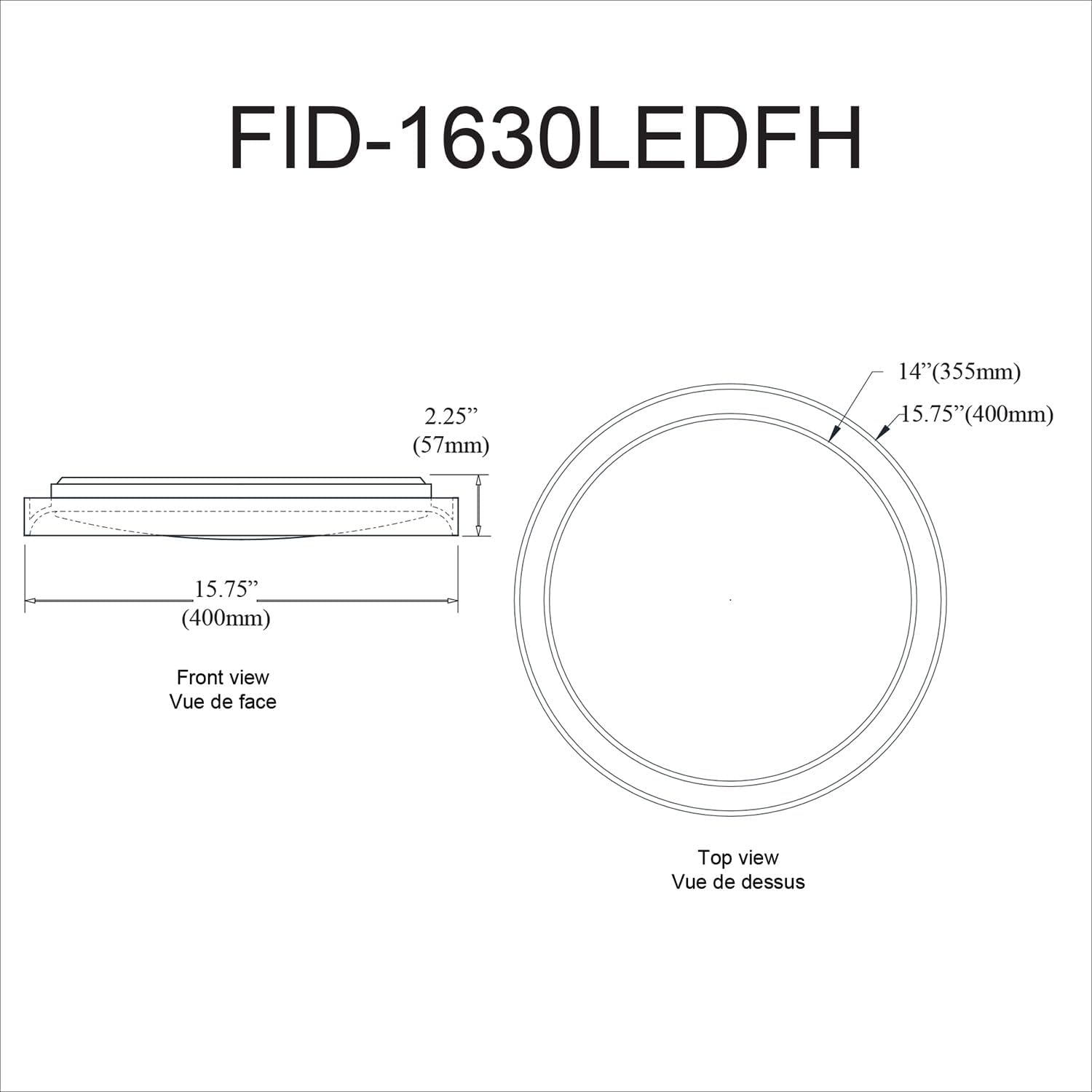
Figure 2: The Dainolite Frida Flush Mount Light in Satin Chrome installed on a ceiling, showcasing its sleek design and how it sits flush against the ceiling.

Figure 3: Another view of the Dainolite Frida Flush Mount Light installed, showcasing its integration into a contemporary interior design with a decorative wall.
5. Operating Instructions
The Dainolite FID-1630LEDFH light fixture is designed for simple operation.
- Power On/Off: Control the light using a standard wall switch connected to the fixture's electrical circuit.
- Dimming Function: This fixture features an integrated dimmable LED. To utilize the dimming function, it must be connected to a compatible ELV (Electronic Low Voltage) dimmer switch (sold separately). Follow the dimmer manufacturer's instructions for installation and operation.
- Remote Control: The fixture is designed to be compatible with a remote control (sold separately). Refer to the remote control's specific instructions for pairing and operation.
6. Maintenance
To ensure the longevity and appearance of your light fixture, follow these simple maintenance guidelines:
- Cleaning: Always disconnect power before cleaning. Use a soft, dry, or slightly damp cloth to wipe the exterior surfaces of the fixture. Do not use abrasive cleaners, solvents, or polishes as they may damage the finish or acrylic diffuser.
- Light Source: The LED light source is integrated and designed for a long lifespan. It is not user-replaceable. If the LED fails, the entire fixture may need to be replaced.
- Inspection: Periodically inspect the fixture for any loose connections or signs of damage. If any issues are found, disconnect power and consult a qualified electrician.
7. Troubleshooting
If you experience issues with your light fixture, refer to the following troubleshooting guide:
| Problem | Possible Cause | Solution |
|---|---|---|
| Light does not turn on. |
|
|
| Light flickers or dims improperly. |
|
|
| Light is too dim. |
|
|
If the problem persists after attempting these solutions, contact customer support or a qualified electrician.
8. Specifications
| Brand | Dainolite |
| Model Number | FID-1630LEDFH |
| Product Dimensions | 15.75" L x 15.75" W x 2.5" H (400mm L x 400mm W x 57mm H) |
| Item Weight | 2 Pounds (0.91 kg) |
| Color | Satin Chrome |
| Material | Acrylic, Metal |
| Style | Transitional / Modern |
| Light Fixture Form | Close to Ceiling |
| Light Source Type | Integrated LED |
| Dimmable | Yes, with compatible ELV dimmer (sold separately) |
| Power Source | Corded Electric |
| Indoor/Outdoor Usage | Indoor |
| UPC | 065214031998 |

Figure 4: Dimensional drawing of the Dainolite FID-1630LEDFH fixture, showing its front and top views with measurements in inches and millimeters.
9. Warranty and Support
This Dainolite fixture comes with a Limited Warranty. Please refer to the warranty documentation provided with your purchase for specific terms and conditions.
For technical support, replacement parts, or warranty inquiries, please contact Dainolite customer service:
- Website: www.dainolite.ca
- Email: support@dainolite.ca
- Phone: Consult the Dainolite website or your purchase documentation for current contact numbers.
Related documentsFID-1630LEDFH


Ask a question about this manual
Ask about setup, troubleshooting, compatibility, parts, safety, or missing instructions. Manuals+ will review the question and use this page’s manual context to help answer it.